Background Review
Background review has Zeotap Agent look over every audience, journey, sync and audience sync shortly after it is saved. It looks for mistakes that the save accepted but that will stop the setup working the way its author meant: a filter nobody can match, a journey branch that leads nowhere, or a mapping that reads a column the model no longer has. Anything it finds appears on the item’s page and is emailed to whoever made the change.
It is off by default. A workspace admin turns it on under Settings → General with Review changes in the background. It needs Zeotap Agent to be on in the workspace.
How It Works
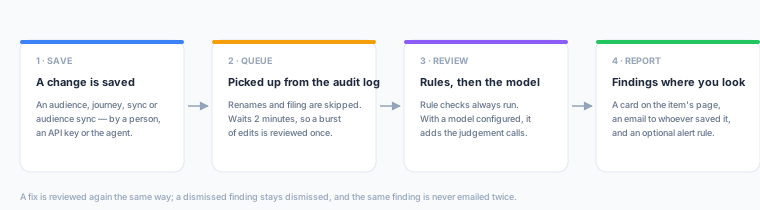
- Save. Any change to one of the four item types is recorded in the workspace audit log. That includes changes made in the app, through the REST API, and by the agent. A change that only renames the item, moves it to a folder or re-tags it is not reviewed.
- Queue. The review waits two minutes after the last change, so a burst of edits is reviewed once, in its final state. Editing a model’s query or columns also queues a review of every sync and audience sync that reads it, because that is the change that breaks a mapping nobody touched.
- Review. Rule checks always run (see What It Checks). When the deployment has a model configured, Zeotap Agent also reads the saved configuration, what it references, and the change that triggered the review. It then adds the judgement calls rules cannot make, such as a threshold that gained a digit or a phone number mapped into an email field.
- Report. Findings appear on the item’s detail page. Whoever saved the change gets an email listing the new problems.
The review only reads. It never changes anything. If you fix a problem yourself, or ask the agent to fix it, that change is reviewed again in the same way.
What It Checks
| Item | Rule checks |
|---|---|
| Audience | Conditions combined with AND that can never all be true, such as the same column equal to two values, an empty numeric range, or a value outside its own list. It also flags an audience with no conditions at all, and a size estimate taken after the last change that found nobody. |
| Journey | A missing or duplicate entry tile, and tiles nothing leads to. It also flags segment, A/B split or hold-until outcomes with no edge, where members stop. Other checks: a catch-all segment branch that is not last and starves the branches after it, split percentages that do not add up to 100, a hold-until with no timeout, and entry audiences or destinations that are gone, archived or failing. |
| Sync | Two mappings writing the same destination field, and a mapped column or primary key the model no longer returns. It also flags a missing or unhealthy destination, and an active sync that has no schedule or whose schedule has ended. |
| Audience sync | The same checks as a sync, plus an audience that is missing, archived or failing. |
Each finding has a severity:
| Severity | Meaning |
|---|---|
| Will break | It will fail, or can never do anything. |
| Likely unintended | It runs, but very likely not the way it was meant to. |
| Worth a look | Often intended. Shown on the page, never emailed. |
Acting on Findings
- Dismiss a finding that is intended. It stays dismissed when the item is reviewed again, and you can bring it back from the list of dismissed findings.
- Review again runs a fresh review straight away, without waiting for the next change.
- The same finding is never emailed twice. If it goes away and later comes back, it is news again.
To route findings somewhere other than email, create an alert rule with the Configuration review found a problem trigger. It opens an incident when a review finds a new problem and recovers when a later review finds the item clean, or when the problem is dismissed.
The agent can read reviews too. Ask it why something is not working, and it can start from the same findings you see.
Reading a review needs the same permission as reading the item. Dismissing a finding or starting a review needs permission to edit the item.