Event Contracts
Event contracts enforce data quality by defining schemas for your events. A contract specifies which properties an event should have, their data types, and what happens when an event violates the schema. Every contract is scoped to a specific event source — the same event name can have different contracts on different sources (e.g., web vs mobile Order Completed).
Why Contracts?
Without contracts, event data drifts over time:
- A developer renames
user_idtouserIdin one service but not another - A new property is added with inconsistent types (string in web, number in mobile)
- Required properties are accidentally omitted in a deploy
- Unused properties accumulate and bloat your warehouse tables
Contracts catch these issues at ingestion time, before bad data propagates to your warehouse, audiences, and downstream destinations.
Creating a Contract
Via the UI
- Navigate to Streams > Contracts
- Click Add Contract
- Select the event source this contract applies to
- Enter the event name this contract applies to (e.g.,
Order Completed) - Define the property schema
- Set the enforcement mode and the undeclared-fields policy
- Click Save
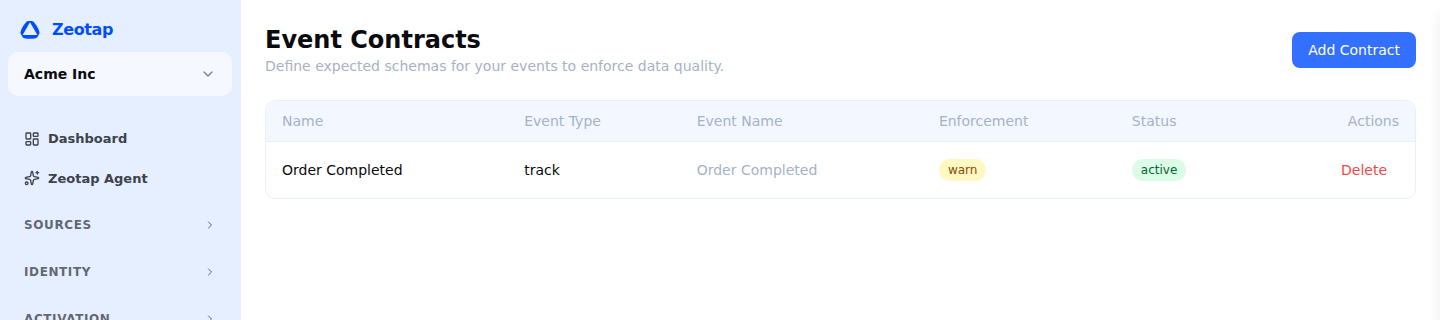
Contract Schema
A contract defines the expected properties for an event:
| Field | Description |
|---|---|
| Property name | The property key (e.g., order_id, total, products) |
| Type | Expected data type |
| Required | Whether the property must be present |
| Description | Human-readable description (for documentation) |
Supported Types
| Type | Description | Example Values |
|---|---|---|
string | Text value | "order_123", "Jane Smith" |
number | Integer or decimal | 42, 99.99, -1 |
boolean | True or false | true, false |
integer | Integer only (no decimals) | 1, 42, 1000 |
array | Ordered list of values | ["tag1", "tag2"], [1, 2, 3] |
object | Nested key-value structure | { "name": "Product", "price": 29.99 } |
datetime | ISO 8601 timestamp string | "2025-03-15T14:30:00Z" |
any | Accept any type | (no type enforcement) |
For array types, you can optionally specify the element type (e.g., “array of objects”). For object types, you can define nested property schemas.
Example Contract
Here is a contract for the Order Completed event:
{
  "event": "Order Completed",
  "properties": [
    {
      "name": "order_id",
      "type": "string",
      "required": true,
      "description": "Unique order identifier"
    },
    {
      "name": "total",
      "type": "number",
      "required": true,
      "description": "Order total amount in dollars"
    },
    {
      "name": "currency",
      "type": "string",
      "required": true,
      "description": "ISO 4217 currency code (e.g., USD, EUR)"
    },
    {
      "name": "products",
      "type": "array",
      "required": true,
      "description": "List of products in the order",
      "items": {
        "type": "object",
        "properties": [
          { "name": "product_id", "type": "string", "required": true },
          { "name": "name", "type": "string", "required": true },
          { "name": "price", "type": "number", "required": true },
          { "name": "quantity", "type": "integer", "required": true }
        ]
      }
    },
    {
      "name": "coupon",
      "type": "string",
      "required": false,
      "description": "Coupon code applied to the order"
    },
    {
      "name": "payment_method",
      "type": "string",
      "required": false,
      "description": "Payment method used (credit_card, paypal, etc.)"
    }
  ],
  "enforcement_mode": "warn",
  "undeclared_fields": "allow"
}
Enforcement
A contract carries two independent settings. Enforcement mode governs events that break the schema you declared; undeclared fields governs properties the contract never mentioned. Each takes the same three values.
Enforcement mode
Applied when an event violates the declared schema — a missing required property, a wrong type, an invalid nested value.
| Mode | Behavior | Use Case |
|---|---|---|
| Allow | Log violations but allow the event through. | Early development — track violations without affecting delivery. |
| Warn | Allow the event but generate a warning. The default for a new contract. | Rolling a contract out — surface problems before they block traffic. |
| Block | Reject events that violate the contract. | Strict environments where bad events should never enter the system. |
Undeclared fields
Applied to properties an event carries that the contract does not declare. This is a separate control, so you can be strict about the shape you declared while staying relaxed about extra fields — or the reverse.
| Mode | Behavior | Use Case |
|---|---|---|
| Allow | Accept undeclared fields without restriction. The default for a new contract. | Instrumentation still in flux, where extra properties are expected. |
| Warn | Accept undeclared fields but flag them. | Watching for schema drift without blocking it. |
| Block | Reject events with undeclared fields. | A closed schema, where anything unexpected is a mistake. |
Violation Types
| Violation | Description | Example |
|---|---|---|
| Missing required property | A required property is not present | Order Completed missing order_id |
| Wrong type | A property has the wrong data type | total is "99.99" (string) instead of 99.99 (number) |
| Undeclared property | A property exists that the contract does not declare — governed by the undeclared fields setting rather than the enforcement mode | discount_pct is sent but not in the schema |
| Invalid nested schema | An object or array element violates its nested schema | products[0].price is "free" instead of a number |
Contract Versioning
Contracts support versioning to manage schema evolution:
Creating a New Version
- Open an existing contract
- Click New Version
- Modify the schema (add properties, change types, update requirements)
- Set the activation date (when this version takes effect)
- Click Save
Version Behavior
- Only one version is active at a time per event
- When a new version activates, it immediately applies to all incoming events
- Previous versions are retained for audit purposes
- You can roll back to a previous version at any time
Migration Strategies
When evolving schemas, consider these patterns:
| Change | Strategy |
|---|---|
| Add a new required property | First add it as optional, update all sources to send it, then make it required in a new version |
| Remove a property | Set undeclared_fields to allow, then remove it from the contract. Events still sending it continue to pass. |
| Change a property type | Create a new property with the correct type, update sources, then remove the old property |
| Rename a property | Use an event transformation to rename in-flight, then update the contract |
Monitoring Contract Violations
The Streams > Contracts dashboard shows:
| Metric | Description |
|---|---|
| Violation rate | Percentage of events that violate the contract |
| Violations by type | Breakdown by missing property, wrong type, unplanned property |
| Violations by source | Which write keys are producing violations |
| Violation trend | Time-series chart of violations over the last 7/30 days |
High violation rates typically indicate a source that has deployed a breaking change. Use the violation details to identify which source needs updating.
API Reference
Every path below is workspace-scoped — {id} is your workspace ID. See Base URL for your instance’s API base URL and Authentication for the required Authorization and X-Workspace-ID headers.
# List all contracts
GET /api/v1/workspaces/{id}/event-contracts

# Get a contract
GET /api/v1/workspaces/{id}/event-contracts/{contractId}

# Create a contract
POST /api/v1/workspaces/{id}/event-contracts

# Update a contract (creates a new version)
PUT /api/v1/workspaces/{id}/event-contracts/{contractId}

# Delete a contract
DELETE /api/v1/workspaces/{id}/event-contracts/{contractId}

# List contract violations
GET /api/v1/workspaces/{id}/event-contracts/{contractId}/violations
Best Practices
- Start permissive — When first deploying contracts, use
allowor the defaultwarnto observe violations without affecting existing integrations - Graduate to block — Once violation rates are near zero, switch the enforcement mode to
blockto enforce the schema, and tightenundeclared_fieldsseparately once the shape has settled - Contract every tracked event — Even if you start with minimal properties, having a contract ensures you know what to expect
- Review violations weekly — Check the violations dashboard to catch data quality issues early
- Version carefully — Use the migration strategies above to avoid breaking changes