Personalization
Personalization answers questions about one person fast enough to use while a page is rendering. It runs beside the batch CDP rather than replacing it: your warehouse stays the system of record, and personalization serves a low-latency copy of the parts you choose to publish.
Two surfaces, two questions
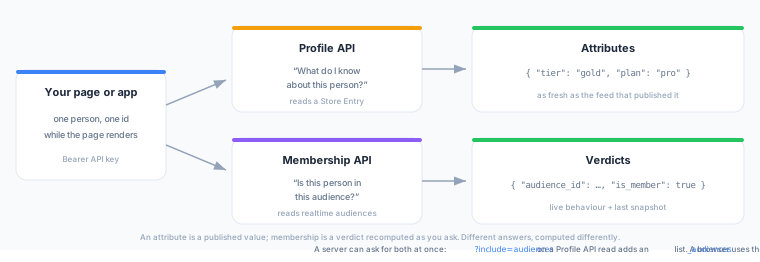
| Surface | The question it answers | What comes back |
|---|---|---|
| Profile | What do I know about this person? | Attributes — a JSON object of the fields you published into a Store |
| Membership (early access) | Is this person in this audience right now? | Verdicts — the realtime audiences this person is in, or a yes/no is_member answer for one you name |
Membership is not attributes. The two answers are different things: an attribute is a published value, and membership is a verdict recomputed as you ask. Choose the surface by the question you are asking.
A server that needs both can ask once. Add ?include=audiences to a Profile API read and the response also carries the audiences that person is in, under _audiences. That is for backends holding a serving key; a browser holding a membership key calls the Membership API, which is the only one of the two it should ever reach.
The two also differ in how fresh their answers are. Profile attributes are as fresh as the feed that populates them, which you schedule. Membership verdicts combine live behaviour — re-evaluated within about a second of the event arriving — with a warehouse-derived half rebuilt on the workspace’s snapshot cadence.
Where to find it in the app
Both surfaces live under Personalize in the left sidebar.
| Navigate to | What is there |
|---|---|
| Personalize → Profile | Overview, API, Playground, API keys, and your Stores |
| Personalize → Membership | Overview, Membership API, Playground, API keys, and Snapshots |
The two items are enabled independently per workspace, so you may see one, both, or neither. If Personalize is missing from your sidebar entirely, neither is enabled — ask a platform administrator to turn them on.
Prerequisites
- For Profile: a configured warehouse and at least one Model whose rows carry the id you want to look up.
- For Membership: at least one realtime event and one realtime audience built on it.
Next Steps
- Profile — publish attributes and read them by id.
- Membership — read is-member verdicts by identifier.
- Realtime Audiences — what you can and cannot build a live audience from.