Realtime Syncs
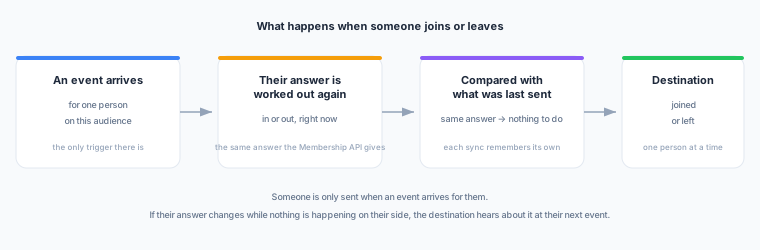
A realtime sync pushes one person to one destination the moment an event shows their answer has changed. It is the push side of the realtime plane: where the Membership API waits to be asked, a realtime sync tells a destination on its own.
Experimental — in active development. Sending is live: a sync you create starts delivering as events arrive. The destination catalogue is still short — webhook and Braze — and grows one destination type at a time.
Why this exists
A realtime audience used to have exactly one way out: you read it, per person, at the moment you needed the answer. It could not be sent to a destination on a schedule — membership is re-evaluated on every read and can flip either way within seconds, so there is no stable list to push.
That is still true of a scheduled sync, and the product still refuses one. What changed is that “no schedule” no longer means “no destination”. A realtime sync does not push a list at all: it pushes a change, one person at a time, as it happens.
What you need first
- A realtime audience — one whose definition contains at least one realtime event condition. A sync on any other audience is refused, and the audience picker leaves those out.
- A destination that can receive one. This is a shorter list than the destination catalogue you use for scheduled syncs: each destination type needs a way to add and remove one person at a time, and today that is webhook and Braze. The picker shows you only the destinations it can actually reach. See Destinations for what each one receives.
- The realtime plane enabled for your workspace. It is the same switch that gives you realtime audiences — if you have those, you have this.
The two modes
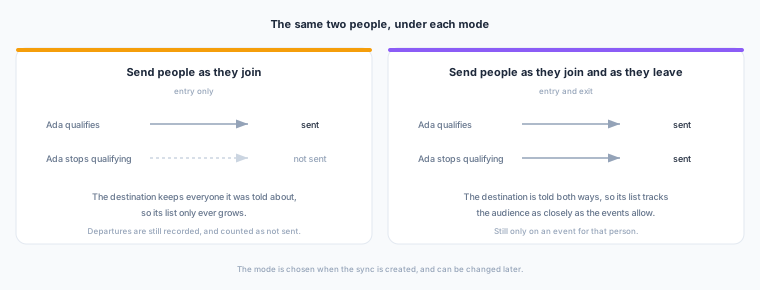
Every sync makes one of two promises to its destination, chosen when you create it and changeable afterwards.
| Mode | What the destination is told |
|---|---|
| Send people as they join | The destination hears as soon as an event shows someone qualifies, and nothing else. |
| Send people as they join and as they leave | The destination also hears when an event shows someone no longer qualifies. |
Under as they join, the destination keeps everyone it was told about. It is never told that someone left, so its list only ever grows — it holds a superset of the audience, and nothing in Zeotap will trim it. Choose this mode when the destination’s own rules decide when someone leaves it, and the other mode when the destination is meant to match the audience.
Departures are not lost under as they join — they are recorded and counted, they are simply not sent. The sync page shows them under Not sent, which is how you explain a destination that still holds somebody.
The one boundary
Someone is only sent when an event arrives for them. If their answer changes while nothing is happening on their side, the destination hears about it at their next event.
This is the whole model, and it is worth reading twice, because it is the one thing that behaves differently from a scheduled sync. A scheduled sync re-reads everybody on a timer; a realtime sync only ever looks at the person an event just arrived for. So:
- Someone who qualifies because of something they did is sent within seconds.
- Someone whose answer changes for a reason that produced no event of theirs — a warehouse rebuild moving them, an edit to the audience, two identities being linked — is sent at their next event, whenever that is.
- Someone who never sends another event is never sent again.
Creating one
- Open the audience and go to its Realtime syncs tab. (A realtime audience has this tab where a scheduled audience has Syncs — an audience has one or the other, never both.)
- Choose Create realtime sync.
- Pick the destination. Only destinations that can receive a realtime sync are offered; if the list is empty, add a webhook or Braze destination first. A Braze destination asks for its own settings here — the attribute or event it should write; see Braze.
- Pick what the destination is told — the two modes above. There is deliberately no default: this is a promise to a third party, and it is yours to make.
- Give it a name. It defaults to the audience and the destination, which is what tells two syncs on the same audience apart.
The sync starts active. People are sent from that moment on; nobody already in the audience is sent retrospectively, because nothing has happened to them yet.
Destinations
Each destination type in the realtime catalogue receives a change in its own shape. Two are available today.
| Destination | What a change becomes | What you configure on the sync |
|---|---|---|
| Webhook | One POST carrying the fixed payload below | Nothing — the URL, method and headers are on the destination |
| Braze | One POST /users/track that sets a custom attribute on the person, sends a custom event, or both | Which of those, and their names |
Braze
Braze has no way to add one person to a segment or remove them: segments are filters. So a realtime sync represents the audience as a custom attribute on the person — true when they join, false when they leave — and you build your Braze segment as attribute is true. Setting the attribute twice is the same as setting it once, so a repeated change does no harm.
A campaign or Canvas that should fire the moment somebody joins wants an event, not a filter. The sync’s What Braze receives setting offers the attribute (the default), a custom event, or both:
| Setting | What it does |
|---|---|
| What Braze receives | The attribute, a custom event each time someone joins or leaves, or both |
| Custom attribute name | The attribute set to true on joining and false on leaving. Up to 255 characters, not starting with $, and not one of Braze’s own profile fields such as email |
| Event name when someone joins / leaves | The custom events sent, when events are on. audience_entered and audience_exited unless you change them |
| People Braze does not know yet | Off, a person with no Braze profile is left alone and the change still counts as sent. On, Braze creates a profile for them carrying only this attribute or event |
The event carries audience_id, audience_name and sync_id as its properties, so a campaign can tell which audience fired it.
Events can repeat; the attribute cannot. A change is sent at least once, and Braze has no way to recognise a repeated event, so a crash at the wrong moment can send a join event twice. The attribute is safe under a repeat. If a campaign must never fire twice for one join, trigger it on the attribute changing rather than on the event.
Attributes you map on the sync land on the person’s Braze profile as custom attributes, beside the membership attribute, in every mode. The membership attribute, the person’s external_id and the create-profile setting always win over a mapped field of the same name.
The destination itself is the same Braze connection your scheduled syncs use — the REST endpoint and API key — configured once. The person is named to Braze by their external_id, which is the audience’s destination key; a person known only by a device id is never sent, as with every destination.
If Braze accepts the request but refuses the person — an attribute name it will not take, for instance — the change is recorded under Recent failures with Braze’s own message, and it is not retried, because asking again would get the same answer.
What arrives at a webhook
One POST per change, to the URL on the destination, with the destination’s own method and headers. The fields below are fixed — every sync sends them, in the same shape — so one consumer can be written against one contract and used by every sync you ever create. A sync can carry an attributes object alongside them, which is the one part you configure; see Attributes and mapping.
{
  "type": "audience.entered",
  "sync_id": "b1f0…",
  "audience": { "id": "9c2e…", "name": "High-intent browsers" },
  "user_id": "u_123",
  "anonymous_id": null,
  "occurred_at": "2026-09-08T10:30:00Z",
  "sequence": 1756900000123456
}| Field | What it is |
|---|---|
type | audience.entered or audience.exited |
sync_id | The sync that sent it — how a shared endpoint tells two syncs apart |
audience | The audience’s id and its name at the moment of the change |
user_id | Who it is about. Always present: this is the identifier the destination knows them by |
anonymous_id | The device the triggering event came from, when there was one. Usually null, and never what the change is keyed on |
occurred_at | When the event that caused the change happened — not when it was sent |
sequence | Microseconds, at the moment of sending |
The header X-Zeotap-Event repeats type, so a proxy or a routing rule can act on it without reading the body.
Two things your endpoint should do:
- Answer quickly, and answer honestly. Any
2xxis success. A4xxmeans “do not send this again” and stops the retries; a5xx, a408or a429means “try again” and it will be retried. A destination that fails repeatedly pauses its own sync. - Tolerate a repeat. A change is sent at least once, so a crash at the wrong moment can produce a duplicate. Adding somebody who is already there, or removing somebody who has already gone, is the shape every destination in the catalogue is expected to handle — and if you need to spot one, compare
sequence: a lower one than you have already processed for that person is a stale repeat.
Attributes and mapping
A change can say more than that somebody joined or left. Alongside the fixed fields, a sync can carry attributes about the person — their tier, their lifetime value, the hashed email an ad platform matches on — read from a Store and shaped by a field mapping.
Nothing is added unless you ask for it. A sync with no mapping sends the body above and no attributes key at all, so an endpoint written against the fixed contract keeps receiving byte-identical traffic. A mapping that runs and produces nothing sends "attributes": {}, which is a different statement: the mapping ran, and there was nothing to say.
Attributes are as fresh as the Store, not as fresh as the event
Read this before you configure anything.
Membership is realtime: the change that reaches your endpoint was worked out from an event that arrived seconds ago. The attributes riding with it were not. They come from a Store, and a Store is populated by feeds that refresh on their own schedules — usually hours apart. If somebody’s tier changed in your warehouse ten minutes ago and the feed carrying it runs nightly, the delivery going out now carries last night’s tier.
So attributes suit values that move more slowly than the feed does: a plan, a loyalty tier, a hashed email, a lifetime value you are bucketing anyway. They do not suit a value the triggering event itself just changed. If the destination needs a value as of the event, read it from the Profile API when the change arrives, rather than trusting what rode along with it.
One read per change
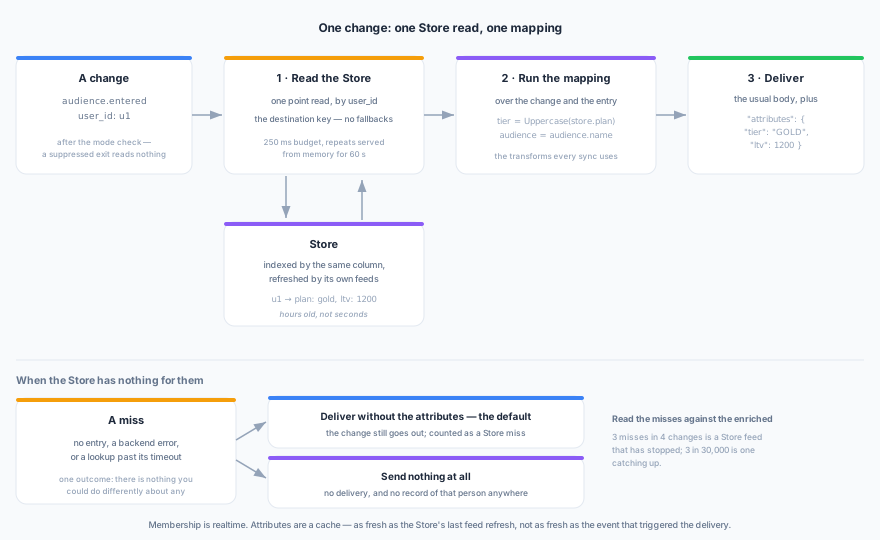
Per change, after the mode has been applied and before the delivery:
- One lookup in the Store, by the destination key — the same
user_idthe change is keyed on. One key, and no fallbacks: a change carries exactly one thing the destination knows the person by, so there is nothing to fall back to. - The mapping runs over the change and whatever the lookup returned.
- The result is delivered as
attributes.
The cost is one lookup and one mapping per change. Repeats are served from memory for the cache interval you set, so somebody whose events arrive in a burst is looked up once. Nothing is read for a change that will not be delivered: under as they join, a departure is dropped before the Store is touched.
Because the lookup is by the destination key and nothing else, the Store has to hold the same people the audience does. In practice that means the Store is fed from the audience’s parent model, or from a model that is one-to-one with it. A Store fed from somewhere else holds different rows entirely — accounts, say, where the audience holds people — so nobody in the audience could be found in it, and every delivery for the life of the sync would go out without its attributes.
You do not have to work this out yourself: the Store picker shows every Store you have and greys out the ones that cannot be read for this audience, each with the reason. A sync configured that way through the API is refused when you save it.
What a mapping can read
| Source | Paths |
|---|---|
| The person | user_id |
| The audience | audience.id, audience.name |
| The change itself | transition.kind, transition.occurred_at, transition.sequence |
| The Store | store.<attribute>, one for each attribute you selected |
| System values and constants | The sync, the audience, the destination, the workspace, the environment, the current timestamp — and any fixed literal you want stamped on every change |
Only the Store attributes you selected are readable, so store.plan is available exactly when you picked plan. Naming anything else — a Store field you did not select, or transition.type in place of transition.kind — is refused when you save, rather than becoming a destination field that is silently never populated.
The vocabulary is the one you already use on a scheduled sync: casts, field transforms such as Uppercase and SHA-256, concatenation, templates and coalesce. A transform means the same thing here as it does there, and SHA-256 produces the same digest on both, so a destination matching on a hashed email matches the same way whichever surface sent it.
A mapping needs no Store. Constants and system values alone are a valid payload, and that is how “send the audience name with every change” is expressed: a mapping, no Store, no lookup.
A mapping that fails while a change is being sent is not a miss, and it is not retried. A mapping is deterministic over one change, so the same person redelivered would fail the same way; it goes straight to Recent failures rather than burning its attempts first.
A worked example. A Store holding plan, email and ltv per customer, and this mapping:
| Destination field | Value |
|---|---|
tier | store.plan, through Uppercase |
hashed_email | store.email, lowercased and then SHA-256 |
ltv | store.ltv |
audience | System value — Audience name |
For u1, whose entry is { "plan": "gold", "email": "U1@Example.com", "ltv": 1200 }, the delivery is:
{
  "type": "audience.entered",
  "sync_id": "b1f0…",
  "audience": { "id": "9c2e…", "name": "High-intent browsers" },
  "user_id": "u1",
  "anonymous_id": null,
  "occurred_at": "2026-09-08T10:30:00Z",
  "sequence": 1756900000123456,
  "attributes": {
    "tier": "GOLD",
    "hashed_email": "6228d577ed8b4c57b0388fbef9d63caed2ca3c1cca39bc8db1253cf22f80beae",
    "ltv": 1200,
    "audience": "High-intent browsers"
  }
}
When the Store has nothing for them
A miss is an entry the Store does not hold, a Store that cannot be reached, or a lookup that runs past its timeout. Those are one outcome rather than three, because there is nothing you could do differently about any of them.
You choose what a miss does.
| Setting | What happens |
|---|---|
| Deliver without the attributes (default) | The change goes out with whatever the mapping could produce without the Store. Fallback values you set on an attribute still apply |
| Send nothing at all | The change is not delivered. The destination is never told about that person |
Delivering anyway is the default for the reason it is the default on event enrichment: a stale serving layer should not become a delivery outage. Choose Send nothing at all only where a change without its attributes is genuinely worse than no change — a required partner identifier, or an attribute your consent handling depends on.
A change skipped this way leaves no record. Nothing is written for that person: Deliveries will not show them, the failures behind the Failed figure will not show them, and the destination is simply never told. The counter below is the whole trace.
Three counts on the sync’s Activity are what make any of this visible (the API serves them as enriched, store_miss and skipped_on_miss):
| Count | What it means |
|---|---|
| With attributes | The Store had an entry, and the attributes went out with the change |
| Sent without attributes | The Store had nothing, and the change went out without them |
| Not sent, no attributes | The Store had nothing, and the change was not delivered |
With attributes is the denominator, and without it neither of the others means very much. Three misses in four changes is a Store feed that has stopped; three in thirty thousand is a feed catching up on people who joined since its last refresh. If misses track your total while With attributes sits at zero, start at the Store’s Refreshes tab.
Matching on a hashed identifier
Some destinations never accept your own id for a person. They match on a digest of an email address or a phone number instead, and an audience reaches them as a list of hashes; Meta Custom Audiences and Google Customer Match are that shape. Neither webhook nor Braze works this way — both take your own id for the person — but the rule below is already enforced, so a sync to the first such destination is either right at the moment you save it or refused.
A sync to a destination of that kind has to be told which identifier it is sending: either the mapping produces one of the identifier fields that destination accepts, or the sync names the identifier kind outright in the destination’s own settings. With neither, the sync is refused when you save it — rather than failing once per person, later, on a queue.
Hashing rules are the same here as everywhere else, and the usual mistake is hashing the value as stored: lowercase and trim an email before SHA-256, or the digest will not be the one the platform is matching against. Match Keys & Identifier Hashing has the normalisation each platform expects.
Setting it up
Attributes is a step when you create a sync, and a card on the sync’s page afterwards. It holds:
| Setting | What it does |
|---|---|
| Store | The Store to read. Stores that do not hold this audience’s people are shown greyed out, with the reason |
| Attributes | The Store fields to read, and a fallback value for any of them, used when the Store holds no such field for that person. The same field cannot be selected twice |
| When there is no match | Deliver without the attributes, or Send nothing at all |
| Lookup timeout | How long one lookup may take: between 50 ms and 2000 ms, 250 ms by default |
| Cache | How long a lookup is remembered in memory, 60 seconds by default. A miss is remembered too — an id the Store does not hold is the most repeated lookup there is — but an unreachable Store never is, so one bad second does not become a bad minute |
| Mapping | The destination fields to send, and where each value comes from. Choosing a Store field decides what is read; this decides what is sent — a field selected above and left out here is fetched on every change and reaches nobody, so the step says so while you are still looking at it |
Anything that would otherwise save cleanly and then fail quietly, one person at a time, is refused at this point instead: a Store that is not yours or does not exist; a Store that does not hold this audience’s people; an attribute no feed writes into that Store (the message names it and lists what the Store can supply); two attributes landing on one name; a mapping naming something the change will not carry; a timeout outside the range above.
That last one is not cosmetic. Below 50 ms a healthy lookup times out on ordinary jitter, every person takes the miss path, and under Send nothing at all you have a sync that silently delivers nothing at all.
How fast
These are targets, not guarantees. They describe the path when everything is healthy; nothing in the product promises them, and nothing alerts on them.
| From | To | Target |
|---|---|---|
| The event arriving at Zeotap | audience.entered at your endpoint | a few seconds |
| The event that disqualifies someone | audience.exited at your endpoint (entry_and_exit only) | a few seconds |
What actually sets the number is your destination: a change spends the queue and the evaluation in single-digit seconds and then waits on your endpoint’s own response. A slow endpoint is the whole latency.
Two things are deliberately not fast, because they are not late — they are waiting for an event:
- Somebody whose answer changed while nothing happened to them is sent at their next event, whenever that is. That is the boundary above, not a delay.
- A brand-new or freshly edited condition sends nobody until the tracked history covers the period it asks about. The sync page says when that is.
Watching one
The sync’s own page has three tabs, and each answers a different question.
| Tab | The question | What it shows |
|---|---|---|
| Overview | Is it moving? | Activity — how many people joined, left, could not be sent, are not identified yet, and are waiting on data, over the last hour and the last day, with a chart of the last 24 hours. Select any of the four figures to open what sits behind it: the deliveries that ran out of attempts under Failed, the two stuck counts under Waiting, and — for a sync that reads a Store — how many were enriched, missed and skipped under Joined |
| Deliveries | What did we send this person? | Every change this sync acted on for one identifier, newest first, and whether each one was actually sent |
| Playground | What would we send this person? | A dry run through this sync’s own steps for one identifier — the Store read, the mapped attributes and the exact request — without sending it |
Beside the Activity figures is a Configuration column: the audience, the destination, what this sync sends, its destination settings and its attributes, including how fresh those attributes are. Close it with the control in its heading if you want the chart to have the full width.
Two readings worth knowing:
- Not identified yet counts people the sync could not name to a destination. A person known only by an anonymous device id has no identifier to send under; once an
identifyevent links that device to auser_id, their next event sends them under it. - Sending from partial history until …, when it appears, means a condition in the audience looks further back than this workspace has been tracking it. People are still sent — from what has been recorded so far — and the time given is when the full stretch is covered. Until then, somebody who would qualify only on activity older than the tracking joins later rather than now. The count can only be short, never long, so nobody is sent who should not be.
- Waiting on data counts people the sync could not answer for at all. That happens when a condition in the audience refers to something nothing is recording yet — usually an event declared moments ago, or one whose declaration was removed. It normally clears within a minute or two by itself; if it does not, the condition is pointing at something that no longer exists, and the audience needs editing.
Editing the audience
Changing which realtime event conditions an audience uses — adding one, removing one, or changing how far back one looks — starts the sync’s memory over. Nobody is sent as a departure because of the edit, and everyone who still qualifies is sent again as a join at their next event. Destinations treat that as adding somebody who is already there, so it is safe.
An edit can leave people behind in the destination. Someone who qualified under the old conditions and does not qualify under the new ones is never sent as a departure, because the sync no longer has a record of them to compare against. Under join and leave, this is the one case where the destination can hold somebody the audience no longer does. If that matters, remove them in the destination.
Any other edit — changing an and to an or, editing a condition that is not a realtime event, renaming the audience — leaves the memory alone, so departures are sent as usual.
Pausing, resuming and deleting
Pause stops the sending and leaves everything else alone. On Resume, each person’s next event is compared against what was recorded before the pause, so nobody is sent twice and nobody is missed except while it was paused.
A sync can also pause itself, after repeated delivery failures. It says so, with the reason. Fix the destination, then resume.
Deleting a sync does not take anyone out of the destination. It stops the sending. Whoever has already been sent stays where they are, and removing them is done in the destination.
What this is not
- Not a scheduled sync. There is no schedule and no run history — a realtime sync sends one person at a time and keeps no runs. If you want a list in a destination, keep the audience free of realtime event conditions and sync it on a schedule.
- Not a backfill. Creating a sync sends nobody. People arrive as their events do.
- Not a replacement for the Membership API. A sync tells a destination what an event showed; the Membership API answers what is true right now. For someone the sync has not re-evaluated since their answer changed, the two can disagree — and the sync’s contract is what an event showed.
What is not sent
The fixed payload, plus whatever you mapped, is the whole of it. In particular:
- No attributes you did not map. A change carries the person’s values only where you configured a Store read and a mapping, and what it carries is as fresh as the Store rather than as fresh as the event — see Attributes and mapping. For a value as of the event, read the Profile API when the change arrives.
- Nobody who has only a device id. A person known only by an anonymous id is counted under Not identified yet and sent to nobody, because there is no identifier a destination could act on. They are sent under their
user_idat their next event after anidentify. - No exits under
entry_only. They are recorded — the sync knows — and the person lookup shows them as not sent. - Nobody, while a condition has nothing behind it. If a condition refers to something nothing is recording, the sync sends nothing at all for that audience and counts it under Waiting on data. A condition that is merely younger than it looks back does not stop anything — see Sending from partial history until … above.
- Nothing on delete. Deleting a sync removes nobody from the destination.
- No per-sync feed of every delivery. The three views on the sync page are what is kept: hourly counts, one person’s history, and the failures that ran out of attempts.
Next steps
- Realtime audiences — writing the audience a sync watches
- Membership — the pull side of the same plane
- Realtime events — declaring the events everything here is triggered by
- Stores — the by-key attribute cache a sync reads its attributes from
- Field transforms — the transform vocabulary a mapping uses