Event Enrichment
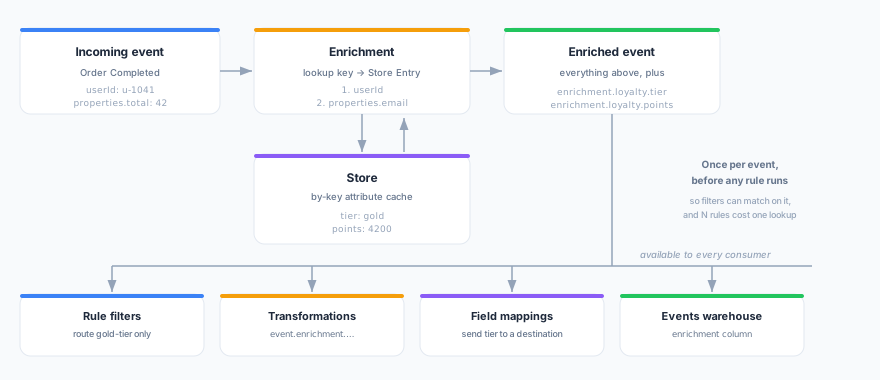
An enrichment looks a value up in a Store and adds the attributes you choose to every event from a source — before that event reaches any forwarding rule.
Your events know who someone is. A track call carries a userId and a cart; an identify carries an email. What they never carry is what you already know about that person: their loyalty tier, their plan, their lifetime value, their churn score. That lives in your warehouse, and a Store is the copy of it that answers in milliseconds.
Enrichment joins the two, live, on the event.
Why it matters
Once an attribute is on the event, it is available everywhere at once:
| Where | How you use it |
|---|---|
| Forwarding rule filters | Route only enrichment.loyalty.tier = gold events to a partner — the paths appear in the field dropdown, so there is nothing to type |
| Transformations | Read event.enrichment.loyalty.tier in JavaScript |
| Field mappings | Send enrichment.loyalty.tier as a destination field |
| Events warehouse | Query the enrichment column beside the event |
Without enrichment, each of those needs its own join — and most destinations cannot do one at all.
How it works
For every event from the source, Zeotap:
- Resolves a lookup key — reads the first of your configured event fields that has a value.
- Reads the Store — a single by-key lookup, typically a few milliseconds.
- Adds the attributes you selected — under
enrichment.<namespace>.<attribute>.
That happens once per event, before any forwarding rule runs — which is what makes the enriched fields usable in a rule’s filter, not just in its payload. Several rules on the same source share the one lookup.
Creating an enrichment
- Go to Streams → Enrichments and click Add Enrichment.
- Source & Store — pick the event source to enrich and the Store to read from. Name the enrichment; its namespace is proposed from the name and decides where the values land (
enrichment.<namespace>.*). - Lookup key — choose the event field that identifies the Store Entry, and optionally add fallbacks.
- Attributes — pick the Store fields to add. Rename any of them, and give any a fallback value.
- Behaviour — decide what happens when there is no match, how long lookups are cached, and whether the enrichment is active.
Use Run test on the last step (or the Test tab on the detail page) to try it against a sample event before it touches live traffic. The test runs the real enrichment engine and shows which key it used, whether the Store had a match, and the enriched event exactly as your rules will see it.
Lookup keys
The lookup key must produce the value your Store Entries are addressed by — the Store’s primary index, shown beneath the Store picker.
Keys are an ordered list, and the first one with a value wins. This is what lets a single enrichment cover both logged-in and anonymous traffic:
1. userId                    ← a signed-in visitor
2. anonymousId               ← the same visitor before they log in
Any dot-path you can use in a filter or a mapping works here: userId, properties.email, context.traits.customer_id.
If none of the keys resolves to a value, the event is treated as a miss — see below.
Attributes
You choose the Store fields explicitly. The picker lists what the Store can supply, derived from the feeds that populate it, and shows which feed owns each field.
Each attribute has two optional settings:
| Setting | What it does |
|---|---|
| Name on the event | Renames the field. points → loyalty_points gives you enrichment.loyalty.loyalty_points |
| Fallback value | Used when the Store has no match, or has no such field |
Fallbacks are worth setting. Without one, a miss leaves the path off the event entirely: a mapping omits the field, a warehouse query sees NULL, and an exists filter is false. With one, the event has the same shape whether or not the Store had a match — which is what makes it safe for a forwarding rule to filter on that path.
Fallbacks keep their type. Type 0 and the destination receives the number 0, not the string "0".
When there is no match
| Setting | Behaviour |
|---|---|
| Forward the event anyway (default) | The event is delivered without the enriched fields. Fallback values still apply |
| Drop the event entirely | The event reaches no forwarding rule and is never written to the warehouse |
Enrichment never blocks delivery on its own. If the Store is slow or unreachable, the event still forwards — unenriched. That is deliberate: a serving-layer problem should not become an events outage.
The one exception is Drop the event entirely, which also applies when the Store is unavailable. Choose it only when an unenriched event is genuinely worse than no event at all — a required partner identifier, or an attribute your consent handling depends on.
Caching
Lookups are cached in memory for the interval you set (60 seconds by default; 0 disables it).
Live traffic is dominated by repeat visitors, so caching cuts Store reads sharply. Store Entries refresh on their feed’s schedule — usually hours — so a cache measured in seconds costs no meaningful freshness.
Chaining enrichments
Several enrichments on one source run in order, each against the already-enriched event. So a later one can use an earlier one’s output as its lookup key:
1. "Profile"  →  keys on userId              →  adds enrichment.profile.account_id
2. "Account"  →  keys on enrichment.profile.account_id
                                             →  adds enrichment.account.plan
Both happen in a single pass through the pipeline.
What enrichment does not affect
Enrichment happens after your events have been accepted, so a few things deliberately never see enriched values:
- Contracts validate the payload your source sent.
- Event schemas and auto-discovery describe what your source sends.
- Volume metrics count what arrived.
All three describe your instrumentation, and an enriched attribute is not something your instrumentation sent.
Availability
Enrichment reads from Stores, so it is available in workspaces that have Stores enabled, on Zeotap Cloud.
Related
- Stores — the by-key attribute cache enrichments read from
- Forwarding — filtering and mapping with enriched fields
- Transformations — reading enriched fields in JavaScript
- Events Warehouse — the
enrichmentcolumn