Customer 360
Customer 360 (the /profiles page) is where you look at one customer. Search for a person by any identifier you hold and Zeotap shows their golden record, the source records that merged into it, why those records merged, the related data reachable from them, and their events — all read from your own warehouse, on demand.
Open it from Customer 360 in the left sidebar, or from the Explorer tab of an identity graph, where a resolved result carries an Open full profile link.
Prerequisites
- An identity graph with at least one completed resolution run. The page reads that run’s output tables — a graph that has never finished a run has nothing to show.
- Relationships registered between your models, if you want the Related data and Events tabs to have anything in them.
- A golden record configuration, if you want the Overview tab to show survived attributes.
Looking up a plain record needs none of this — see By Model below.
Finding a customer
By ID Graph
Pick the identity graph, pick the identifier family (email, phone, user ID, …), type the value, and click Search.
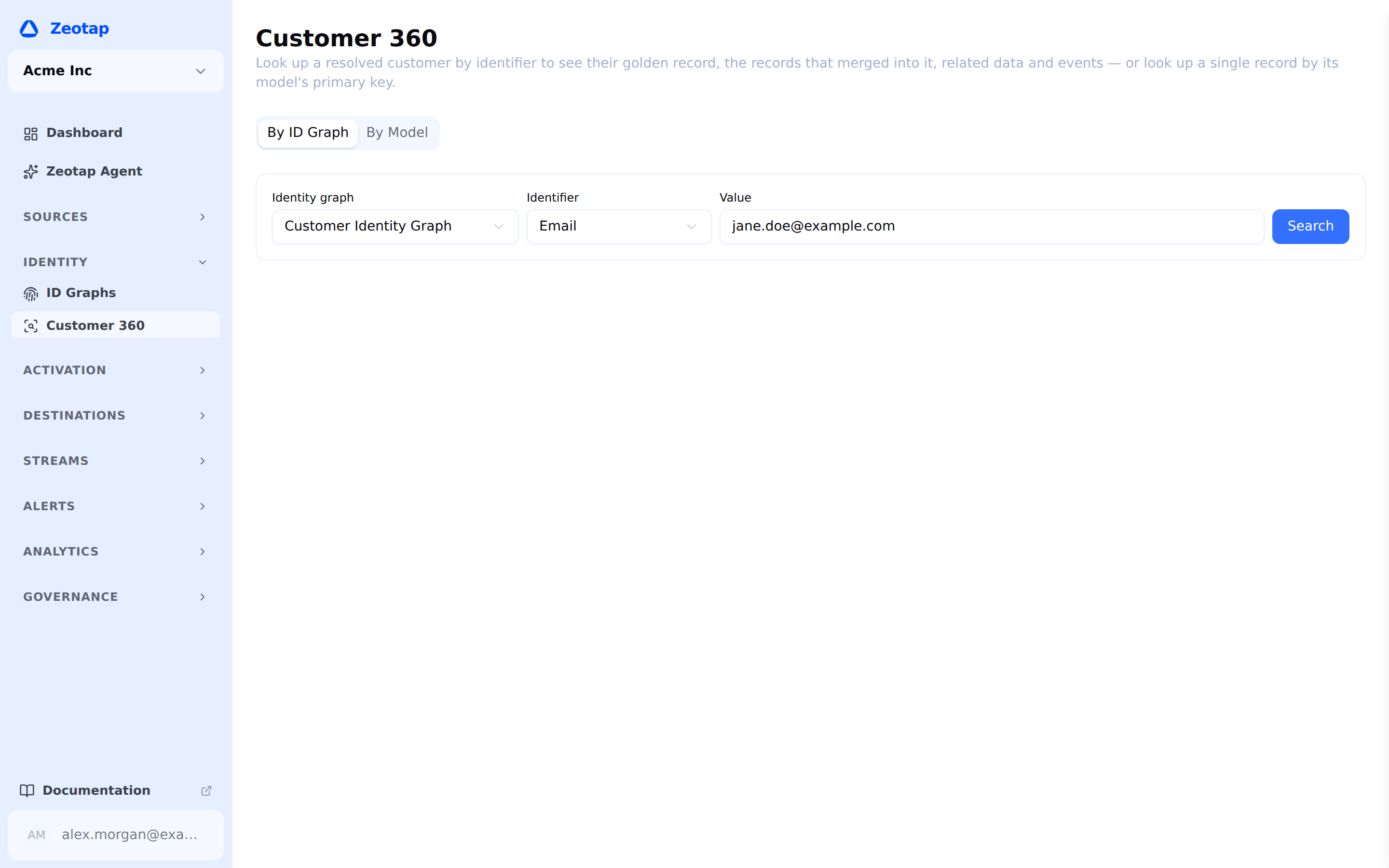
The identifier list is the graph’s own: it holds the families that graph maps a column to, including any custom identifier types you defined on it (a loyalty number, a CRM id), which are searched exactly like the built-in ones. Change the graph and the list changes with it.
The value is normalized the same way the graph normalizes that family when it resolves identities, so you can type an email in any casing and it will match. If the graph’s identifier mappings cannot be read, the list falls back to the built-in families; searching one the graph maps no column to is rejected with a message saying so — the graph cannot look up something it never indexed.
A hit opens the profile and puts its address in the browser bar, so the URL is copyable, reloadable and shareable with anyone who has access to the workspace.
When the value is shared, you get a chooser rather than a guess. A search matches records and then reports the profiles those records resolved to, so one value can legitimately belong to several — a household tablet’s cookie is the ordinary case, and a per-profile limit makes it deliberate. The page then says so at the top — “3 profiles carry cookie id C1 — this identifier is shared” — and lists each profile’s id, row count and identifier families. Pick one to load it; the list stays on screen, so you can move between them without searching again. Starting a new search, or switching graph, clears it.

By Model (no identity graph needed)
The search has two modes, on a tab strip above the form: By ID Graph and By Model. Switch to By Model to look a single row up by its model’s own primary key. Pick the model, type the key, and click Open record.
This is the same page with the identity-dependent parts removed: there is no cluster, so no merged rows and no merge lineage, and no golden record, so Overview shows the record’s own row instead of a survived one. Related data and Events work exactly as they do for a resolved profile, anchored on the record instead of on the cluster.
A workspace with no identity graph opens in this mode by default.
Two things are worth knowing about it:
- Only models that declare a primary key can be looked up, because that is what a record is addressed by. Models without one do not appear in the picker.
- If more than one row carries the key you typed, the page says so at the top. That means the model’s declared primary key is not actually unique, which is worth fixing: the row shown is one of several, and the related data below is anchored on all of them.
What the page shows
Header
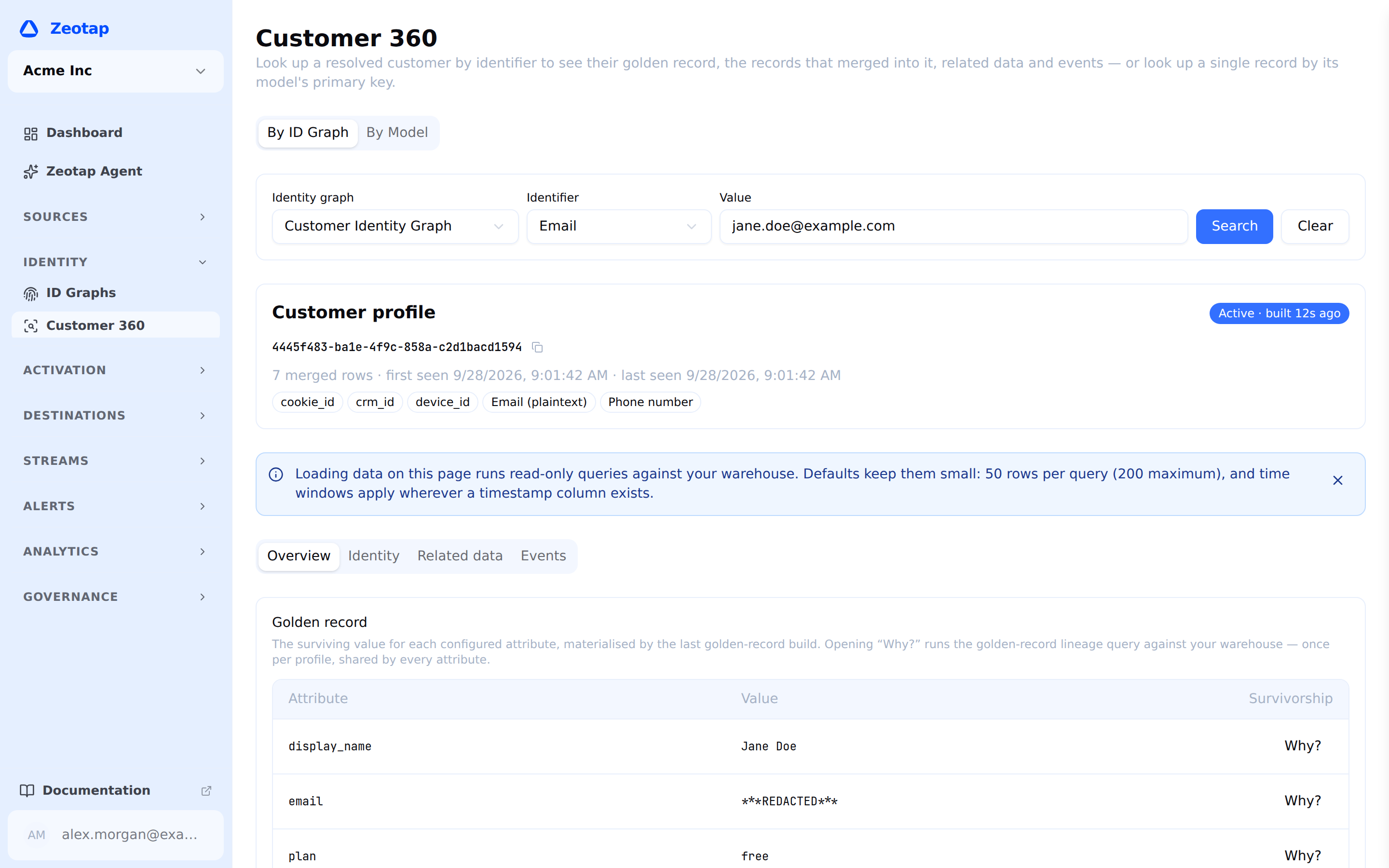
The resolved profile id, copyable, with the identifier families the cluster was built from, how many source rows merged into it, when it was first and last seen, and a freshness badge for the golden record (its status, and when it was last built).
Cluster confidence is shown only when it is below 1 — a cluster whose every link is an exact match reports 1.00 for both minimum and average, which says nothing.
Overview
The golden record: the surviving value for each configured attribute, as materialized by the last golden-record build.
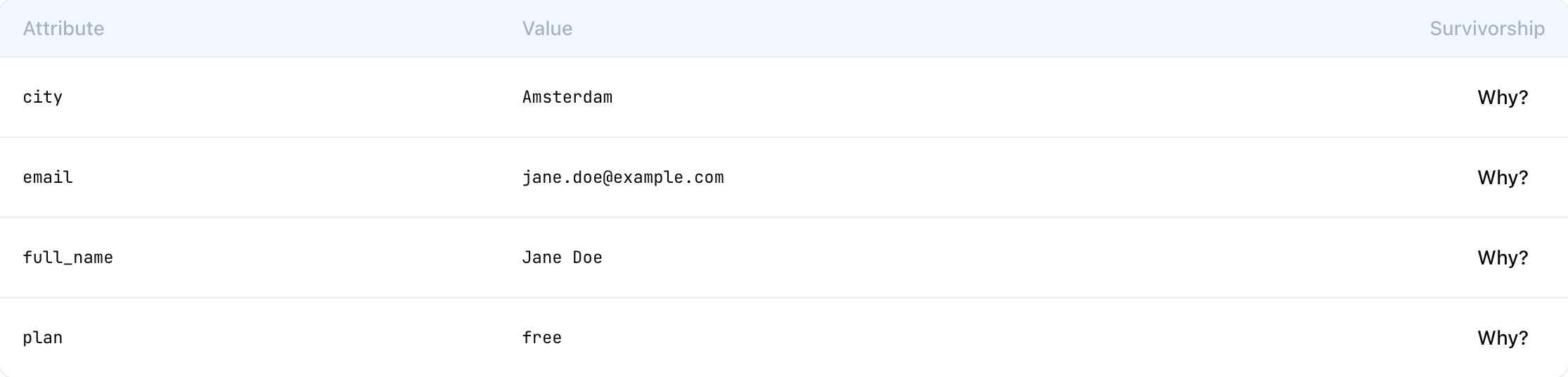
Each attribute has a Why? control that explains the survivorship: which strategy chose the value, and the candidate values it chose between — one row per contributing source record, with the model it came from, that record’s key, the value itself, how recent it is and the source’s priority, with the winning candidate marked. Opening it runs one query per profile, shared by every attribute.
Candidates are read from the same frozen inputs the last golden-record build consumed rather than from your models as they stand now, so what you see is the choice that build actually made. Two signals qualify it: an attribute is marked Stale when its stored value is no longer what survivorship would pick over those inputs — the record predates a change to them, and a resolution run rebuilds it — and the popover says so when the survivorship configuration itself was changed after the record was built, which means the candidates are being ranked by rules the stored value never saw.
Values are masked according to the same column sensitivity that governs the rest of the product, in the golden record and in every candidate behind it. An attribute whose sources are marked as redacted shows the redaction placeholder, and the Why? control says why the values there are hidden; one whose sources are blocked is not returned at all.
Identity
Three sections.
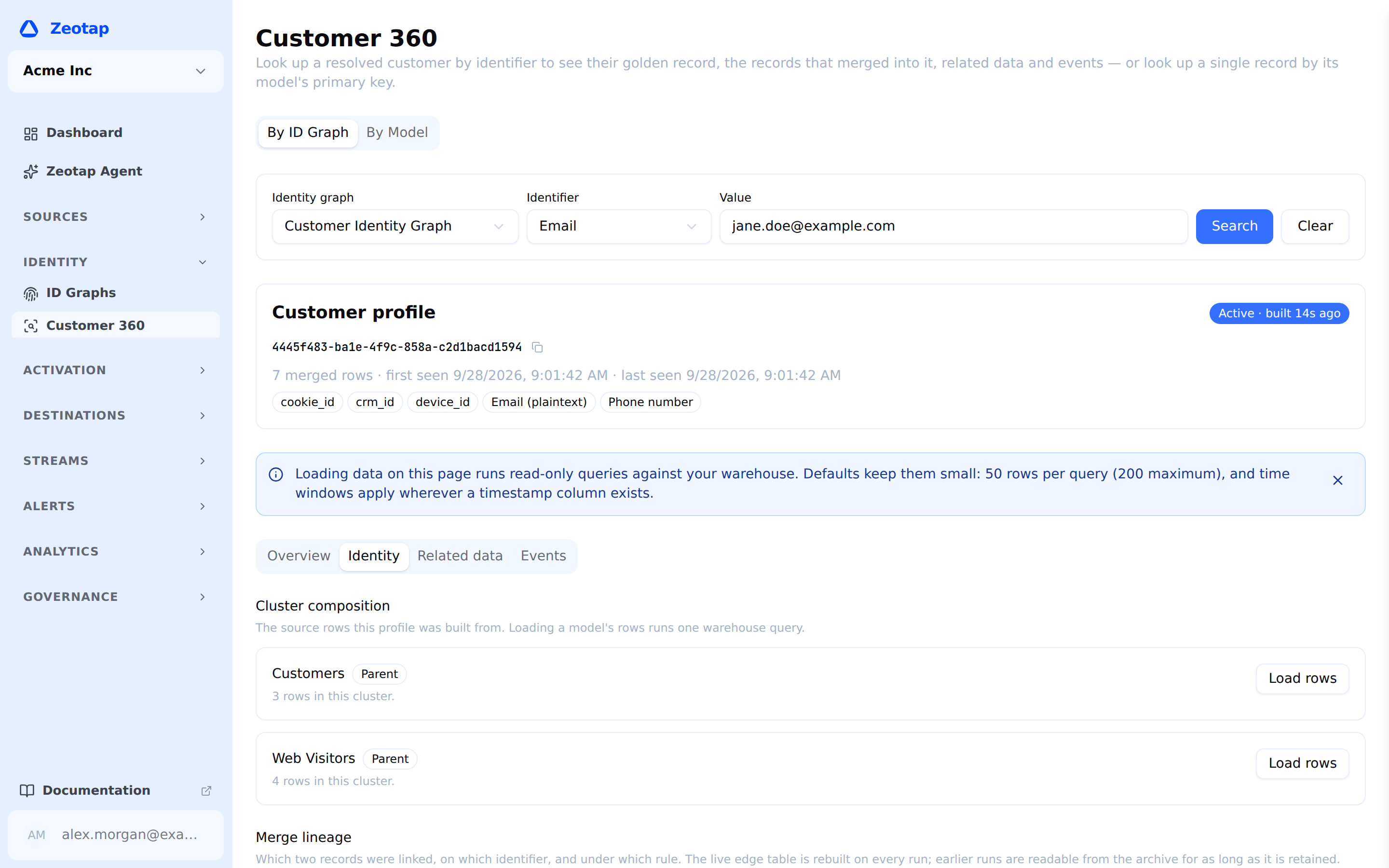
Cluster composition lists the models that contributed rows to this profile, with per-model counts. Each has a Load rows button that fetches those rows with their values — one warehouse query, only when you ask.
Merge lineage explains why the records merged: for each link, the identifier it matched on, the two rows it connected (model and primary key on each side), the confidence, whether the match was deterministic or probabilistic, and the merge rule that produced it.
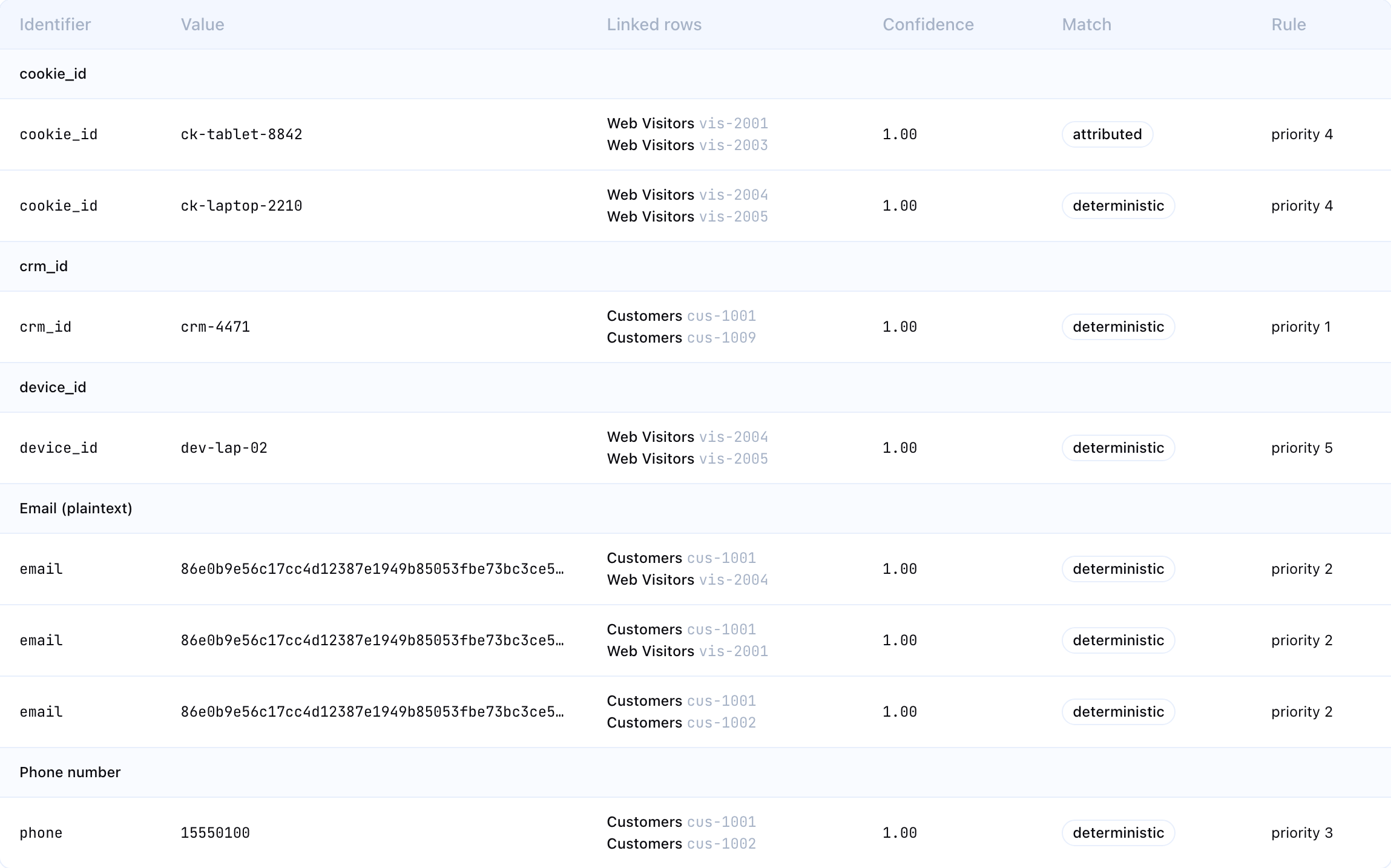
Beneath the table the section restates the graph’s merge rules and its Limits, one clause per family and in the same words the rules themselves use — a profile may hold up to 1 email values; ignore any email value shared by more than 100 records — with (default) on any number nobody configured. Both limits are named because either can be the reason two records are not one profile, so an identifier that contributed no links is accounted for rather than simply absent.
A single-row profile shows “This profile was never merged with another record” — correct, not an error.
Kept apart answers the opposite question: why records that share a value are not one profile. It is a table of Identifier, Value, What happened and Anonymous activity.
What happened is one sentence leading with the value itself, with the merge rule priority the decision was taken at beneath it. There are four:
| What you read | What it means |
|---|---|
| c1 is also used by another person. The email limit (1 per profile) kept them separate. | The value is carried by records holding two different emails. Joining them would have made two people one |
| c1 is also used by another person. Joining would put more than 1 email values on one profile. | The value does not bridge two people by itself, but taking it would breach the limit through another hop |
| noreply@company.com is shared by more than 100 records, so it was not used for matching. | The shared-value limit, not a per-profile one. That number counts records sharing one value, not values on one profile |
| Its anonymous activity pointed at two different people, so it stayed on its own. | Not a limit at all: anonymous activity that could have been given to either of two people was given to neither |

Anonymous activity says where the activity carrying that value went: went to this profile, went to another profile (linked, so you can open it), stayed on its own, by this graph’s setting, or no anonymous activity to assign: every record with this value already belongs to a profile. The last two look alike and are not: the first is your shared identifier attribution setting, which you can change; the second means there was nothing to give away, and changing the setting would do nothing.
“Nothing was kept apart from this profile in the latest run” is the healthy, common answer, and it is stated rather than left as an empty space.
Three caveats, all shown in place:
- Latest run only. These rows are rebuilt by every run and are not archived, so this section always describes the most recent run — including when the Identity run selector above is reading an archived one, which it says explicitly.
- It fills in after the graph’s next full run on a graph whose last full run predates this feature.
- Capped at the first 200 rows, with a note when the cap is hit. A profile whose every record carries its own shared bot cookie would otherwise make one page load an unbounded read.
Identifier values here are masked under exactly the same rules as a link’s value in Merge lineage — same columns, same sensitivity, same fail-closed behaviour — so a value hidden on a merge cannot be legible here.
Related data
One card per registered relationship whose other side is reachable from a model in this identity graph — orders, subscriptions, tickets. Each card carries a Time window and Row limit control and a Load button, and loads nothing until you press it.
Relationships the profile view does not yet support are reported in the card itself rather than as a passing notification, so the limitation stays visible: many-to-many relationships and non-scalar (array or JSON-path) join keys are not traversed here.
Events
Event-entity model rows for this customer — both event models attached to the identity graph and event models reachable through a relationship. Same controls, same on-demand loading, newest first, with a Last 24 hours default window. An event table is the one place a profile query fans out per occurrence rather than per customer, so the default answers “what has this person just done” and you widen the Time window — up to All time — when you want history.
Where your workspace collects ingested event streams through the events pipeline, and the event warehouse sits on the same source as the identity graph, this tab also offers those raw tables. They are what the ingest pipeline writes as your SDK and server-side events arrive — no model, no relationship — and they are matched to the profile by its own user_id and anonymous_id values, where the modelled event cards above join through a registered relationship instead. Default window 7 days. Those tables carry no column configuration, so values there are redacted from column names alone — a weaker guarantee than the model-backed cards above, and the page says so in place.
Cost guardrails
Every panel on this page reads your warehouse, so the page is built to make that visible and to keep each read small. A banner at the top says as much on your first visit, and stays dismissed once you close it.
| Guardrail | What it means |
|---|---|
| Nothing fans out on open | Only the initial lookup runs by itself. Member rows, related rows, events and lineage each wait for you to ask. |
| Every query is capped | 50 rows by default; the Row limit control offers 50, 100 and 200, and 200 is the ceiling. Merge lineage is capped at 500 links, and Kept apart at 200. |
| Time windows by default | 90 days for related data, 24 hours for event models, 7 days for ingested event streams — applied wherever the model has a timestamp column. The Time window control offers last 24 hours, 7, 30, 90 or 365 days, and All time to remove the window. |
| One relationship per request | There is no server-side fan-out across relationships; each card is its own query. |
| The filters that ran are shown | After a load, the card states the limit, the window, the timestamp column used, and the ordering — as the server applied them, including defaults it filled in and a window it skipped because the model has no timestamp column. |
| Estimates before you load | On warehouses that can price a query without running it — BigQuery, Snowflake and Databricks — each card shows approximately how much it would scan, beside its Load button. Nothing is scanned to produce that number. On the others, and wherever the engine cannot price a particular query, no estimate is shown rather than a misleading one. |
Changing a filter marks a card stale rather than re-running it. Loading is always something you do.
Truncation is stated rather than implied: a card that hit its limit says so and tells you which control to change.
Lineage caveats
Read these before drawing conclusions from the Merge lineage section.
It reflects the latest run. The link table is rebuilt from scratch by every resolution run. What you see is why the records are merged now — not the history of how the cluster grew.
Earlier runs are readable only while retained. Each run also archives its links, and the Identity run selector appears when archived runs exist, letting you read an earlier run’s lineage instead of the current one. That archive is kept for a limited retention window and is pruned beyond it, so the selector offers recent runs, not all of them. If no archive exists, the selector is not shown at all — the absence means there is no history to switch to.
Identifier values follow the same masking as record values. The link table stores the normalized identifier, and normalizing is not anonymizing — a normalized phone number is still the phone number. So a link’s value is redacted here whenever the column it came from is masked in the record views, and a family the graph no longer maps is redacted too. Everything else about the link — the identifier family, both linked rows, the confidence, the match type and the rule — is still shown, so you can always state exactly why two records merged without displaying the value they merged on.
Per-row confidence is deliberately not shown. The confidence recorded against an individual source row depends on the order the graph happened to be traversed in and is not reproducible between runs. Cluster-level confidence (in the header) and per-link confidence (in the table) are the two figures that mean something.
A profile with merged rows but no links is possible. If the last run recorded no link for a cluster that clearly has several rows, the section says so rather than claiming the customer was never merged.
Troubleshooting
| What you see | What it means |
|---|---|
| ”No profile found for that value” | No cluster carries that identifier. Confirm a resolution run has completed since the record was added, and that a merge rule covers the family you searched. |
| An error mentioning the identifier family | The graph maps no column into that family, so it cannot be searched. Open the identity graph and add an identifier mapping. |
| ”This identity graph has never completed a run” | The profile queries could not read the graph’s output tables. Trigger a run and wait for it to complete. |
| ”All columns on this model are hidden by column policies” | Every column is blocked or sync-only for your role, so the query was never sent. This is a column-policy result, not an empty table. |
| Redaction placeholders in place of values | The column is marked redacted. Model creation marks detected personal data that way by default. |
| No rows after a load | Widen the Time window — the default hides anything older than it — or confirm the join key actually matches. |
Next Steps
- Golden Records — how survivorship picks the winning value
- Merge Rules — what is allowed to link two records
- Limit Rules — the two limits the lineage and Kept apart sections report
- Running Resolution — running and re-running resolution
- Relationships — registering the relationships the Related data tab traverses