Destination Sharing
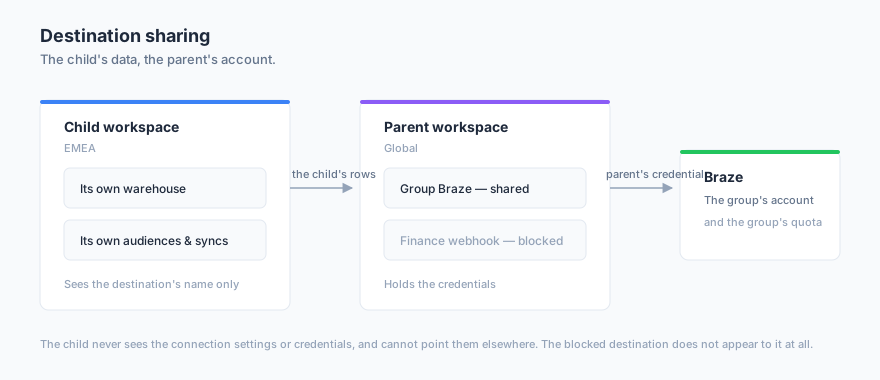
Destination sharing lets one workspace lend its delivery targets to its own team workspaces. A central team owns the connections — the corporate Braze workspace, the group’s ad account, the partner webhook — and regional teams send their own audiences through them, without ever holding the credentials.
What Problem It Solves
Contracts, quotas and API credentials usually sit with one central team, while the people building audiences sit in regional or brand teams. Without destination sharing there were two ways to make that work, and neither is good.
You could copy the credential into every team workspace — which means as many copies of a secret as you have teams, as many places to rotate it, and as many ways to leak it. Or you could put everyone into one workspace, and lose the separation between teams entirely.
Destination sharing gives you the third option: the credential stays in one place, and the teams send through it.
How It Relates to Workspace Sharing
Workspace sharing lends a parent’s definitions — models, relationships and traits — and the child runs the resulting queries on its own warehouse.
Destination sharing is the mirror image. It lends the parent’s connection, and the child writes into the parent’s account. The two are independent: you can share destinations without sharing a single model, and the other way round.
Both need the same thing first: the child must be a direct child of the parent, set in Organization settings.
How It Works
A destination share is one parent workspace offering its destinations to one direct child. It covers all of them at once, including ones you connect later — the unit is the pair of workspaces, not the individual destination.
You then block any destination that particular child should not use. Blocks are per child, so one region can use the group’s ad account while another cannot, from the same share.
Sharing goes one hop, downward only. A child cannot pass a destination on to its own children, and cannot share anything upward or sideways.
Prerequisites
- Both workspaces belong to the same organization
- The child workspace is a direct child of the parent
- To share destinations you need destination-share write permission in the parent workspace
- To use one, the child needs only its ordinary sync or journey permissions — there is no third grant to hold
Share Destinations With a Child
Destination shares live beside model shares on the same tab:
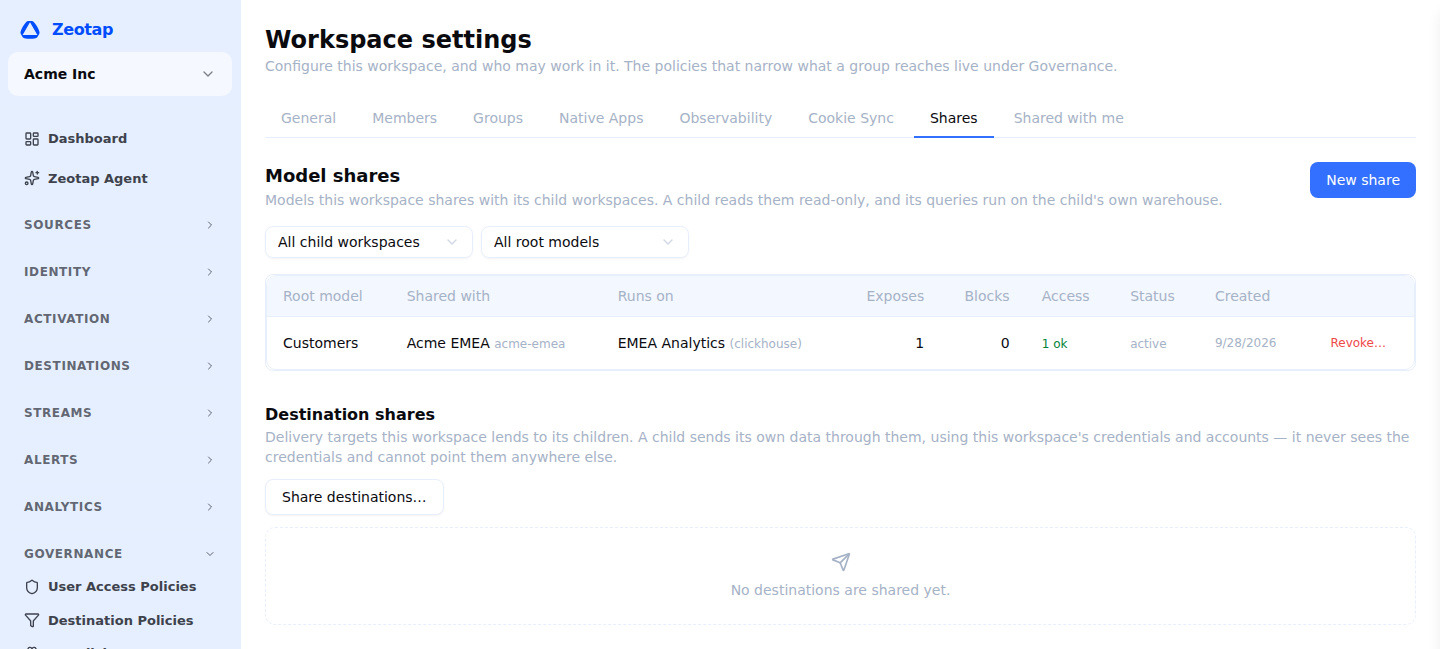
- In the parent workspace, open Settings → Shares
- Under Destination shares, choose Share destinations…
- Pick the child workspace
- Untick any destination that child should not use — you can change this at any time
- Choose Share destinations
The child sees them immediately.
What the Child Sees
In the child workspace, shared destinations appear in the ordinary destinations list, marked Shared from <parent>, and in every destination picker — model syncs, audience syncs and journey send tiles.
What the child can see is deliberately narrow: the destination’s name, its type, and whether the connection is working. It never sees the connection settings, the credentials, the URL, the account id, or the error text behind a failed connection. If the connection has a problem, the child is told that the owning workspace reports one, and nothing more.
A blocked destination is not shown as blocked. It simply is not there — the child is never told that it exists, how many are hidden, or that a blocklist is in play.
What the Child Can Do
A child can send through a shared destination and nothing else:
| Child workspace | |
|---|---|
| Use in a model sync, audience sync or journey tile | Yes |
| See which lists, audiences or fields exist in the account | Yes |
| Rename, edit settings or rotate credentials | No |
| Delete it | No |
| Run a connection test | No |
| Use in event forwarding, a profile store or a store feed | No |
The connection test is worth a word, because its absence looks like an omission and is not. There is one credential and therefore one answer to “does this connection work”, and the owning workspace already publishes that answer as the destination’s status. Letting every child fire test calls at the same third-party API would spend the owner’s rate limit to re-derive something the owner already has.
What Sending Actually Does
When a child runs a sync into a shared destination:
- the rows come from the child’s warehouse, read with the child’s own connection and billed to the child
- the delivery uses the parent’s credential, into the parent’s third-party account
- the run belongs to the child — it appears in the child’s run history, not the parent’s
Two consequences are worth stating plainly before you share anything.
The child spends the parent’s quota. Sends count against the parent’s rate limits and contract volumes. The owning workspace can see how much, per destination, on the share page.
The child creates objects in the parent’s account. Naming its own list, audience or target table is exactly what makes the destination usable, and those objects are created in the parent’s account. What it cannot do is point the credential somewhere else — where the data lands is the child’s to choose, which account it lands in is not, and that is enforced by the platform rather than by convention.
For warehouse destinations there is one more: the child’s rows pass through a staging bucket in the parent’s cloud project on the way in. That is inherent to loading into someone else’s warehouse.
New Destinations Are Shared Automatically
A destination you connect in the parent workspace becomes available to every child you already share with, the moment you save it. That default is what makes the feature usable — re-sharing after every connection is the kind of step people stop doing — but it is also the one that surprises.
Two things keep it honest. Every exposure is recorded in the parent’s audit log, so “when did that team get access to this account?” is a question with an answer. And the destination form tells you how many child workspaces will see the new connection, with a Don’t share with child workspaces yet checkbox if you would rather decide later.
Block One Destination
From the share page in the parent workspace, choose Block on any row.
If nothing in the child is using it, the block is immediate. If something is, you are told how many syncs, audience syncs or journeys would stop working — never what they are called — and asked to confirm. Confirming marks them broken: they stay, they stop running, and the child sees why on each one.
Unblocking puts them back with nobody editing anything.
Revoke a Share
Revoking takes away every destination at once. Like a block, it is refused while the child is using them and offered again with a count. Revoking does not undo anything already delivered; it stops future sends.
Revoke is the emergency control. If a child is pushing far more than you expected into your account, it is the right lever, and it needs no investigation first.
A child workspace that still holds a live destination share cannot be re-parented or detached until the share is revoked.
Seeing How Much a Child Sends
The share page shows, per destination, how many runs the child has made, how many rows it delivered, how many failed, and when the last delivery was — over the last 30 days.
It shows counts, never names. The parent can see that a team is sending and how much, not what that team calls its audiences.
What Does Not Transfer
This is the most important limit to understand before you rely on the feature.
Your destination policies do not follow the destination. Destination filters and frequency caps belong to the workspace running the sync, so a child’s sends are shaped by the child’s policies, not yours. If your governance rule is “nobody sends to Braze without excluding opt-outs”, sharing the destination does not enforce it in the child.
Sharing a destination decides whether a team may send to an account. It does not yet decide what they may send. Central policy over shared destinations is planned and is a separate piece of work.
Permissions
| Permission | What it allows | Owner | Admin | Member |
|---|---|---|---|---|
destination_shares.read | List destination shares this workspace owns, and destinations shared with it | Yes | Yes | Yes |
destination_shares.write | Share destinations with a child workspace, and block or unblock individual destinations | Yes | Yes | No |
destination_shares.delete | Revoke a destination share, in the owner workspace | Yes | Yes | No |
Sharing has its own permissions rather than reusing destination editing, so an organization can let a team manage its own connections without letting it lend a corporate account to another workspace.
Limits
- Re-sharing. A share names a direct child only, and a child cannot pass it on
- Central policy. The owning workspace’s destination filters and frequency caps do not apply to a child’s sends — see above
- Per-share target limits. You cannot yet restrict a child to particular schemas, tables or list ids within a shared destination; the credential’s own permissions are the boundary
- Two kinds cannot be shared. Platform-managed destinations, and the in-account warehouse target used by the Snowflake Native App — both are tied to the workspace that holds them
- Other uses. A shared destination cannot be used for event forwarding, a profile store or a store feed
- Allowlist mode. Sharing covers everything by default and you block the exceptions; there is no “share only these” mode
Next Steps
- Workspace Sharing for sharing the modelling itself
- Organizations for grouping workspaces and setting a parent
- Destination Policies for shaping what reaches a destination
- Set up RBAC to control who can manage shares