Probabilistic Matching
Probabilistic matching extends identity resolution beyond exact-match rules by using fuzzy and statistical signals to link records. Each probabilistic match produces a confidence score between 0.0 and 1.0 that flows through to audiences and syncs, letting you control the precision/recall tradeoff at query time without re-running the identity pipeline.
Graph Types
An identity graph’s type is set in step 1 of the creation wizard and decides whether confidence scoring exists at all.
| Type | Description | Confidence features |
|---|---|---|
| Deterministic | Exact-match rules only. The default. Every link carries confidence 1.0 | Hidden — no confidence controls, columns or thresholds |
| Probabilistic | Exact and fuzzy rules in the same graph, chosen per merge rule | Enabled — confidence columns, and thresholds at graph, audience and sync level |
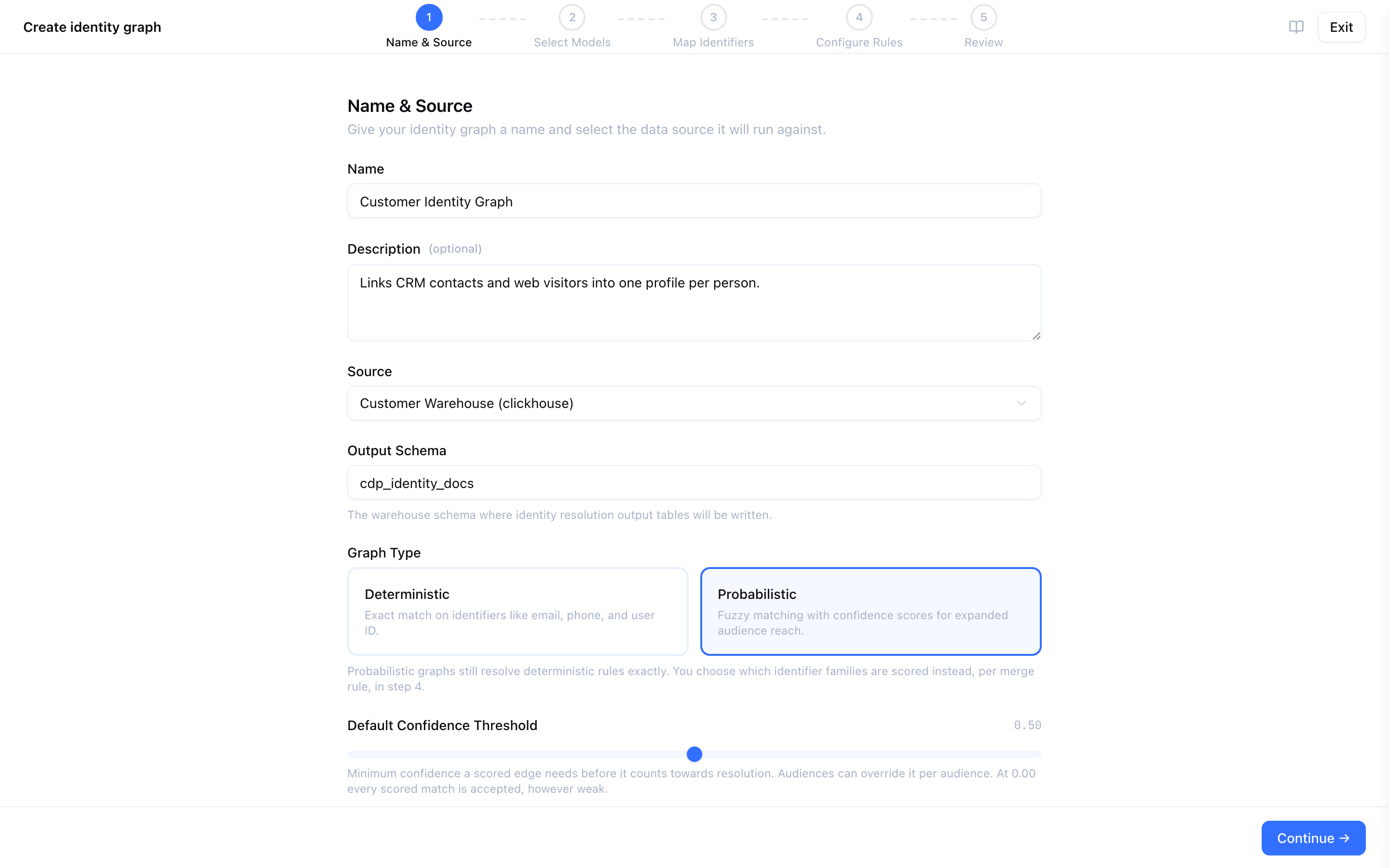
Deterministic graphs behave exactly as they always have. A probabilistic graph adds confidence throughout the pipeline: on links, on profile aggregates, on golden record rows, and as a filter in audience queries.
Graph type cannot be changed after creation. To move a deterministic graph to probabilistic, create a new identity graph and run it. Adding a probabilistic rule to a deterministic graph is rejected outright rather than stored as a rule that silently produces nothing.
A probabilistic graph always rebuilds in full. Incremental resolution is not available for it, whatever the run mode says, and every run records probabilistic as the reason. Budget for that before choosing the type.
Configuring a Probabilistic Rule
On a probabilistic graph, every merge rule gains a Match control. Set it to Probabilistic and a configuration panel appears under the rule:
| Control | Range | Default | Meaning |
|---|---|---|---|
| Scoring Function | Fuzzy Name · IP Cluster · Household | Fuzzy Name | How candidate record pairs are compared |
| Base Confidence | 0.10 – 1.00, in steps of 0.05 | 0.70 | The starting confidence assigned to links this rule produces |
| Min Similarity (Fuzzy Name) | 0.50 – 1.00 | 0.85 | Minimum similarity for two names to count as a match |
| Time Window (hours) (IP Cluster) | 1 – 168 | 24 | How far apart two events on one IP may be |
| Name Similarity Threshold (Household) | 0.50 – 1.00 | 0.80 | How similar surnames at one address must be |
A scoring function reads fixed identifier families — not the family its own merge rule is on. A probabilistic rule on email that selects Fuzzy Name still scores the name family. If the families it needs are not mapped, the rule produces no links at all and the run succeeds having done nothing. The rule editor warns before you save, naming the families to map.
Scoring Functions
Fuzzy Name
Matches records with similar names.
- Reads: the
namefamily — afirst_name,last_nameorfull_namecolumn mapped on participating models. - How it works: records sharing a phonetic code are selected as candidates, which keeps the comparison from being all-pairs. Confidence is then the similarity score the warehouse can compute — Snowflake uses Jaro-Winkler, Databricks and ClickHouse use a normalised edit distance. BigQuery and Redshift have no usable similarity function, so every phonetically-matched pair scores the flat base confidence instead, and Min Similarity becomes an all-or-nothing gate on that constant rather than a graded threshold.
Example: “Alice Smith” and “Alice M. Smith” share a phonetic code. On Snowflake the similarity scores 0.92, which clears the 0.85 threshold, so a link is created carrying confidence 0.92.
IP Cluster
Links records seen on the same IP address close together in time.
- Reads: the
ip_addressfamily, plus a column mapped astimestamporevent_timestampon the same model. - How it works: exact IP match, with the time window as a second condition. Every matched pair carries the rule’s base confidence.
- Without a timestamp: the window is dropped and the links carry half the base confidence, because “same IP, any time” is a far weaker claim than “same IP within a day”.
Example: two records on IP 203.0.113.7 eighteen hours apart fall inside a 24-hour window, and are linked at the rule’s base confidence.
Household
Links records at the same address with similar names.
- Reads: the
addressfamily (postal_codeorzip_code) and thenamefamily, and both must be mapped on the same model — the two columns are read from one row. A graph with names on one model and postal codes on another produces nothing, and the rule editor warns about exactly this. - How it works: exact postal-code match plus a phonetic name match. Where the warehouse can compute a similarity score, the Name Similarity Threshold is applied as a second condition; on BigQuery and Redshift it cannot be enforced and the phonetic match alone decides. Every link carries the rule’s base confidence.
Example: two records in postal code 10001 named “John Smith” and “J. Smith” match on postal code and phonetic code, and are linked at the rule’s base confidence.
Household links a household, not a person. Treat it as a way to reach a family unit for direct mail or connected TV, not as evidence that two records are the same individual — and give it a low base confidence so a threshold can separate it from person-level matches.
Confidence Scores
| Link type | Confidence |
|---|---|
| Deterministic — email, phone, customer id, any exact rule | Always 1.0 |
| Fuzzy Name | The computed similarity score, where the warehouse can compute one; otherwise the rule’s base confidence |
| IP Cluster | The rule’s base confidence, halved when no timestamp column is available |
| Household | The rule’s base confidence |
Propagation
Confidence propagates through the connected-components algorithm. When two records are linked through one or more intermediate links, the confidence of the path between them is the lowest confidence on that path. One weak link therefore lowers the confidence of everything reachable through it.
The output tables in your warehouse carry this:
| Table | Column | Meaning |
|---|---|---|
_IDENTITY_GRAPH | min_edge_confidence | The lowest confidence on the path from that record to the rest of its profile |
_IDENTITY_PROFILES | min_confidence | The lowest min_edge_confidence of any record in the profile |
_IDENTITY_PROFILES | avg_confidence | The average across the profile’s records |
_GOLDEN_RECORD | _min_confidence | The lowest confidence across the records that contributed to the golden record row |
Confidence Thresholds
A threshold excludes low-confidence profiles from audience queries and syncs. Thresholds are evaluated at query time, so changing one takes effect on the next query with no re-run of resolution.
Three levels
The effective threshold is resolved highest-precedence first:
- Sync override — set on an individual audience sync, for destination-specific tuning
- Audience threshold — set on the audience
- Graph default — Default Confidence Threshold on the identity graph itself, which the wizard sets to 0.50 for a new probabilistic graph
A threshold of 0.0 at every level means no filtering: all profiles are included whatever their confidence. Thresholds apply only to probabilistic graphs — a deterministic graph has no confidence to filter on.
Example
| Level | Threshold | Effect |
|---|---|---|
| Graph default | 0.5 | Base filtering — anything below 0.5 is excluded wherever nothing else is set |
| Email campaign audience | 0.8 | Stricter: only high-confidence profiles qualify for this audience |
| Google Ads sync | (none) | Falls back to the audience’s 0.8 |
| Braze sync | 0.9 | Strictest override — personalised messaging demands accuracy |
Where thresholds apply
- Audience size estimates, previews and membership — profiles below the threshold are excluded from all three, so estimates move when you change it.
- Syncs — the same filter is applied when the sync compiles, using the sync’s own override if it has one.
- Golden records — an audience reading through the golden record filters on
_min_confidenceinstead, so both routes to the same profile agree.
Threshold changes need no pipeline re-run. They do change audience sizes, so review an audience’s estimate after adjusting one.
Best Practices
- Start deterministic, add probabilistic later — get the deterministic graph right and validate its profiles first. Once you understand your data’s identity patterns, create a probabilistic graph to expand reach.
- Map the families the scoring functions read — a probabilistic rule with no
name,ip_addressoraddresscolumns behind it produces nothing, and the run still succeeds. - Keep limits on the weak families — fuzzy signals chain records together through transitive closure more readily than exact ones. Probabilistic families take no per-profile limit by default, so set one explicitly if a profile is accumulating variants, and keep the shared-value limit tight on IP addresses and postal codes. See Limit Rules.
- Review the confidence distribution before setting a threshold — after a run, look at
min_confidencein_IDENTITY_PROFILESto see the shape of your data, and set the graph default from that rather than from an arbitrary number. - Tune per destination — ad platforms tolerate a looser threshold in exchange for reach; email and SMS platforms deserve a stricter one, because a wrong match damages sender reputation.
- Watch
avg_confidenceover time — a declining average across runs points at degrading source data or a rule producing weak links at scale. - Pair with Audience Boost — probabilistic resolution expands your first-party graph by linking records you already hold. Audience Boost enriches with third-party identifiers at sync time. They close different gaps.
Next Steps
- Merge Rules — Configure deterministic and probabilistic rules and set rule priorities
- Identifier Families — Map the name, address and IP columns the scoring functions need
- Golden Records — Unified profiles with confidence metadata and survivorship rules
- Running Resolution — Execute the pipeline and review the output tables