Event Sources
Event sources authenticate when sending data to Zeotap’s Events API. Each event source has a name and a source type, and the source type determines which schema its events are validated against.
What Is an Event Source?
An event source is a key that identifies where events are coming from and which workspace they belong to. Send it in the X-Write-Key header:
X-Write-Key: your_event_source_keyIt can also be sent as the username in HTTP Basic authentication with an empty password (for Segment and analytics.js compatibility), or as a ?writeKey= query parameter for navigator.sendBeacon, which cannot set headers:
# Base64 encode the event source key with an empty password
Authorization: Basic $(echo -n "your_event_source_key:" | base64)
Event sources are source-scoped — each key is tied to a named source that identifies where events are coming from. This lets you:
- Track which source generated each event
- Validate each source’s events against a schema appropriate to it
- Revoke access for a specific source without affecting others
- Monitor event volume and errors by source
Source Types
The source type is not about the platform sending events — a web app, a mobile app and a backend can all use the same type. It decides how the source’s events are validated:
| Source type | Description |
|---|---|
| Standard SDK | Events follow the built-in standard schema (the analytics.js/Segment shape). The default, and what the browser SDK sends. No schema to attach. |
| Custom SDK | Events come from your own client-side instrumentation with a shape of your own. Attach an event schema, or let schema auto-discovery infer one from incoming traffic. |
| Custom S2S | Server-to-server events with a custom shape. Same schema handling as Custom SDK. |
| Custom Webhook | Events forwarded from a third-party webhook. Same schema handling as Custom SDK. |
Custom-typed sources are eligible for schema auto-discovery: Zeotap observes the events arriving on the key and builds a candidate schema from them, which you can review and promote to a real schema rather than authoring one by hand.
Creating an Event Source
Via the UI
- Navigate to Streams > Event Sources in the left sidebar
- Click Create Key
- Fill in the configuration:
| Field | Description | Required |
|---|---|---|
| Key name | Descriptive name for the source (e.g., “Web App”, “iOS App”, “Backend Server”) | Yes |
| Source type | standard_sdk, custom_sdk, custom_s2s, or custom_webhook | Yes (defaults to standard_sdk) |
| Attached schema | The event schema to validate against. Offered only for custom source types — a Standard SDK source always uses the built-in standard schema. | No |
| Payload translation | Rewrites a foreign wire format into the standard shape at ingest, before schema discovery and contract evaluation. None (standard wire format) is the default; Legacy zeocollect (web SDK) accepts payloads from the legacy web SDK so an existing instrumentation can send to a new source without being rewritten. Independent of the source type. | No |
- Click Create Key
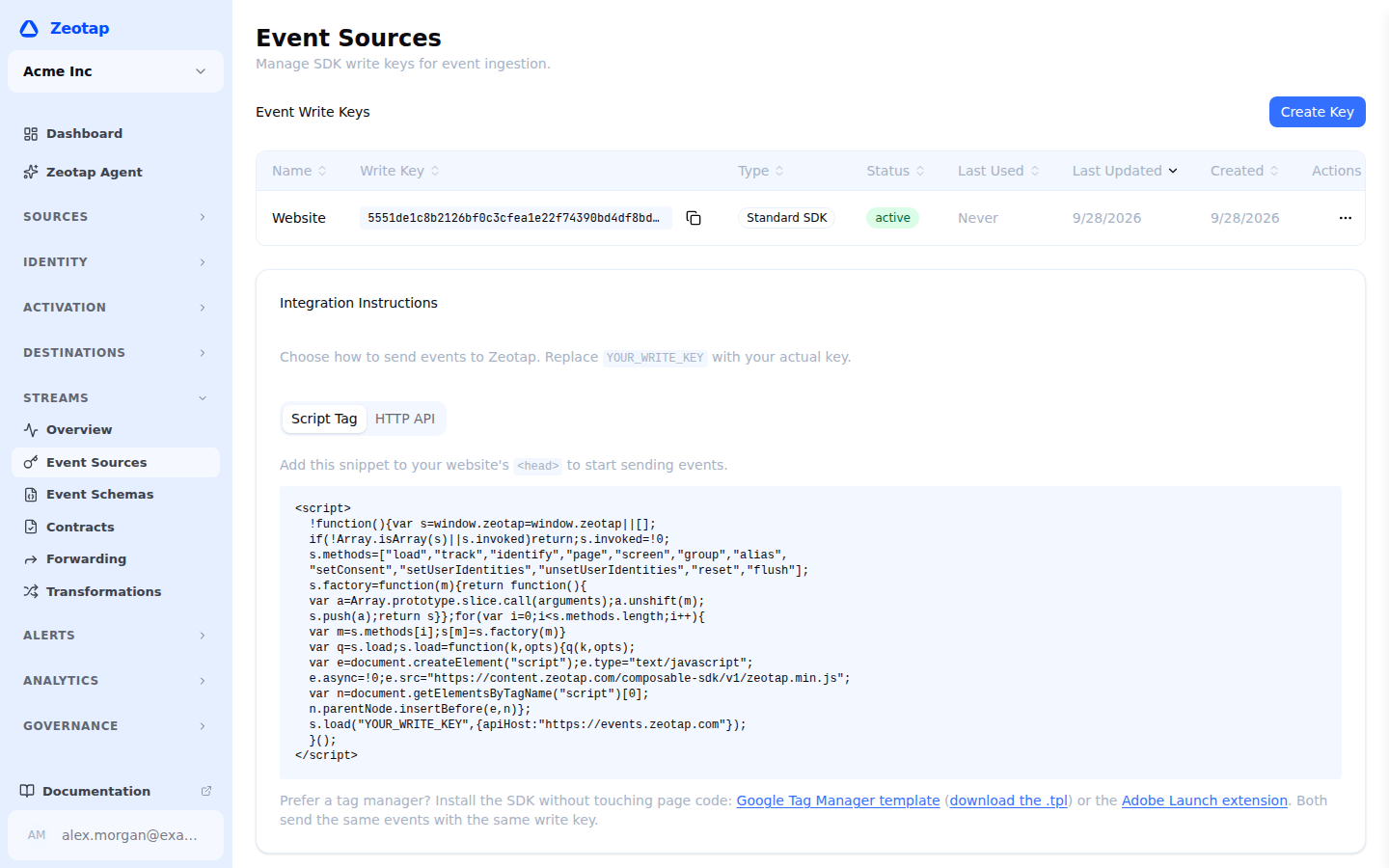
- The full write key is visible in the Event Sources table. Click the copy icon next to any key to copy it to your clipboard. Write keys are public identifiers (embedded in client SDKs), so Zeotap does not mask them — there is no one-time reveal flow.
Via the API
Event sources are managed on the control-plane API, not the stream ingest host — so unlike the events themselves, these calls use your API token and workspace headers. See Base URL and Authentication.
curl -X POST "$API_BASE_URL/api/v1/workspaces/$WORKSPACE_ID/event-keys" \
  -H "Authorization: Bearer $API_TOKEN" \
  -H "X-Workspace-ID: $WORKSPACE_ID" \
  -H "Content-Type: application/json" \
  -d '{
    "name": "Web App",
    "source_type": "standard_sdk"
  }'
Response:
{
  "id": "990e8400-e29b-41d4-a716-446655440000",
  "workspace_id": "660e8400-e29b-41d4-a716-446655440000",
  "name": "Web App",
  "key": "sk_live_a1b2c3d4e5f6...",
  "source_type": "standard_sdk",
  "status": "active",
  "created_at": "2025-03-15T10:00:00Z"
}
Write keys are public identifiers, so the key field is returned by every list and get call, not only at creation.
Event Source API Reference
# List event sources
GET /api/v1/workspaces/{id}/event-keys

# Create an event source
POST /api/v1/workspaces/{id}/event-keys

# Change an event source's type or attached schema
PATCH /api/v1/workspaces/{id}/event-keys/{keyId}

# Revoke an event source
DELETE /api/v1/workspaces/{id}/event-keys/{keyId}

# Send a test event without handling the plaintext key
POST /api/v1/workspaces/{id}/event-keys/{keyId}/test-event
Managing Event Sources
Listing Event Sources
View all event sources in the Streams > Event Sources tab. Each entry shows:
- Name and source type
- Status (active, revoked)
- Creation date
- Last event received timestamp
- Event volume (last 24 hours)
Sources the platform provisioned for itself — connecting a delivery partner for sending creates the source its engagement webhook posts to — are hidden from this list. Tick Show system-provisioned sources to see them; they are marked System and offer no actions, because they are managed from the delivery configuration that created them and revoking one by hand stops engagement events arriving. Over the API they are omitted unless ?include_system=true is passed, and they carry a system_owner field.
Replacing an Event Source Key
There is no rotate operation and no grace period — a key is never re-issued in place. To replace a key without downtime, run the old and new keys side by side and retire the old one once traffic has moved:
- Create a second event source with the same configuration
- Copy its key and deploy it to your application
- Watch the Last event received timestamp and 24-hour volume on both sources until the old one goes quiet
- Revoke the old event source
Because the two keys are independent, both are accepted for as long as you leave the old one active — the overlap is however long you need rather than a fixed window.
# Create the replacement
POST /api/v1/workspaces/{id}/event-keys
Revoking an Event Source
To immediately stop accepting events from an event source:
- Click the event source you want to revoke
- Click Revoke
- Confirm the revocation
Revoked event sources return 401 Unauthorized for all subsequent requests. Revocation is immediate and cannot be undone — you must create a new event source.
# Revoke via API
DELETE /api/v1/workspaces/{id}/event-keys/{keyId}
What an Event Source Does and Does Not Restrict
An event source key is a routing and identification credential, not an authorization boundary. It is worth being precise about what it does:
| Control | Behavior |
|---|---|
| Workspace | Enforced. The key determines which workspace an event lands in; there is no way to write into another workspace with it. |
| Active or revoked | Enforced. A revoked key is rejected with 401 Unauthorized immediately, with no grace period. |
| Event type | Not restricted per key. Any source can send any of track, identify, page, screen, group and batch. |
| Browser origin | Not restricted per key. The ingest endpoint accepts cross-origin requests from any origin, so a key visible in your page’s JavaScript can be used from elsewhere. |
| Rate | Not capped per key. There is no per-source events-per-second limit and no 429 response. |
| Schema | Recorded, not blocked. Events that do not match the source’s schema are still accepted; contracts record the violations for you to act on. |
Write keys are public identifiers by design — they are embedded in client-side JavaScript and visible in every outbound request. Treat a key as a label saying “these events came from here”, not as a secret. Anything that must not be sent should be kept out of the payload at the point of instrumentation, because the ingest endpoint will accept whatever a valid key sends.
Security Best Practices
- Use a separate key per source — One key per app, site or service. Revoking a compromised or retired key then costs you one integration rather than all of them, and volume graphs stay attributable.
- Keep sensitive values out of event payloads — Since a key does not restrict what may be sent, decide at instrumentation time what a client is allowed to put into an event. Anything a browser can send, a copied key can send too.
- Set identity-bearing traits server-side — A browser key can send
identifycalls, so treat browser-supplied traits as claims. Set anything authoritative — plan, entitlements, internal IDs — from a backend source. - Replace keys regularly — Stand up a replacement event source and retire the old one at least quarterly, or immediately if you suspect a key has been compromised.
- Monitor for anomalies — Watch for unexpected spikes in event volume or events from unknown sources. The event debugger can help, and each source’s Last event received and 24-hour volume make a key that has started behaving oddly easy to spot.
- Enforce shape with contracts — Use event contracts to catch malformed or unexpected events, since the key itself will not reject them.
Troubleshooting
| Issue | Cause | Resolution |
|---|---|---|
401 Unauthorized | Invalid or revoked event source key | Verify the key is correct and still active — a revoked source is rejected immediately. |
400 Bad Request | Malformed JSON, or a body missing required fields | Check the payload against Sending Events. Each event needs a type and either userId or anonymousId. |
| Events accepted but not arriving in the warehouse | Delivery is asynchronous | Events are written to the warehouse on a schedule rather than per request. Check the event debugger to confirm receipt, then Event Warehouse for load timing. |
| Events accepted but flagged as violations | Payload does not match the source’s schema | Ingest accepts them regardless; review the violations on the contract and fix the instrumentation or update the schema. |
| No events appearing | Key may be for wrong workspace | Verify the event source key belongs to the correct workspace. |