Merge Rules
Merge rules define which identifiers are allowed to link two customer records together in the identity graph. One rule per identifier family: enabling the email rule means records sharing an email address are linked.
How Merge Rules Work
Each enabled merge rule groups every record by its normalised value for that family and links the records within each group. A rule matches on the family, so all of that family’s variants participate: a record storing a plaintext email and one storing its hash normalise to the same value and are linked, which is exactly what makes cross-system matching work.
After the links are built, the connected-components algorithm finds clusters of transitively connected records — groups that are all linked directly or indirectly.
With only the email rule enabled:
| Record | Phone | Result | |
|---|---|---|---|
| A | alice@co.com | 555-0100 | Linked to B by the shared email |
| B | alice@co.com | — | Linked to A |
| C | — | 555-0100 | Not linked — this rule only reads email |
Enable the phone rule as well and A–C is linked too, so all three become one profile.
A family that is mapped but has no merge rule is loaded and never matched. The rule editor lists such families underneath the rules, with a button to add a rule for each.
What a Merge Rule Carries
| Setting | Meaning |
|---|---|
| Family | Which identifier family the rule matches on. One rule per family |
| Enabled | The checkbox beside the family name. Unticked, matches on this family create no links at all |
| Match | Deterministic (exact, after normalisation) or Probabilistic (similarity-scored). The control appears only on a probabilistic graph |
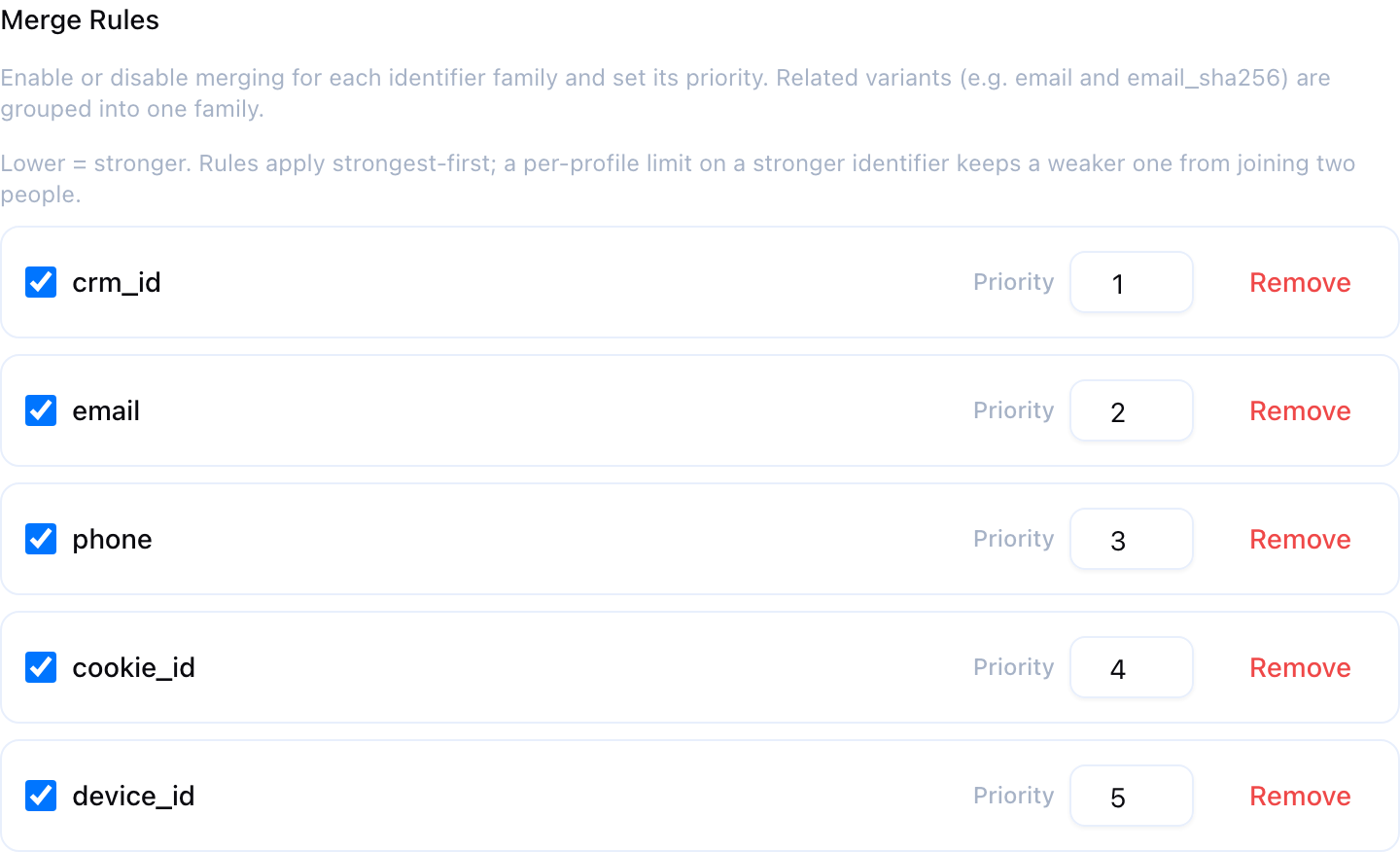
| Priority | A whole number, lower = stronger. See Rule Priority |
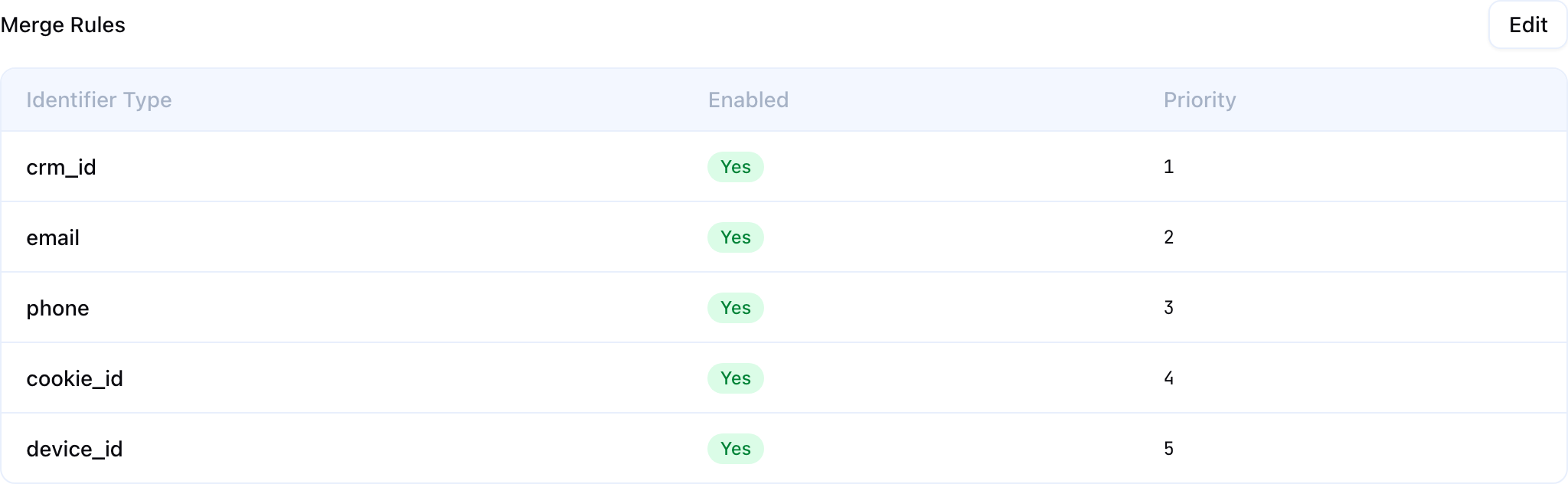
Rules are edited in step 4 of the creation wizard and under Merge Rules on the graph’s Configuration tab. Both use the same editor, so the two cannot disagree.
A rule cannot be narrowed to one variant, and it cannot require two families at once. A rule on the Email family matches every email variant you have mapped — that is the point of families, and it is what lets a hashed email in one system match a plaintext one in another. If you want a rule that only ever matches one column, map that column to its own custom identifier family; if you want “link only when phone and surname agree”, express it in the model’s SQL as a single composite column and map that.
Deterministic vs. Probabilistic Matching
Deterministic Matching
Deterministic rules require an exact match on the identifier value, after normalisation. Two records are linked if and only if they carry the same canonical value.
- Email:
alice@company.commatchesALICE@company.comand matches its SHA-256 hash; it does not matchalice.smith@company.com - Phone:
+1 (555) 0100matches15550100; it does not match5550100, because country codes are never added - Custom id:
CRM-123matchescrm-123
Deterministic matching is high precision but misses matches when identifiers differ at all — typos, nicknames, a missing country code.
Probabilistic Matching
Probabilistic rules use similarity scoring rather than exact matching, and are available only on a probabilistic graph. Switching a rule’s Match control to Probabilistic reveals a scoring function and its parameters.
| Scoring function | Families it reads | Method |
|---|---|---|
| Fuzzy Name | name | Same phonetic code as a blocking key, then a similarity score where the warehouse can compute one |
| IP Cluster | ip_address | Exact IP match within a time window |
| Household | name and address, both on the same model | Exact postal-code match plus phonetic name match, with an optional similarity threshold |
A scoring function reads the families in the table above, not the family its own merge rule is on. A probabilistic rule on email that selects Fuzzy Name scores the name family. If those families are not mapped, the rule produces nothing at all — the editor warns when that is the case.
Each probabilistic edge carries a confidence score between 0.0 and 1.0; deterministic edges always carry 1.0. Confidence propagates through the graph and can be filtered at query time without re-running resolution.
A probabilistically matched family gets no default per-profile limit — a similarity match joins two different values on purpose, so a limit counting distinct values per profile would prevent the very merges these rules exist to make. You can still set one explicitly.
See Probabilistic Matching for the parameters, confidence propagation and threshold management.
Transitive Closure
Merge rules create direct links; the connected-components algorithm follows transitive closure to find all indirectly linked records.
With the email and phone rules both enabled:
| Record | Phone | |
|---|---|---|
| A | alice@co.com | — |
| B | alice@co.com | 555-0100 |
| C | — | 555-0100 |
A links to B on the shared email, B links to C on the shared phone, and the result is one profile holding all three. A and C share no identifier directly.
Benefits
Transitive closure is what makes cross-system resolution work. System A might share emails with System B, and System B might share phone numbers with System C; without it, A and C would never be linked.
Risks
It also propagates mistakes. A single bad match — a shared generic email like test@test.com — can chain many unrelated records into one profile. This is why limit rules exist, and why they are on by default.
Rule Priority
Every merge rule carries a priority. Lower number = stronger identifier. Priority is a trust ranking, and what it ranks is whose limit gets to veto whose merge.
Priority does one of two things, depending on whether any family has a values one profile may hold limit:
| Your configuration | What priority does |
|---|---|
| No family has a values one profile may hold limit | Nothing you can observe. Rules are processed strongest-first, but links are a set — the same profiles come out whatever the order. Priority only decides which rule the run spends its time on first |
| At least one family has a values one profile may hold limit | Priority decides the graph. Rules are grouped into passes by priority and run strongest-first; after each pass, every per-profile limit at or above that pass is checked, and a merge proposed by the pass that would carry a profile past a stronger identifier’s limit is not made |
Since every enabled, deterministic family has a per-profile limit by default, the second row is the normal case.
Ties are allowed. Two rules with the same priority are the same tier and run in one pass.
How passes work
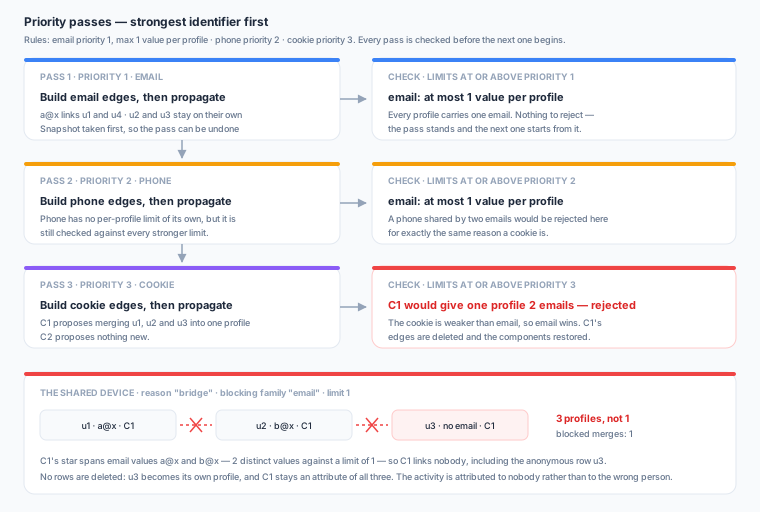
Each pass builds its own rules’ links, forms profiles, and then answers one question before the next pass may start: did this pass break any promise a stronger-or-equal identifier made about how many values a profile may hold? If it did, those identifier values stop linking — their links are removed and the profiles revert — and the run moves on.
The rule is asymmetric, and the asymmetry is the point:
- A weaker identifier may not overrule a stronger one. If a cookie match would put two distinct emails in one profile, and email is limited to one value per profile, the cookie links nobody. The two people are kept apart.
- A stronger identifier is trusted. If an email match leaves a profile holding four cookies when cookies are limited to two, nothing is un-merged. When the cookie pass arrives, the surplus cookies simply stop matching — they cannot pull further records in.
Worked example
Four records, with email at priority 1 limited to one value per profile and cookie_id at priority 2 with no per-profile limit:
| Record | Cookie | |
|---|---|---|
| u1 | a@x | C1 |
| u2 | b@x | C1 |
| u3 | (none) | C1 |
| u4 | a@x | C2 |
Pass 1 (email). a@x links u1 and u4. u2 and u3 are on their own.
Pass 2 (cookie). C1 proposes merging u1, u2 and u3 — but that profile would then carry two emails, a@x and b@x, against a limit of one. C1 links nobody, and u1 and u2 stay two different people. No setting anywhere changes that — merging them is the failure the limit exists to prevent. The run reports 1 kept apart.
That leaves the anonymous record u3, and where it lands is the shared identifier attribution setting’s call. With attribution set to no one, the result is three profiles: {u1, u4}, {u2} and {u3}.
Now invert the priorities — cookie_id at priority 1, email at priority 2 still limited to one value per profile — and run exactly the same records:
Result: one profile, {u1, u2, u3, u4}, carrying two emails. The cookie pass is now the strongest tier, so the email limit cannot veto it; it only truncates, keeping a@x matchable and setting b@x aside. Nothing is reported as kept apart.
Same data, same limit, opposite answer. Once a per-profile limit exists anywhere in the graph, priority is the most consequential setting on the page.
Where the anonymous records go
Take the shared device on its own: one cookie seen with two identified people and two anonymous rows, with email at priority 1 limited to one value per profile.
| Record | Cookie | Cookie first seen with this person | |
|---|---|---|---|
| u1 | a@x | C1 | January |
| u2 | b@x | C1 | March |
| u3 | (none) | C1 | April |
| u4 | (none) | C1 | May |
C1 links nobody in every variant below — u1 and u2 are two people whatever you choose. Only the two anonymous rows move:
| Give the anonymous activity to | Result |
|---|---|
| the person seen with it first (the default) | {u1, u3, u4} and {u2} |
| the person seen with it last | {u1} and {u2, u3, u4} |
| no one | {u1}, {u2}, {u3}, {u4} — each anonymous row becomes its own profile |
People are ranked by when the shared identifier was seen with each of them, not by how old their profile is.
What “links nobody” does and does not do
A value that links nobody loses its power to join the identified people it spans. Nothing else about it changes:
- The two people are never merged. That is the whole point, and it is not configurable.
- No records are dropped. A record whose only link was that value either joins one of the two profiles under shared identifier attribution, or becomes its own single-record profile.
- The value is still an attribute of every profile whose records carry it. Searching for it returns all of them, and the Profiles page lists it under Kept apart with the limit that applied.
- All of this is recomputed every run. Fix the underlying data and the value links again next run.
See Limit Rules for how to set a per-profile limit, where the anonymous records go, and what it costs.
Recommended Priority Order
- System-assigned customer ids (strongest) —
user_id, a CRM id, a loyalty number - Phone — strong, with some household sharing risk
- Everything else
- Device, cookie, IP and anonymous ids (weakest) — the highest sharing risk, and the reason per-profile limits exist
The creation wizard seeds priorities in this order automatically. Adjust them where your data disagrees.
Example Configuration
A typical setup for an e-commerce company, with the per-profile limit each family takes by default:
| Priority | Family | Match | Values one profile may hold | Notes |
|---|---|---|---|---|
| 1 | user_id | Deterministic | 1 (default) | Strongest signal; one account id per person |
| 2 | email | Deterministic | 1 (default) | The shared-device guard usually lives here |
| 3 | phone | Deterministic | 1 (default) | Raise it where people in your data legitimately have both a mobile and a landline |
| 4 | maid | Deterministic | 5 (default) | Cross-app linking |
| 5 | cookie_id | Deterministic | 5 (default) | Weakest; the family most often kept from linking |
Priorities are first set on the wizard’s rules step, one row per mapped family, and are editable afterwards from the graph’s Configuration tab.
Best Practices
- Start conservative — begin with high-confidence families (email, customer id) and enable weaker ones only after reviewing the initial results
- Set priorities thoughtfully — priority is a trust ranking, not a schedule. With per-profile limits on, it decides which merges are allowed to happen at all; put your system-assigned ids first and your devices and cookies last
- Guard the weak families with limits, not with extra conditions — a device id cannot be made safer by requiring a second signal, because a rule matches on one family. What makes it safe is a values one profile may hold limit on a stronger family, which stops the device’s merge when it would put two people together
- Exclude known-bad identifier values at the source — placeholder values like
test@test.comor000-000-0000are best removed in the model’s SQL. Failing that, the shared-value limit stops any single value from fusing large numbers of records - Monitor merge quality — after a run, open a few profiles and read their merge lineage to check for false merges
- Document your rules — record the business rationale for each family’s priority and limits, so the next person understands why certain merges are allowed and others are not
Next Steps
- Limit Rules — Prevent over-merging, and decide who gets a shared identifier’s anonymous activity
- Identifier Families — Define the identifiers that merge rules operate on
- Running Resolution — Execute identity resolution with your rules