Data Tests & Reconcile
A build that succeeds is a build whose statements succeeded, which says nothing at all about the rows it wrote. A lookup join that started matching nothing, a source that began sending NULL ids, an upstream that silently halved — each of those publishes exactly as confidently as a correct build, into a table your models, audiences, orchestrations and syncs all read on their own schedules.
Three things address that: data tests, which refuse to publish; reconcile, which proves an incremental table has not drifted; and input drift detection, which notices when an input changed shape.
Data tests — the publish gate
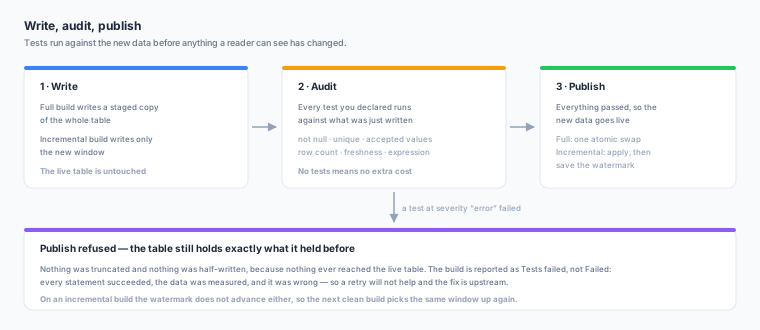
The rule, stated once:
A test runs against the new data before anything a reader can see has changed. A failure at
errorseverity refuses to publish, and the live table is left exactly as it was — not truncated, not half-written, but untouched, because nothing ever reached it.
Tests are declared on the prepared table’s Tests tab.
The seven kinds
| Kind | Options | What it counts |
|---|---|---|
| Never NULL | column | Rows whose column is NULL |
| Unique | columns | Key groups appearing more than once. Rows with a NULL key are excluded — that is Never NULL’s subject, and counting it here would report one defect twice |
| One of a set of values | column, values, allow_null | Rows outside the list, compared as text |
| At least this many rows | value | The table must hold at least this many rows |
| Row count may not move by more than | value (percent) | The rebuilt count against the live count. Full rebuilds only, and skipped on a first build |
| Fresher than | column, seconds | The newest value of the column must be within that many seconds of now |
| Custom SQL condition | sql | Rows for which a boolean expression over the table’s own output columns is not true. NULL counts as a violation |
Every test carries a severity, and it is required — whether a failure stops a publish is not something to leave unsaid.
| Severity | On failure |
|---|---|
error | The build refuses to publish. The table keeps what it had |
warn | Recorded on the build; the build publishes |
What happens on a build
| Build | When tests run | What a failure does |
|---|---|---|
| Full rebuild | Every kind, against the staged table, before the swap | No swap. The node is reported Tests failed and tables downstream of it are skipped |
| Incremental | Never-NULL, unique, set-of-values and custom-condition tests against the new rows, before they are applied | Nothing is applied, and the watermark does not advance — so the next clean build picks the same window up again |
| Incremental, whole-table kinds | Row counts, freshness and table-wide uniqueness, after the apply | They can only warn — the rows are already there — and each result says so rather than pretending to gate |
| No-op | Nothing runs | There is nothing new to measure |
A table with no tests costs exactly what it cost before: no extra statement is issued.
Tests failed is not Failed. Failed means your warehouse refused something and a retry may be in order. Tests failed means every statement succeeded, the data was measured, it was wrong, and the build chose not to publish it. Retrying will not help — the fix is upstream of Zeotap.
Reading a result
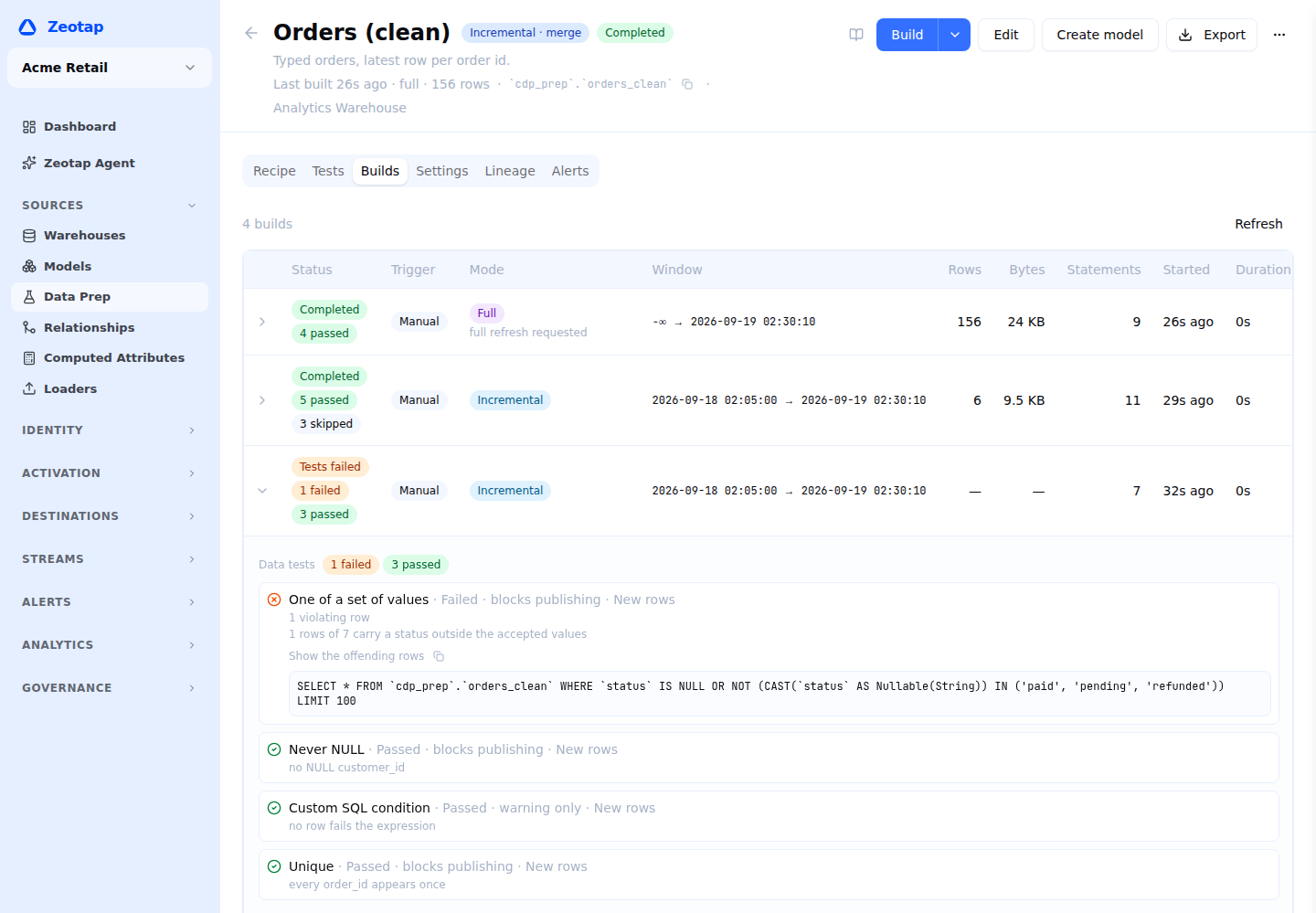
Each failure carries one sentence describing what was measured and why it failed, the number of violating rows (or key groups, for uniqueness), which copy of the data it was measured against, and a ready-to-run query for the offending rows that you can copy into your warehouse.
Results are on the prepared table’s Builds tab: every build carries the counts beside its status, and opening one lists each test with its severity — blocks publishing or warning only — and what it was measured against.
Suggested tests
Saving a recipe built from typed steps returns the tests it should probably carry: uniqueness and not-null on whatever the table’s identity already is — the merge key, or a trailing dedupe’s key.
These are not opinions about data quality. They are the columns the incremental apply already keys on, so a duplicate or a NULL in one of them means the apply is about to do something other than what you asked for. The Tests tab offers them behind one button and leaves out the ones you already have.
They are offered, never added for you: an error test can stop a table updating, and that is your
decision.
Reconcile
An incremental table is a claim: that applying every window in order produces the same table a full rebuild would. Reconcile is the only thing that tests it.
It rebuilds the recipe — bounded at the table’s current watermark, so the comparison is not merely measuring time passing — into a scratch copy, compares row counts and an order-independent checksum over every output column, counts and samples the keys that differ when the table has a merge key, and drops the copy.
It never swaps, never applies and never moves the watermark, so it is safe to run on a table that is working.
Run it from the prepared table’s Build menu — Reconcile now, under Full refresh; a recurring reconcile is set through the API.
| Available for | Incremental tables that have been built at least once |
| Refused for | A table that rebuilds in full (there is nothing to compare — every build is a full rebuild), a table that has never been built, and a paused table |
| A result that finds drift | Completes. Finding drift is a successful check, not a failed one |
When there is drift, read the numbers before doing anything: “4 keys differ out of 2 million” and “every key differs” are the same verdict and completely different conversations. The result card offers a full refresh, which is the fix — and which makes the two sides agree by construction and destroys the evidence, so reconcile first.
Sample key values are masked when the key is personal data. A reconcile result samples up to twenty of the keys that differ, and a key column is often an email address. A sampled value is shown only when its column is one of the table’s output columns, is not marked sensitive, is not unverified, and the sampled values themselves do not read as email addresses or phone numbers; anything else is redacted. A composite key masks only the positions that need it, and the result carries a flag saying the samples were masked, so you know the redaction is deliberate. Nothing stored is changed — the masking happens on the way out, for the API and for Zeotap Agent alike.
Two empty tables reconcile as no drift. A checksum over zero rows is undefined on most warehouses, so “no checksum” is simply the normal state of an empty table. With rows on either side, a checksum that cannot be read still reports drift and says which side could not be measured.
Input drift
Before a build spends anything, Zeotap reads each raw input’s current columns from your warehouse’s catalogue — metadata, not a scan — and compares them with what was recorded the last time the recipe was saved.
| What it finds | What happens |
|---|---|
| A column the recipe reads is gone, or changed type family (text → number, timestamp → text) | The build fails before any warehouse compute, naming the input, the column, and what the type was and now is |
A column changed within its family (VARCHAR(50) → VARCHAR(255), INT → BIGINT) | Nothing. This is not a finding |
| A new column appeared | A notice, and a banner offering re-validate. Re-validating and saving accepts the new shape |
| A column nobody reads disappeared | Nothing, for a fully typed recipe |
“Reads” is exact for a fully typed recipe — the column lineage plus every column named in a step’s options. A recipe containing a SQL step cannot have its references known without parsing the SQL, so every recorded column counts as read there, which means an unrelated dropped column fails the build. One more reason to prefer typed steps.
The check fails open: if the catalogue could not be read at all, the build proceeds exactly as it would have. A metadata read that failed is not evidence that a column is gone.
Alerting
All of this is routable. See Alerting for the rule types available on a prepared table — including separate triggers for failed tests, detected drift, an input that changed shape, and a table that has stayed behind its inputs for too long.