Deletion Rules
A deletion rule erases data for a population you define, across your warehouse, on demand or on a schedule — and records exactly what it did. Use it to fulfil GDPR right-to-erasure and CCPA deletion requests at scale, instead of looking up and deleting identifiers one at a time.
A live deletion permanently removes data from your warehouse. It is not recoverable through Zeotap. Every rule starts in observe mode and disabled, so you can see what it would delete before it deletes anything.
How a Deletion Rule Works
A rule has four parts:
| Field | Description |
|---|---|
| Parent model | The entity the rule operates on — usually your person or user model. It defines the grain of the deletion and constrains which models can be targeted. |
| Match conditions | The records to erase, expressed as a filter tree in the same language as an audience. A live estimate shows how many records currently match. |
| Targets | One or more models, each with either delete the whole row or clear specific columns. |
| Schedule | Manual, or a recurrence. Each run resolves the match conditions again, so newly matching records are erased too. |
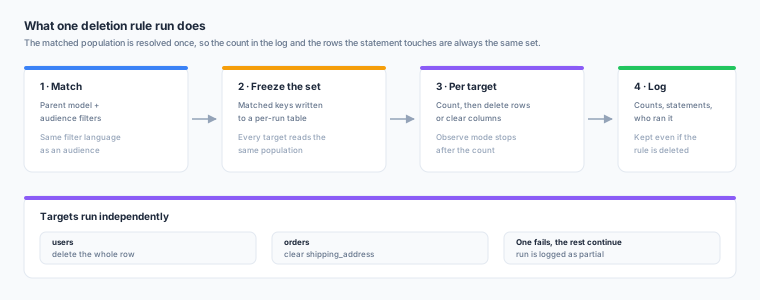
Each run resolves the matched population once and writes the matched keys to a short-lived table in your warehouse’s planner schema (CDP_PLANNER), which every target then reads. Two things follow from that, and both matter:
- The numbers in the log are the numbers that happened. The count reported for a target and the statement executed against it select the same rows, so
records affectedis never an estimate. - All targets see one population. Without this, data changing mid-run could leave a person’s rows deleted from one table and still present in another — the one outcome an erasure request cannot tolerate.
The table is dropped when the run finishes.
Choosing What Gets Deleted
For each target, pick one:
| Action | Effect |
|---|---|
| Delete the whole row | A physical DELETE. The record is gone from that table. |
| Clear specific columns | An UPDATE setting the columns you choose to NULL. The row survives — useful when it must stay for referential or analytical reasons but the personal data on it must not. |
Clearing columns is idempotent: the statement only matches rows where at least one selected column still holds a value, so a second run affects nothing and records affected always means “records that still held data”.
Which models can be targeted
The parent model is always listed first, under The matched records themselves — deleting the records a rule matched is the commonest thing a rule does. Related models follow.
A model appears in the target list only when all of the following hold. An ineligible related model is not offered rather than failing when you save; an ineligible parent model is still shown, with the reason, because “you cannot delete from the model this rule is about” is something you need told rather than left to infer.
| Requirement | Why |
|---|---|
| On the same warehouse as the parent model | Deleting across warehouses would mean moving keys between them, which this feature does not do. Create one rule per warehouse. |
| Maps directly onto one warehouse table | A model built from custom SQL may filter or aggregate what its table holds, so deleting from the table would erase more than the model’s name describes. A golden record is assembled from the models it reads and has no table of its own — target those models instead; clearing them is what changes the golden record. |
| The parent model itself, or directly related to it | The join comes from your declared relationships, so a rule can only use joins the rest of the platform already recognises. Either direction works. |
| Each of its rows belongs to a single record | A model reached through a many-to-one relationship — households from customers, say — shares one row across many records. Deleting it for one matched customer would erase the address of everyone else in that household, and the run would report “1 record affected” and look correct. Only one_to_many (parent → target), many_to_one (target → parent) and one_to_one qualify. |
| Not related through a join model | A many-to-many relationship gives the target no single column linking it to the matched population. |
The join a rule is saved against is pinned to it. If you later delete or change that relationship, the next run refuses rather than silently matching on a different column — re-open the rule, review the new join, and save it again.
How many rows is that?
A model name says nothing about volume, so the picker can count it. Count rows measures, for each selected target, how many rows a run would delete or clear right now — alongside the number of records matched, which is a different number: one matched customer can own several orders.
Nothing is deleted or changed by counting. It runs the same population query and the same per-target COUNT a run does, so the figure you see is the figure the run will report.
- It costs one query per target against your warehouse, so it runs when you ask rather than on every edit.
- Editing the filter or the targets clears the counts — a stale number next to a live-run button is worse than none.
- Counts are never cached. Count again after a run and you get the state after the run.
- A Clear specific columns count includes only rows that still hold a value in those columns, which is why counting again after a live run reports zero. That is the same property that makes re-running a rule safe.
- If a count fails for one target — a missing grant, a table that has been dropped — that target reports “could not count” and the others still report. Read it as unknown, never as zero.
It is available on the rule detail page too, so you can measure a saved rule before switching it to live deletion.
Columns that cannot be cleared
The column carrying the link to the parent model, and the model’s own primary key, are never offered. Clearing either would make the row unreachable on any later run and break the guarantee that re-running is safe.
Observe Mode, Enabling, and Running
A rule has one Run mode with three settings:
| Run mode | Effect |
|---|---|
| Off | The rule does not run. Its schedule is ignored and a live run is refused. You can still start a dry run by hand. |
| Observe only | Every run — manual and scheduled — reports what it would delete and changes nothing. |
| Live deletion | Runs permanently erase matching data, including on the schedule, unattended. |
The Dry run button is always available and always non-destructive, whatever the rule’s mode.
New rules are created in Observe only. Switching to Live deletion asks you to type the rule’s name back, and tells you what the schedule will do and when the rule was last dry-run.
Over the API these three settings are the dry_run and enabled booleans: Off is enabled: false, Observe only is dry_run: true, enabled: true, and Live deletion is dry_run: false, enabled: true.
A scheduled rule left in observe mode is a useful thing to keep: it reports how many records would be erased on every tick, so you can watch a policy’s volume before switching it live.
Availability
Deletion Rules are off in every workspace by default. A Zeotap platform
administrator enables the feature per workspace; until they do, the section does
not appear in the nav and the API answers 403 deletion rules are not enabled for this workspace.
Once a workspace is enabled, the permissions below take over — your own owners and admins build and run rules, without further involvement from the platform team. Disabling is immediate: the API starts refusing and any scheduled rule stops firing on the next tick.
Ask your Zeotap contact to enable Deletion Rules for a workspace. The grant and every later change is recorded in the platform audit log.
Permissions
| Permission | Grants |
|---|---|
deletion_rules.read | View rules and deletion logs. Granted to Owner, Admin, and Member. |
deletion_rules.write | Create, edit, and delete rules. Owner and Admin. |
deletion_rules.execute | Trigger runs. Owner and Admin. |
Write and execute are separate so you can let someone run an already-reviewed rule without letting them change what it deletes.
These permissions only apply in a workspace where the feature has been enabled — see Availability above. A workspace settings change cannot grant the feature to itself.
Deletion Logs
Every run writes a log entry, dry or live. Each entry records:
- Rule name, trigger (manual or schedule), mode (dry run or live), and status
- Records matched, and records affected in total
- Who initiated it, and when it started and finished
- Per target: the physical table, the action, the columns, the records affected, and the exact statement executed — or, in a dry run, the statement that would have been
Logs are retained even if the rule is deleted. Each entry snapshots the rule’s name, definition, and the initiating user’s email, so the audit trail stays readable and attributable after the rule (or the account) is gone. There is no way to delete a log entry.
Run statuses
| Status | Meaning |
|---|---|
running | In progress. A run continues past the request that started it — refresh to follow it. |
completed | Every target succeeded. |
partial | Some targets succeeded and some failed. Targets are independent statements, so this is a real state, not a flavour of failure — read the per-target errors and re-run. |
failed | Nothing was erased. |
What a Deletion Rule Does Not Do
This is the part worth reading before a compliance deadline.
| Not covered | What to do instead |
|---|---|
| Derived and aggregated data | Nothing cascades. The rule builder lists the related models, computed attributes, audiences, and syncs that read the targeted data. Act on those separately — for example, re-evaluate a computed attribute whose stored value now describes deleted data. |
| Records already sent to a destination | A deletion rule erases warehouse data. It does not recall records a sync already delivered. Use the destination’s own deletion API or its data-subject-request process. |
| Cross-warehouse deletion | One rule deletes within one warehouse. Create a rule per warehouse. |
| Two-person approval | There is no dual-authorization workflow. Splitting deletion_rules.write from deletion_rules.execute is the available control. |
| Stopping a run | A run cannot be cancelled once started. Dry-run first. |
| Shared rows | A model whose rows serve several records (a household, a company, a device shared by a family) cannot be targeted at all — see the eligibility table above. |
| Restoring deleted data | Recovery is your warehouse’s problem — Snowflake Time Travel, BigQuery table snapshots, Delta time travel. Confirm your retention window before running a rule live. |
Creating a Rule via the UI
- Navigate to Governance → Deletion Rules
- Click Create rule
- Select the parent model the rule operates on
- Build the match conditions. The estimate panel shows how many records match — check it before continuing
- Choose what to delete for each target model — the parent model is listed first, related models below. Click Count rows to see how many rows each one would lose, and review the “Also affected” warning listing what else reads this data
- Set a schedule, or leave it manual
- Name the rule and review the summary
The rule is created in Observe only. Open it, click Dry run, and read the log — each target shows the records it would affect and the exact statement it would issue. When those look right, set Run mode to Live deletion and use Run deletion.
Creating a Rule via the API
Rules are workspace-scoped. See Base URL and Authentication for the required headers.
# Erase opted-out EU customers: delete their user row, clear the address on orders
curl -X POST "$API_BASE_URL/api/v1/workspaces/$WORKSPACE_ID/deletion-rules" \
  -H "Authorization: Bearer $API_TOKEN" \
  -H "X-Workspace-ID: $WORKSPACE_ID" \
  -H "Content-Type: application/json" \
  -d '{
    "parent_model_id": "'"$USERS_MODEL_ID"'",
    "name": "Erase opted-out EU customers",
    "description": "Fulfils standing right-to-erasure requests for EU opt-outs.",
    "filter_tree": {
      "type": "and",
      "children": [
        {
          "type": "condition",
          "condition_type": "property",
          "field": "region",
          "operator": "equals",
          "value": "EU"
        },
        {
          "type": "condition",
          "condition_type": "property",
          "field": "erasure_requested",
          "operator": "equals",
          "value": true
        }
      ]
    },
    "targets": [
      { "model_id": "'"$USERS_MODEL_ID"'", "action": "delete_rows" },
      {
        "model_id": "'"$ORDERS_MODEL_ID"'",
        "action": "null_columns",
        "columns": ["shipping_address", "phone"]
      }
    ],
    "schedule": "0 3 * * *",
    "dry_run": true,
    "enabled": false
  }'
dry_run and enabled default to true and false respectively, so omitting them creates an observe-only rule. Sending "dry_run": false with "enabled": true arms the rule immediately — do that deliberately.
Trigger a run:
# Non-destructive, whatever the rule's mode. Returns 202 with the opened run.
curl -X POST "$API_BASE_URL/api/v1/workspaces/$WORKSPACE_ID/deletion-rules/$RULE_ID/dry-run" \
  -H "Authorization: Bearer $API_TOKEN" \
  -H "X-Workspace-ID: $WORKSPACE_ID"

# Live. Requires enabled=true and dry_run=false on the rule.
curl -X POST "$API_BASE_URL/api/v1/workspaces/$WORKSPACE_ID/deletion-rules/$RULE_ID/run" \
  -H "Authorization: Bearer $API_TOKEN" \
  -H "X-Workspace-ID: $WORKSPACE_ID"
Both return 202 Accepted with the run in running state — the deletion continues past the request. Poll the log to follow it:
curl "$API_BASE_URL/api/v1/workspaces/$WORKSPACE_ID/deletion-rules/$RULE_ID/runs" \
  -H "Authorization: Bearer $API_TOKEN" \
  -H "X-Workspace-ID: $WORKSPACE_ID"
See Governance API for the full endpoint list.
Warehouse Support
Deletion rules work on Snowflake, BigQuery, Databricks, Redshift and ClickHouse. On ClickHouse the deletion is issued as a synchronous mutation (ALTER TABLE … DELETE WHERE … SETTINGS mutations_sync = 1), because MergeTree tables have no standalone DELETE — the run does not report success until the rows are gone, though background merges continue afterwards.
Deletion needs write access to the target tables and to the CDP_PLANNER schema. That is the same schema syncs and computed attributes already use, so an existing warehouse connection typically needs no additional grants beyond DELETE / UPDATE on the tables you intend to target.
Related Governance Controls
| Need | Feature |
|---|---|
| Stop data reaching a destination | Destination Policies |
| Hide rows from specific users | Access Policies |
| Mask sensitive columns in the UI and in syncs | PII Masking |
| Control who can do any of this | RBAC |