Triggers & Freshness
A prepared table is a cleaned copy of data somebody else lands, so a schedule was never the right instrument for deciding when to rebuild it: too tight and you pay for builds that had nothing to do, too loose and the table is behind exactly when someone needs it.
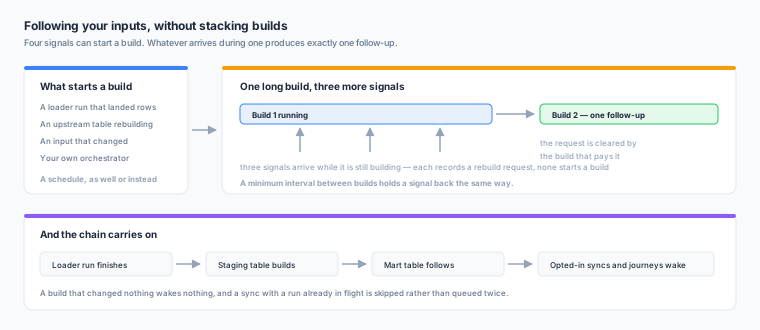
Four availability signals can start a build, and any combination of them can be on at once alongside a schedule.
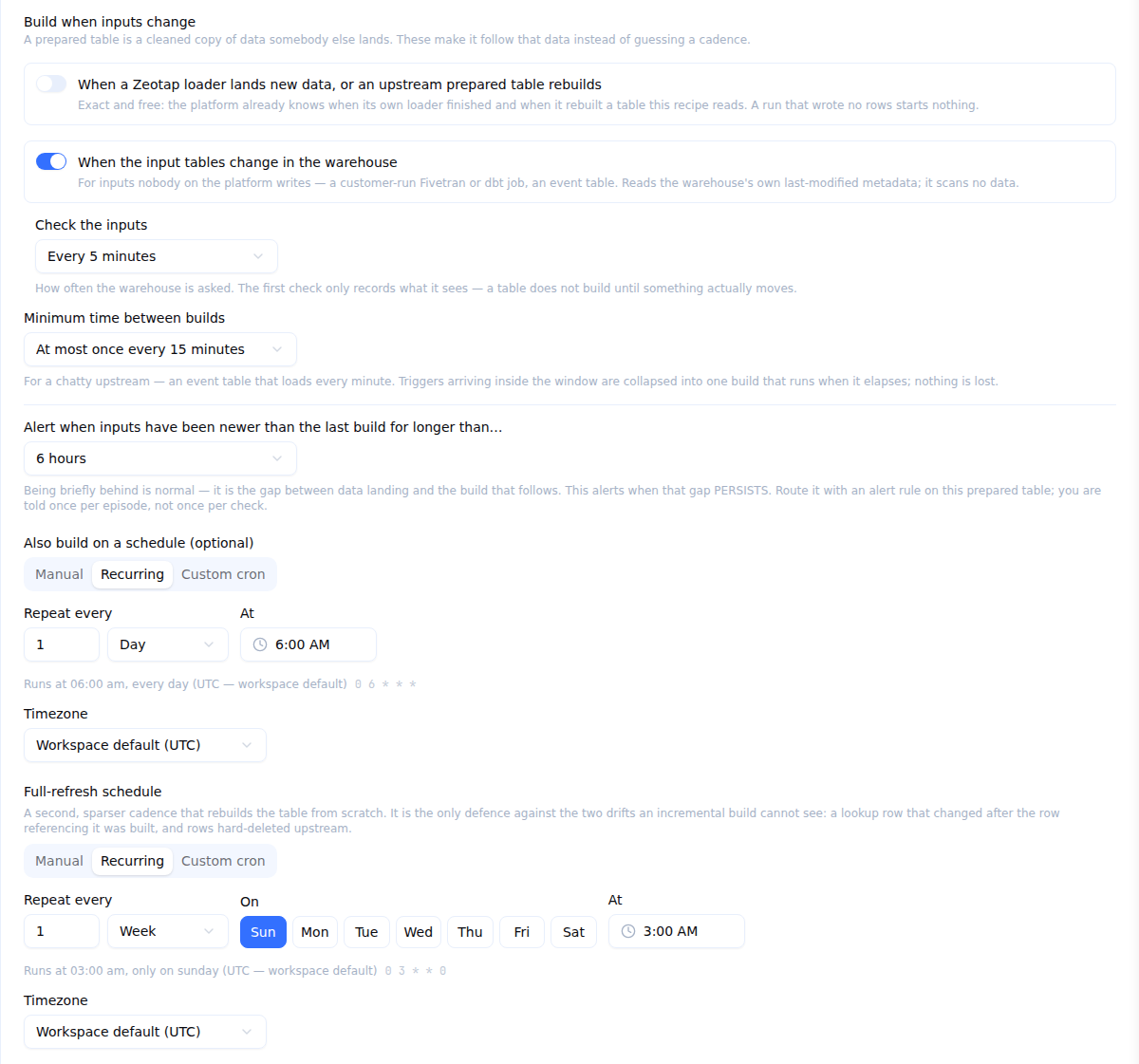
All of them live under Build when inputs change, with the schedules below them — on the Build settings step of the editor while you are writing the recipe, and on the prepared table’s Settings tab afterwards.
The four signals
A loader run landed rows
The switch reading When a Zeotap loader lands new data, or an upstream prepared table rebuilds, on a table whose recipe reads a Zeotap loader’s landing table. When that loader’s run finishes successfully and wrote at least one row, the table rebuilds.
This is the default for a table created from a loader stream and for any table whose primary input is a loader landing.
An upstream prepared table rebuilt
The same switch. When a prepared table this one reads finishes a build that actually wrote something, this table follows. A whole chain — landing → staging → mart — therefore moves as one.
A build that changed nothing triggers nothing downstream.
An input changed, and nothing on the platform wrote it
When the input tables change in the warehouse turns on the input-change sensor, for inputs Zeotap does not write: your own ELT tool’s output, an event table, a table somebody maintains by hand.
The sensor asks your warehouse’s own catalogue when the table was last modified. It is a metadata read, not a scan, so it costs nothing in warehouse compute on the cloud engines. Probes are batched per warehouse and bounded by Check the inputs (every 5 minutes by default, every minute at the most), so a tight setting never turns into a stream of metadata queries.
The sensor needs your warehouse to be able to answer “when did this table last change”. Where it cannot, the option is shown as unavailable with the reason, rather than being offered and never firing. Two cases worth knowing: on Databricks a view or a non-Delta table cannot answer, and on ClickHouse only MergeTree-family tables can.
Your own orchestrator says so
If you already run Airflow, dbt Cloud, a Fivetran webhook relay or anything else that knows when data has landed, it can start a build directly through the API using a REST API key that carries the Data Prep run permission. The call is fire-and-forget and returns the build to poll.
See API Reference for the endpoint and key setup.
Coalescing and debounce
Signals arriving while a table is already building do not start a second build. Each one records a rebuild request instead, and that request is cleared by the build that pays it — so N signals during one long build produce exactly one follow-up build.
Minimum time between builds holds a signal back the same way. Set it on a table whose inputs land very frequently — an event table loading every minute, say — and the follow-up fires once the interval has elapsed rather than on every landing.
Between them, these two mean you can turn on every signal a table could use without ever stacking builds.
Freshness
A prepared table shows “Inputs newer than last build” on the Data Prep list, on its own page, and on every model that reads it.
It is derived from two timestamps Zeotap already keeps — when the inputs last changed, and when the last build started — so reading it never costs a warehouse query.
Being briefly behind your inputs is normal. What is worth an alert is that state persisting. The last control under Build when inputs change — Alert when inputs have been newer than the last build for longer than… — is how you ask for one: from fifteen minutes to seven days, and off by default. Zeotap reports it once per episode, and again only after a build has caught the table up. See Alerting.
Schedules
A schedule is still available, and still useful:
| Schedule | What it does |
|---|---|
| Build schedule | Rebuilds on a cron. Once a table follows its inputs, this field reads “Also build on a schedule (optional)“ |
| Full-refresh schedule | Incremental tables only. Rebuilds the table from scratch, weekly by default. See Incremental Builds |
| Reconcile schedule | Incremental tables only, and set through the API rather than this form. Checks for drift without changing anything. See Data Tests & Reconcile |
Tables of the same warehouse that come due in the same tick are collected into one build and run in dependency order, so putting the same schedule on a whole chain is a reasonable thing to do.
A tight schedule on an incremental table is cheap. When the input has not moved, the build stops after one small query and reports No changes — no scan, no rewrite.
Cancelling and build history
Every build is listed on the prepared table’s Builds tab with, per table in it: the status, the mode (full, incremental or no changes) and why that mode was chosen, the window it covered, rows written, duration, the data-test result, and — where the build failed — the error and the exact query that produced it. What caused the build is shown too: Loader finished, Upstream rebuilt, Input changed, External, Schedule or Manual.
A running build can be cancelled; it stops cleanly between statements rather than mid-write.