React Native SDK
The Zeotap React Native SDK (@zeotap/react-native-sdk) captures events from your React Native app and sends them to the ingest API.
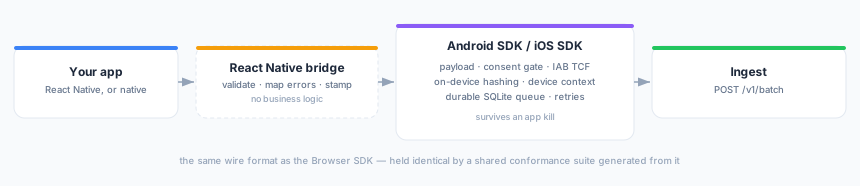
It is a thin bridge over the Android SDK and the iOS SDK, not a JavaScript re-implementation. Everything that decides what an event looks like — the payload shape, the consent gate, the IAB TCF integration, on-device identity hashing, the durable offline queue, the retry policy — runs in the native SDK on the platform you are on. The bridge validates what you pass it, maps native errors onto JavaScript ones, stamps the integration and forwards.
That matters for what you get: your React Native events survive an app kill, share an anonymous id with a WebView in a hybrid app, and carry the same device context as a fully native integration — none of which a JavaScript SDK can do.
React Native ≥ 0.73 (old and new architecture), iOS 14+, Android minSdk 23.
Install
npm install @zeotap/react-native-sdk
cd ios && pod install
Autolinking finds the native module — there is no manifest edit and no AppDelegate change.
Expo
You need a development build . Expo Go ships a fixed set of native modules and cannot load this one, so configure() would fail with a linking error however correct your code is.
Add the config plugin:
{
  "expo": {
    "plugins": [
      ["@zeotap/react-native-sdk", {
        "iosUserTrackingUsageDescription": "We use your data to personalise ads."
      }]
    ]
  }
}
The plugin sets NSUserTrackingUsageDescription (only when you pass one — adding it unconditionally makes App Review ask about tracking your app does not do) and raises android.minSdkVersion to 23 if your app is below it.
Quick start
import Zeotap from '@zeotap/react-native-sdk';

await Zeotap.configure('YOUR_WRITE_KEY', {
  apiHost: 'https://events.zeotap.com',
  consent: { require: true, default: 'denied' },
});

await Zeotap.track('Order Completed', { revenue: 149.0, currency: 'USD' });
await Zeotap.screen('Checkout', 'Shop', { step: 3 });
await Zeotap.identify('user-42', { plan: 'pro' });
await Zeotap.setUserIdentities({ email: 'shopper@example.com' });
apiHost is required. On the web an empty host means “same origin”; a device has no origin, so an absent host would be a silent no-send.
Three behaviours to know before you write your first screen
Every method returns a Promise, and a consent-gated drop rejects. When the resolved consent denies an event, the promise rejects with a ZeotapConsentError carrying the SDK’s own message:
try {
  await Zeotap.track('Order Completed', { revenue: 149.0 });
} catch (error) {
  // "[SDK] Dropped track: no track consent"
}
This is the same information the browser SDK delivers through a callback. If you do not want consent decisions surfacing as rejections at each call site, subscribe to the error stream instead (below) and ignore the promise.
An empty name resolves without sending. track(''), group('') and alias('') are silent no-ops, exactly as in the browser SDK — a missing product name in a UI is not an error you can act on.
Calls before configure() reject. The message names the method:
[SDK] Not initialized. Call configure() before track(). The one exception is getConsentState(), which answers { resolved: false } — the same pre-init behaviour the browser SDK has.
Options
Option names and units are the browser SDK’s, so one object configures both platforms and nothing has to be relearned: flushInterval is milliseconds, cmpTimeoutMs keeps its suffix.
| Option | Type | Default | Notes |
|---|---|---|---|
apiHost | string | — | Required. Absolute http(s) URL |
namespace | string | "zeotap" | Storage-key prefix; matches a WebView’s SDK when they agree |
flushAt | number | 10 | Flush when this many events are queued |
flushInterval | number | 5000 | Milliseconds between timed flushes |
debug | boolean | false | Verbose native logging |
nativeAppId | string | "" | Sent as X-Native-App-ID |
maxQueueSize | number | 500 | Durable-queue cap; the oldest event is dropped on overflow |
trackApplicationLifecycleEvents | boolean | false | Application Installed/Updated/Opened/Backgrounded |
flushOnBackground | boolean | true | Flush when the app is backgrounded |
collectAdvertisingId | boolean | false | See Advertising id |
consent | object | — | Same shape as the browser SDK’s consent |
Options that exist in the browser SDK but not here are reported on the debug stream rather than silently ignored: autoPage, storage, credentials and the cookie options. Mobile has no cookie jar, and screen() is the mobile primitive — there is no page().
Consent
await Zeotap.setConsent({ analytics: true, marketing: false });   // categories
await Zeotap.setConsent({ tcfString: 'CQ...' });                  // IAB TCF
await Zeotap.setConsent({ usPrivacy: '1YNN' });                   // US Privacy

const state = await Zeotap.getConsentState();
// { resolved: true, signals: { track, identify, cookieSync }, source: 'manual' }
Exactly one form per call. Passing two is rejected rather than resolved, because whichever one won would silently decide whether events flow. Passing an empty object is also rejected: an absent category counts as a grant, so setConsent({}) would resolve to full consent — almost certainly the opposite of what was meant. Pass { analytics: false } to deny.
Everything else about consent — the gate, the pre-consent buffer, the persisted decision, the CMP timeout, the IAB TCF-for-Apps integration — is the native SDK’s, so the Android and iOS pages describe the actual behaviour.
Identities
await Zeotap.setUserIdentities({
  email: 'shopper@example.com',
  cellno: '91 9999999999',      // "<country code> <number>"
  fpuid: 'internal-id-42',      // passed through raw, never hashed
});

await Zeotap.unsetUserIdentities(['email']);   // or no argument for all of them
Values are hashed on the device — plaintext PII never leaves the app. The hashing matrix is the browser SDK’s, verbatim, and is described on the platform pages.
Values must be strings. A number is rejected by key name rather than stringified, because { loyaltyId: 12345 } coerced to "12345" would be hashed, shipped, and match nothing downstream — with no error anywhere to tell you.
Already-hashed values use the flat key form:
await Zeotap.setUserIdentities({ email_sha256_lowercase: '…' }, { hashed: true });Diagnostics
Zeotap.addListener('error', ({ message }) => console.warn(message));
Zeotap.addListener('debug', ({ message }) => console.log(message));
A promise covers the call that failed. This stream carries what no single call owns: a batch rejected by ingest, a delivery exhausted after four attempts, a pre-consent buffer overflow that dropped an event nobody was awaiting, and the option warnings from configure().
Errors
| Class | When |
|---|---|
ZeotapConfigError | An option or argument the bridge rejected — the message names it |
ZeotapConsentError | The SDK dropped the event because consent denies it |
ZeotapLinkingError | The native module is missing — names the build step to re-run |
ZeotapPlatformError | A platform-specific method called on the other platform |
ZeotapUnsupportedError | The platform SDK has no way to honour the call |
ZeotapSdkError | Anything else; the native code is on .code |
All extend ZeotapError, so error instanceof ZeotapError catches every one.
Advertising id
// Android — limitAdTracking is the user's opt-out
await Zeotap.android.setAdvertisingId(gaid, limitAdTracking);

// iOS — you own the ATT prompt; the SDK never calls requestTrackingAuthorization
await Zeotap.ios.setAdvertisingId(idfa, trackingAuthorized);
Two methods rather than one, because the arguments differ irreducibly: Android has a limit-ad-tracking flag, iOS an ATT decision. Calling the wrong one rejects with a ZeotapPlatformError — it does not quietly do nothing, which is what the legacy SDK did, and which let an app ship believing it had set an advertising id that was never sent.
Both require collectAdvertisingId: true. That flag is your single switch for whether an advertising id may be collected at all, so one call does not override it; the native side logs a warning when it is false rather than failing. A host-supplied value always wins over the SDK’s own lookup — and on Android the Play Services lookup is then not attempted at all, which matters because it is a blocking IPC call. Pass null to withdraw a previously supplied id.
If you would rather not supply one, Android can resolve the GAID itself: collectAdvertisingId: true plus the play-services-ads-identifier dependency.
Which SDK am I actually running?
Zeotap.info;
// { version: '0.1.0', integration: 'react-native-sdk', newArchitecture: true }
Every event this bridge sends carries context.library.integration = { name: 'react-native-sdk', version } alongside the platform SDK’s own context.library. So in your warehouse an event is attributable to the bridge, not just to Android or iOS — the same way the GTM template and the Adobe extension identify themselves on the web. Your app cannot override it.
What runs where
Related
- Android SDK — the engine on Android, and the reference for every behaviour above
- iOS SDK — the same for iOS
- Browser SDK — the contract all three reproduce
- Sending events — the wire format and the event model