Golden Records
Golden records are the unified customer profiles produced by identity resolution. For each cluster of linked records, Zeotap creates one golden record that contains the “best” value for each attribute, determined by configurable survivorship strategies.
What Is a Golden Record?
When identity resolution groups multiple source records into a cluster, those records often contain conflicting attribute values — and those records may come from different data models. For example:
| Record | Model | Name | City | |
|---|---|---|---|---|
| A | Website Events | Alice Smith | alice@gmail.com | New York |
| B | CRM Contacts | Alice M. Smith | alice@company.com | New York |
| C | App Users | alice_s | alice@gmail.com | San Francisco |
All three records represent the same person, but they come from different models and disagree on name and city. The golden record resolves these conflicts using survivorship strategies to produce a single, definitive profile:
| Field | Golden Record Value | Strategy Used |
|---|---|---|
| Name | Alice M. Smith | Source priority (CRM ranked highest) |
| alice@gmail.com | Most recent | |
| City | San Francisco | Most recent |
Multi-Model Architecture
Golden records in Zeotap support multi-model configurations. A single golden record config is attached to an identity graph and can draw attributes from columns across any of the models participating in that graph.
Each golden record attribute defines:
- Attribute name — the output column name in the golden record table
- Survivorship strategy — how conflicting values are resolved
- Sources — one or more model-column mappings that feed this attribute
This means you can combine columns from different models into a single unified profile. For example, you might pull email from your CRM model, last_login from your App model, and lifetime_value from your Transactions model — all into one golden record.
Each identity graph can have at most one golden record configuration.
Column Type Compatibility
Every source column mapped to one attribute must have a compatible data type, because the attribute becomes a single typed column in the golden record table:
- Allowed: identical types; numeric widening (
INT,BIGINT,FLOAT— the output takes the widest); string variants (STRING,VARCHAR,TEXT, …) - Blocked: mixing type families —
TIMESTAMPwithSTRING,BOOLEANwithSTRING, anARRAYorSTRUCTwith any scalar, and mixing calendar shapes (DATEorTIMEwith aTIMESTAMP)
A mapping that mixes incompatible types is rejected when you save, with the two conflicting columns named. Split them into separate attributes, or cast the column in the source model. The same rule applies through the API and the agent, not just the editor.
The resolved type is carried onto the output: when all sources agree, the golden record column keeps that type verbatim; a numeric-widening mix produces a numeric column; Collect All attributes are always text (the output is a joined list). Configurations created before this check keep building — a warning on the graph page names any attribute whose sources conflict, and that attribute’s column stays text until the mapping is fixed.
Survivorship Strategies
Survivorship strategies determine how conflicting values are resolved for each attribute. Every attribute must have an explicitly assigned strategy.
Most Recent
Uses the value from the record with the most recent timestamp. This assumes that newer data is more accurate than older data.
Recency is read from each model’s own timestamp column — the one set on the model, not something configured per attribute.
Every source model of a Most Recent attribute needs a timestamp column. A model without one has nothing to rank by, so its records all tie and the winner falls through to the tie-breaks below — the source listed first, then the smallest primary key — neither of which is the most recent anything. The editor blocks the strategy and names the model to fix; the same rule applies through the API and the agent. A configuration saved before this check keeps building, and a warning on the graph page names the attribute.
Any entity type can carry a timestamp column. It is required on an event model and optional on a parent or related one — set it under Schema → the model → Entity Config. Setting it does nothing else: a related model with a timestamp column is still a related model, with no event-style time window in the audience builder and no change to how it joins.
If a source has no timestamp of its own, use the one Zeotap stamps. Every pull loader writes _ss_loaded_at onto the rows it lands — the moment the platform received the row — and it appears in the timestamp picker as ingestion time. It is a reserved column name: a source that declares a column called _ss_loaded_at keeps its own, and that table is then left unstamped (so the picker only calls it ingestion time when its type is actually a timestamp). Push loaders — generic HTTP push and Braze Currents — land received_at instead, which serves the same purpose. See Reserved columns.
The check is that a timestamp column is set, not that it holds values. A column that is NULL on every row passes it and still leaves every record tied, so the winner falls through to the tie-breaks — the source listed first, then the primary key — exactly as if no column were set. Two cases reach that state with _ss_loaded_at: rows landed before the column existed (they are NULL until the loader next writes them — a merge-mode loader heals each row as it upserts it, an append-mode one never does), and a table whose widening the warehouse refused, which the loader logs and carries on from. If a Most Recent attribute is returning stale-looking values, check the column has data before checking anything else.
Best for: Attributes that change over time, like address, city, phone number, or subscription status.
Example:
| Record | Model | Updated At | City |
|---|---|---|---|
| A | CRM | 2024-01-15 | New York |
| B | App | 2024-06-20 | San Francisco |
| C | Website | 2024-03-10 | New York |
Result: San Francisco (Record B has the most recent timestamp)
Ties. When two records share the newest timestamp, the winner is decided in this order — so the same data always produces the same golden record:
- Timestamp, newest first.
- Source order — the record from the source listed first under the attribute wins. The editor reminds you of this under any Most Recent attribute with more than one source. To change which source wins a tie, change the order the sources are listed in (through the API or the agent, the order of the
sourcesarray). - Primary key, smallest first — this only settles two records from the same source with the same timestamp.
For example, if the CRM and App records above were both stamped 2024-06-20 and the attribute lists CRM first, the result is New York.
Most Frequent
Uses the value that appears most often across all source records in the cluster, regardless of which model they came from. This applies a “majority vote” approach.
Best for: Attributes where the most common value is likely correct, like gender, country, or language preference.
Example:
| Record | Model | Country |
|---|---|---|
| A | CRM | US |
| B | App | US |
| C | Website | UK |
Result: US (appears 2 out of 3 times)
Ties are broken by the value itself, in ascending order — not by recency. Two values appearing twice each resolve to whichever sorts first. That is deterministic rather than meaningful, so reach for Most Recent when the tie-break matters.
Source Priority
Uses the value from the source model that you designate as the most authoritative. You assign a numeric priority to each source (lower number = higher priority), and the value from the highest-priority source that has a non-null value is used.
Configuration:
- Priority — Each source mapping includes a priority number. Lower numbers indicate higher priority.
Best for: Attributes where certain systems are known to be more reliable. For example, a CRM might have more accurate customer names than a website registration form.
Example:
Source priorities: CRM (priority 1) > App (priority 2) > Website (priority 3)
| Record | Model | Priority | Name |
|---|---|---|---|
| A | Website | 3 | Alice Smith |
| B | CRM | 1 | Alice M. Smith |
| C | App | 2 | alice_s |
Result: Alice M. Smith (CRM has the highest priority and a non-null value)
When using source_priority, each source must have a distinct priority value.
The priority picks the model, not the row. When the winning model contributes several rows to one profile — which a related model usually does — they all rank equally on priority, and the winner among them is decided by that model’s timestamp column, newest first. With no timestamp column set the tie falls to the primary key, which is deterministic but arbitrary. Set a timestamp column on the source model (Schema → the model → Entity Config) whenever it can contribute more than one row and you care which one wins.
First Non-Null
Ignores nulls and takes the lowest of the remaining values across the cluster. There is no ordering of a cluster’s records for a value to be “first” in, so “first” here means first in sort order: the earliest date, the smallest number, the alphabetically first string.
Best for: Immutable attributes whose lowest value is the one you want — an original signup date, a first-seen timestamp.
For a date or a number this behaves exactly like Minimum, and that is usually what you want. For text it does not mean “the value from the earliest record”: first referral source under this strategy returns the alphabetically first referral code in the cluster, which is unlikely to be the first one seen. Use Most Recent or Source Priority for text where the record it came from matters.
Collect All
Aggregates all distinct non-null values across the cluster into a single comma-separated string. This is useful when you want to preserve all values rather than picking a winner.
Best for: Tags, categories, or multi-valued attributes where all values are meaningful. For example, collecting all product categories a customer has interacted with.
Example:
| Record | Model | Interest |
|---|---|---|
| A | CRM | Sports |
| B | App | Music |
| C | Website | Sports |
Result: Music,Sports — the distinct values, comma-separated. Snowflake and Redshift sort them; Databricks, BigQuery and ClickHouse do not guarantee an order, so treat the string as a set rather than a sequence.
Minimum
Selects the minimum value across all source records, ignoring nulls.
Best for: Attributes where the earliest or smallest value is desired, like first_seen_at, created_at, or min_purchase_amount.
Maximum
Selects the maximum value across all source records, ignoring nulls.
Best for: Attributes where the latest or largest value is desired, like last_seen_at, lifetime_value, or max_order_value.
Configuring Golden Records
Creating a Configuration
There are two places to do this, and they configure the same thing.
On an existing graph:
- Open your identity graph and select the Golden Records tab
- Click Create Golden Record
- Define your output attributes. For each one:
- Enter an Attribute name — the output column name, which must be a valid identifier (letters, digits and underscores)
- Select a strategy
- Add one or more Sources — each maps a model and a column to this attribute, with a priority used by the Source Priority strategy
- Click Create
In the wizard, when you first create the graph: tick Enable golden record on the Configure Rules step and build the same attribute list there. The graph is created with its golden record already active.
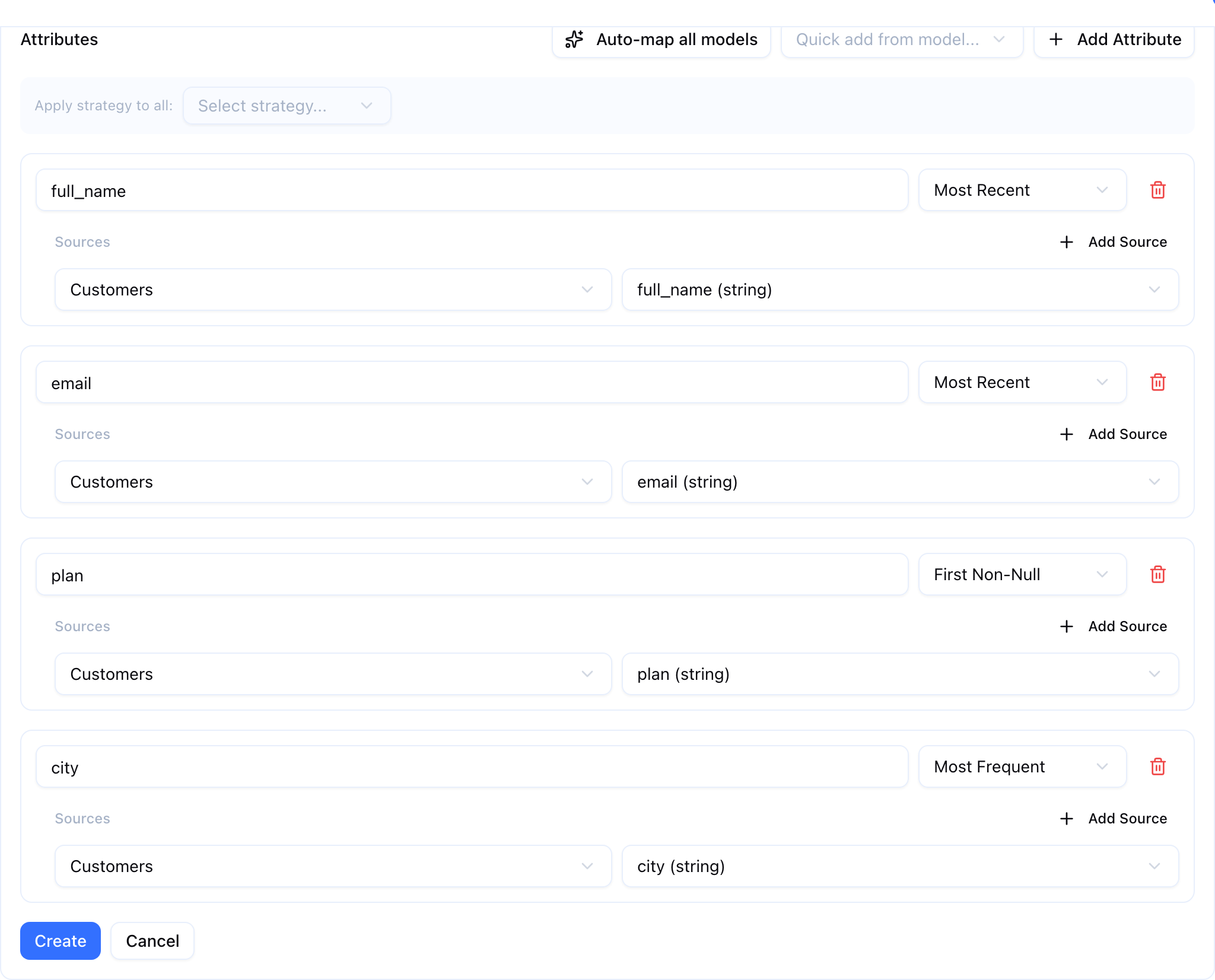
Three shortcuts sit above the attribute list in both places:
| Control | What it does |
|---|---|
| Add Attribute | Adds one empty attribute for you to fill in |
| Quick add from model… | Adds one attribute per column of the model you pick |
| Auto-map all models | Groups columns with matching normalized names across every selected model into one attribute each, skipping primary-key and timestamp columns |
| Apply strategy to all | Sets every attribute in the list to one strategy at once. Shown once there are two or more |
Attributes added by the shortcuts start on First Non-Null; change the strategy on each one that needs a different rule.
Activating a Configuration
A configuration created from the Golden Records tab starts as a draft, and an identity run skips a draft — no _GOLDEN_RECORD table is built and the Profiles page reports the record as never built. Click Activate to put it into effect on the next run.
| Status | What it means |
|---|---|
| draft | Paused. Runs skip it |
| active | Built by every identity run |
| error | Something was wrong with the last build, and the message is shown beside the badge. Runs keep retrying, so a fixed cause needs no re-activation. Two different things reach this state: a build that failed outright, and a build that succeeded with an attribute left empty because its only source model cannot contribute to the graph — the message names the model in that case |
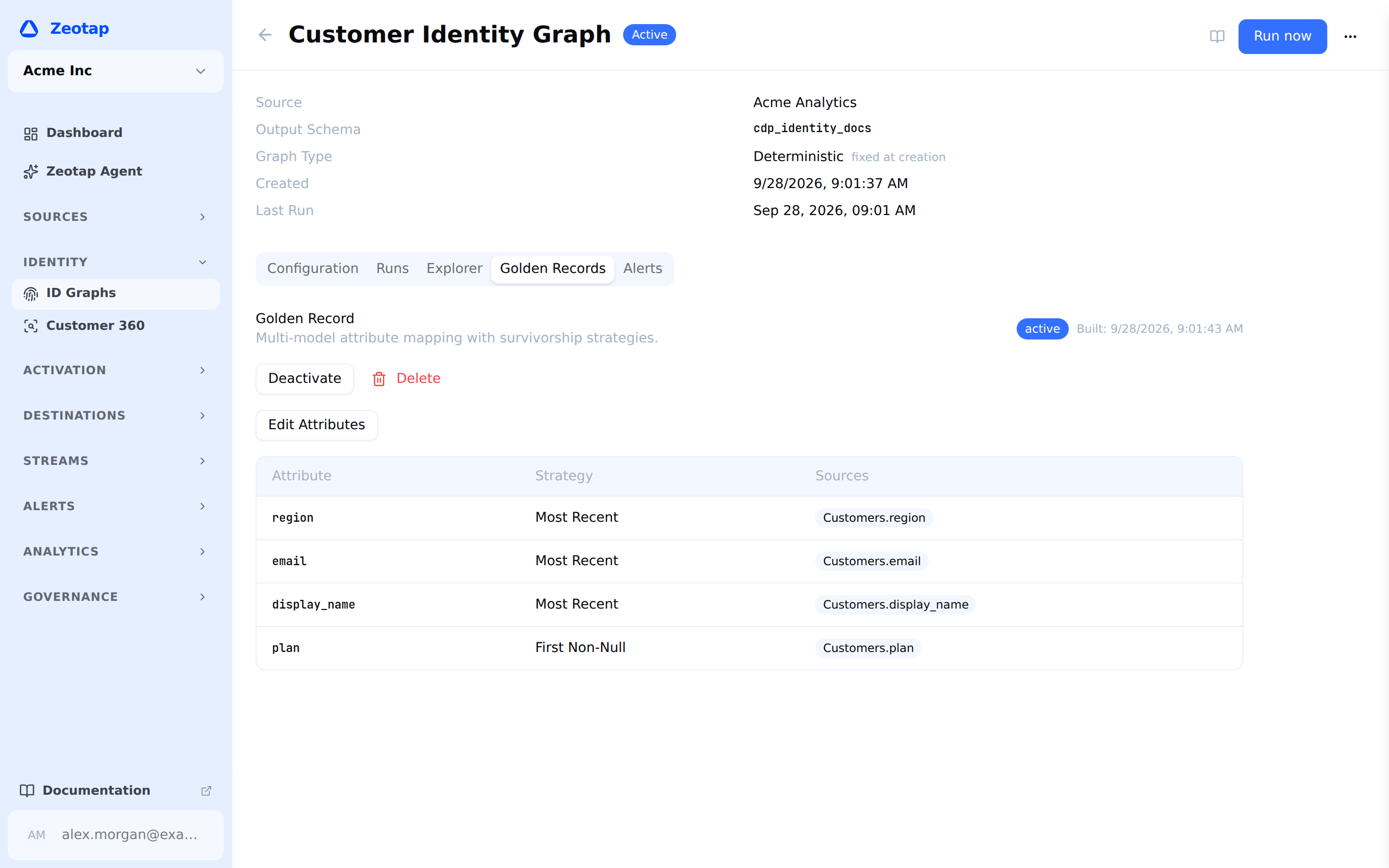
Deactivate returns an active configuration to draft, Edit → Save Attributes changes its attributes, and Delete removes it. Each identity graph holds at most one configuration, so creating a second means editing the first.
Validation
A configuration is rejected on save when:
- it has no attributes, or an attribute has no source
- an attribute name is empty, duplicated, or is not a valid identifier
- a strategy is not one of the seven above
- an attribute uses Source Priority and two of its sources share a priority number
Attribute Sources
Each attribute requires at least one source. A source maps a specific column from a specific model to the golden record attribute:
Attribute: "email"
  Strategy: most_recent
  Sources:
    - Model: CRM Contacts → Column: email_address
    - Model: App Users    → Column: user_email
    - Model: Website      → Column: contact_email
This tells Zeotap: “To produce the golden record email column, look at email_address from CRM, user_email from App, and contact_email from Website, then pick the most recent one.”
Example Configuration
| Attribute | Strategy | Sources |
|---|---|---|
email | Most Recent | CRM → email_address, App → user_email |
name | Source Priority | CRM → full_name (priority 1), App → display_name (priority 2) |
country | Most Frequent | CRM → country, Website → geo_country |
created_at | Minimum | CRM → created_at, App → signup_date |
lifetime_value | Maximum | Transactions → total_ltv |
referral_source | First Non-Null | App → referral_code, Website → utm_source |
interests | Collect All | App → interest_category, Website → content_category |
Golden Record Schema
The golden record is materialized as a _GOLDEN_RECORD table in the identity graph’s warehouse schema. It contains:
| Column | Description |
|---|---|
ss_id | The cluster identifier from the identity graph — uniquely identifies the resolved entity |
| Attribute columns | One column per configured attribute, populated by the assigned survivorship strategy |
_winning_model_id | The model ID of the record with the most recent timestamp in the cluster |
_winning_pk | The primary key of the most recent record (from the winning model) |
_min_confidence | The lowest link confidence in the cluster — 1 for a cluster whose every link is an exact match |
Query _GOLDEN_RECORD directly from your BI tools or data pipelines. It is replaced wholesale by a full resolution run; an incremental run instead deletes and re-inserts the profiles that changed, so the rest of the table is left exactly as the previous run wrote it. Either way, a run that fails leaves the previous run’s table readable.
Golden Records and the Platform
Golden records integrate with other Zeotap features:
An Auto-Generated Model
Every successful build also creates or updates a model named ‹graph name› — Golden Record, selecting from the _GOLDEN_RECORD table on the graph’s own source. You do not create it and you should not need to edit it; it exists so that everything in the product that consumes a model — audiences, computed attributes, relationships — can consume unified profiles without anyone hand-writing the SQL. It carries ss_id, one column per configured attribute, and the two winning-record columns.
Computed Attributes
Computed Attributes can be computed on golden records. When you select the resolved entity type as the basis for a computed attribute, the computed-attribute query joins against the golden record table rather than individual source tables.
Audiences
Audiences can segment golden records. Filter conditions reference the golden record attributes and computed attributes derived from golden records. This means your audiences operate on unified profiles, not fragmented source records.
When a golden record exists for an identity graph, audience compilation queries the _GOLDEN_RECORD table directly — the data is already deduplicated, so no additional deduplication logic is needed.
Syncs
Syncs can send golden record identifiers and attributes to destinations. For example, you might sync the golden record email (the “best” email from the survivorship strategy) to an ad platform.
Viewing Golden Records
Two surfaces show one customer’s golden record, and they answer different questions.
The Profiles page is the full view. Its Overview tab lists the surviving value for each attribute, and each one carries a Why? control that explains the choice: the strategy that made it, and every candidate value it chose between — one row per contributing source record, with its model, that record’s key, the value, how recent it is and the source’s priority, with the winner marked. Two signals qualify what you see: an attribute is marked Stale when its stored value is no longer what survivorship would pick over the inputs the build read, and the popover says so when the configuration itself changed after the record was built.
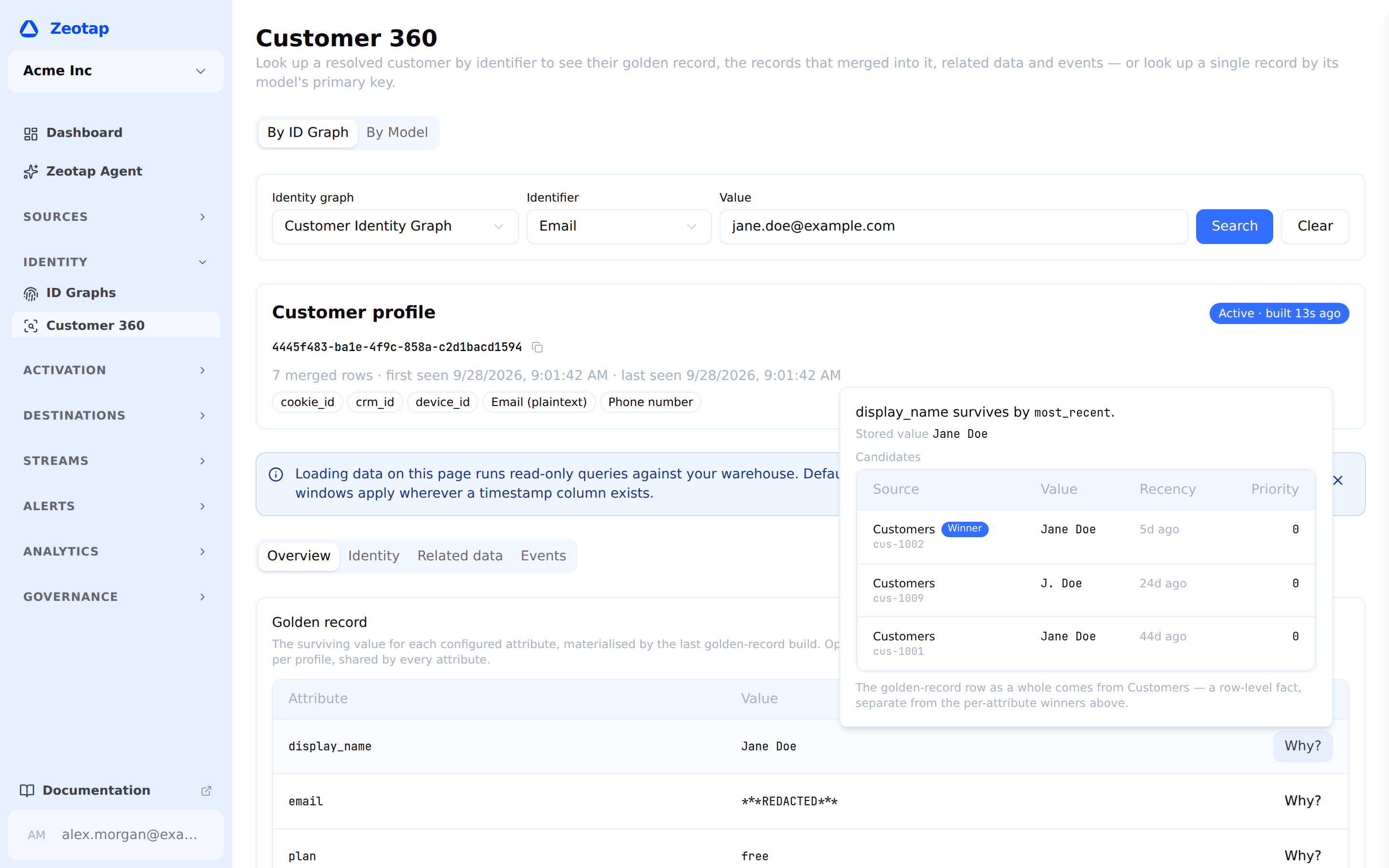
The graph’s Profile Explorer tab shows the same attribute values as a plain Attribute / Value table, with no provenance. It is the quick check that a build happened and produced something sensible.
Both read the record the last build wrote, so an attribute you have just reconfigured shows its old value until the graph next runs.
Updating Golden Records
Golden records are recomputed by every identity resolution run of a graph whose configuration is active (or in error, which is retried):
- Full resolution — Every golden record is recomputed from scratch
- Incremental resolution — Only the profiles that changed are recomputed, and merged into the existing table. Each one is still recomputed from all of its records, so no strategy is applied to a partial cluster: Most Frequent still sees the whole cluster’s counts and Collect All the whole distinct set
Editing the configuration does not need a rebuild from scratch. Adding, removing or re-pointing an attribute changes the table’s shape, so the next ordinary Run now rebuilds the whole golden record rather than merging into it. The same is true after any edit, including a strategy change.
Two cases do still fall back to a full golden-record rebuild every run, and are worth knowing because they cost the saving:
- The graph’s warehouse is ClickHouse, where deletes are asynchronous and an in-place merge cannot be trusted to have finished
- The identity run itself was a full rebuild, so there is no changed-row set to derive the changed profiles from
Next Steps
- Profiles — One customer’s golden record, with the Why? explanation behind each value
- Profile Explorer — The quick check that a build produced something sensible
- Running Resolution — Execute resolution to produce golden records
- Computed Attributes — Compute attributes on golden records