Audience Boost
Audience Boost enriches your audience sync data with third-party identity graph identifiers to increase ad platform match rates. When enabled on an audience sync, it resolves your first-party identifiers (emails, phones, device IDs) against an identity graph and appends additional identifiers that the destination platform can match on.
Why Match Rates Matter
When you sync an audience to an ad platform like Meta, Google, or TikTok, the platform tries to match each row in your audience against its own user database using the identifiers you provide. If a user’s email in your data doesn’t match the email they used on the platform, that user goes unmatched — and your campaign reaches fewer people than intended.
Typical first-party match rates range from 30-60%, meaning up to 70% of your audience may go unmatched. Audience Boost closes this gap by resolving additional identifiers from an identity graph, giving the platform more signals to match on.
How Dual Audiences Work
When Audience Boost is enabled, a single audience sync creates two audiences on the destination platform:
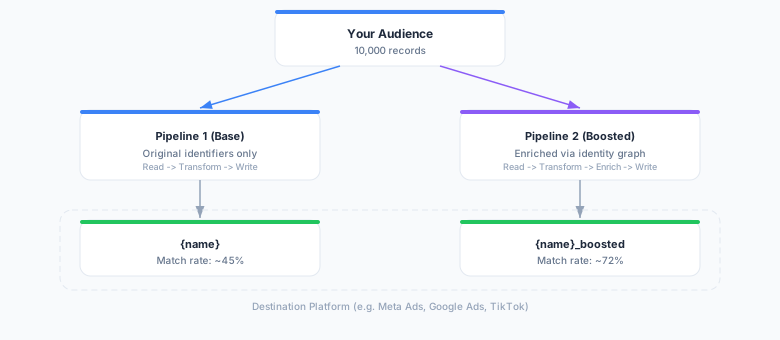
- Base audience (
{name}) — synced with your original identifiers only, serving as a baseline - Boosted audience (
{name}_boosted) — synced with enriched identifiers from the identity graph
This dual-audience approach lets you directly compare match rates and audience reach between the two, so you can measure the exact uplift that enrichment provides.
Identifier Flow
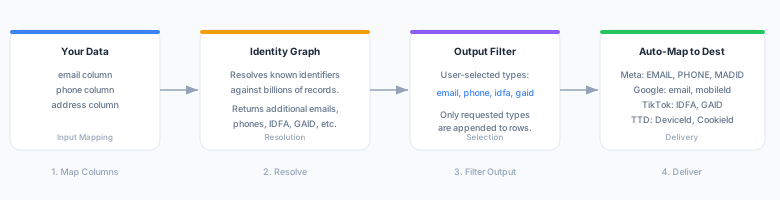
The enrichment process has four stages: mapping your source columns, resolving against the identity graph, filtering to your selected output types, and auto-mapping to destination-specific field names.
Enabling Audience Boost
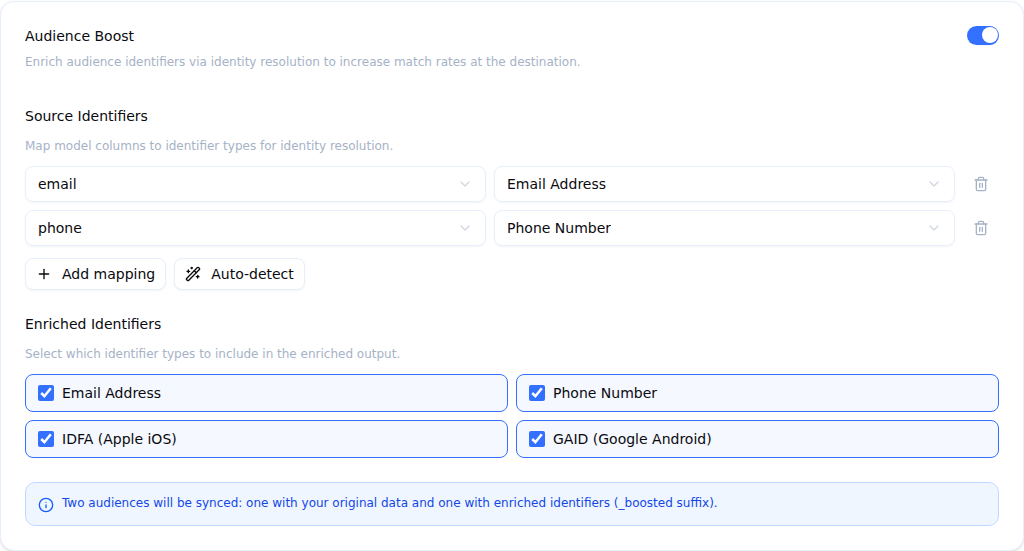
- Open the audience sync and go to the Configuration tab.
- In the Audience Boost card, turn the switch on.
- Under Source Identifiers, map your model’s columns to identifier types (see below).
- Under Enriched Identifiers, choose the identifier types to add to the boosted audience.
- Click Save Changes.
If the save is refused — for example because an enriched identifier type is selected that the destination does not accept — the reason is shown at the top of the Configuration tab. To stop boosting, turn the switch off and click Save Changes; later runs update the base audience only.
Configuring Input Identifier Mapping
The identifier mapping tells Audience Boost which columns in your source model contain identifiable information and what type of identifier they represent.
| Source Column | Identifier Type | Description |
|---|---|---|
email | email | Email addresses (hashed or plaintext) |
phone | phone | Phone numbers |
address | address | Physical/mailing addresses |
Map each relevant column in your source model to its identifier type. The identity graph uses these mappings to look up matching records and resolve additional identifiers.
Example
If your source model has columns user_email and user_phone, you would configure:
[
  {"source_column": "user_email", "identifier_type": "email"},
  {"source_column": "user_phone", "identifier_type": "phone"}
]
Selecting Output Identifier Types
Output identifiers control which enriched identifier types are included in the boosted audience. The configuration UI lists only the types your destination accepts. If a sync already has a type selected that the destination does not accept, it stays in the list so you can uncheck it; until you do, the sync cannot be saved.
| Type | Label | Destinations that accept it |
|---|---|---|
email | Email Address | Every supported destination |
phone | Phone Number | Every supported destination except Criteo |
idfa | IDFA (Apple iOS) | Google Ads, TikTok Ads, The Trade Desk |
gaid | GAID (Google Android) | Google Ads, TikTok Ads, The Trade Desk |
ttd_cookie | TTD Cookie | The Trade Desk |
Enriched identifiers are automatically mapped to the field each destination reads, so you don’t map them yourself.
Some destinations need extra settings before they can receive device IDs:
- Google Ads uploads IDFAs and GAIDs only when the destination’s iOS App ID / Android App ID is set. They go to separate
<audience name>_ios/_androidlists. - The Trade Desk uploads device IDs and TTD cookies through its Data API to the segment named by Segment Name.
What the boosted audience receives
- Every resolved identifier. A member the identity graph resolves to several emails, phones or device IDs has all of them sent, up to 20 values of each kind per member.
- The member’s own identifiers stay. A resolved identifier never replaces one the member already has; the boosted audience is the base audience plus what the graph adds.
- Only identifiers a platform can match. Raw values and SHA-256 hashes are sent. MD5 and SHA-1 hashes held in the identity graph are dropped, because no supported platform matches on them.
Supported Destinations
Audience Boost is available for the following ad platforms:
| Platform | Supported Identifiers |
|---|---|
| Meta (Facebook) Ads | email, phone |
| Google Ads | email, phone, IDFA, GAID |
| Google Ad Manager | email, phone |
| TikTok Ads | email, phone, IDFA, GAID |
| LinkedIn Ads | email, phone |
| Snapchat Ads | email, phone |
| The Trade Desk | email, phone, IDFA, GAID, TTD cookie |
| Criteo | |
| Pinterest Ads | email, phone |
| Yahoo DSP | email, phone |
| Microsoft Ads | email, phone |
| X Ads | email, phone |
| Amazon DSP | email, phone |
The boosted audience needs a fixed name
The boosted audience is named after the base audience with _boosted appended. Zeotap looks it up by that exact name on every run and creates it only the first time, so later runs reuse the same boosted audience.
That needs a fixed audience name in the destination settings. If the sync targets an existing audience by Audience ID only, or takes the audience name from a column, there is no single name to derive the boosted audience from: the sync runs without Boost and only the base audience is updated.
Reading Boost Results
Run history
On an audience sync’s Runs tab, a Boost run shows as two rows, Base and Boosted, each reporting its own half of the run:
- The members it processed (added / updated / deleted). Row counts always count members, not identifiers, so the two rows line up.
- N identifiers sent (+M from Boost) — the identifiers delivered, and how many of them Boost added.
- K not sent (no accepted identifier) — members skipped because they carry no identifier the destination accepts.
- Its own batches, status and error.
The Boosted row carries a +x% uplift badge. If the boosted half fails, its error appears on the Boosted row only: the run keeps the base half’s outcome, and the failure does not count toward the consecutive failures that automatically pause a sync.
Per-identifier-type breakdown
Click the Boosted row to expand the per-identifier-type breakdown. The sync’s Insights tab shows the same table for the latest Boost run under Boost Performance.
| Column | Description |
|---|---|
| Base | Unique identifiers of this type in the base audience |
| Uplift | Identifiers Boost added, with the percentage they add to the base (+2,500 (+25.0%)), or +N new for a type the base audience had none of |
| Total | Unique identifiers of this type sent to the boosted audience |
Types are sorted by uplift, largest first, and a Total row sums them. The time the boosted upload took is shown below the table.
Example breakdown:
| Identifier Type | Base | Uplift | Total |
|---|---|---|---|
| Phone | 3,000 | +5,200 (+173.3%) | 8,200 |
| IDFA | 0 | +4,100 new | 4,100 |
| GAID | 0 | +3,800 new | 3,800 |
| 10,000 | +2,500 (+25.0%) | 12,500 | |
| Total | 13,000 | +15,600 (+120.0%) | 28,600 |
These metrics help you understand which identifier types contribute the most uplift and whether Audience Boost is delivering value for a given audience and destination combination.
Privacy and Data Handling
Audience Boost is designed with privacy as a core constraint:
- No PII storage — Enrichment happens in-flight during sync execution only. No enriched identifiers are stored on Zeotap infrastructure.
- Provider isolation — The identity graph provider receives only the identifier types you configure in the input mapping. It does not receive your full audience data.
- Fail-open by default — If the identity graph returns an error for part of a run, those members are sent to the boosted audience with their own identifiers only, and the run carries on (
fail_open, on by default). Withfail_openoff, the error stops the boosted half instead; the base audience is still delivered. If Boost cannot be started for a run at all, the run updates the base audience only. - Audit trail — All boost-related metrics are recorded on the sync run record, providing a complete audit trail of enrichment activity.
- Dual audience transparency — Both base and boosted audiences are visible on the destination platform, so you always know exactly what data was sent.