Profile Explorer
The Explorer tab on an identity graph is a lookup: give it an identifier value and it tells you which profile that value resolved to, which source records are in it, and — where one is configured — its golden record. It is the quickest way to answer “did this resolve, and to what?” while you are tuning a graph.
It deliberately stops there. Everything you want next — the source records with their actual attribute values, why they merged, what was kept apart from them, related data and events — lives on the Profiles page, and every Explorer result carries an Open full profile link straight into it.
Searching for Profiles
Search by Identifier
Choose the identifier family and enter a value:
| Search Input | What It Matches |
|---|---|
alice@company.com | Any profile with this email in any variant |
+1-555-0100 | Any profile with this phone number |
CRM-12345 | Any profile with this customer ID |
6D92078A-8246-4BA4-AE5B-76104861E7DC | Any profile with this device ID |
The search normalizes your input the same way the graph normalizes that family when it resolves identities, so casing and formatting do not matter — Alice@Company.Com matches alice@company.com, and a plaintext email matches a record that only stores its hash.
The family list is the graph’s own: it holds the families that graph maps a column to, including custom identifier types you defined on it. Searching a family the graph maps no column to is rejected with a message saying so — the graph cannot look up something it never indexed.
The Explorer searches by identifier only. If you already hold a profile id — from API results, logs, or a downstream system — open it directly at /profiles/<id> on the Profiles page, or pass ss_id to the explore endpoint instead of an identifier pair. See API Access.
When One Value Returns Several Profiles
A search matches records, and then reports the profiles those records resolved to. So a single identifier value can legitimately return more than one profile — and when it does, that is information, not a bug.
The usual cause is a per-profile limit that kept two people apart. If cookie_id C1 was seen with two different people’s email addresses and email is limited to one value per profile, C1 links nobody: the records that carry it stay in their separate profiles, and C1 remains an attribute of each. Searching for C1 returns all of them.
On the Profiles page this is shown as a chooser rather than resolved silently:
3 profiles carry cookie id C1 — this identifier is shared
Each row lists that profile’s id, how many source records it holds, and the identifier families it was built from. Selecting one opens it; the chooser stays on screen so you can move between them without searching again. This is the shared-device case, and showing every profile is the honest answer — a page that picked one would be presenting a person made of two people.

The Explorer tab itself resolves to the first profile and links to it. When you are investigating a value you suspect is shared, start from the Profiles page instead, where the chooser makes the sharing visible.
Search Results
A resolved result shows one card and up to two tables:
- SS ID — The unique identifier for the resolved profile
- Identifier Types — The families the cluster was built from
- Merged Rows — How many source records are in the cluster
- Source Rows — A table of each contributing record, as Source Model ID and Primary Key
- Golden Record — An Attribute / Value table, when the graph has a golden record configured and it has been built
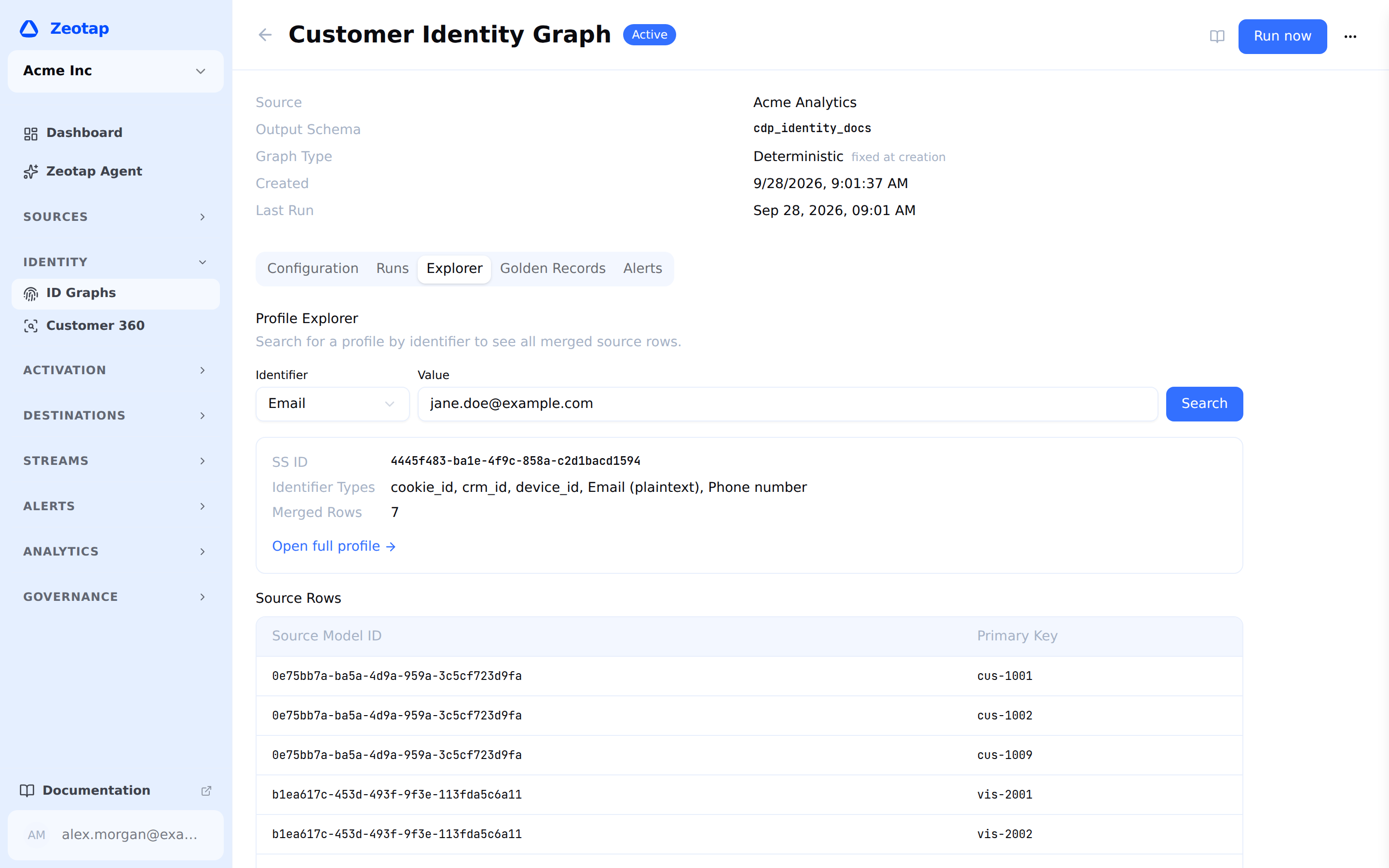
Source rows are listed as model id and key rather than as values: the Explorer is a resolution check, not a data browser. Follow Open full profile for the records with their attribute values, masked according to your column policies.
When no profile carries the value, the panel says so and reminds you that a run has to have completed: “No profile found for this identifier. Make sure a run has completed successfully.”
Reading a Profile
The full profile view is documented in Profiles (Customer 360). Two of its sections exist specifically to explain resolution, and they are the ones to reach for from here.
Merge lineage
For each link inside the cluster: the identifier it matched on, the two records it connected, the confidence, whether the match was deterministic or probabilistic, and the merge rule that produced it. It answers why these records are one profile.
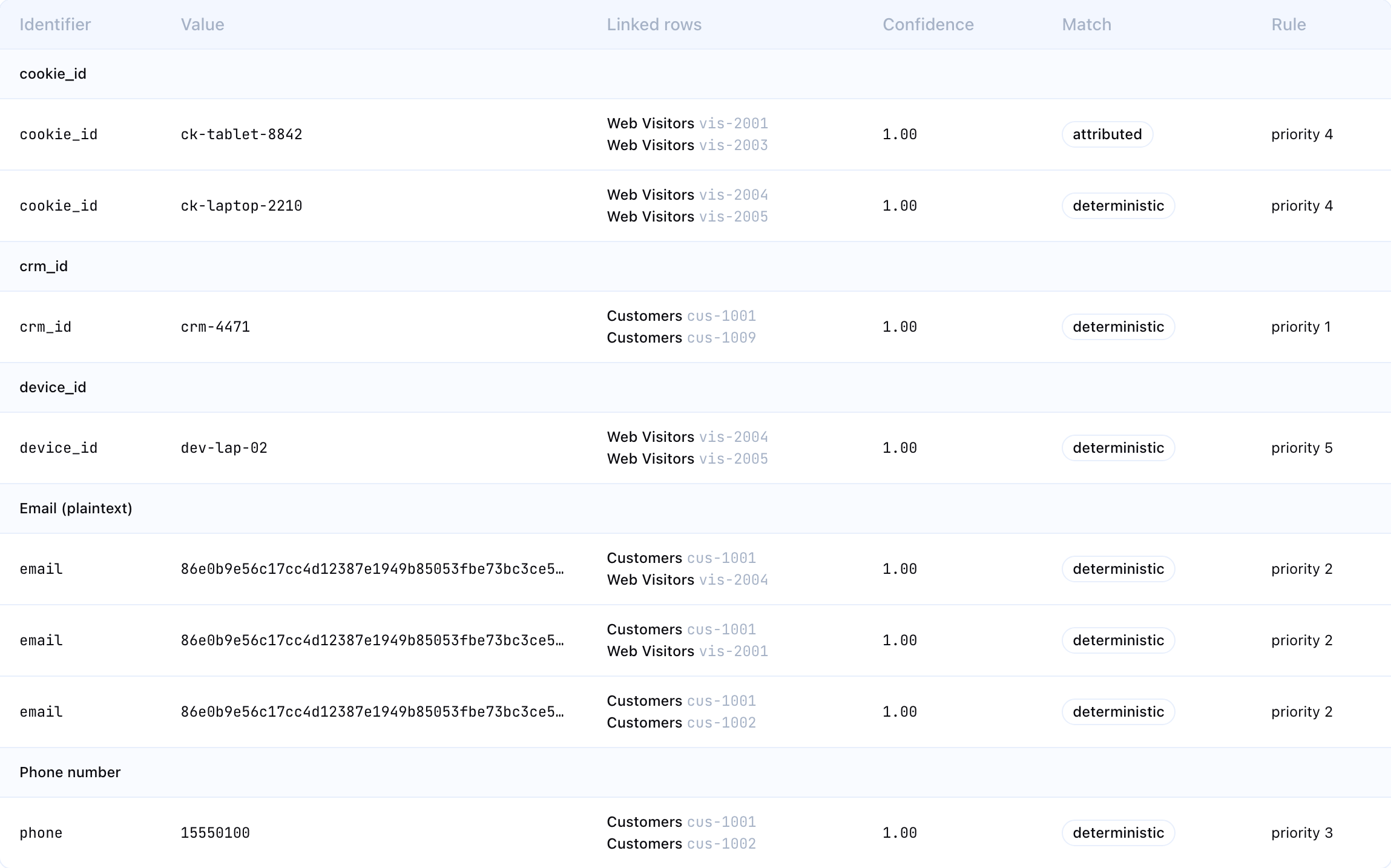
It reflects the latest run, because the link table is rebuilt from scratch every run. Where archived runs are still within their retention window, a run selector lets you read an earlier one.
Kept apart
The other half of the story, and the harder support question: why these records are not one profile. Two profiles for what you believe is one person look identical whether the cause was a deliberate limit, a missing identifier, or a broken run — and only this panel can tell them apart.
It is a four-column table:
| Column | What it holds |
|---|---|
| Identifier | The family the value belongs to |
| Value | The value itself, masked under the same rules as any other record value |
| What happened | One sentence naming the outcome, with the merge rule priority the decision was taken at beneath it. Four are possible: the value is also used by another person and a named family’s limit kept them separate; joining would put more than N ‹family› values on one profile through a chain of other merges; the value is shared by more than N records, so it was not used for matching; or its anonymous activity pointed at two different people, so it stayed on its own |
| Anonymous activity | Where the activity on that identifier went: went to this profile, went to another profile (with a link to it), stayed on its own, by this graph’s setting, or no anonymous activity to assign |

Three things to know before drawing conclusions from it:
- It describes the latest run only. Unlike merge lineage, these rows are not archived. If you are viewing an archived run’s lineage, the panel says so rather than letting the two be read as one moment in time.
- It fills in after the graph’s next full run if that graph’s last full run predates this feature. Setting a per-profile limit on a family is itself a rule change, so the run that first makes the panel meaningful is a full rebuild anyway.
- It is capped at the first 200 rows for one profile, and says so when it hits the cap. A profile whose every record carries its own shared bot cookie would otherwise turn one page load into an unbounded read. If you are hitting the cap, the interesting question is why that many values cannot link — start from the run’s kept apart count instead.
Investigating Merge Quality
The Profile Explorer is the primary tool for validating identity resolution results. Use it to:
Verify Correct Merges
Look up known customers and confirm that the right records are linked:
- Search for a customer by a known identifier
- Check that all expected source records appear in the cluster
- Verify that no unexpected records are included
- Confirm that the golden record attributes look correct
Investigate Suspicious Merges
If a cluster seems too large or contains unrelated records:
- Open the full profile and review its source records
- Read the merge lineage to see which links assembled the cluster
- Identify the specific identifier value and merge rule that caused the suspicious link
- Decide whether to:
- Set a values one profile may hold limit on a stronger family — the direct fix for a shared device pulling two people together
- Lower the offending family’s shared-value limit cap, if the culprit is a placeholder or bot value
- Raise the stronger identifier’s priority so its limit can veto the weaker one’s merge
- Exclude the value at the source, in the model’s SQL — usually the most durable fix
Find Missing Merges
If two records that should be linked are in separate clusters:
- Search for each record separately
- Compare their identifiers — do they share any identifier values?
- If yes, check whether a merge rule covers that identifier family and is enabled
- If a merge rule does cover it, open either profile and read Kept apart: a per-profile limit on a stronger family stops a weaker identifier’s merge, and the panel names the exact value, the family whose limit applied and that limit’s value
- If no shared identifiers exist, the records cannot be merged with the current configuration
API Access
You can also look up profile data programmatically. A single workspace-scoped call does the whole lookup: you give it an identifier, and it returns the profile that identifier resolves to, together with the source rows behind it.
POST /api/v1/workspaces/{id}/identity-graphs/{graphId}/explorecurl -X POST "$API_BASE_URL/api/v1/workspaces/$WORKSPACE_ID/identity-graphs/$GRAPH_ID/explore" \
-H "Authorization: Bearer $API_TOKEN" \
-H "X-Workspace-ID: $WORKSPACE_ID" \
-H "Content-Type: application/json" \
-d '{
"identifier_family": "email",
"identifier_value": "alice@gmail.com"
}'The response carries the resolved profile ID, the identifier families it was built from, how many source rows contributed, the source rows themselves, and the golden record when the graph has one configured. When the value is shared, it also carries every profile that holds it:
{
  "ss_id": "aae84001-e29b-41d4-a716-446655440000",
  "identifier_types": "email,phone,user_id",
  "row_count": 3,
  "source_rows": [
    { "source_model_id": "770e8400-e29b-41d4-a716-446655440000", "source_primary_key": "cust_9012" }
  ],
  "profile_count": 2,
  "profiles": [
    {
      "ss_id": "aae84001-e29b-41d4-a716-446655440000",
      "row_count": 3,
      "identifier_types": "email,phone,user_id",
      "source_rows": [ /* … */ ]
    },
    {
      "ss_id": "bb195102-e29b-41d4-a716-446655440000",
      "row_count": 1,
      "identifier_types": "cookie_id",
      "source_rows": [ /* … */ ]
    }
  ]
}
The top-level ss_id, row_count, identifier_types and source_rows describe profiles[0] only, which keeps existing integrations working and gives them one coherent profile rather than a blend of several. Branch on profile_count: anything above 1 means the identifier you searched is shared, and reporting the first profile as if it were the only one would be wrong. The list is not truncated — profile_count is always the length of profiles.
Alongside those, the response carries:
| Field | What it holds |
|---|---|
profile | Cluster statistics for profiles[0]: row_count, min_confidence, avg_confidence, first_seen, last_seen |
models | The models that contributed rows, with per-model row counts |
golden_record | The surviving value for each attribute, when the graph has a golden record that has been built |
golden_record_meta | That record’s config_id, status and last_built_at |
A value nothing carries returns 200 with an empty ss_id, profiles: [] and profile_count: 0 rather than a 404, so a client can branch on profile_count alone.
Passing {"ss_id": "..."} instead of the identifier pair looks a profile up directly — supply one or the other, never both. To go from a profile back to its underlying data, either use the profile endpoints behind the Profiles page or query the source models listed in source_rows in your warehouse.
Best Practices
- Spot-check after every resolution run — Look up 10–20 known customers to verify merge quality
- Investigate the largest clusters — These are the most likely to contain false merges
- Use merge lineage for debugging — When a merge looks wrong, the lineage tells you exactly which identifier and rule caused it
- Use Kept apart for the opposite question — When a merge you expected did not happen, that panel names the value and the limit that applied, which is faster than reasoning about it from the rules
- Monitor the single-record profile count — A high rate may indicate that merge rules are too restrictive, that identifiers are not overlapping enough, or that a per-profile limit is stopping merges you expected. Check the run’s kept apart count before changing rules
- Expect shared values to belong to several profiles — When they do, the resolver kept two people apart rather than guessing which of them the value belongs to. Look the value up on the Profiles page, where the chooser shows all of them, and read the Kept apart row before assuming it was wrong
Next Steps
- Profiles (Customer 360) — The full profile view, with merge lineage and what was kept apart
- Golden Records — Understand survivorship strategies
- Running Resolution — Run or re-run identity resolution
- Merge Rules — Adjust rules based on explorer findings