Profiling & Suggestions
Before you decide what a recipe should do, it helps to know what is actually in the table. Profile measures a raw table — or a prepared table’s built output — and tells you.
It is the first tab of the panel beside the steps in the recipe editor. Opening it profiles the recipe’s primary input; it will also profile any other table the recipe reads, or any table you pick through Profile in the Input control’s warehouse browser.
Opening the tab is what asks for the measurement, and that is deliberate: a profile is a real pass over your warehouse, and it is also what tells Zeotap which columns hold personal data — so it changes what a preview of an opaque SQL step is allowed to show you. It is cached for a day, and the panel says when it was taken.
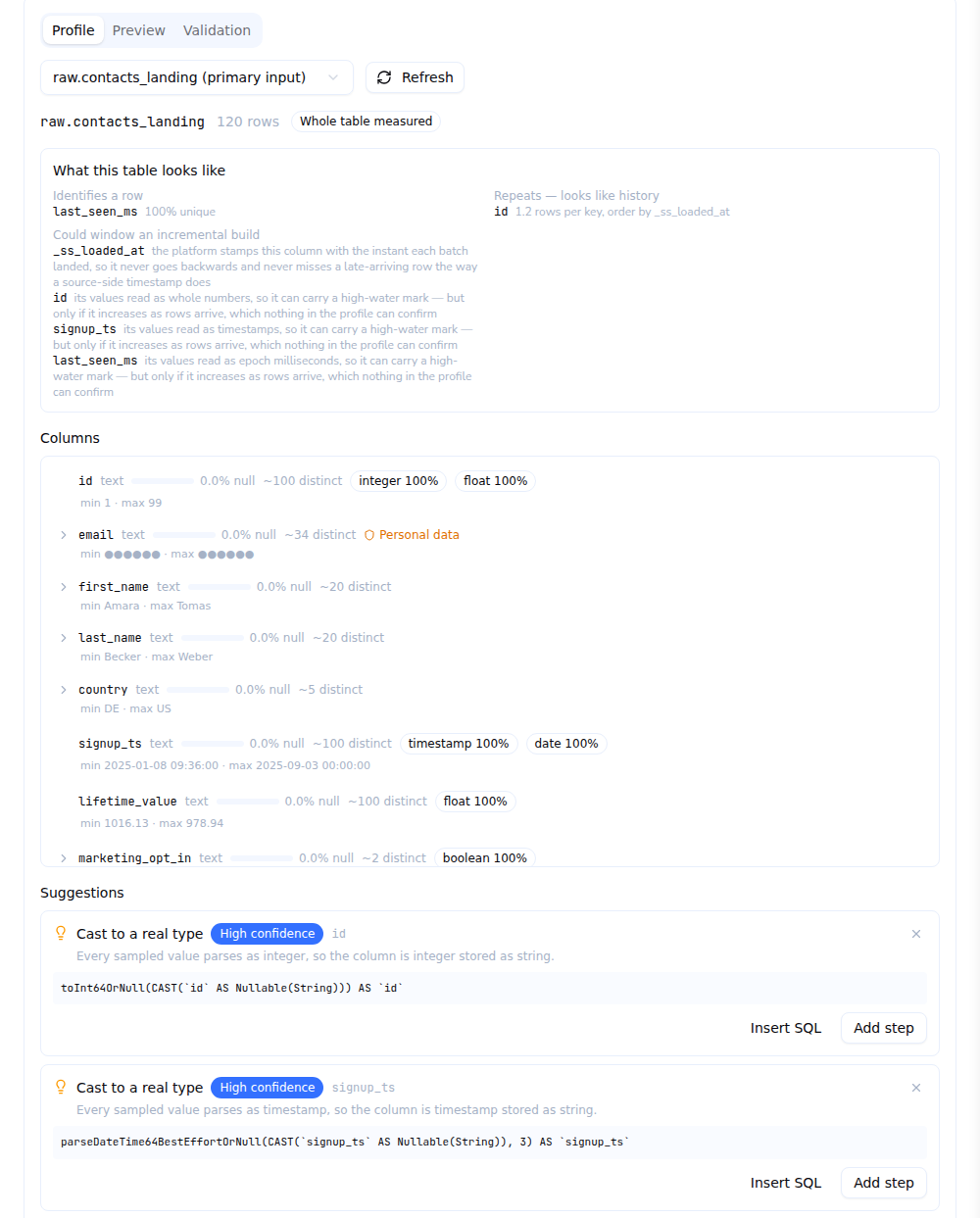
What a profile measures
Per column:
| Type | The warehouse type, and the family Zeotap puts it in |
| Null rate | How much of the column is empty |
| Distinct count | Approximate, and the ratio of distinct to non-null values |
| Minimum and maximum | For orderable types |
| Length | Average and maximum, for text — and how much of it carries stray leading or trailing whitespace |
| Castability | The success rate of safely casting the column to each type, including whether an integer column is really an epoch in seconds or milliseconds |
| JSON | Whether the values are JSON, whether they are objects or arrays, and the key paths those documents hold with how often each one is filled |
| Personal data | How much of the column looks like an email address or a phone number |
| Top values | Collected only when the column has 50 or fewer distinct values. This is where placeholders live — N/A, unknown, -, test@test.com |
What it derives
On top of the measurements, the profile answers the things you actually have to choose:
| Unique keys | Which columns identify a row. A key the loader itself upserts on is marked as declared, and is the strongest candidate there is |
| History keys | A key that repeats — an append-only history of a record rather than its current state, which means you need a dedupe |
| Watermarks | Which column an incremental build should window on, already in preference order, each with a one-line reason |
| Soft-delete columns | A column that marks a row deleted rather than removing it |
| Loader details | When the table is a Zeotap loader’s landing: that loader’s sync mode, primary key and cursor field |
Take the first watermark candidate. The list is ordered by how trustworthy the column is as an answer to “when did this row become visible?” — and a column that is not offered was refused for a reason, so the materialization form would reject it anyway.
Personal data is never shown
A column whose sampled values are at least half email addresses or phone numbers — or that a model over the same physical table marks as sensitive — comes back masked: its minimum, maximum, top values and JSON examples are replaced.
Masking is applied when the profile is taken and again every time a stored profile is read, so a column you mark sensitive an hour after profiling is hidden immediately rather than when the stored result happens to expire.
The same applies to Zeotap Agent: the agent sees the masked profile, not the values.
What a profile costs
A profile of an ordinary table costs three warehouse queries, plus at most ten small ones for top values, however many columns the table has: a single pass computes every per-column figure, and JSON keys are worked out from one bounded page of values rather than a query per column.
Measurements are taken from a sample that genuinely reduces the scan on warehouses billed by bytes. The row count is exact and never sampled. Results are stored and re-served for a day — the panel says when the profile was taken and whether it came from the cache — and Refresh re-reads the warehouse.
On BigQuery — the one supported warehouse that can price a query before running it — a profile that would scan an unreasonable amount is refused with the estimate, rather than run.
Suggestions
Under the profile is an ordered list of proposals, each with the reason it fired and a confidence:
| Suggestion | Fires when |
|---|---|
| Cast to a real type | A text column is reliably castable to one type — including an integer column that is really an epoch |
| Flatten the JSON payload into columns | The column is JSON objects, and keys are filled often enough to be columns |
| Explode the JSON array into rows | The column is JSON arrays |
| Keep only the latest row per key | The table looks like an append-only history of a key |
| Handle soft-deleted rows | There is a soft-delete column |
| Normalise the email column / Normalise the phone column | A column is mostly email addresses or phone numbers |
| Turn placeholder values into NULL | The top values include placeholders |
| Trim stray whitespace | Values carry stray whitespace |
| Build incrementally, merging on a key / appending new rows | A unique key and a watermark both exist — or, for an event-shaped table, a watermark alone |
Thresholds are deliberately high. A suggestion list is read as a to-do list, so a rule Zeotap cannot be reasonably sure of does not fire.
Applying one
Most suggestions offer Add step, which appends the step — the actual step, built from what the rule found rather than from SQL text, so accepting the same suggestion on ClickHouse and on Snowflake adds the same thing to your recipe. It lands in the step list beside the panel, after the step you have selected. Insert SQL beside it splices the equivalent SQL into the step you are editing, for the codes that have no typed form and for authors who prefer writing it.
The two incremental suggestions offer Apply to materialisation instead, which fills in the Build settings step and takes you to it, so you see what it decided before you save. They carry no step by design: they propose how the table is built, and there is nothing to add to the recipe.
A loaded profile also orders the watermark and unique-key choices on that step, each with the reason it was offered — an ordering, never a choice made for you.
Check a castability rate before you accept a cast. A rate just under the threshold means a small number of real rows will become NULL. The profile tells you exactly what fraction.
Starting from a loader stream instead
If the table is a Zeotap loader’s landing, there is something better than profiling it: open the loader, find the stream, and click Prepare.
That builds a draft recipe from what Zeotap already knows about its own landing — the
stream’s declared columns and types, its declared primary key, its cursor field, its sync mode — rather
than from a reading of a sample. Typically it arrives as: keep and order the columns, cast the ones
whose declared type is richer than what landed, flatten declared JSON columns, and keep the latest row
per declared key when the loader is append-only — materialized incrementally on _ss_loaded_at when
the landing carries it.
Nothing is saved until you save it. A draft that decided how the table is built — incremental, merging, following its landing — says so in a line on the Recipe step with a link to Build settings, so nothing is set on your behalf that you have not had the chance to look at.
Profile the landing as well if you need to choose something the draft left open, such as which JSON paths to flatten.