Governance
Governance in Zeotap provides the controls you need to manage who can access what data, where data can flow, and how your organization enforces compliance policies. It covers role-based access control, data flow restrictions, row-level data filtering, and multi-workspace management.
What Is Governance?
As your CDP usage grows — more team members, more destinations, more sensitive data — you need controls that go beyond simple authentication. Zeotap’s Governance features let you:
- Control access — Define who can see and modify which resources using roles and permissions
- Mask sensitive data — Set column-level sensitivity labels that control PII visibility in previews, suggestions, and syncs
- Restrict data flow — Set rules that prevent sensitive data from reaching unauthorized destinations
- Filter data visibility — Create access policies that automatically apply row-level filters based on user group membership
- Erase data on request — Define audience-scoped deletion rules that remove data from your warehouse on a schedule, with an audit log of every run
- Manage at scale — Group workspaces under one organization with a shared member list and one set of administrators
- Track every change — See who changed which piece of configuration, what the value was before, and when
Governance Features
Role-Based Access Control (RBAC)
Zeotap provides a fine-grained permission system with three built-in roles, custom roles, and 120 permissions across 43 resource categories. Permissions are additive — a member’s effective permissions are the union of their own role, the roles of every group they belong to, and those groups’ direct permissions.
- Owner — Every permission, including deleting the workspace
- Admin — Every permission except deleting the workspace
- Member — Read across the platform; a custom role is how a team gets write access to its own area
Learn more:
- RBAC Overview — How the permission model works
- Roles — Built-in role definitions and comparison
- Permissions — Complete permission reference (120 permissions, 43 categories)
- Groups — Organize members for easier management
- Managing Members — Invite, modify, and remove members
PII Masking
PII masking provides column-level sensitivity controls that determine how personal data is exposed across the platform. Mark columns as redacted (masked in UI, syncable), sync-only (hidden in UI, syncable), or blocked (hidden everywhere, not syncable). Includes automatic PII detection by column name patterns and SHA256 hash-on-sync for ad platform audience matching.
See PII Masking for configuration details.
Destination Policies
A destination policy is a filter on one of your models, scoped to one destination type. When a sync sends that model to that kind of destination, only the records matching the filter are read out of the warehouse — everything else is withheld before it leaves. Use them to:
- Keep a population out of a destination entirely — EU customers out of an ad platform, minors out of a marketing tool
- Send only the records that qualify — opted-in, verified, over a spend threshold
- Apply the same restriction to every connection of that type at once, rather than per sync
See Destination Policies for configuration details.
User Access Policies
Governance → User Access Policies decides which people reach what in a workspace, always through groups. It has three tabs:
- Subsets — row-level access control. Define filter conditions that apply automatically to every query run on behalf of a member of a given group: restrict regional teams to their own data (e.g., an “EMEA only” policy), limit partner access to specific customers, or enforce data sovereignty requirements. See User Access Policies.
- Folders and Destinations — access lists. Restrict a folder (and every folder below it in the tree) or a destination to named groups, so nobody else sees it at all. A restricted folder also hides the audiences, orchestrations and A/B tests filed in it, and a restricted destination hides the syncs that send to it. See Folder and Destination Access.
AI Policies
AI policies — guardrails — decide what the AI agent may do in the workspace on its own, what it must have a human approve first, and what it may never do. Rules match on the tool being called, how often it is called, the columns in a filter, or the destination being written to. New workspaces start with two of them switched on, holding deletions and sync triggers for approval.
They live on the AI Policies page in this section, and are documented under Guardrails.
Deletion Rules
Deletion rules erase data for a population you define — the same filter language as an audience — across one or more models in your warehouse, on demand or on a schedule. Use them to:
- Fulfil GDPR right-to-erasure and CCPA deletion requests at scale, instead of deleting identifier by identifier
- Delete whole rows, or clear only the personal columns on rows that must survive
- Keep an auditable log of every run: records affected per model, the exact statements issued, and who ran it
Every rule starts in observe mode, reporting what it would delete without changing anything.
See Deletion Rules for the eligibility rules, safety controls, and what the feature deliberately does not cascade.
Audit Log
The workspace audit log records every change to your workspace’s configuration — the person who made it, the resource they touched, and the exact fields that moved, with their values before and after. It covers changes made through the app and the REST API, and can be filtered, downloaded as CSV or JSON, or emailed to your team. (Changes the AI agent makes through its own tools are not yet recorded there; its tool calls appear in the AI Audit Log instead.)
See Audit Log for what is recorded and how to export it.
Version History
Audiences, orchestrations, models, relationships and syncs keep every earlier definition. You can compare any version with the current one and restore it in one step. The restore goes through the same checks as an edit and never changes status, schedule, folder or tags.
See Version History for what a version contains and when a restore is refused.
Organizations
Organizations let you manage several Zeotap workspaces under a single umbrella, and they are where all access control lives: people, groups, roles and the grants that connect them. Every workspace belongs to one. The seeded Organization admins group holds Owner on every workspace in the organization, now and in future.
See Organizations for setup instructions.
How Governance Fits into the Platform
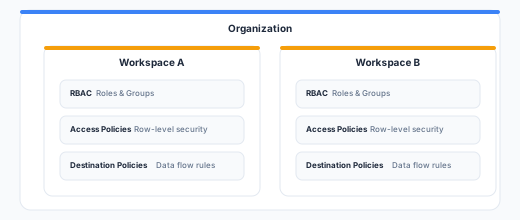
Governance features are workspace-scoped:
- RBAC (roles, permissions, groups) applies within a workspace
- Destination policies are defined per workspace
- User access policies (subsets, folder and destination access lists) are defined per workspace and granted to groups
- AI policies constrain the AI agent within the workspace that defines them
- Audit log entries are workspace-scoped and readable by owners and admins
- Organizations provide a cross-workspace management layer
API Reference
Govern resources are managed through the Zeotap REST API. Policies, groups and members are workspace-scoped, so their paths carry your workspace ID as {id}; organizations sit above workspaces and are keyed by {orgId} instead. See Base URL for your instance’s API base URL and Authentication for the required Authorization and X-Workspace-ID headers.
# Destination Policies
GET    /api/v1/workspaces/{id}/destination-rules
POST   /api/v1/workspaces/{id}/destination-rules
PUT    /api/v1/workspaces/{id}/destination-rules/{ruleId}
DELETE /api/v1/workspaces/{id}/destination-rules/{ruleId}

# Deletion Rules — run/dry-run return 202 with the opened run; the
# deletion continues past the request, so follow it through the log
GET    /api/v1/workspaces/{id}/deletion-rules
POST   /api/v1/workspaces/{id}/deletion-rules
PUT    /api/v1/workspaces/{id}/deletion-rules/{ruleId}
DELETE /api/v1/workspaces/{id}/deletion-rules/{ruleId}
POST   /api/v1/workspaces/{id}/deletion-rules/{ruleId}/dry-run
POST   /api/v1/workspaces/{id}/deletion-rules/{ruleId}/run
GET    /api/v1/workspaces/{id}/deletion-rules/{ruleId}/runs
GET    /api/v1/workspaces/{id}/deletion-runs

# Access Policies
GET    /api/v1/workspaces/{id}/subsets
POST   /api/v1/workspaces/{id}/subsets
PUT    /api/v1/workspaces/{id}/subsets/{subsetId}
DELETE /api/v1/workspaces/{id}/subsets/{subsetId}

# Groups — organization-scoped, and the only thing that grants access
GET    /api/v1/organizations/{orgId}/groups
POST   /api/v1/organizations/{orgId}/groups
PUT    /api/v1/organizations/{orgId}/groups/{groupId}
DELETE /api/v1/organizations/{orgId}/groups/{groupId}

# The grant — one group, one workspace, one role
PUT    /api/v1/organizations/{orgId}/groups/{groupId}/workspaces/{workspaceId}
DELETE /api/v1/organizations/{orgId}/groups/{groupId}/workspaces/{workspaceId}

# Reads from one workspace: who reaches it, and which groups grant that
GET    /api/v1/workspaces/{id}/members
GET    /api/v1/workspaces/{id}/groups

# People join the organization, not a workspace
GET    /api/v1/organizations/{orgId}/members
POST   /api/v1/organizations/{orgId}/members/invite
DELETE /api/v1/organizations/{orgId}/members/{accountId}

# Audit Log
GET    /api/v1/workspaces/{id}/audit-log
GET    /api/v1/workspaces/{id}/audit-log/filters
GET    /api/v1/workspaces/{id}/audit-log/export
POST   /api/v1/workspaces/{id}/audit-log/email

# Organizations
GET    /api/v1/organizations
POST   /api/v1/organizations
PUT    /api/v1/organizations/{orgId}
See the API Reference for full request/response schemas.
Best Practices
- Start with least privilege — grant a group the Member role by default and escalate only when needed.
- Groups are the only lever — access is granted at the group level and nowhere else, so create groups that map to your team structure and grant each one a role per workspace. A group of one is a membership row with extra steps.
- Layer destination policies early — Set up destination policies before connecting sensitive destinations. It’s easier to relax restrictions later than to discover sensitive data was already synced.
- Document your governance model — Keep a record of which groups exist, what access policies they have, and why. This helps with compliance audits and onboarding new team members.
- Review access regularly — Periodically audit member lists, role assignments, and destination policies to ensure they still reflect your organization’s needs. The Audit Log filtered to the
role,memberandgroupresource types is the fastest way to run this review.
Next Steps
- Set up RBAC for your workspace
- Create destination policies to control data flow
- Define access policies for row-level access control
- Restrict folders and destinations to named groups
- Set up deletion rules to fulfil data subject deletion requests
- Create an organization for multi-workspace management