Relationships
The Relationships module in Zeotap provides a unified view of your customer data model. It lets you define entity types (such as Users, Accounts, and Products), map them to your warehouse data, and establish relationships between them — creating a semantic layer that powers identity resolution, audience building, and cross-entity activation.
What Is the Relationships Module?
While Models define how to extract data from your warehouse, the Relationships module defines what that data means. It answers questions like:
- What are the core entities in your business? (Users, Accounts, Products, Orders)
- Which model columns represent which entity attributes?
- How do entities relate to each other? (A User belongs to an Account; an Order contains Products)
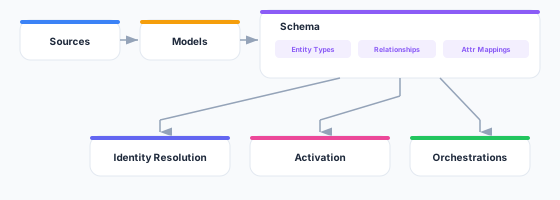
This semantic layer is used across the platform:
- Identity Resolution uses entity definitions to merge and unify profiles
- Audiences use relationships to build cross-entity activation lists
- Orchestrations use entity types to personalize messages with the right context
- Syncs use schema mappings to validate field compatibility
Key Concepts
Entity Types
An entity type says what role a model plays. A model carries exactly one:
| Entity type | What it describes | Example |
|---|---|---|
| Parent | The subject you build audiences about — one row per person or account | customers, users |
| Related | Attributes belonging to a parent record, reached through a relationship | subscriptions, addresses |
| Event | Things that happened, with a timestamp — many rows per parent | orders, page_views |
A model you have not classified shows as Unclassified and cannot be used in the audience builder.
Relationships
Relationships define how classified models connect to each other. For example:
- A customers model has many orders (one-to-many)
- An orders model belongs to one customer (many-to-one)
- A customers model has one address (one-to-one)
- A customers model reaches products through a purchases junction (many-to-many)
Relationships enable cross-model queries in Audiences (e.g., “Find all customers who placed more than three orders in the last 30 days”) and power the ERD visualization.
Column Configuration
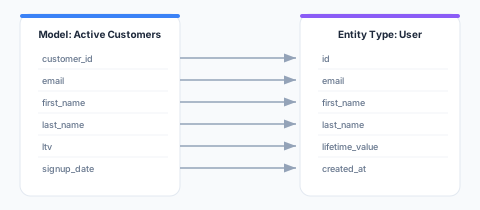
A classified model’s columns carry per-column settings — a display alias, whether the column is offered in the audience builder, its data type, and how sensitive its values are. This is the semantic layer over the raw model:
How Relationships Fits into the Platform
Getting Started
1. Classify Your Models
Open Relationships and give each model an entity type. Start with the model that describes the people or accounts you want to build audiences about, and make that one Parent.
See Entity Types for the full guide.
2. Configure Columns
For each classified model, set its primary key, its timestamp (for event models), and the per-column settings — which columns the audience builder offers, their aliases, and their sensitivity.
3. Define Relationships
Connect the models to each other. A relationship declares the cardinality (one-to-one, one-to-many, many-to-one, many-to-many) and the join keys used to link the rows.
See Relationships for the full guide.
4. Visualize
Use the ERD Visualization to see your whole data model as an interactive diagram.
API Reference
The Relationships module is managed through the Zeotap REST API. Every path below is workspace-scoped — {id} is your workspace ID. See Base URL for your instance’s API base URL and Authentication for the required Authorization and X-Workspace-ID headers.
An entity type is not a standalone resource: you assign one to a model, so entity types are managed through the model’s entity configuration rather than their own endpoints.
# List models (each carries its entity type and identifier configuration)
GET /api/v1/workspaces/{id}/models

# Get a single model
GET /api/v1/workspaces/{id}/models/{modelId}

# Set a model's entity type, primary key, timestamp and column configuration
PUT /api/v1/workspaces/{id}/models/{modelId}/entity-config

# List relationships
GET /api/v1/workspaces/{id}/relationships

# Get a single relationship
GET /api/v1/workspaces/{id}/relationships/{relId}

# Create a relationship
POST /api/v1/workspaces/{id}/relationships

# Update a relationship
PUT /api/v1/workspaces/{id}/relationships/{relId}

# Delete a relationship
DELETE /api/v1/workspaces/{id}/relationships/{relId}

# List the relationships a single model participates in
GET /api/v1/workspaces/{id}/models/{modelId}/relationships
Best Practices
- Start with one parent — Classify the model your audiences are about first; everything else hangs off it
- Related or event? Ask whether the rows are a timeline — If a row is a thing that happened at a moment, it is an event
- Pick a stable primary key — It is what relationships join on, so a column that gets rewritten will silently change what joins
- Name relationships descriptively — “Customer places order” reads better than “customers-orders” when you meet it in the audience builder
- Review the ERD regularly — As the data model evolves, use it to verify the relationships are still what you meant