Predictive Models
Predictive Models produce a per-entity score — a purchase propensity, a churn risk, a lifetime-value estimate, or any numeric outcome — for every row of a parent model, and keep it in your warehouse. Audiences, syncs and journeys select people by that score or by its percentile rank, and one view per model keeps them working across retrains and rescores.
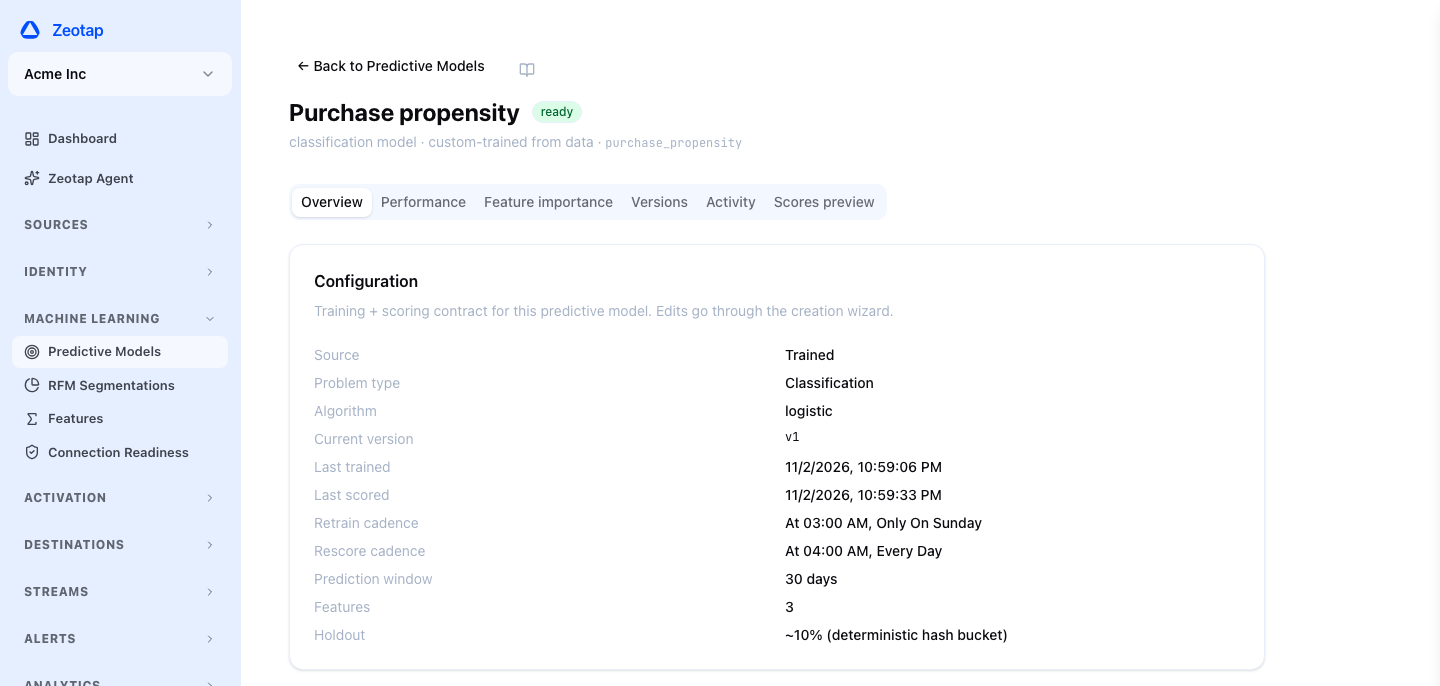
Zeotap supports two sources for predictive scores. Trained models are fit inside your data warehouse and rescored on a schedule against the version you promote (by default the wizard retrains monthly and rescores daily). BYO (bring-your-own) models wrap a scored table your data-science team already maintains, with no training pipeline at all.
Predictive Models also include RFM segmentation, which groups customers into named archetypes instead of scoring them. This page also covers Feature Analysis, which profiles a model’s columns before you train on them.
How It Works
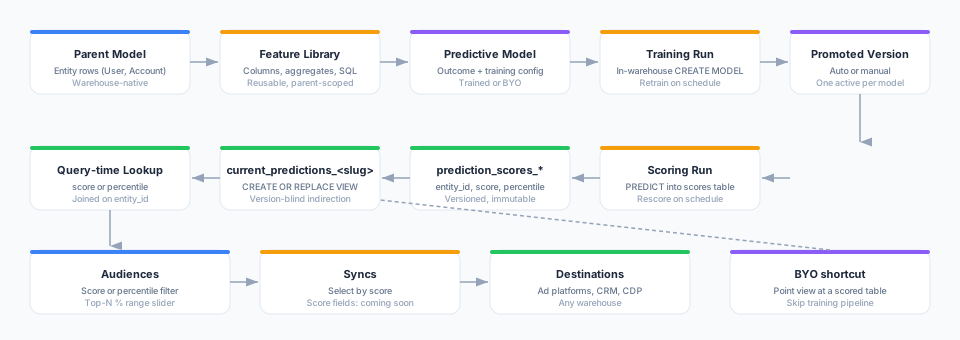
Every predictive model is attached to a parent model (the entity the score is about — User, Account, Device, etc.). Training draws features from that parent model plus a reusable library, and produces a version. Scoring applies the promoted version to every entity and writes a new scores table — one row per entity with its score, its percentile (0–100) and when it was scored — then points the model’s current_predictions_<slug> view at it. Audiences, syncs and journeys look the score up in that view when they run, so they always read the latest promoted scores and never have to change when a model is retrained.
Trained Predictive Models
A trained model uses a warehouse-native ML engine (BigQuery ML, a Snowpark stored procedure on Snowflake, or a training notebook on Databricks) to fit a model on historical features and observed outcomes, then applies it to the current feature set on its rescore schedule.

Outcome Templates
When creating a trained model you pick a template, which seeds the outcome definition, the feature palette, and sensible defaults. You can always switch to Custom to hand-write the outcome SQL.
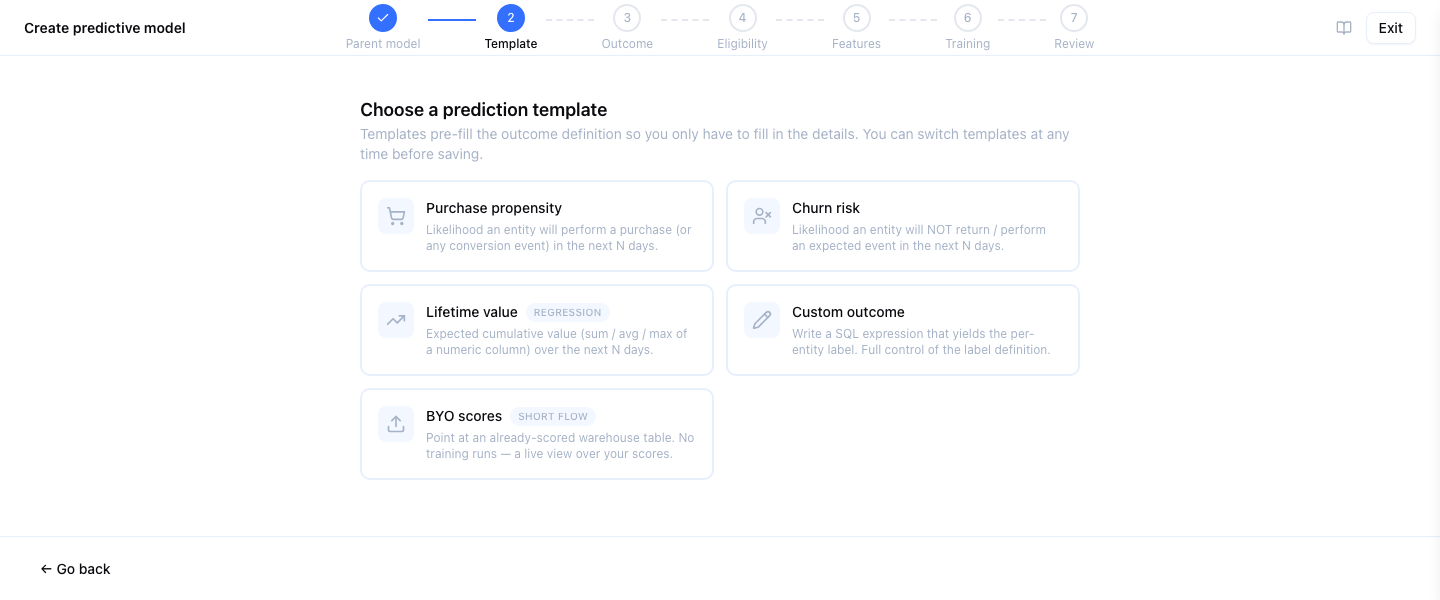
| Template | Problem type | Outcome definition |
|---|---|---|
| Purchase propensity | Classification | User does a purchase event in the next N days |
| Churn risk | Classification | User does no qualifying activity in the next N days |
| Lifetime value | Regression | Sum of revenue over the next N days |
| Custom | Classification or regression | Hand-written outcome SQL and label extractor |
Prediction Window and Eligibility
- Prediction window — how far into the future the outcome is observed. Training anchors the feature view at
now − prediction_windowso labels can be observed between the anchor and now. - Eligibility filter — restricts the user universe the model sees. For example, “users with at least one event in the last 90 days”. Eligibility applies identically at training and scoring time so the populations are comparable.
Features
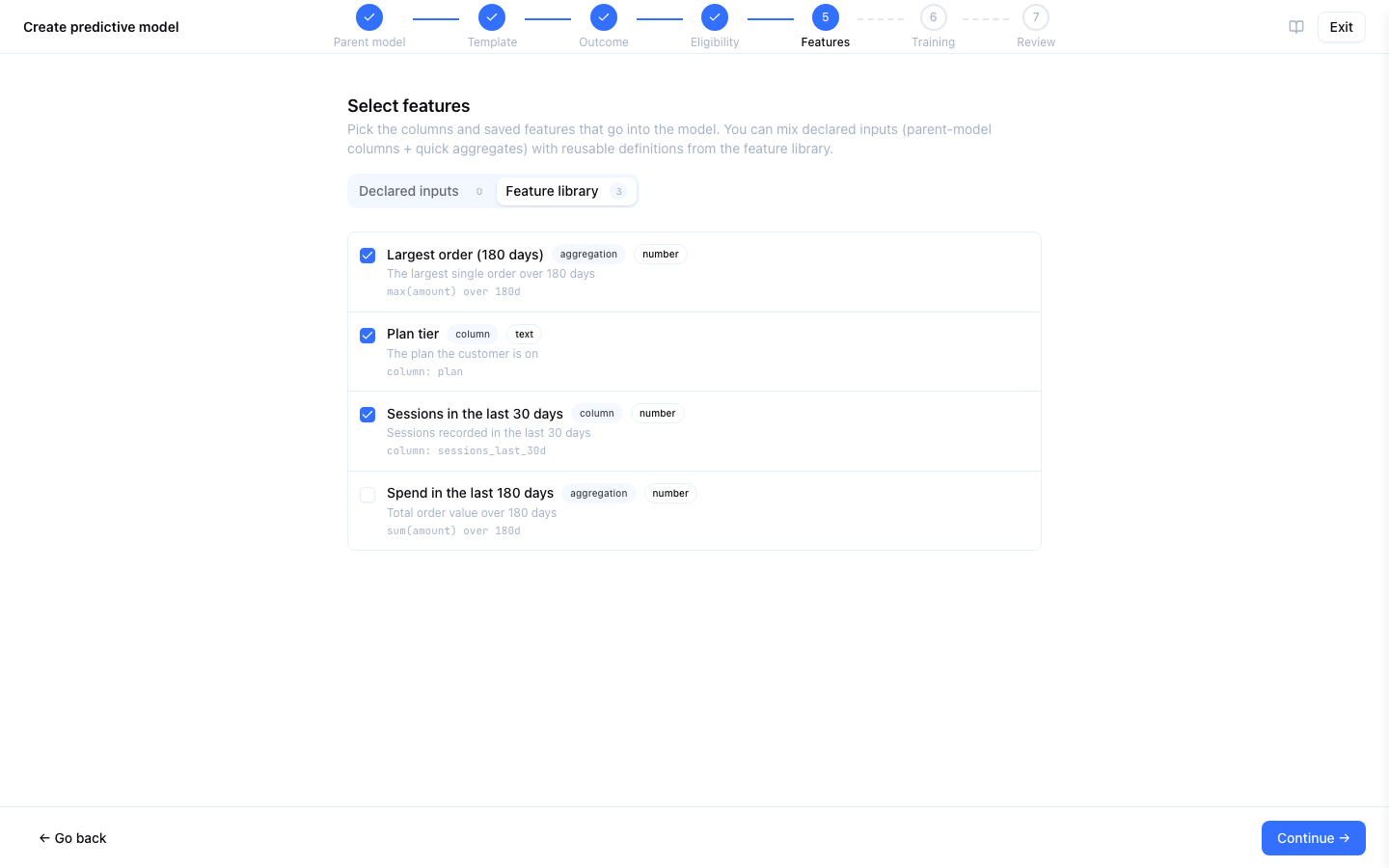
Features are reusable input specifications scoped to a parent model. Zeotap offers two kinds today:
| Feature kind | Definition | Example |
|---|---|---|
| Column | A raw column on the parent model | plan_tier, signup_country |
| Aggregation | A visual builder (function + source table + filters + window) | “Count of completed orders in the last 30 days” |
Coming soon: SQL features — a hand-written expression returning one value per entity.
Save a feature once in the Features library and every predictive model referencing it picks up the change on the next retrain. The library is parent-model scoped — each parent model has its own catalogue.
Training Configuration
| Setting | Description |
|---|---|
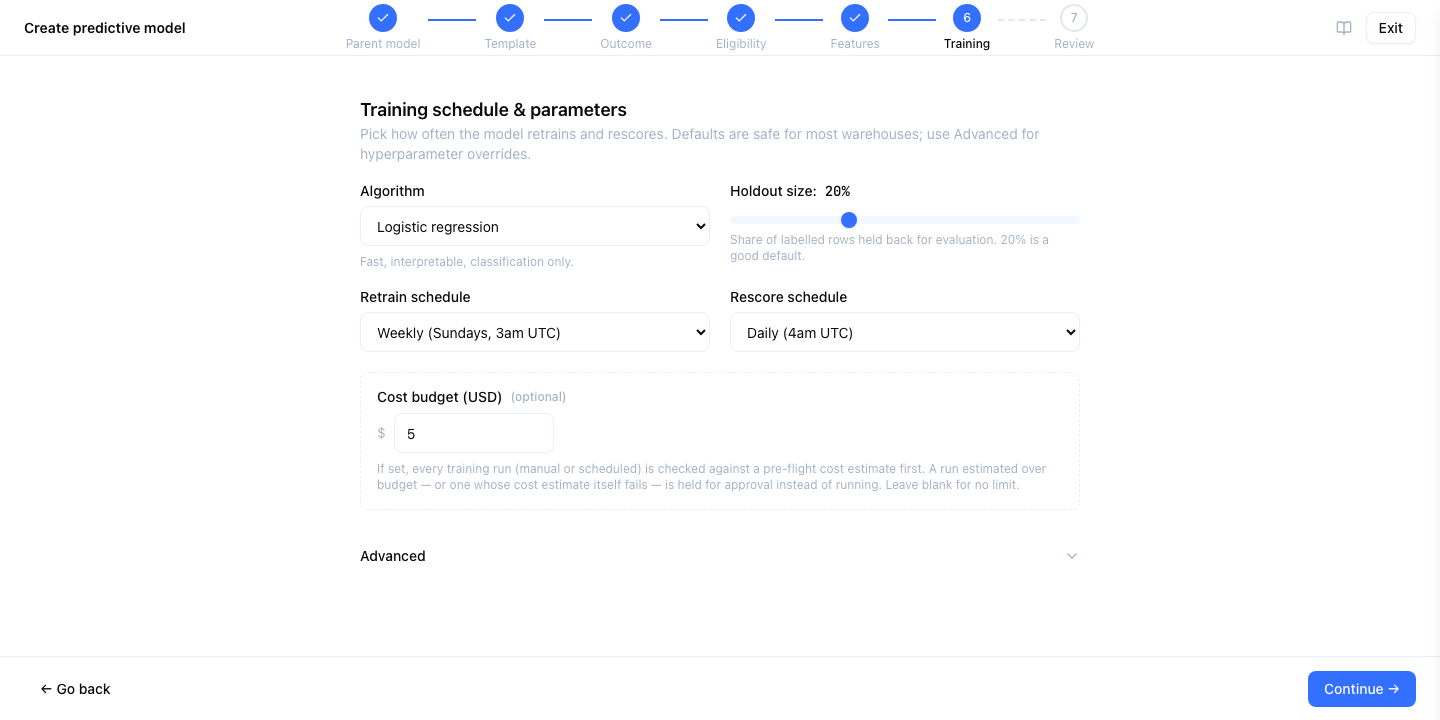
| Retrain schedule | When to fit a new version: monthly (the default), weekly, quarterly, or manual only. |
| Rescore schedule | When to apply the promoted version to current features: daily (the default), weekly, monthly, or manual only. |
| Cost budget | Upper-bound dollar estimate. Training runs above budget park in Awaiting Approval until an admin explicitly approves. |
| Retained versions | Number of historical versions to keep. Default: 5. Older versions are archived by a periodic sweep. |
| Auto-promote tolerance | A new version auto-promotes if it is no worse than the promoted version by more than this tolerance — AUC for classification, RMSE for regression. A first classification version auto-promotes if its AUC is at least 0.55. |
The Training Lifecycle
- Click Create Predictive Model, pick a template, choose the parent model and outcome.
- Configure the eligibility filter and features — pick from the library or declare new ones inline.
- Review the training configuration and click Save. The model is created with its schedules; nothing is trained until you train it or its retrain schedule fires.
- Zeotap runs a pre-flight cost estimate. It is shown as a range, with its likely figure and how it was reached. If the top of the range exceeds your budget, the run pauses at Awaiting Approval with the reason; otherwise it proceeds.
- On Databricks, the estimate is modelled from how many rows and features the model trains on, the algorithm and the compute. It has two parts: the training job (jobs compute), and the SQL warehouse work that builds the training table. If the warehouse can’t be reached in time, the estimate is based on the model’s last run.
- Actual cost on Databricks comes from billing, hours after a run finishes. It shows as pending, then provisional, then final, and covers the training job’s compute at list price; the warehouse part stays an estimate. You can alert on a run whose cost never appears in billing, or that cost more than 1.5× its budget, with the Training cost problem alert.
- On BigQuery, the estimate is modelled from the model type and how much data it trains on, at Google’s list price for your dataset’s location.
- Linear and logistic regression are trained by BigQuery itself and priced by the data they read.
- Boosted trees are trained on Vertex AI and priced by training time. On small and mid-sized data that is mostly a fixed start-up cost.
- Sizing the estimate costs nothing: Zeotap checks the model’s query without running it, or uses the model’s last completed run.
- AutoML has no estimate, so with a budget set, its runs pause for approval.
- Actual cost on BigQuery is measured from the bytes BigQuery billed for the training and for the queries that prepared its data, at list price for the location. It is final as soon as the run completes. If you pay for capacity (editions) rather than on demand, read it as a list-price equivalent.
- A Databricks budget is also the job’s time limit. The job is stopped once it has run for as long as the budget can pay for, so a run cannot quietly exceed its budget on jobs compute. A budget too small to pay for even a minimal run pauses the run instead of starting a job that could not finish.
- Features and labels are compiled into a feature table; the warehouse executes
CREATE MODEL; evaluation, feature importance, and lift-by-decile are computed in-warehouse. - The version lands in Pending Review. If it passes the auto-promote rule (within tolerance, and not flagged
suspected_leakage— see Limits), it promotes automatically and a rescore is queued. Otherwise it waits for a manual promote. - A separate rescore pipeline runs on its own cadence, producing a fresh
prediction_scores_*table per run and atomically swapping thecurrent_predictions_<slug>view.
Rolling back is a single click — Promote on an earlier version makes it current and queues a rescore with it; the view moves to the new scores when that rescore finishes. Audiences and syncs need no change. A version whose warehouse artifacts were already removed by retention cannot be promoted again.
Deleting a model. A model that something still filters on cannot be deleted: an audience (in any status), an audience canvas’s draft or published version, a journey, a destination rule, a deletion rule, a subset or an audience template. The refusal names what uses the model; remove its condition from those, or delete them, first. Deleting it anyway would leave each of them filtering on scores that no longer exist.
Erasure. A deletion rule on the parent model also removes the matched people from this model’s current and retained score tables, in the same run.
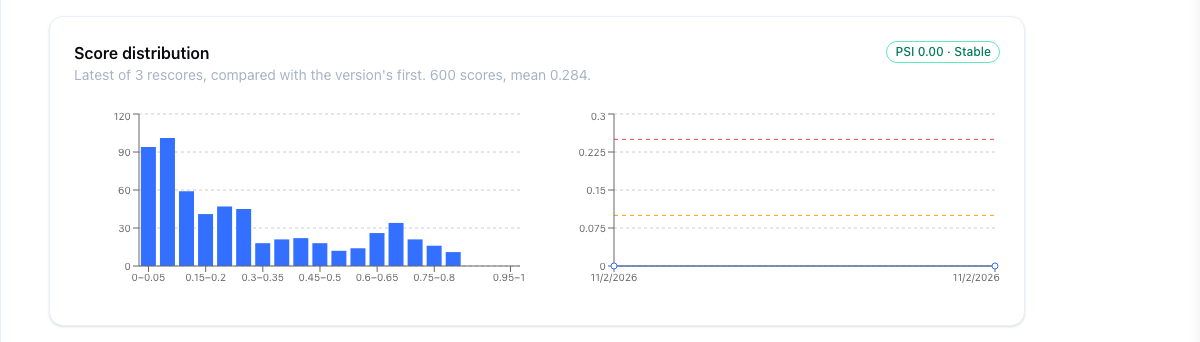
Score drift. After every rescore, Zeotap measures the scores it just served: how many, their range and average, and how they spread across 20 bins. The version’s first rescore is its reference. Each later rescore is compared with that reference, and with the rescore before it, using a Population Stability Index (PSI). Under 0.10 means the population looks the same. From 0.10 it has moved, and from 0.25 it has moved a lot: often the moment to retrain. The Scores drifted alert fires at 0.10 (critical from 0.25) and recovers on the next rescore back under 0.10. Classification scores are binned in 20 equal steps from 0 to 1; regression scores on the ranges the first rescore’s scores fell into, so every rescore of a version is binned the same way.
Seeing and acting on drift. The model’s Overview shows the latest rescore’s score distribution and how its PSI has moved over recent rescores, and every rescore in Activity carries a PSI chip (green while stable, amber from 0.10, red from 0.25). When the scores have moved, a Retrain button starts a training run, exactly as Train does.
Retrain automatically on drift. Turn on Retrain predictive models when their scores drift in the workspace’s General settings, and a model whose latest rescore drifted to 0.25 or more is retrained once, automatically, without waiting for its schedule. The retrain runs on your warehouse and goes through the model’s cost budget like a scheduled retrain: if it would exceed the budget it waits for approval instead. It is off by default, and nothing is retrained again until a newer rescore drifts.
Unity Catalog limits (Databricks). Unity Catalog allows 10,000 tables and 1,000 registered models per schema, and 5,000 registered models per metastore. Past a limit, creating a table or registering a model fails for every flow on that source. A daily check counts the platform’s schemas on each Databricks source. The Unity Catalog limit approaching alert fires at 80% of any of these limits, and recovers on the first daily check back under it. Create the alert with the Any resource scope.
BYO Scored Tables
If you already have a scored table in your warehouse — from an external data-science team, a Databricks notebook, or a vendor tool — you can register it as a predictive model without any training pipeline.
When to Use BYO
- Your data-science team maintains the model elsewhere and you only need Zeotap for activation.
- You have a proprietary scoring algorithm Zeotap doesn’t offer (survival analysis, deep-learning recommender, etc.).
- You want to compare an external model’s scores against a Zeotap-trained baseline.
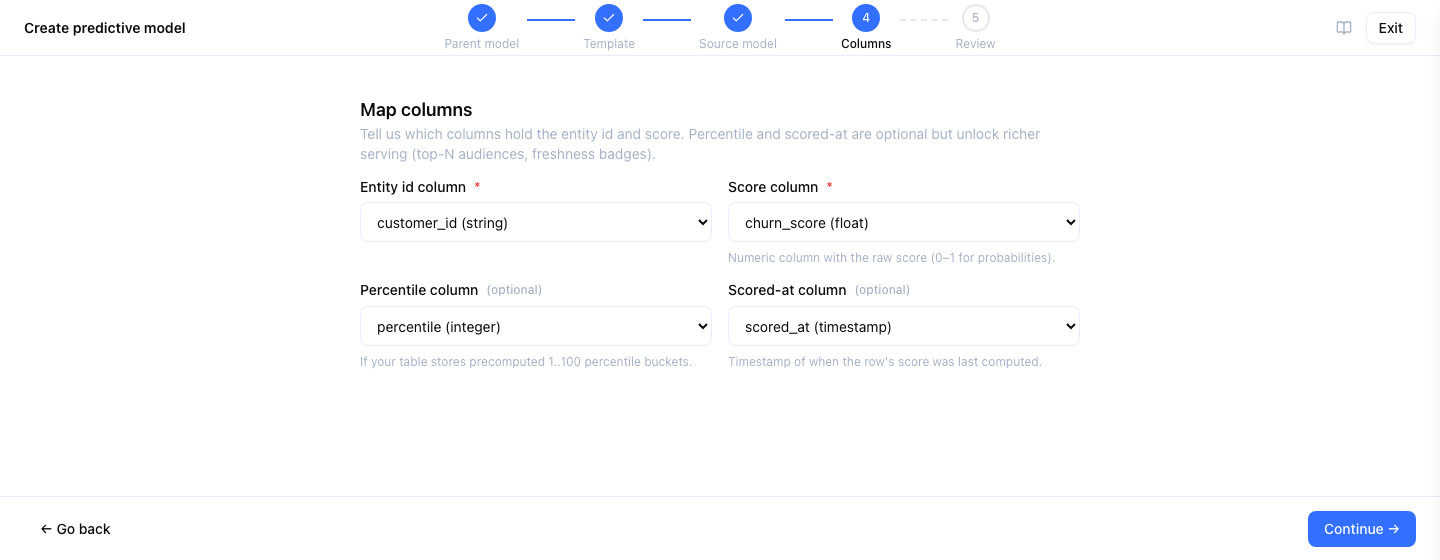
Column Mapping
Point Zeotap at the scored table and map its columns:
| Mapping | Required | Description |
|---|---|---|
| Entity ID column | Yes | Column that joins back to the parent model’s primary key |
| Score column | Yes | Numeric column with the probability, LTV, or other predicted value |
| Percentile column | No | Pre-computed percentile. If omitted, Zeotap computes NTILE(100) at query time. |
| Scored-at column | No | Timestamp of when the row was scored, carried through the view |
Live-View Semantics
BYO does not materialise a copy of your scored table. Instead Zeotap creates a live view (current_predictions_<slug>) that SELECTs from your source table every time an audience or sync runs. Updates to the source table are visible immediately — there is no refresh schedule to configure.
If Zeotap cannot create the view — the table or a mapped column is missing, or a type does not fit — the model is left in Error with the warehouse’s reason, and Retry view creates it again once the table is fixed. Ingesting again is never the fix: it would register a second model.
Warehouse Support
Predictive Models depend on warehouse-native ML features. What each warehouse needs before you train — grants, packages and compute — is on its own page: BigQuery, Snowflake and Databricks. Check readiness on the model’s page runs those checks for you and says how to fix each one that fails, without running anything billed.
| Warehouse | Training | Scoring | Feature importance | Evaluation | Available |
|---|---|---|---|---|---|
| BigQuery | BigQuery ML CREATE MODEL | ML.PREDICT | ML.GLOBAL_EXPLAIN (attribution) | ML.EVALUATE | Generally available |
| Snowflake | Snowpark stored procedure (XGBoost / scikit-learn) | Scoring stored procedure | Tree impurity / linear contribution | Metrics on the sealed holdout | Available |
| Databricks | LightGBM / scikit-learn notebook, run as a Jobs API job on serverless compute | Scoring notebook (MLflow model, pinned version) | Tree gain / linear contribution | Metrics on the sealed holdout | Generally available |
Snowflake does not use Snowflake Cortex. Training and scoring run in stored procedures that Zeotap deploys into the planner schema, so the role Zeotap connects with needs no access to Cortex AI functions or Cortex models (model RBAC application roles).
AutoML is available on BigQuery only. It is not available on Databricks or Snowflake: choosing AutoML there is refused, and the option is not offered for a parent model on those warehouses. On Databricks, Auto trains a LightGBM model. Databricks trains on a single machine, so a very large training set is sampled (the holdout used to grade the model never is); scoring is not limited this way. Databricks runs training and scoring on serverless compute by default; to use a classic cluster instead, see Databricks → Predictive models.
Predictive Models enforce a single-warehouse invariant: the parent model, the feature sources, the outcome source, and the promoted view all live in the same warehouse source. Destinations can be anywhere: a sync or journey that selects people by a score delivers them like any other audience.
Where predictive objects live. Training and scoring write their tables, the promoted current_predictions view and (on BigQuery and Databricks) the warehouse models into the platform’s planner schema. If the source is bound to a working dataset, that schema is inside the working dataset’s project, database or catalog, exactly as for syncs and journeys; otherwise it is inside the container the connection points at. Audiences, syncs and journeys read predictions from wherever scoring last wrote them. On Databricks the catalog (the working dataset’s, else the source’s) must be a Unity Catalog catalog: a source whose catalog is hive_metastore, or empty, is refused when training or scoring is triggered, because models cannot be registered there.
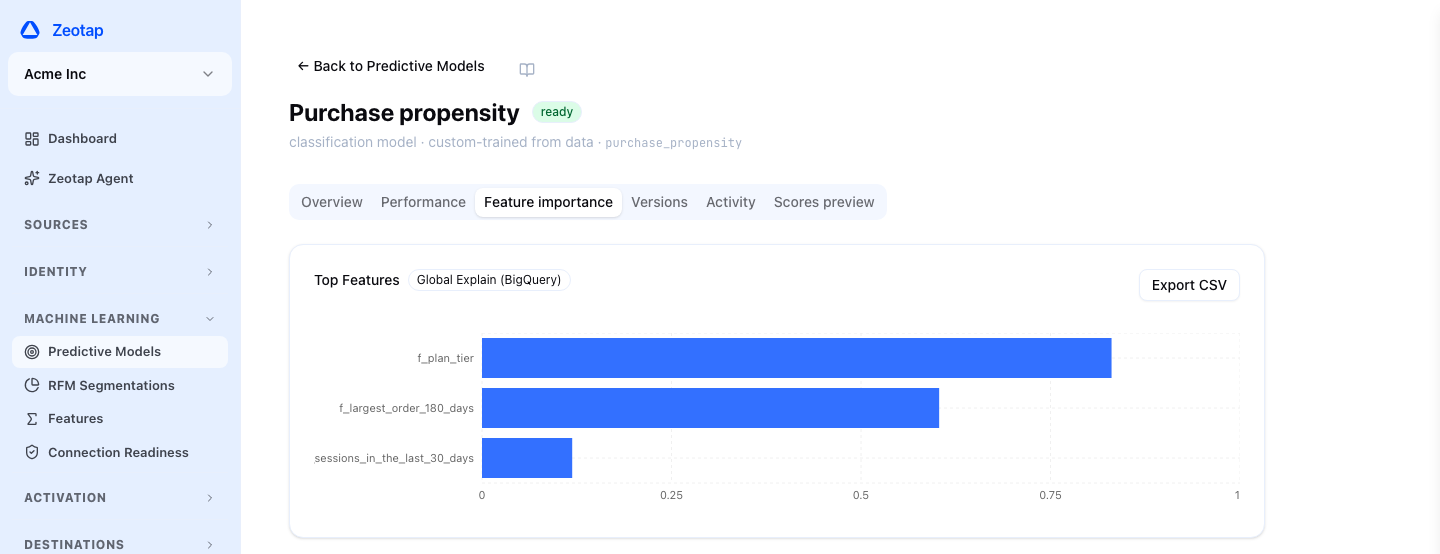
Feature importance is reported per-warehouse with different methods: BigQuery reports attribution, Snowflake reports tree impurity or, for linear models, the spread of each feature’s contribution, and Databricks reports tree gain or the same contribution spread. The importance chart surfaces the method alongside the numbers so you don’t accidentally compare a BigQuery attribution score against a Snowflake or Databricks one.
Using Predictions
In an Audience
Predictive models have their own Predictive Models group in the audience builder’s attribute picker.
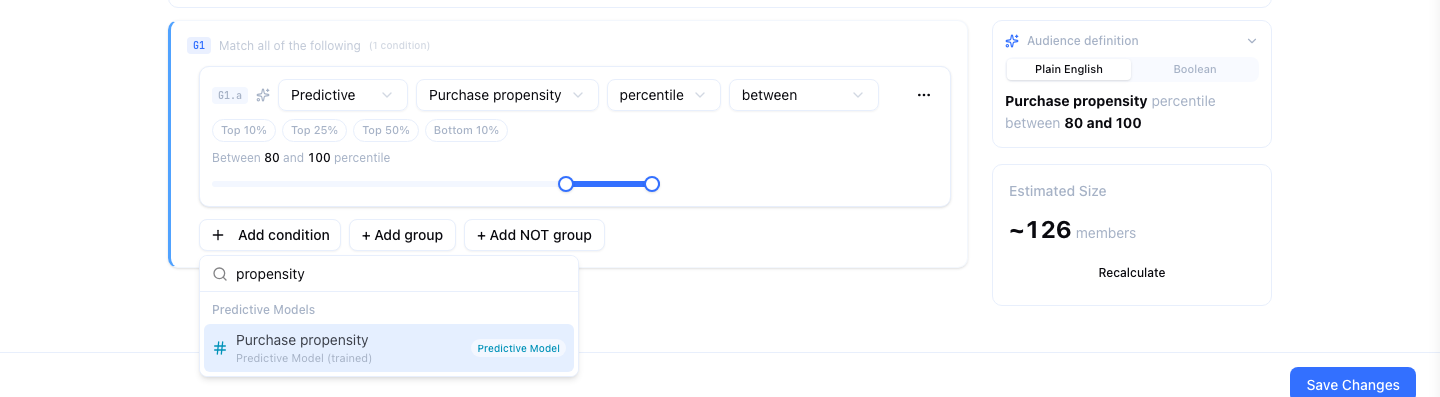
Picking one adds a predictive condition:
| Control | Choices |
|---|---|
| Value | score — the raw prediction (a probability for classification, the predicted amount for regression) — or percentile, its rank from 0 to 100 across everyone scored |
| Operator | greater than or equal, greater than, less than or equal, less than, between |
| Value input | A number, or for a percentile between, a range slider with Top 10%, Top 25%, Top 50% and Bottom 10% chips |
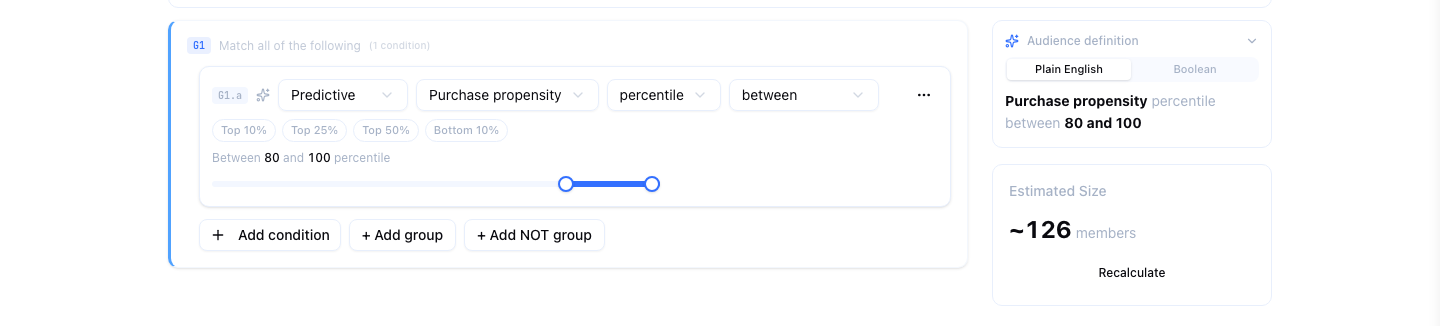
Percentile is usually the better choice: “the top 20% by churn risk” stays meaningful when a retrain shifts the raw scores, and it is what the slider is built for. Switching between score and percentile clears the threshold, because the two are on different scales.
Predictive conditions combine freely with every other condition, so “customers with a lifetime value above 500 whose churn risk is in the top 20%” is one audience. The score is read from the model’s current view each time the audience is counted, previewed or synced.
In Syncs and Journeys
A sync or journey whose audience has a predictive condition selects people by their current score, exactly as the audience does. Journeys can use predictive conditions in their entry and branch rules too.
Coming soon: mapping a score or percentile into a destination field, using predictions inside formula computed attributes, and showing a customer’s predictions in Customer 360. Today a prediction decides who is selected; it is not sent as a field.
From the API and the Agent
Everything on this page is available over the Predictive Models REST API. The Zeotap Agent can read, price, create, change, train, rescore, pause and delete predictive models through its MCP tools; training above the workspace’s approval threshold, every promotion and every rescore wait for a person to approve them.
Operating a Model
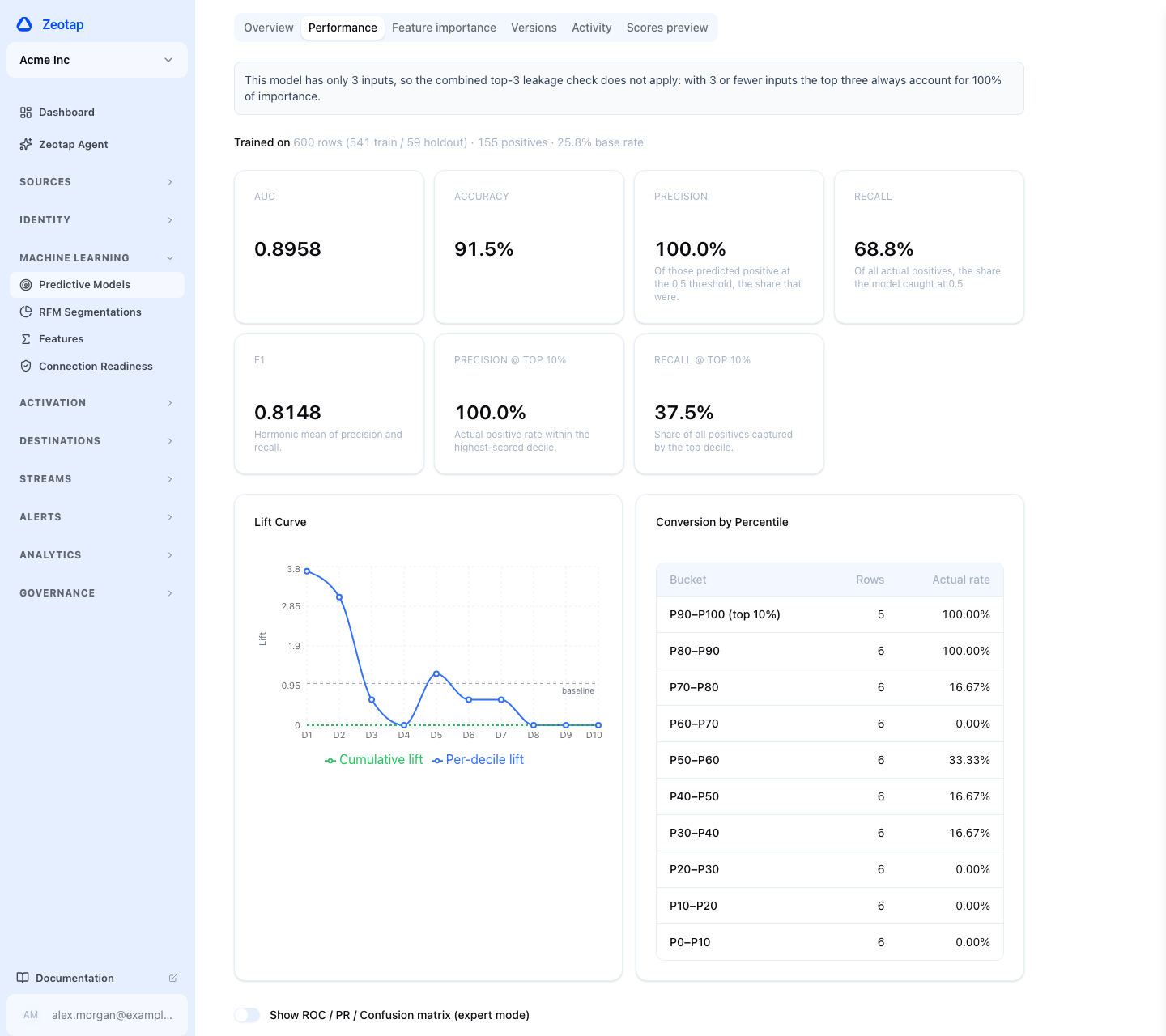
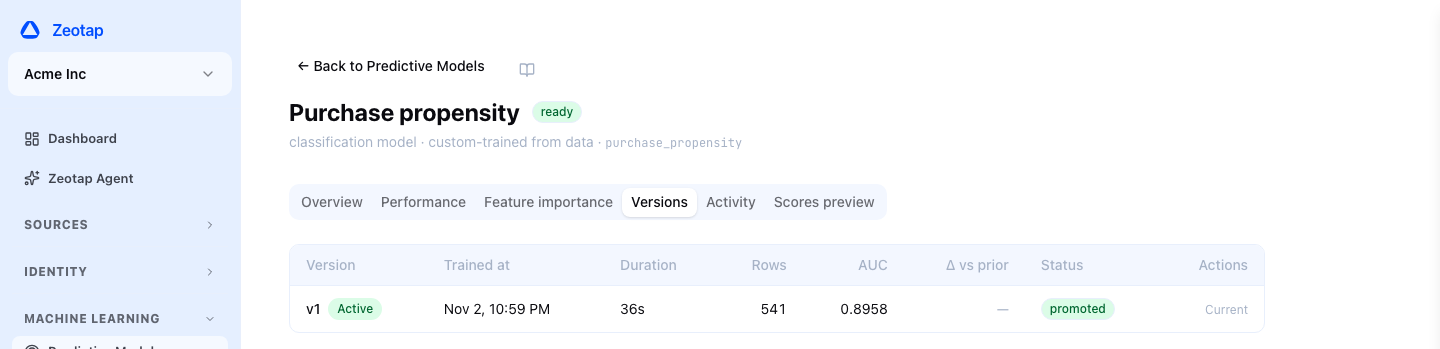
Versions and promotion. Every training run produces a version with its metrics, feature importance and the run’s cost. The Versions tab shows them all and promotes or rolls back. Activity lists training and scoring runs with their status, cost and, for each rescore, a drift chip.
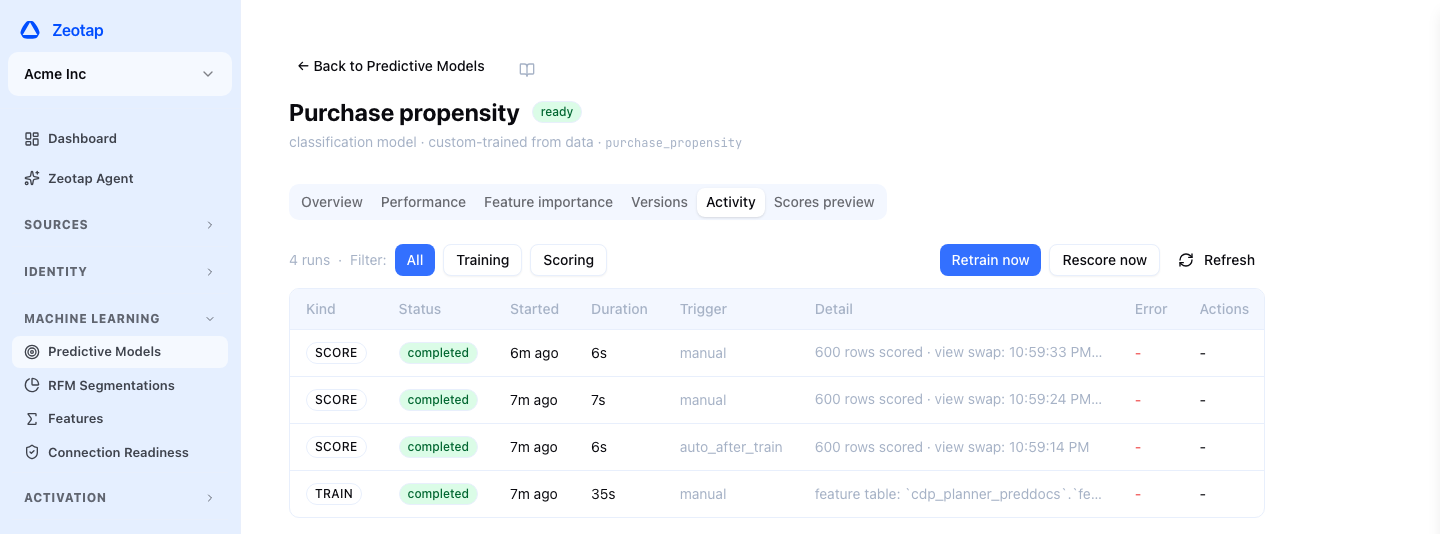
Freshness. The model’s header shows a Stale badge when the last successful rescore is older than twice its rescore schedule (48 hours for a model with no schedule), and the Scores are stale alert fires at the same point. Rescore now refreshes the scores without waiting for the schedule.
Leakage. A version is flagged Suspected label leakage when its AUC is above 0.99, when one feature carries most of the model’s importance, or when the top three together do. A flagged version never auto-promotes. If a dominant feature is legitimate, approve it through the API and later versions are only flagged again if its share moves.
Pausing. Pause stops a model’s scheduled retraining and rescoring; its current scores stay in place and audiences keep using them. Resume restarts the schedules.
RFM Segmentation
RFM segmentation groups the customers of a parent model by how Recently, how Frequently and for how much Money they act, using a clustering model trained in your warehouse. Its output is a category, not a score, so it is used in audiences through its own model rather than as a predictive score.
RFM segmentations are listed under Predictive Models, with the problem segmentation. To create one, click Create predictive model, pick the parent model, and choose the RFM segmentation template. Then complete five steps:
- Parent model — the customers to segment, already selected from the step before, and a name.
- Qualifying event — the event model, how its events are matched to the parent, and the condition an event must meet to count. The match is taken from your relationships: with one link between the two models it is shown and used; with several you pick the one that names the record each event belongs to (the buyer rather than a gift recipient, say). RFM needs a direct one-to-one or one-to-many link on a single column, and the step says so when there is none.
- Monetary columns — the numeric columns that measure value. Zeotap suggests them, skipping columns Feature Analysis found empty or constant.
- Configuration — the lookback window (1–365 days), the number of segments (2–10), the minimum qualifying population, and an optional schedule.
- Review — Check data reads the event model through the same window and condition and says whether the segmentation will work before you save.
Each run clusters the customers and matches every cluster to a named archetype — Champions, Loyal Customers, At Risk, Hibernating, New Customers, Potential Loyalist, Needs Attention, About to Sleep, Promising and Cant Lose Them — with a low, mid or high value tier. The result is registered as an ordinary model related to the parent, so the segment name and value tier can be used in any audience, sync or journey condition. The detail page shows each segment’s size and averages, and the run history.
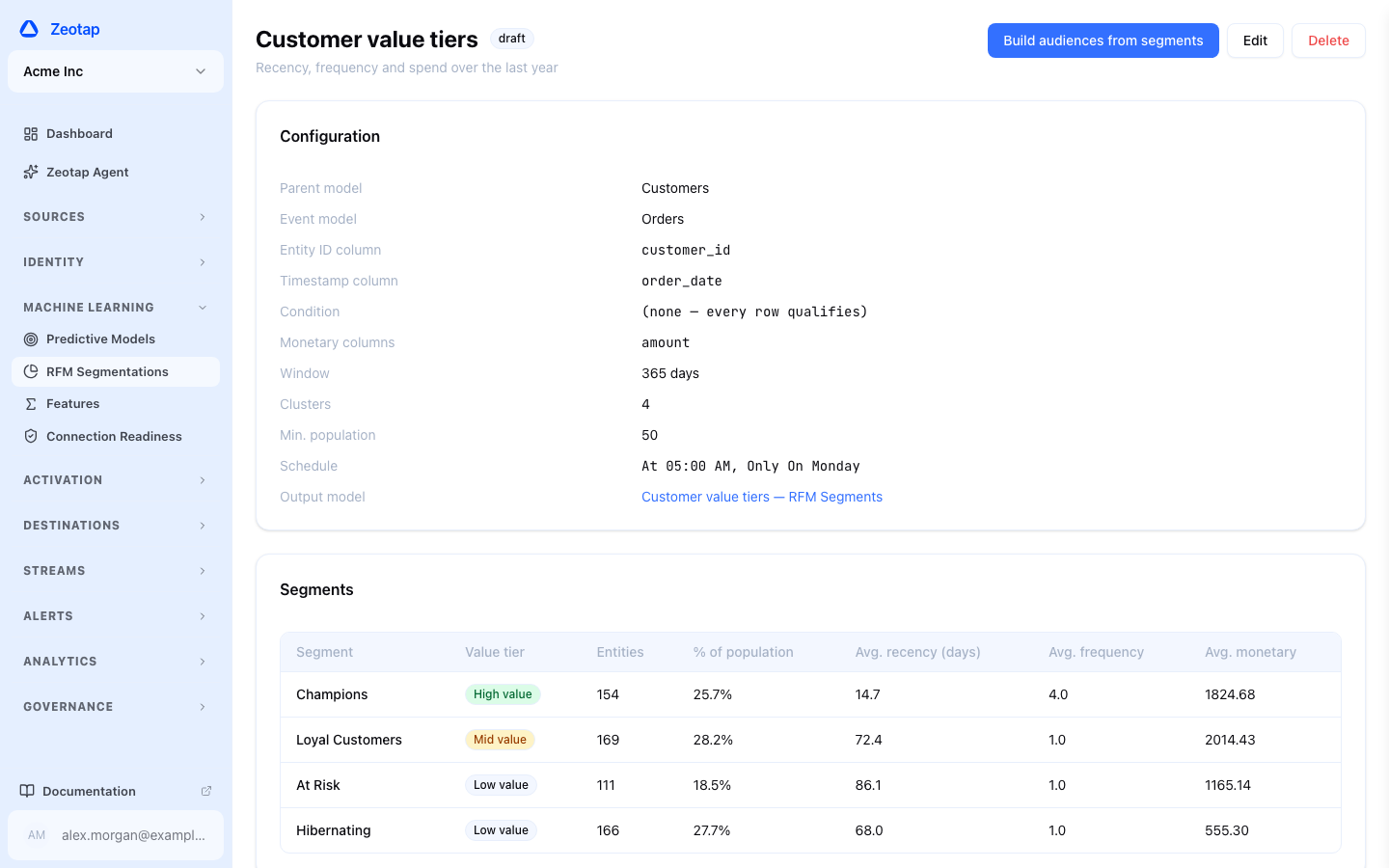
RFM segmentation runs on BigQuery, Databricks and Snowflake.
Feature Analysis
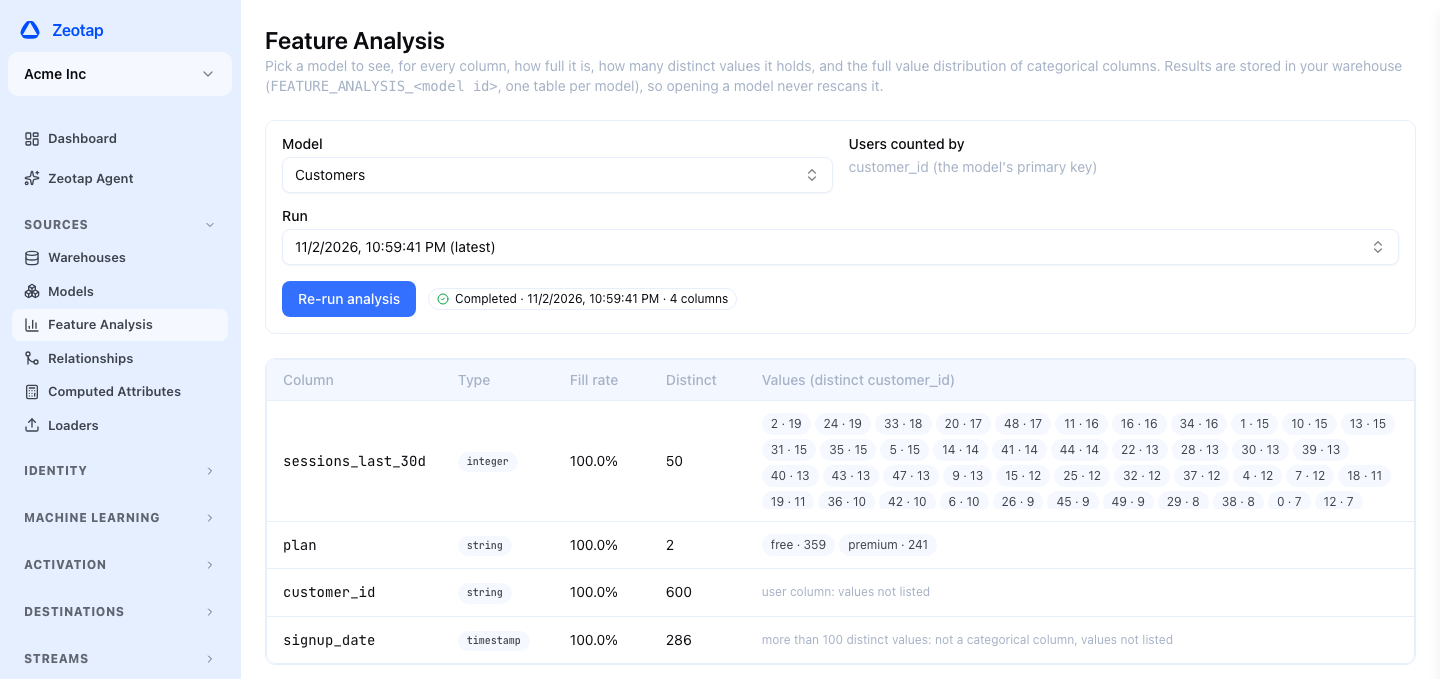
Feature Analysis in the sidebar profiles one of your models before you build features or a segmentation on it. For every column it shows the fill rate and the distinct count and, for categorical columns, how the values are distributed and how many distinct customers hold each one.
A run scans the model once and stores the result in a table in your warehouse’s planner schema; opening the model later reads that table without scanning again, and past runs stay selectable. Columns the model marks sensitive, and very high-cardinality columns, store no values. It works on every warehouse.
Limits
- Single warehouse per model. Parent model, features, outcome, and the promoted view must all live in the same warehouse source. Destinations are unrestricted.
- Cost lives on your warehouse bill. Training and scoring run as warehouse queries. The pre-flight estimate gives an upper bound; you can raise or lower the budget per model.
- Classification and regression. Both are supported on BigQuery, Snowflake and Databricks, and for BYO. AutoML is BigQuery only, and must be enabled for your workspace.
- Retained versions. Each model has a retained-versions setting (default 5). Where version retention is enabled for your deployment, older versions are removed by a periodic sweep, after an audit record is written, and can no longer be promoted; the promoted version is always kept. Independently of that, each version keeps only its two most recent score tables.
- Suspected leakage blocks auto-promote. A near-perfect AUC (above 0.99) or a feature that dominates the model almost always means the features contain the outcome. The version is flagged and is not promoted automatically; see Leakage.
Coming soon: predictive models in the Snowflake Native App.
Next Steps
- Creating an Audience — Select people by a predictive score or percentile
- Models — Parent models that predictive models attach to
- Predictive Models API — Create, train and promote models programmatically
- MCP Server — The Zeotap Agent’s predictive tools