Permissions Reference
Zeotap has 120 permissions across 43 resource categories. Every API call that reads or changes something checks one of them. This page is the complete list, what each one allows, and which built-in roles carry it.
Permission Format
Permissions are dotted keys — a resource category, then the action:
sources.read
sources.write
syncs.trigger
events.contracts.write
workspace.settings.edit
Most categories pair exactly two permissions. read views the resource; write covers creating, editing and deleting it. Where one action needs to be grantable on its own, it gets its own key: syncs.trigger runs a sync without being able to change it, stores.trigger refreshes a store feed, deletion_rules.execute runs a deletion rule against the warehouse, warehouse_users.rotate rotates a stored credential, workspace_audit.export emails or downloads the audit log, and events.debug opens the live event debugger.
A category with sub-resources nests them before the action. Events split this way into six pairs — events.contracts.*, events.keys.*, events.forwarding.*, events.schemas.*, events.transformations.* and events.enrichments.* — so a team can be given event contracts without being given write keys.
How Permissions Are Granted
Permissions reach an account only through groups. A group is granted one or more roles — built-in or custom — on each workspace it should reach, and an account’s effective permissions in a workspace are the union of the roles held there by every group it belongs to. There is no per-person role and no permission granted directly to a group.
Grants are additive. A second group or a second role only ever adds; nothing narrows what another grant allows. To restrict which rows a member can see, use access policies, which are a separate mechanism.
The seeded Organization admins group holds the Owner role on every workspace in its organization, and Organization viewers holds Member.
Platform administrators sit outside this: they hold the Admin role’s permissions in every workspace, plus whatever their own groups grant there. Because Admin withholds workspace.delete, a platform administrator can delete a workspace only where one of their own groups grants it, for example through the Owner role.
A REST API key is capped rather than granted. The key declares its scopes when it is created, and a request made with it is denied anything outside them — even where the account that created it is an Owner.
To see the effective set for the current caller:
curl "$API_BASE_URL/api/v1/workspaces/$WORKSPACE_ID/permissions/me" \
  -H "Authorization: Bearer $API_TOKEN"
GET /api/v1/permissions returns the full catalog of permission keys with their categories and descriptions.
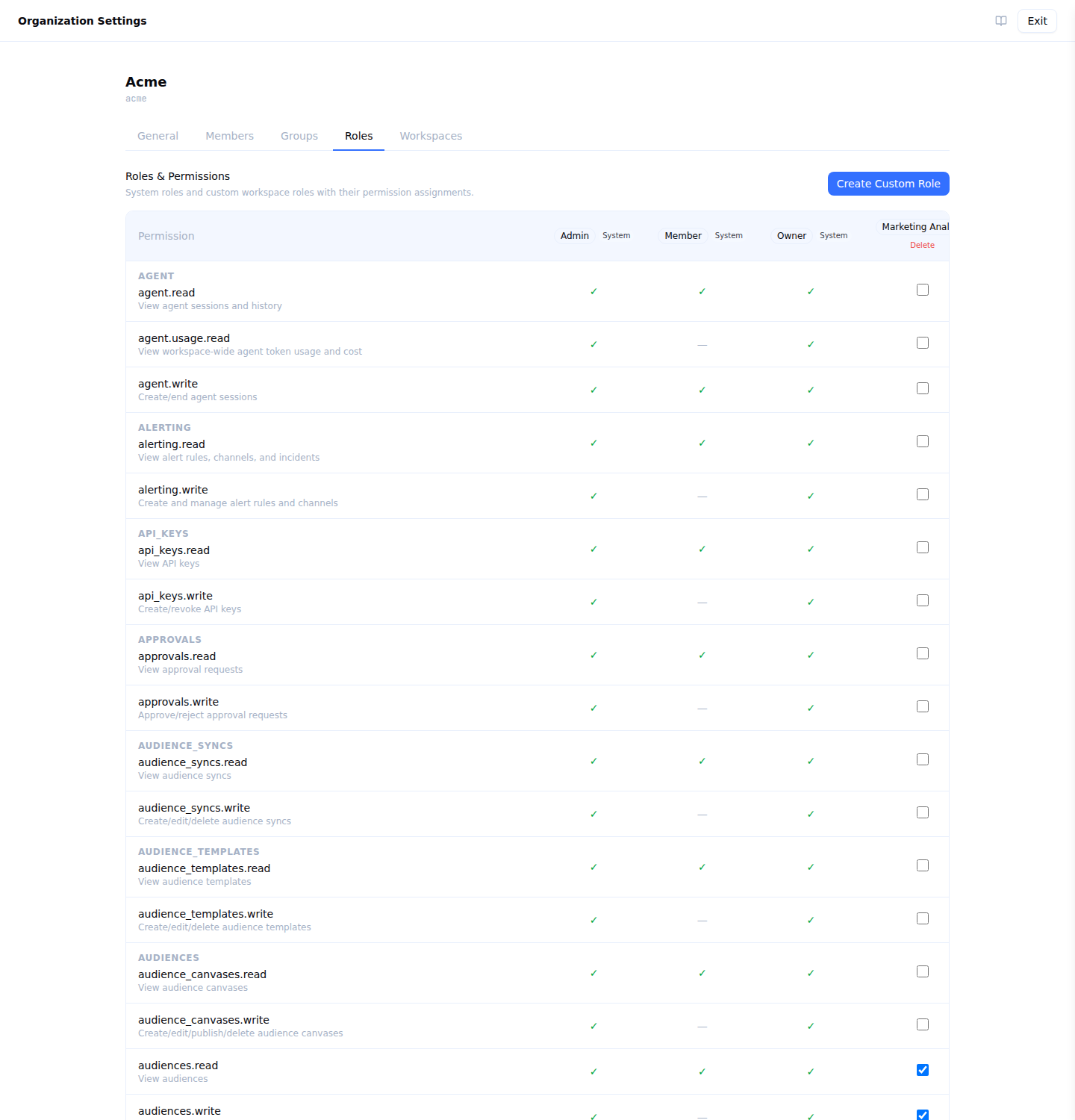
Organization settings → Roles shows the same thing the table below does, live for your organization, with a column per role:
Complete Permission Table
Warehouses and modelling
| Permission | What it allows | Owner | Admin | Member |
|---|---|---|---|---|
sources.read | View sources | Yes | Yes | Yes |
sources.write | Create/edit/delete sources | Yes | Yes | No |
connections.read | View connections | Yes | Yes | Yes |
connections.write | Create/edit/delete connections | Yes | Yes | No |
models.read | View models | Yes | Yes | Yes |
models.write | Create/edit/delete models | Yes | Yes | No |
dataprep.read | View prepared tables, their recipes and their build history (Data Prep, where enabled for the workspace) | Yes | Yes | Yes |
dataprep.write | Create, edit and delete prepared tables | Yes | Yes | No |
dataprep.run | Trigger and cancel prepared-table builds | Yes | Yes | No |
traits.read | View traits | Yes | Yes | Yes |
traits.write | Create/edit/delete traits | Yes | Yes | No |
loaders.read | View loaders and their run history | Yes | Yes | Yes |
loaders.write | Create, update, delete, and trigger loaders | Yes | Yes | No |
folders.read | View folders | Yes | Yes | Yes |
folders.write | Create, rename, move, and delete folders | Yes | Yes | No |
tags.read | View tags | Yes | Yes | Yes |
tags.write | Create, rename, and delete tags | Yes | Yes | Yes |
field_mapping_presets.read | View saved field mappings | Yes | Yes | Yes |
field_mapping_presets.write | Create, edit, and delete saved field mappings | Yes | Yes | No |
subsets.read | View subsets and assignments | Yes | Yes | Yes |
subsets.write | Manage subset categories, subsets, and assignments | Yes | Yes | No |
cdp_working_datasets.delete | Delete an unreferenced working dataset container | Yes | Yes | No |
cdp_working_datasets.read | View where the platform’s working data is stored | Yes | Yes | No |
cdp_working_datasets.write | Create, rename and bind working dataset containers | Yes | Yes | No |
execution_environments.delete | Delete an unreferenced execution environment | Yes | Yes | No |
execution_environments.read | View which compute runs queries | Yes | Yes | No |
execution_environments.write | Create, rename and bind execution environments | Yes | Yes | No |
warehouse_users.delete | Delete an unreferenced warehouse user | Yes | Yes | No |
warehouse_users.read | View warehouse users and their principals | Yes | Yes | No |
warehouse_users.rotate | Rotate a warehouse user’s stored credential | Yes | Yes | No |
warehouse_users.write | Create, rename, disable and bind warehouse users | Yes | Yes | No |
Identity
| Permission | What it allows | Owner | Admin | Member |
|---|---|---|---|---|
identity_graphs.read | View identity graphs | Yes | Yes | Yes |
identity_graphs.write | Create/edit/delete identity graphs | Yes | Yes | No |
Audiences and orchestration
| Permission | What it allows | Owner | Admin | Member |
|---|---|---|---|---|
audience_canvases.read | View audience canvases | Yes | Yes | Yes |
audience_canvases.write | Create/edit/publish/delete audience canvases | Yes | Yes | No |
audiences.read | View audiences | Yes | Yes | Yes |
audiences.write | Create/edit/delete audiences | Yes | Yes | No |
audience_templates.read | View audience templates | Yes | Yes | Yes |
audience_templates.write | Create/edit/delete audience templates | Yes | Yes | No |
audience_syncs.read | View audience syncs | Yes | Yes | Yes |
audience_syncs.write | Create/edit/delete audience syncs | Yes | Yes | No |
splits.read | View splits | Yes | Yes | Yes |
splits.write | Create/edit/delete splits | Yes | Yes | No |
priority_lists.read | View priority lists | Yes | Yes | Yes |
priority_lists.write | Create/edit/delete priority lists | Yes | Yes | No |
frequency_caps.read | View frequency caps | Yes | Yes | Yes |
frequency_caps.write | Create and manage frequency caps | Yes | Yes | No |
journeys.read | View journeys | Yes | Yes | Yes |
journeys.write | Create/edit/delete journeys | Yes | Yes | No |
Destinations and syncs
| Permission | What it allows | Owner | Admin | Member |
|---|---|---|---|---|
destinations.configure_sync | Configure models and syncs on a destination | Yes | Yes | No |
destinations.manage | Full management of destination settings | Yes | Yes | No |
destinations.read | View destinations | Yes | Yes | Yes |
destinations.write | Create/edit/delete destinations | Yes | Yes | No |
destination_rules.read | View destination rules | Yes | Yes | Yes |
destination_rules.write | Create/edit/delete destination rules, and choose which groups may manage one | Yes | Yes | No |
syncs.read | View syncs | Yes | Yes | Yes |
syncs.trigger | Trigger sync runs manually | Yes | Yes | No |
syncs.write | Create/edit/delete syncs | Yes | Yes | No |
Events
| Permission | What it allows | Owner | Admin | Member |
|---|---|---|---|---|
events.contracts.read | View event contracts and violations | Yes | Yes | Yes |
events.contracts.write | Create, update, and archive event contracts | Yes | Yes | No |
events.debug | Access live event debugger | Yes | Yes | Yes |
events.enrichments.read | View event enrichments | Yes | Yes | Yes |
events.enrichments.write | Create and manage event enrichments | Yes | Yes | No |
events.forwarding.read | View event forwarding rules and delivery logs | Yes | Yes | Yes |
events.forwarding.write | Create and manage event forwarding rules | Yes | Yes | No |
events.keys.read | View event write keys | Yes | Yes | Yes |
events.keys.write | Create and revoke event write keys | Yes | Yes | No |
events.read | View events, volume metrics, and live stream | Yes | Yes | Yes |
events.schemas.read | View event schemas and discovered schemas | Yes | Yes | Yes |
events.schemas.write | Create, update, and archive event schemas | Yes | Yes | No |
events.transformations.read | View event transformations | Yes | Yes | Yes |
events.transformations.write | Create and manage event transformations | Yes | Yes | No |
events.write | Configure event settings | Yes | Yes | No |
Personalization
| Permission | What it allows | Owner | Admin | Member |
|---|---|---|---|---|
stores.read | View stores and their feeds | Yes | Yes | Yes |
stores.trigger | Trigger, cancel and resume store feed refreshes | Yes | Yes | No |
stores.write | Create/edit/delete stores and store feeds | Yes | Yes | No |
realtime_events.read | View realtime events | Yes | Yes | Yes |
realtime_events.write | Create/edit/delete realtime events | Yes | Yes | No |
Monitoring
| Permission | What it allows | Owner | Admin | Member |
|---|---|---|---|---|
alerting.read | View alert rules, channels, and incidents | Yes | Yes | Yes |
alerting.write | Create and manage alert rules and channels | Yes | Yes | No |
observability.read | View external observability exports | Yes | Yes | Yes |
observability.write | Create and manage external observability exports | Yes | Yes | No |
Governance
| Permission | What it allows | Owner | Admin | Member |
|---|---|---|---|---|
policies.read | View guardrail policies | Yes | Yes | Yes |
policies.write | Create/edit/delete guardrail policies | Yes | Yes | No |
approvals.read | View approval requests | Yes | Yes | Yes |
approvals.write | Approve/reject approval requests | Yes | Yes | No |
deletion_rules.execute | Trigger deletion rule runs against the warehouse | Yes | Yes | No |
deletion_rules.read | View deletion rules and deletion logs | Yes | Yes | Yes |
deletion_rules.write | Create, edit, and delete deletion rules | Yes | Yes | No |
audit_log.read | View the AI agent audit log | Yes | Yes | Yes |
workspace_audit.export | Export or email the workspace audit log | Yes | Yes | No |
workspace_audit.read | View the workspace audit log | Yes | Yes | No |
agent.read | View agent sessions and history | Yes | Yes | Yes |
agent.usage.read | View workspace-wide agent token usage and cost | Yes | Yes | No |
agent.write | Create/end agent sessions | Yes | Yes | Yes |
Workspace hierarchy and sharing
| Permission | What it allows | Owner | Admin | Member |
|---|---|---|---|---|
workspace_hierarchy.read | See a workspace’s parent and children | Yes | Yes | Yes |
workspace_hierarchy.write | Assign, replace or remove a workspace’s parent | Yes | Yes | No |
model_shares.delete | Revoke a share, in the owner workspace | Yes | Yes | No |
model_shares.read | List shares a workspace owns, and shares granted to it | Yes | Yes | Yes |
model_shares.write | Create shares and add or remove blocks, in the owner workspace | Yes | Yes | No |
destination_shares.delete | Revoke a destination share, in the owner workspace | Yes | Yes | No |
destination_shares.read | List destination shares a workspace owns, and destinations shared with it | Yes | Yes | Yes |
destination_shares.write | Share destinations with a child workspace, and block or unblock individual destinations | Yes | Yes | No |
Workspace administration
| Permission | What it allows | Owner | Admin | Member |
|---|---|---|---|---|
workspace.delete | Delete the workspace | Yes | No | No |
workspace.settings.edit | Edit workspace settings | Yes | Yes | No |
workspace.settings.read | View workspace settings | Yes | Yes | Yes |
members.invite | Invite new members | Yes | Yes | No |
members.list | List workspace members | Yes | Yes | Yes |
members.remove | Remove members | Yes | Yes | No |
members.role.change | Change member roles | Yes | Yes | No |
groups.create | Create groups | Yes | Yes | No |
groups.delete | Delete groups | Yes | Yes | No |
groups.edit | Edit groups | Yes | Yes | No |
groups.list | List groups | Yes | Yes | Yes |
groups.members.manage | Add/remove group members | Yes | Yes | No |
roles.read | View custom roles and their permissions | Yes | Yes | Yes |
roles.write | Create, edit, and delete custom roles | Yes | Yes | No |
api_keys.read | View API keys | Yes | Yes | Yes |
api_keys.write | Create/revoke API keys | Yes | Yes | No |
demo.seed | Seed demo activation outcomes in a demo workspace | No | No | No |
Summary by Role
Owner — 119 of 120
Owner carries every permission but demo.seed, which is granted to no built-in role and reaches only demo workspaces. workspace.delete is the one Owner holds that no other built-in role does.
Admin — 118 of 120
Admin matches Owner everywhere except workspace.delete (and demo.seed, which no built-in role carries). Admins configure warehouses and destinations, manage members, groups and custom roles, and run every part of the platform.
Member — 49 of 120
Member is a read role. It carries the read permission in every category except five, plus members.list, groups.list, events.debug for the live event debugger, agent.write so a member can hold a conversation with the AI agent, and tags.write so a member can tag the resources they browse.
The five reads that belong to Owner and Admin:
| Permission | Why |
|---|---|
agent.usage.read | Workspace-wide agent token spend |
workspace_audit.read | The workspace audit log is administrative |
warehouse_users.read | Credentials and compute are infrastructure a platform or security owner administers. A Member can act on none of it — every write, rotate and delete is Owner and Admin — so the pages would be navigation to a place where nothing they do is possible |
execution_environments.read | As above |
cdp_working_datasets.read | As above; it also shares the source form’s placement picker with execution environments, so granting one without the other buys a Member nothing |
All five stay in the catalog and any of them can be granted to a custom role — that is how a workspace that disagrees with the default expresses it.
Anything that creates, edits, deletes or triggers belongs to Owner and Admin. A team that needs a member to build models or audiences is served by a custom role: start from the read permissions and add the write keys for the categories that team owns.
audit_log.read, which covers the separate AI agent audit log, is available to Members as well.
Permission Denials
A request that fails a permission check returns 403 with the key that was missing:
{
  "error": "permission denied: sources.write"
}
401 means the request was not authenticated at all — a missing, expired or malformed token.
Next Steps
- Roles — the built-in roles and how to build a custom one
- Groups — grant permissions to a team rather than a person
- Access policies — restrict which rows a member can see