OAuth for Developers
Zeotap runs a standard OAuth 2.0 authorization server so that an application you build, or one a vendor ships, can act as a signed-in Zeotap user. This page is the reference for writing that client: the endpoints, the flow, the rules the server enforces, and how an application gets registered.
If you are connecting an existing agent platform such as Gemini Enterprise, start with Connect an Agent instead. It has the click-by-click setup and the four values to paste in.
The sign-in address
The authorization server has an address of its own, separate from the agent. Read it off the agent card rather than writing it down: the card’s OAuth 2.0 security scheme carries oauth2MetadataUrl, the authorization server’s metadata document, and that document’s issuer is the sign-in address. The card always names the address your instance currently serves.
METADATA=$(curl -s https://agentic-a2a.zeotap.com/.well-known/agent-card.json \
  | jq -r '.securitySchemes[] | select(.type == "oauth2") | .oauth2MetadataUrl')
ISSUER=$(curl -s "$METADATA" | jq -r .issuer)
Everything below is under $ISSUER, and the metadata document describes all of it. The paths are relative to the issuer:
| Endpoint | Path | Used for |
|---|---|---|
| Metadata (RFC 8414) | /.well-known/oauth-authorization-server | Discovery. Configure your client library from this document |
| Authorization | /oauth/authorize | Where you send the person’s browser to sign in |
| Token | /oauth/token | Exchanging a code, and refreshing |
| Revocation (RFC 7009) | /oauth/revoke | Ending a grant from your side |
| Registration (RFC 7591) | /oauth/register | Self-registration for Gemini Enterprise only (see Registering a client) |
The issuer has no trailing slash, and it is the address the document was fetched from: a client that checks the two against each other, as RFC 8414 asks, will find they match. Configure your client library from the document’s authorization_endpoint, token_endpoint and revocation_endpoint rather than building the URLs yourself.
The person does not sign in on the sign-in address itself. The authorization endpoint sends their browser to your instance’s own login page, the same one they use every day (including your organisation’s single sign-on), and then to a consent screen. After they answer, it sends them back to your application.
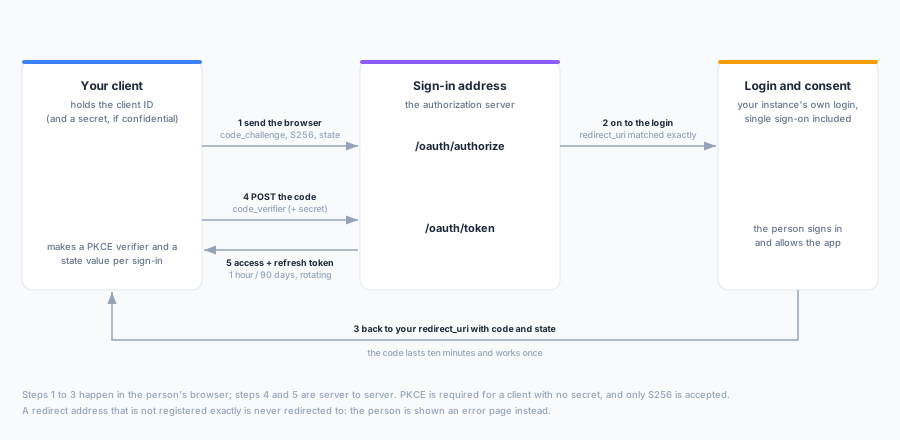
The flow: authorization code with PKCE
This is the only grant for signing a person in. The implicit and password grants are not supported.
1. Send the browser to the authorization endpoint.
GET $ISSUER/oauth/authorize
    ?response_type=code
    &client_id=a2c_...
    &redirect_uri=https://app.example.com/oauth/callback
    &scope=agent:invoke%20offline_access
    &state=<random, per request>
    &code_challenge=<BASE64URL(SHA256(verifier))>
&code_challenge_method=S256redirect_uriis required, and must match one of the client’s registered addresses exactly, character for character. A trailing slash,httpinstead ofhttps, or an added query string is a different address. An address that does not match is never redirected to: the person sees an error page instead.stateis returned to you unchanged. Check it on the way back.- The person has ten minutes to sign in and decide.
2. Receive the code. The browser comes back to your redirect_uri with code and state, or with error and error_description if the request was refused or the person declined (access_denied). A code is valid for ten minutes and can be used once.
3. Exchange it. POST form-encoded (a JSON body is refused) to the token endpoint:
curl -X POST "$ISSUER/oauth/token" \
  -u "a2c_...:a2cs_..." \
  -d grant_type=authorization_code \
  -d code=a2cd_... \
  -d redirect_uri=https://app.example.com/oauth/callback \
  -d code_verifier=<the verifier from step 1>
The redirect_uri must be the same one the code was issued for. The response is never cacheable (Cache-Control: no-store):
{
  "access_token": "a2u_...",
  "token_type": "Bearer",
  "expires_in": 3600,
  "refresh_token": "a2r_...",
  "scope": "agent:invoke offline_access"
}
Send the access token as Authorization: Bearer a2u_... to the agent address. See Authentication for where each credential is accepted.
PKCE
| Client | PKCE |
|---|---|
| Public (no secret: a browser app, a desktop or mobile app, a CLI) | Required |
| Confidential (has a secret, runs on a server) | Optional, and recommended |
The only accepted method is S256, and it must be named: an omitted code_challenge_method, or plain, is refused. The challenge and the verifier are 43 to 128 unreserved characters. When a challenge was sent, the token request must carry the matching code_verifier, whatever kind of client you are.
Authenticating a confidential client
A confidential client is issued a client secret (a2cs_...) and presents it on every token and revocation request, either as HTTP Basic (client_secret_basic, preferred) or as client_id and client_secret form fields (client_secret_post). A public client sends only client_id (none). A wrong or missing secret is 401 invalid_client.
A platform administrator can rotate the secret. The old one stops working the moment the rotation is confirmed, so have the new one ready to deploy.
Scopes
There are two, and they say what your application may ask for, never what the person may do:
| Scope | Means |
|---|---|
agent:invoke | Use the AI agent as the signed-in person. Every authorization must include it |
offline_access | Stay signed in: a refresh token is issued with the access token |
Leaving scope out asks for everything the client is registered for. A refresh may ask for less than was granted, never more.
What the person can actually do is decided on every request by their own permissions in the workspace the work runs in. A token never carries more than they currently have, and someone who loses access to a workspace stops being able to act there immediately.
Tokens, refresh and revocation
| Credential | Prefix | Lifetime |
|---|---|---|
| Authorization code | a2cd_ | 10 minutes, single use |
| Access token | a2u_ | 1 hour |
| Refresh token | a2r_ | 90 days, replaced on every use |
Tokens are opaque strings. Do not parse them; treat them as secrets.
Refresh rotates. Each refresh returns a new access token and a new refresh token, and retires the one you presented. Store the new refresh token before you use the new access token:
curl -X POST "$ISSUER/oauth/token" \
  -u "a2c_...:a2cs_..." \
  -d grant_type=refresh_token \
  -d refresh_token=a2r_...
A retired refresh token presented again ends the grant. A second use of a refresh token is either a replay or a stolen copy racing your client, and the server cannot tell which, so it revokes the whole grant: every access and refresh token it produced stops working, and the person has to sign in again. In practice this means two things for your client: never retry a refresh with the old token after a successful response, and serialise refreshes if several workers share one grant.
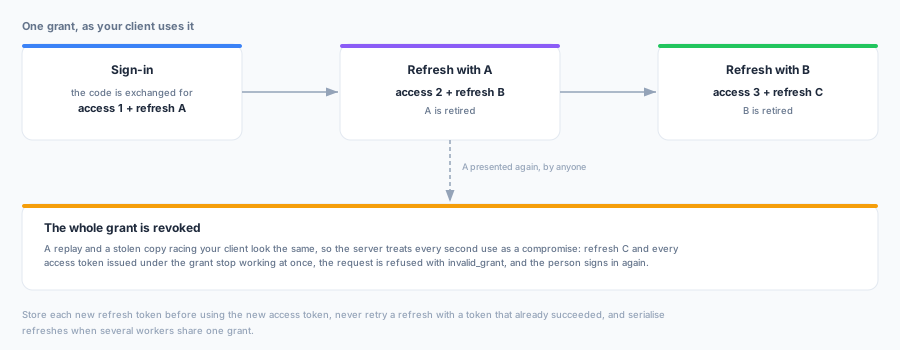
Revocation. To end a grant from your side, for example when a user disconnects in your application, revoke the refresh token:
curl -X POST "$ISSUER/oauth/revoke" \
  -u "a2c_...:a2cs_..." \
  -d token=a2r_... \
  -d token_type_hint=refresh_token
Revoking a refresh token ends the whole grant. Revoking an access token ends just that token. The response is an empty 200 whether or not the token existed, as RFC 7009 requires, so you can revoke without checking first. The person can also remove access themselves on their Connected apps page, and a platform administrator can disable your application for everyone.
Registering a client
A client is registered once for the whole instance, and then works in every workspace its users belong to.
- By a platform administrator. Most clients are registered under Platform admin → Connected apps: a name the person will recognise, the exact redirect URIs, whether it can keep a secret, and the customer it is for. A client for no particular customer can be used from any customer’s workspaces; only a platform administrator can create one. The client ID and, for a confidential client, the secret are shown once. Connect an Agent has the steps. Redirect URIs must be
https, excepthttpon a loopback address (127.0.0.1,localhost) for native and command-line apps, and must not contain a fragment. - By Gemini Enterprise itself.
POST /oauth/registeraccepts RFC 7591 registration only from Gemini Enterprise bought through Google Cloud Marketplace, carrying a software statement Google signed. See Self-registration through Google Cloud Marketplace. Any other registration is refused.
Members only
A client that belongs to a customer can be set to members only. Then only members of that customer’s organization can sign in through it. Anyone else is refused when they try to allow the app, with a message naming the app and the organization. The rule is checked again when your client exchanges a code, on every refresh and on every request to the agent, so a person removed from the organization loses access at their next request rather than when their tokens expire. A refused refresh leaves the refresh token as it was: if the person is added back, the same token works. A platform administrator turns the setting on or off per client.
Errors
The authorization endpoint returns errors to your redirect_uri as error and error_description query parameters, with your state. The exception is an unknown client_id or an unregistered redirect_uri, which are shown to the person as a page and never redirected. The token and revocation endpoints return RFC 6749 §5.2 JSON:
{ "error": "invalid_grant", "error_description": "the authorization code is invalid, expired or has already been used" }| Error | Usually means |
|---|---|
invalid_request | A missing or malformed parameter, including a missing PKCE challenge on a public client, plain, or a JSON body |
invalid_client (401) | At the token and revocation endpoints: an unknown client, a wrong or missing secret, or a client an administrator has disabled |
unsupported_grant_type | A grant_type other than authorization_code or refresh_token |
invalid_grant | A used, expired or unknown code or refresh token; a redirect_uri or code_verifier that does not match; a refresh token that was already rotated, which also ends the grant; or, for a members-only client, a person who is no longer a member of its organization |
unauthorized_client | At the authorization endpoint only, sent back to your redirect_uri: the client has been disabled by an administrator |
invalid_scope | A scope outside the two above, or one the client is not allowed |
access_denied | The person declined on the consent screen |
If your instance’s sign-in address changes, applications configured with the earlier one keep working: it goes on serving the same endpoints for the same clients and tokens, and a grant started on one address can be refreshed on the other. Its metadata names its own address as its issuer, so an application that checks the issuer keeps passing. Moving to the address the card names is a configuration change you can make whenever you like.
Next Steps
- Connect an Agent: registering an app and the Gemini Enterprise recipe
- Authentication: every credential Zeotap accepts, and where