Operators Reference
This page documents all comparison operators available in the audience filter builder. Each operator is listed with its supported data types, behavior, and examples.
Operator Summary
| Operator | String | Number | Boolean | Date / Timestamp | Description |
|---|---|---|---|---|---|
| Equals | Yes | Yes | Yes | Yes | Exact match |
| Not Equals | Yes | Yes | Yes | Yes | Inverse of equals |
| Contains | Yes | — | — | — | Substring match |
| Not Contains | Yes | — | — | — | Inverse of contains |
| Starts With | Yes | — | — | — | Prefix match |
| Not Starts With | Yes | — | — | — | Inverse of starts with |
| Ends With | Yes | — | — | — | Suffix match |
| Not Ends With | Yes | — | — | — | Inverse of ends with |
| Greater Than | — | Yes | — | Yes | Strict greater than |
| Greater Than or Equal | — | Yes | — | Yes | Greater than or equal |
| Less Than | — | Yes | — | Yes | Strict less than |
| Less Than or Equal | — | Yes | — | Yes | Less than or equal |
| Within / Not Within | — | — | — | Yes | Inside (or outside) a relative time window |
| Before / After | — | — | — | Yes | Cut at a point in time, absolute or relative |
| On / Not On | — | — | — | Yes | A whole calendar day, week, month, quarter or year |
| On or Before / On or After | — | — | — | Yes | The same cut, keeping the period |
| Anniversary Within / Not Within | — | — | — | Yes | Month-and-day match, ignoring the year |
| Anniversary Between / Not Between | — | — | — | Yes | Month-and-day inside two independent offsets |
| Part Is / Part Is Not | — | — | — | Yes | A repeating calendar component (month, weekday, quarter…) |
| Time of Day Is / Is Between / Is Not Between | — | — | — | Yes | A clock position inside the day |
| Between | — | Yes | — | Yes | Inclusive range |
| Not Between | — | Yes | — | Yes | Outside inclusive range |
| In | Yes | Yes | — | — | Match any value in a list |
| Not In | Yes | Yes | — | — | Match no value in a list |
| Is Null | Yes | Yes | Yes | Yes | Value is null |
| Is Not Null | Yes | Yes | Yes | Yes | Value is not null |
| Is True | — | — | Yes | — | Boolean is true |
| Is False | — | — | Yes | — | Boolean is false |
| Is Set / Is Not Set | Yes | Yes | Yes | Yes | Whether the property carries a value at all |
| Matches Regex / Not Matches Regex | Yes | — | — | — | Regular-expression match |
Array columns have operators of their own, listed under Array Operators.
String Operators
Equals
Exact match comparison. Case-sensitive by default.
| Field | Operator | Value | Matches |
|---|---|---|---|
country | Equals | "US" | Entities where country is exactly "US" |
SQL: country = 'US'
Not Equals
Inverse of equals. Matches entities where the field does not have the specified value.
| Field | Operator | Value | Matches |
|---|---|---|---|
status | Not Equals | "churned" | Entities where status is anything except "churned" |
SQL: status != 'churned'
Not Equals does not match null values. If status is null, the entity will not be included. To include nulls, combine with an OR Is Null condition.
Contains
Substring match. Returns entities where the field value contains the specified text anywhere within it.
| Field | Operator | Value | Matches |
|---|---|---|---|
email | Contains | "@company.com" | All emails containing "@company.com" |
SQL: email LIKE '%@company.com%'
Not Contains
Inverse of contains. Matches entities where the field value does not contain the specified text.
| Field | Operator | Value | Matches |
|---|---|---|---|
email | Not Contains | "test" | All emails that do not contain "test" |
SQL: email NOT LIKE '%test%'
Starts With
Prefix match. Returns entities where the field value begins with the specified text.
| Field | Operator | Value | Matches |
|---|---|---|---|
phone | Starts With | "+1" | All phone numbers starting with "+1" |
SQL: phone LIKE '+1%'
Not Starts With
Inverse of starts with. Matches entities where the field value does not begin with the specified text.
Ends With
Suffix match. Returns entities where the field value ends with the specified text.
| Field | Operator | Value | Matches |
|---|---|---|---|
email | Ends With | "@gmail.com" | All Gmail addresses |
SQL: email LIKE '%@gmail.com'
Not Ends With
Inverse of ends with. Matches entities where the field value does not end with the specified text.
Numeric Operators
Equals / Not Equals
Exact numeric match. Same semantics as string equals/not equals.
| Field | Operator | Value | Matches |
|---|---|---|---|
order_count | Equals | 0 | Entities with exactly zero orders |
Greater Than
Strict greater than comparison.
| Field | Operator | Value | Matches |
|---|---|---|---|
lifetime_value | Greater Than | 1000 | Entities with lifetime value above 1000 |
SQL: lifetime_value > 1000
Greater Than or Equal
Greater than or equal comparison.
| Field | Operator | Value | Matches |
|---|---|---|---|
order_count | Greater Than or Equal | 5 | Entities with 5 or more orders |
SQL: order_count >= 5
Less Than
Strict less than comparison.
| Field | Operator | Value | Matches |
|---|---|---|---|
days_since_last_purchase | Less Than | 30 | Entities who purchased within the last 30 days |
SQL: days_since_last_purchase < 30
Less Than or Equal
Less than or equal comparison.
| Field | Operator | Value | Matches |
|---|---|---|---|
avg_session_minutes | Less Than or Equal | 2 | Entities with average session 2 minutes or less |
SQL: avg_session_minutes <= 2
Between
Inclusive range comparison. Matches entities where the field value is between the lower and upper bounds (inclusive of both bounds).
| Field | Operator | Lower | Upper | Matches |
|---|---|---|---|---|
lifetime_value | Between | 100 | 500 | Entities with lifetime value from 100 to 500 |
SQL: lifetime_value BETWEEN 100 AND 500
Not Between
Inverse of between. Matches entities where the field value is outside the specified range.
| Field | Operator | Lower | Upper | Matches |
|---|---|---|---|---|
age | Not Between | 18 | 65 | Entities younger than 18 or older than 65 |
SQL: age NOT BETWEEN 18 AND 65
Boolean Operators
Is True
Matches entities where the boolean field is true.
| Field | Operator | Matches |
|---|---|---|
is_enterprise | Is True | All enterprise entities |
SQL: is_enterprise = TRUE
Is False
Matches entities where the boolean field is false.
| Field | Operator | Matches |
|---|---|---|
has_opted_out | Is False | All entities that have not opted out |
SQL: has_opted_out = FALSE
Equals / Not Equals
Boolean fields also support equals and not equals with explicit true or false values. Functionally equivalent to Is True / Is False.
Date and Timestamp Operators
Date and timestamp fields have their own operators, because time questions come in shapes a plain comparison cannot express. There are four families.
Time windows — Within and Not Within
A time window is described by four controls: a direction, a count, a range, and — for calendar ranges — whether the period you are currently in counts.
Direction is which side of now the window sits on. Last looks backwards, next looks forwards. This is what makes “renewal date in the next 30 days” possible.
Range comes in two flavours, and the difference matters more than it first looks:
- Rolling ranges (hours, days, weeks, months, years) measure elapsed time from the moment the audience is evaluated. “Last 4 days” means the last 96 hours, ending at this instant.
- Calendar ranges (calendar days, weeks, months, quarters, years) snap to period boundaries. “Last 4 calendar days” means four whole days on the calendar, whatever the time of day.
Including the current period has three settings, shown only for calendar ranges:
| Setting | What it means |
|---|---|
| Incl. current | The period you are in counts in full — including the part that has not happened yet |
| To date | The period you are in counts only up to right now |
| Excl. | The period you are in does not count at all |
The count always means exactly that many periods. So “last 4 calendar days including today” reaches back three days — today plus three earlier ones. The row shows the resolved meaning in words underneath, so you can check you got the window you meant.
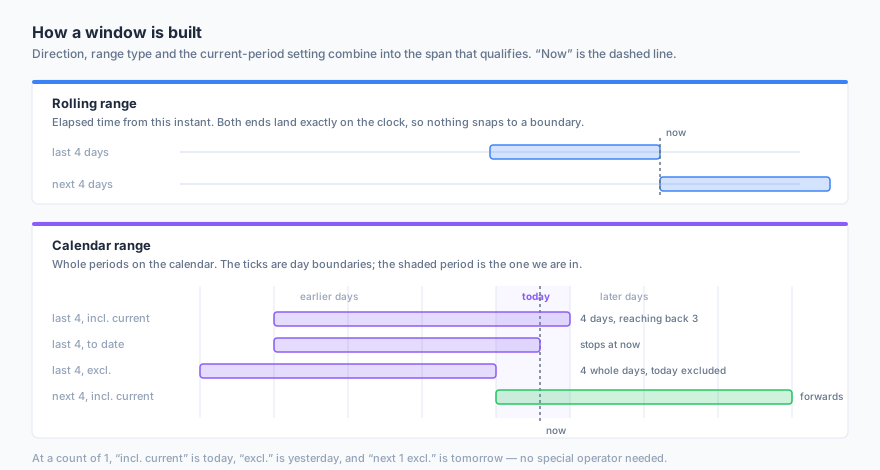
At a count of 1 the calendar combinations become the everyday phrases, with no special operator needed:
| Configuration | Reads as |
|---|---|
| Last 1 calendar day, incl. current | today |
| Last 1 calendar day, excl. | yesterday |
| Next 1 calendar day, excl. | tomorrow |
| Last 1 calendar week, incl. current | this week |
| Last 1 calendar week, excl. | last week |
| Last 1 calendar month, to date | month to date |
| Next 1 calendar month, to date | the rest of this month |
Not Within means outside the window in either direction — not “before” it. A value two years in the future satisfies “not within the last 4 days”. Rows where the field is empty match neither operator, and the row says so.
Points in time — Before, After, On
These operators want a single point rather than a span, and that point can be a picked date or a relative one: an offset, a range, and ago or from now. An offset of zero means the period you are currently in.
This is what a window genuinely cannot say. A window always runs from now to somewhere; on 4 calendar days ago is that one day by itself, and between 30 and 7 calendar days ago needs two independent points.
The operator name decides which edge of the period the cut falls on, so there is no extra control to get wrong:
| Operator | Where the cut falls |
|---|---|
| Before | Before the period started |
| On or After | From the moment the period started |
| After | After the period ended |
| On or Before | Up to the moment the period ended |
| On | Inside the period |
| Not On | Anywhere outside the period |
That also makes the pairs exact opposites: before selects the same rows as not on or after.
On now means a whole day, not an instant. Previously “on 10 August” against a timestamp field matched only rows stamped at exactly midnight — so in practice it matched nothing. It now matches the whole day, which can only add members to a set that was silently empty.
Anniversaries
An anniversary operator discards the year of the stored date and asks whether the resulting month-and-day falls in your window. That is what powers birthday and renewal-anniversary campaigns.
| Field | Operator | Configuration | Matches |
|---|---|---|---|
birthdate | Anniversary Within | Next 7 calendar days, incl. current | Anyone whose birthday is in the coming week |
birthdate | Anniversary Between | 7 calendar days ago → 2 calendar days ago | Anyone whose birthday was 2 to 7 days back |
Three things are worth knowing:
- It works across the New Year. A window running 30 December to 2 January matches a 1 January birthday.
- 29 February falls back to 28 February in years that do not have one, so a birthday campaign stays in the same month.
- The window must be shorter than a year. A longer one would match everyone who has a date at all, so it is refused rather than quietly returning your whole audience.
Repeating parts and times of day
Some questions are not windows at all, and no start-and-end can express them.
Date-part operators read one component of the date and ask whether it is in a set you pick. They are periodic — true in every cycle, every year — which is why no start-and-end can express them.
There is one operator per component, so picking the operator is the whole choice:
| Operator | Values | Answers |
|---|---|---|
| Month is / is not | January–December | ”everyone born in December” |
| Day of week is / is not | Monday–Sunday | ”only ever purchases at the weekend” |
| Day of month is / is not | 1–31 | ”renews on the 1st” |
| Quarter is / is not | Q1–Q4 | finance-aligned cohorts |
| Year is / is not | a year | ”signed up in 2024” without typing a date range |
You can select several values at once, so “month is January, June, December” is one condition rather than three ORed together.
Time of Day reads the clock position inside the day, which the hours range cannot express — “within the last 4 hours” is a duration, never a reading.
| Field | Operator | Value | Matches |
|---|---|---|---|
order_ts | Time of Day Is Between | 09:00 and 17:30 | Orders during office hours |
order_ts | Time of Day Is Between | 22:00 and 02:00 | Late-night orders, spanning midnight |
A band whose start is later than its end crosses midnight and matches both sides of it. The row tells you when that is happening.
Time of Day is not offered on date-only fields. A field stored as a DATE holds
no clock reading, so there is nothing for these three operators to compare — the
dropdown leaves them out. Everything else on this page still applies to a date field:
windows, anniversaries and repeating parts are largely what date fields are for.
These two families read a value out of the field rather than comparing the field itself, so they cannot skip partitions — the query reads every row. Worth knowing on very large tables, and it applies to anniversary operators too.
Absolute dates
Every point-in-time operator still accepts a picked date; switch the control from relative to a date.
| Field | Operator | Value | Matches |
|---|---|---|---|
created_at | After | 2025-01-01 | Entities created after 1 January 2025 |
created_at | Between | 2025-01-01 and current calendar day | Entities created since the start of 2025 |
A range can mix the two: a fixed launch date on one side and current calendar day on the other.
Which timezone all of this is evaluated in
Every claim above — “today”, “this month”, “22:00”, and a picked date’s midnight — is computed in the audience’s evaluation timezone. It is set in three places, each overriding the one above it:
- Workspace setting — the default for every audience. UTC unless you change it.
- Audience setting — overrides the workspace for one audience.
- A single condition — overrides the audience for one row.
The chain exists because one audience sometimes genuinely needs two clocks: store visits on the store’s local calendar day, and email opens on the campaign’s UTC day.
This is deliberately not your schedule timezone. When a job runs and which calendar day it counts are different questions — a workspace can sync at 03:00 UTC while counting Berlin days. If you want both, set both.
Two related points:
- The week start is a workspace setting, Monday by default. It is written into every query explicitly rather than left to the warehouse, because the warehouses disagree with each other — so the same audience would otherwise give different answers depending on which source it read.
- Fields carrying no timezone of their own (a
DATETIME, or aTIMESTAMP_NTZ) are read as UTC. If such a field actually holds local wall-clock time, its readings will be off by that offset near midnight. The condition row says so whenever a non-UTC evaluation zone is in force.
Windows saved before this redesign
An audience saved earlier keeps working and keeps matching exactly what it matched before — nothing changes on its own. Its row is marked (as saved), and hovering it shows the equivalent in the new controls.
The moment you touch any control, the window is rewritten in the explicit form. You will usually see the count change by one — 30 days becoming 31 calendar days including today, for instance. That is not a new window: it is what the saved one always meant, now stated plainly.
List Operators
In
Matches entities where the field value is any one of the specified values. Enter values as a comma-separated list.
| Field | Operator | Values | Matches |
|---|---|---|---|
plan_type | In | "free", "trial" | Entities on free or trial plans |
country | In | "US", "UK", "CA", "AU" | Entities in English-speaking countries |
SQL: plan_type IN ('free', 'trial')
Not In
Inverse of In. Matches entities where the field value is not any of the specified values.
| Field | Operator | Values | Matches |
|---|---|---|---|
status | Not In | "deleted", "banned" | All active entities |
SQL: status NOT IN ('deleted', 'banned')
Array Operators
These apply to array columns — a list of values on the record, such as tags or purchased_categories.
| Operator | Value | Matches |
|---|---|---|
| Contains Any | A list | The array shares at least one value with the list |
| Contains All | A list | The array contains every value in the list |
| Is Empty | — | The array has no elements |
| Is Not Empty | — | The array has at least one element |
| Size Equals | A number | The array has exactly that many elements |
| Size Greater Than | A number | The array has more than that many elements |
| Size Less Than | A number | The array has fewer than that many elements |
Element Operators
Arrays of objects — a repeated group of fields, such as an orders array where each element has its own total and status — additionally support two quantifiers. Each takes a nested set of conditions rather than a single value, and those conditions are evaluated against one element at a time.
| Operator | Matches |
|---|---|
| Any Element Matches | At least one element satisfies every nested condition |
| All Elements Match | Every element satisfies every nested condition |
The distinction that matters: conditions inside one quantifier must be satisfied by the same element. An orders array where one order is over $100 and a different order was refunded does not match “any element matches: total > 100 AND status = refunded”.
Regular Expression Operators
| Operator | Value | Matches |
|---|---|---|
| Matches Regex | A pattern | The string matches the pattern |
| Not Matches Regex | A pattern | The string does not match |
Patterns are evaluated by your warehouse, so the supported syntax is your warehouse’s regular-expression dialect.
Null Operators
Is Null
Matches entities where the field value is null (not set).
| Field | Operator | Matches |
|---|---|---|
phone | Is Null | Entities with no phone number |
SQL: phone IS NULL
Is Not Null
Matches entities where the field value is not null (has a value).
| Field | Operator | Matches |
|---|---|---|
email | Is Not Null | Entities with an email address |
SQL: email IS NOT NULL
Null handling is important in audience definitions. Most comparison operators (equals, greater than, contains, etc.) return false when the field value is null. If you want to explicitly include or exclude null values, use the Is Null / Is Not Null operators.
Is Set / Is Not Set
Is Set and Is Not Set ask whether the property carries a value at all, and take no value of their own. They apply to a property of any type.
Operator Behavior by Data Type
This matrix summarizes which operators are available for each data type:
| Operator | String | Number | Boolean | Date | Timestamp |
|---|---|---|---|---|---|
| Equals | Yes | Yes | Yes | Yes | Yes |
| Not Equals | Yes | Yes | Yes | Yes | Yes |
| Contains | Yes | — | — | — | — |
| Not Contains | Yes | — | — | — | — |
| Starts With | Yes | — | — | — | — |
| Not Starts With | Yes | — | — | — | — |
| Ends With | Yes | — | — | — | — |
| Not Ends With | Yes | — | — | — | — |
| Greater Than | — | Yes | — | Yes | Yes |
| Greater Than or Equal | — | Yes | — | Yes | Yes |
| Less Than | — | Yes | — | Yes | Yes |
| Less Than or Equal | — | Yes | — | Yes | Yes |
| Between | — | Yes | — | Yes | Yes |
| Not Between | — | Yes | — | Yes | Yes |
| In | Yes | Yes | — | — | — |
| Not In | Yes | Yes | — | — | — |
| Is Null | Yes | Yes | Yes | Yes | Yes |
| Is Not Null | Yes | Yes | Yes | Yes | Yes |
| Is True | — | — | Yes | — | — |
| Is False | — | — | Yes | — | — |
Next Steps
- Filter Builder — How to use operators in the visual builder
- Creating an Audience — End-to-end audience creation guide