Credentials
A credential is who Zeotap connects to your warehouse as. It is a workspace-level object in its own right: warehouses reference a credential rather than containing one, so two warehouses on the same Snowflake account or carrying the same service-account key share a single credential.
That sharing is the whole point. Rotating a key becomes one change instead of one per warehouse, and a security team can create and grant a credential before anyone has built a pipeline that needs it.
Find them on the Warehouses page, under the Credentials tab.
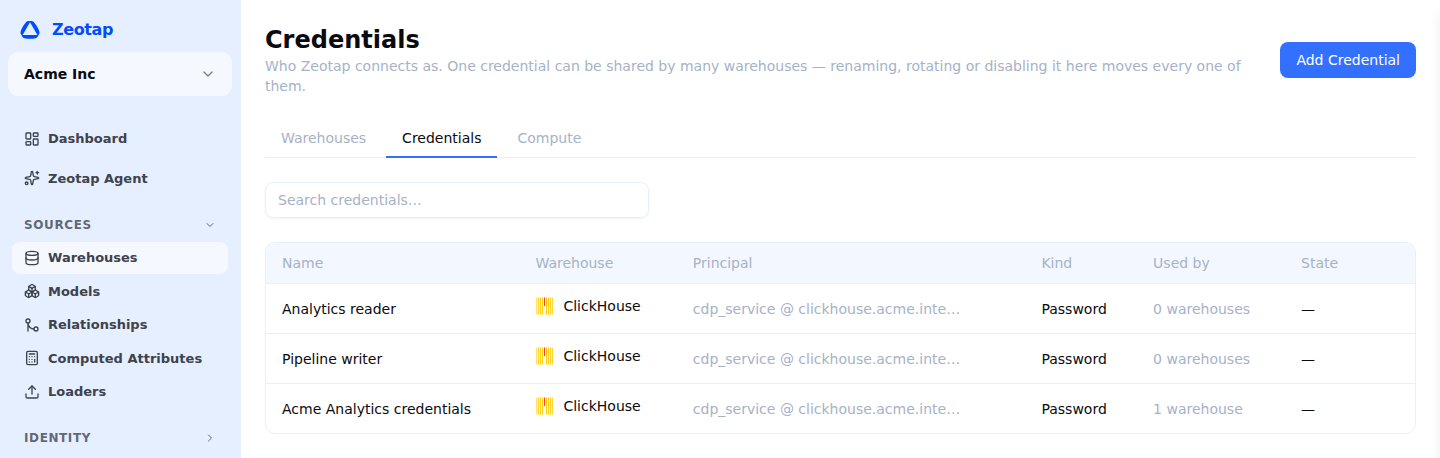
What is on the list
Every credential in the workspace, with:
- Principal — the human-recognisable “who”: a service-account email, a Snowflake
USER @ account, a Databricks service-principal id. Some kinds of credential genuinely have none. A Databricks personal access token and a BigQuery OAuth credential identify themselves only to the warehouse, so the column shows a dash rather than inventing something. - Kind — a key you supplied, or a Zeotap-managed identity (see below).
- Used by — how many warehouses connect as it. This is the blast radius of everything else on the page.
- State — shown only when there is something to say: a credential you have disabled, or a managed identity that is retired and counting down to deletion.
There is deliberately no “healthy / unhealthy” column. A credential is proved by a warehouse connecting with it, and that warehouse’s own connection status is where that answer lives.
Creating one
Add Credential asks for the warehouse type first — a credential belongs to one warehouse type and cannot be moved between them — then for the same authentication fields the warehouse setup form asks for, and nothing else.
Two fields are asked here that a warehouse setup form does not have to ask, because it can read them off the connection you are already filling in:
- What it is bound to — the Snowflake account, the Databricks server hostname, the ClickHouse host, the Spark endpoint. Optional. Left blank, the credential is offered to every warehouse of that type in the workspace, and a wrong pairing only surfaces when that warehouse’s connection is tested. BigQuery service accounts are global and a Redshift cluster is the host you connect to, so neither asks.
- Role (Snowflake only) — the role the user activates. It belongs to the user rather than to any one warehouse, which is why it is set here.
The connection is not tested at this point, and that is deliberate: a test needs the database, catalog or project that belongs to a warehouse, not to a credential. The credential is proved the first time a warehouse connects with it.
Changing one
Everything on a credential’s own page moves every warehouse bound to it at once. That is why these live here rather than on a warehouse page, and why the number of affected warehouses is stated before you commit.
- Rename — a label change, nothing else.
- Rotate — replace the stored key. Every bound warehouse switches to the new key on this save and should be re-tested afterwards. The authentication method is fixed here; to change from a password to a key pair, supply the new key from the warehouse’s own page.
- Disable — fails closed. A disabled credential does not fall back to anything; every bound warehouse stops connecting until it is enabled again.
- Delete — only possible once nothing is bound. The page tells you so instead of letting you find out by clicking.
To point one warehouse at a different credential, go to that warehouse — repointing affects it alone, so it belongs there.
Zeotap-managed identities
For BigQuery, Zeotap can provision a dedicated Google service account and reach it by impersonation. It holds no key at all, so there is nothing for you to download, store or rotate — and nothing that can be exported.
A workspace gets one, shared by every warehouse that uses it. Its page carries the address to hand to your cloud admin, the roles to grant and why each is needed, ready-to-paste gcloud and Terraform, and the commands to revoke the access again.
Who can do what
Credentials have their own permissions, separate from warehouses, so a role can hold pipeline-building without holding key rotation:
| Permission | Allows |
|---|---|
warehouse_users.read | View credentials and their principals |
warehouse_users.write | Create, rename, disable and bind |
warehouse_users.rotate | Replace a stored key |
warehouse_users.delete | Delete an unreferenced credential |
Owners and admins hold all four. Members hold none of them: every action here moves every warehouse bound to the credential at once, so the page is administration rather than something the people building audiences need in their way. A member still sees which credential a warehouse connects as, on that warehouse’s own page.
If your workspace wants a member to see this page, grant warehouse_users.read through a custom role — the permission is still in the catalogue, and a custom role that already carries it keeps it.