Limit Rules
A limit rule constrains how identifiers are allowed to merge records. Each rule is keyed on an identifier family and carries two independent settings:
| Setting | What it counts | The failure it prevents |
|---|---|---|
| A profile may hold up to N values | How many distinct values of the family one profile may hold | Two people sharing a tablet becoming one person |
| Ignore values shared by more than N records | How many distinct source records may share one identifier value | A placeholder or bot value — noreply@company.com, a shared kiosk cookie — fusing thousands of unrelated people into one profile |
Both appear side by side on the wizard’s Configure Rules step, one row per identifier family, with each family’s default shown as the placeholder.
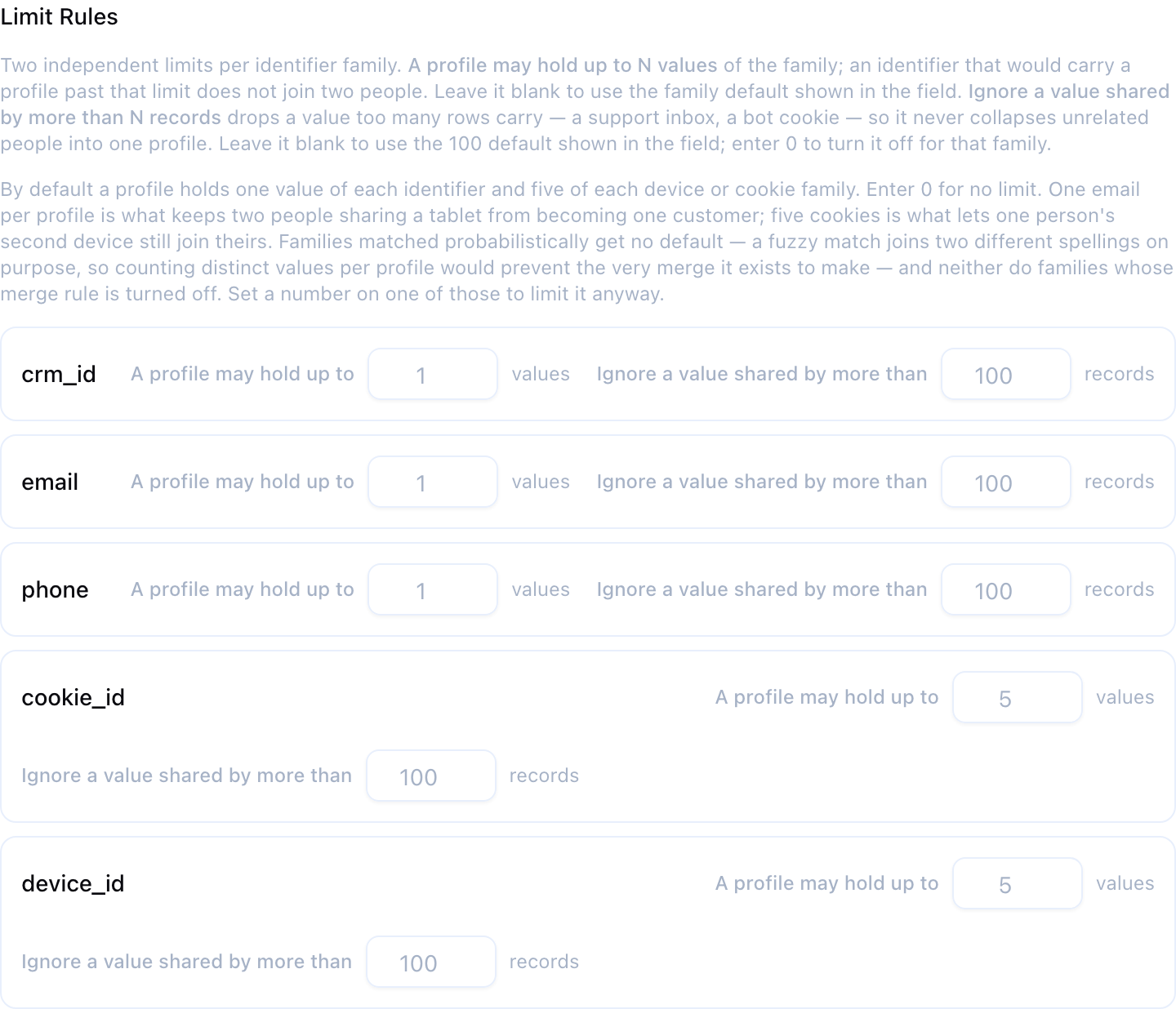
They sound alike. They guard against opposite failures, and they are not interchangeable.
A third setting, shared identifier attribution, is not part of a limit rule but only ever does anything alongside one: it decides who gets the anonymous activity on a shared identifier once two people have been kept apart. See Shared identifier attribution.
The two are not the same number, and 1 on the wrong one breaks the graph.
If you want “one email per person”, the setting is a profile may hold up to 1 email value — which, for an identity family, is already the default.
Setting ignore values shared by more than 1 record does the opposite of what it sounds like: matching needs the same value on at least two records, so a limit of one ignores every group and switches that family’s matching off entirely. This is the single most common misconfiguration when porting rules in from another CDP, where “limit 1 on email” means the per-profile setting.
Both settings have a default, and both are independently overridable. For either one, 0 means no limit for that family — deliberately.
Ignore Values Shared by Many Records
This is the shared-value guard. It exists because real source data always contains at least one value that is not an identity — a placeholder email, a support inbox, a bot’s cookie, an empty-string surrogate — and without a limit, every record carrying that value merges into one profile.
Why It Matters
Suppose noreply@company.com appears on 50,000 records. The email merge rule links records that share an email, so with no limit it links all 50,000 into a single profile. That profile is not a person, and everything downstream of it — audiences, journeys, suppression — is wrong.
A limit rule that ignores any email value shared by more than 100 records says: an email value that widely shared is not an identity signal. Those records are not linked by their email. They can still be linked by any other identifier they share.
An ignored value does not make records disappear. Each one still resolves — as its own profile, or merged through a different identifier family. Only the over-shared value stops linking them.
Every Enabled Merge Rule Has One
Each merge rule family gets a shared-value limit whether or not you configure one:
| Configuration | What the run enforces |
|---|---|
| No limit rule for the family | Ignore any value shared by more than 100 records (the default) |
| Limit rule set to 25 | Ignore any value shared by more than 25 records |
| Limit rule set to 0 | No limit — you have deliberately turned it off |
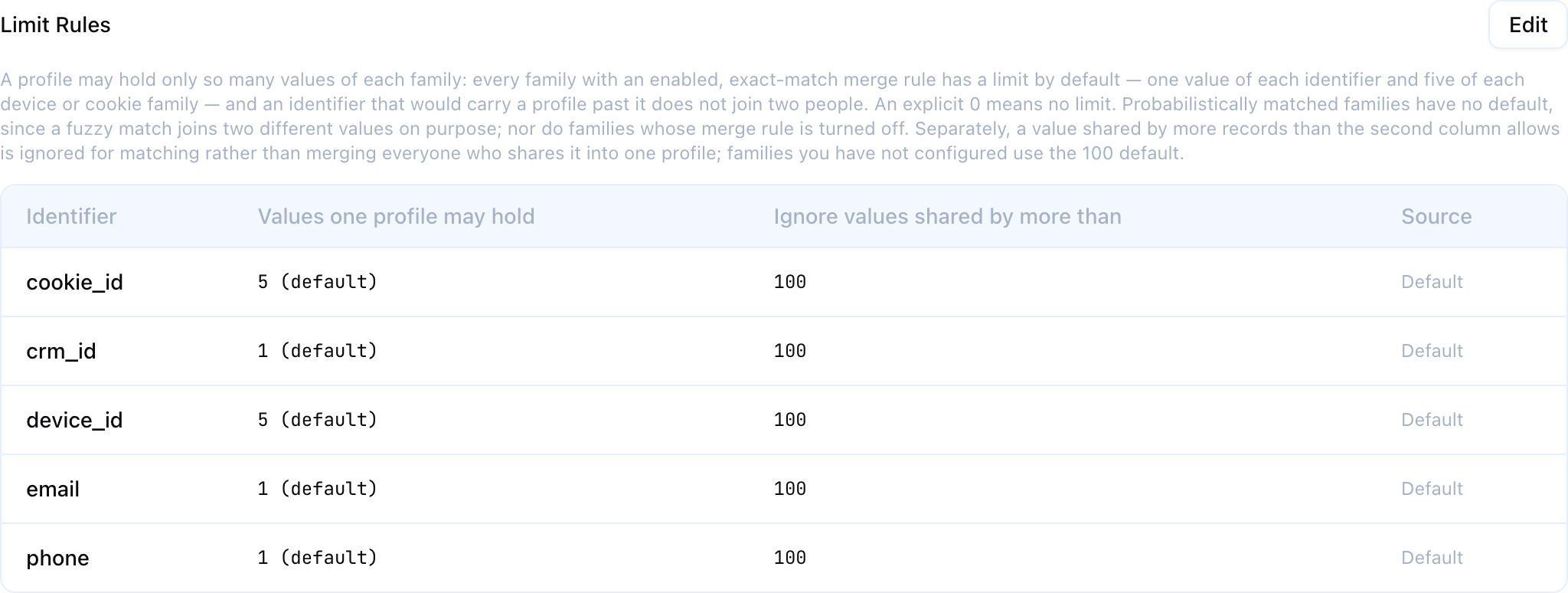
The Limit Rules table on the graph’s Configuration tab lists every enabled family under Ignore values shared by more than, with whether that number is Configured or Default, so what the resolver actually enforces is always visible. Click Edit on that section to change it: the field’s placeholder is the default, and 0 turns the limit off.
Setting a family to 0 removes its only protection against a shared value collapsing unrelated people into one profile. Prefer raising the number to turning it off.
Choosing a Number
| Family | Typical range | Why |
|---|---|---|
email | 10–100 | Household and shared-inbox addresses are the usual offenders |
phone | 5–50 | Support and store numbers appear on many records |
user_id | 50–500 | Should be near-unique; a high count usually means a placeholder value |
cookie_id | 20–200 | Shared or reset devices inflate counts legitimately |
Measure before you choose. This query gives the distribution of how widely each value is shared, which is exactly what the limit compares against:
SELECT shared_by, COUNT(*) AS values_at_this_level
FROM (
    SELECT LOWER(TRIM(email)) AS value, COUNT(DISTINCT id) AS shared_by
    FROM crm_contacts
    WHERE email IS NOT NULL AND TRIM(email) <> ''
    GROUP BY 1
) _dist
GROUP BY shared_by
ORDER BY shared_by DESC
LIMIT 50;
A healthy family has a long tail at shared_by = 1 and a handful of outliers. Set the limit above the legitimate cluster sizes and below the outliers.
How It Is Enforced
The limit is applied in two places, and the first is the one that matters.
While links are built. Each identifier value’s group size is computed as the links are written, and groups larger than the limit produce no links at all. This is the only placement that can stop a value fusing a crowd: a limit applied afterwards has to let the rows be written before it can delete them, and for a value shared by tens of thousands of records, writing them is the step that does not complete.
After links are built. A second pass deletes links for over-shared values. Exact-match links were already handled above, so what this catches is probabilistic links, which are scored pair by pair and therefore cannot carry a group-size condition while being built.
Incremental runs apply the same limit, so a delta run can never reintroduce a group the full run left out.
Two properties are worth stating because they are easy to assume the other way round.
It is measured over every record carrying the value, including records whose copy of a different identifier a per-profile limit has stopped using for matching. A value over the limit is over the limit whatever else the run decided — this limit is applied first, and a per-profile limit elsewhere cannot bring a value back under it.
It is recorded, on any graph that carries a per-profile limit somewhere. Each ignored value is written to _IDENTITY_REJECTED_EDGES alongside the values that kept two people apart, marked shared by more than N records, so it was not used for matching, so the Profiles page can explain why two records sharing that identifier are separate profiles. It is not part of the run’s kept apart count — see What Happens to a Value That Cannot Link.
Values One Profile May Hold
This is the shared-identifier guard, and it is the setting that makes merge rule priority meaningful.
It says: a profile may hold at most N distinct values of this family. One email per person. One CRM id per account. Five devices per person.
Every Deterministically Matched Family Has One By Default
You do not have to set this. Every identifier family with an enabled, deterministic merge rule arrives with a per-profile limit already in effect:
| Family class | Default | Why |
|---|---|---|
Identity-bearing — email, phone, user_id, a CRM id, a loyalty number, and any custom family | 1 | One person has one email address, one customer id. A profile holding two is the signature of exactly the merge this limit exists to prevent |
Device-class — anonymous_id, cookie_id, device_id, session_id, ip_address, android_id, browser_id, ga_client_id, the advertising ids (idfa, idfv, gaid, aaid, adid, maid, advertising_id), and any custom family whose name contains cookie, device, anonymous, session, browser, advertis or one of those advertising-id abbreviations | 5 | A person legitimately has a phone, a personal laptop, a work laptop and a tablet — and their second device must still be able to pull its anonymous browsing into the profile. A limit of 1 here would fragment ordinary people. A shared kiosk seen by dozens of visitors is still capped far below the point where it fuses a crowd |
| Probabilistically matched — any family whose merge rule is probabilistic (fuzzy name, household, IP cluster — see Probabilistic Matching) | (none) | A similarity match joins two different values on purpose — “Jon Smith” to “John Smith” — so a limit counting distinct values per profile would prevent the very merge the rule exists to make |
| Disabled or unruled — a family whose merge rule is switched off, or which has no merge rule at all | (none) | It contributes no matches, so there is nothing for a limit to bound |
A family with no default has no limit unless you type a number into it. You still can: an explicit limit applies to any family, probabilistic ones included, and is the way to bound how many name variants one profile may accumulate.
The wizard and the graph’s Limit Rules table show each family’s effective limit under Values one profile may hold. A number the defaults supplied is marked inline — 1 (default), 5 (default), no limit (default) for a family the defaults leave unlimited — and one you typed is shown bare. A Source column beside the two numbers says Configured or Default for the row, or both words when the two numbers came from different places. Type a number to override the default; leave the field blank and its placeholder shows the default that will apply.
| What you enter | What it means |
|---|---|
| (nothing) | The family’s default above — and no limit at all where the family has no default |
| A number ≥ 1 | That limit, on any family |
0 | No limit — you have deliberately turned the per-profile limit off for this family |
Existing graphs are not affected. Every identity graph that existed before per-profile limits were defaulted keeps behaving exactly as it did: its families were written to no limit explicitly, so nothing about its resolution, its profile ids or its run schedule changed. The defaults apply to graphs created from now on. If you want them on an older graph, set them yourself — and expect the next run to be a full rebuild, as any rule change is.
Setting a family to 0 removes the shared-identifier guard for it. That is sometimes right — a family whose values genuinely accumulate without bound on one person — but it is the setting that lets two people sharing a device become one profile, so make it deliberately.
Why the Shared-Value Limit Cannot Do This Job
Take four records:
| Record | Cookie | |
|---|---|---|
| u1 | a@x | C1 |
| u2 | b@x | C1 |
| u3 | (none) | C1 |
| u4 | a@x | C2 |
C1 links u1, u2 and u3. a@x links u1 and u4. All four end up in one profile carrying two different people’s emails.
No shared-value limit can prevent this. C1 is shared by three records; the default limit is 100. A family tablet used by two or three people never comes close to tripping it. That limit is asking “is this value a placeholder?” — and it isn’t. The question that needs asking is “should one person have two emails?”, and only the per-profile limit asks it.
With email at a profile may hold up to 1 value — its default — the same data resolves into three: {u1, u4}, {u2}, and u3, whose destination is decided by shared identifier attribution.
Priority Decides Who Wins
When a merge would breach a per-profile limit, what happens depends on which identifier is stronger — that is, which merge rule has the lower priority number.
| Situation | Outcome |
|---|---|
| A weaker identifier’s merge would carry a profile past a stronger family’s limit | The two are kept apart. The weaker identifier’s value links nobody, and the records stay in their separate profiles. |
| A stronger identifier’s merge leaves a profile over a weaker family’s limit | Allowed. Nothing is un-merged. When the weaker family’s turn comes, the surplus values simply stop matching — they cannot pull further records in. |
The asymmetry is deliberate. A cookie is not trusted to overrule what an email asserts about identity, so it does not join the two. An email is trusted, so its merge stands, and the cookies it swept up beyond the limit are demoted from matching keys to plain attributes.
This means priority is no longer cosmetic. Swap email and cookie_id in the example above and the same records resolve to one profile instead of three. Review your priority order before you set your first per-profile limit.
Worked Examples
All three use: email priority 1, a profile may hold up to 1 email value; cookie_id priority 2, a profile may hold up to 2 cookie values.
A shared device. u1(a@x, C1), u2(b@x, C1), u3(no email, C1), u4(a@x, C2).
The email pass merges u1 and u4. The cookie pass then proposes merging u1, u2 and u3 on C1 — which would give one profile two emails. C1 links nobody, and u1 and u2 stay separate people.
Result: three profiles — {u1, u4}, {u2}, and u3 on its own. Where u3 ends up next is the shared identifier attribution decision: on the default it joins whichever of the two was seen with C1 first, and on no one it stays its own profile.
Absence is not conflict. u5(no email, C9), u6(c@x, C9).
C9 spans exactly one email value — c@x — because u5 contributes no email at all. A missing value is not a competing value.
Result: one profile {u5, u6}. This is the ordinary anonymous-to-known stitch, and the per-profile limit does not interfere with it.
Truncation by a stronger identifier. r10–r13 all carry d@x, with cookies C10–C13. r14 carries only C10; r15 carries only C13.
The email pass merges r10–r13 into one profile — which now holds four cookies against a cookie limit of two. Nothing is un-merged, because the merge came from the stronger identifier. When the cookie pass runs, the profile keeps its first two cookie values matchable (C10, C11) and sets the rest aside. r14 joins via C10. r15 does not join via C13.
Result: {r10, r11, r12, r13, r14} and {r15}. Nothing is recorded as kept apart — a truncated identifier stopped matching, it did not keep two people separate.
“First two” is by earliest observation — the oldest timestamp on the records carrying each value inside that profile. A profile therefore keeps the identifiers it has had longest and stops matching on the ones it accumulated past the limit. Where the underlying records carry no timestamp, the ordering falls back to a stable record ordering instead, so the result is still the same from run to run.
Shared Identifier Attribution: Where the Anonymous Activity Goes
Keeping two people apart settles one question and opens another.
The question it settles is not negotiable: two people seen with one identifier stay two profiles. No setting anywhere in Zeotap merges them, because merging them is the exact failure the per-profile limit exists to prevent.
The question it opens is about the other records carrying that identifier. A family tablet does not only carry Alice’s and Bob’s sign-ins; it carries page views with a cookie and nothing else. Not using the cookie leaves every one of those records as its own single-record profile — activity that certainly belongs to one of the two people, credited to neither, and a household’s traffic scattered across dozens of one-record profiles.
The feature is named for the identifier, not for the device. The shared value is usually a cookie or a device id, but a household email address, a family phone number and a shared loyalty-card id behave identically and are governed by the same setting.
Shared identifier attribution is the setting for those anonymous records, and only those. You will find it on the wizard’s Configure Rules step and on an existing graph’s Configuration tab. Where no family has a per-profile limit yet, the control still saves — it just does nothing, and says so: only takes effect once an identifier family has a per-profile limit.

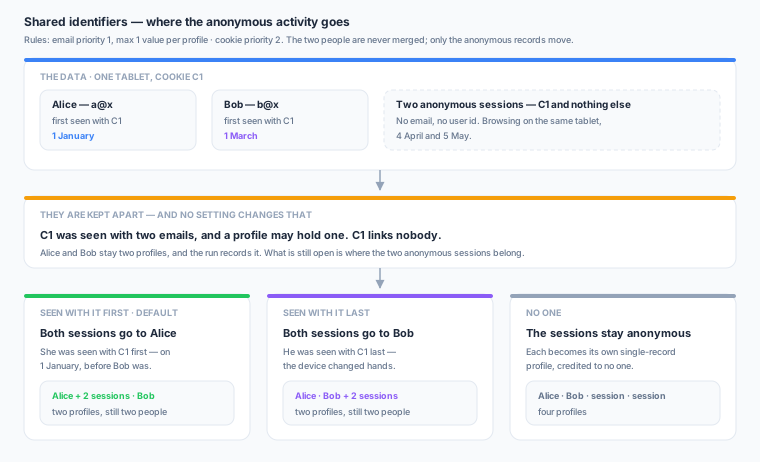
The control asks one question — When an identifier is shared by two people, give its anonymous activity to: — and offers three answers:
| Option | What happens to the anonymous records |
|---|---|
| the person seen with it first (default) | They go to whichever of the two people was seen with the shared identifier first |
| the person seen with it last | They go to whichever was seen with it most recently — the better guess for a device that has changed hands |
| no one | They stay on their own, as their own anonymous profiles |
Worked example
email priority 1, a profile may hold up to 1 email value; cookie_id priority 2. Four records on one tablet, all carrying cookie C1:
| Record | Seen | |
|---|---|---|
| u1 | a@x (Alice) | 1 January |
| u2 | b@x (Bob) | 1 March |
| u3 | (none) | 4 April |
| u4 | (none) | 5 May |
C1 links nobody in all three cases — it was seen with two emails and a profile may hold one.
| Setting | Result |
|---|---|
| no one | {u1} {u2} {u3} {u4} — four profiles |
| the person seen with it first | {u1, u3, u4} {u2} — the anonymous browsing goes to Alice, who was seen with C1 on 1 January |
| the person seen with it last | {u1} {u2, u3, u4} — it goes to Bob, seen with C1 most recently |
In every case Alice and Bob remain two profiles, and C1 is still recorded as having kept them apart.
”First” means the identifier, not the account
The ranking is by when the shared identifier was seen with each person, not by how old their profile is. A five-year-old account that first touched this cookie yesterday is not the cookie’s owner; the account that has carried it since 2019 is, however recently it was created. Profile age is only used to break a tie, and if the underlying records carry no timestamps at all the choice falls back to a stable, deterministic ordering rather than to chance.
What attribution can and cannot do
- It can never merge two people. A record is only ever given away when it carries no identifier of any limited family — so the profile it joins gains records and no new identifier values, and no limit can be exceeded this way.
- An anonymous visitor pointing at two people goes to neither. Two anonymous records linked to each other (say by a phone) and sitting on two shared identifiers of the same kind — two cookies, each seen with a different person — would bridge those two profiles if attached to both. They stay on their own instead, and the Profiles page says so: its anonymous activity pointed at two different people, so it stayed on its own. (A record carrying two different kinds of shared identifier is never given away in the first place: each one identifies it for the other’s purposes, so it is not anonymous either way. And a single record can only carry one value per identifier kind — the resolver reads one mapped column per kind per model.)
- What kept the two people apart is recorded either way. Attribution does not hide it; it answers a second question about it. The Profiles page shows both — the value that kept them apart, and where the anonymous activity went.
- It only does anything once a family has a per-profile limit in effect. Since every deterministically matched family is defaulted, that is true of every new graph with an exact-match rule — and not true of a graph created before defaults, whose families all have no limit until you change them, nor of a purely probabilistic graph, whose families take no default at all.
- Changing it makes the next run rebuild from scratch, the same as changing any other rule — on a graph where it does anything. On a graph with no per-profile limit the setting is inert, so changing it costs nothing and forces nothing.
Which to choose. Pick the person seen with it first — the default — for household devices, where the person who set the tablet up is the one whose device it mostly is. Pick the person seen with it last where devices genuinely change hands, such as a shared workstation or a refurbished handset pool. Pick no one when anonymous activity must never be credited to a named individual — the conservative choice for regulated or consent-sensitive data.
Each run reports how many anonymous rows it assigned, alongside how many values it kept apart. See Running Resolution.
Identifiers That Only Constrain
A family can carry a per-profile limit without an enabled merge rule. It then never links anything — it only keeps things apart.
This is the “one CRM id per account” rule. The CRM id is recorded, it is never used to merge (because two systems may reuse ids, or because you simply do not trust it to), but no profile may ever end up holding two of them. A constraint-only family applies at every priority tier, because it is stronger than every merge rule by definition.
What Happens to a Value That Cannot Link
A value that cannot link loses its ability to join records. That is all it loses.
- No records are dropped. Every source record is a profile before any link exists, so a record whose only link was that value becomes its own single-record profile. Where those records go next is decided by shared identifier attribution.
- The value stays as an attribute. Golden records are built from records, not from links, so the cookie still appears on every profile whose records carry it. Downstream consequence: a destination keyed on that identifier will receive the same value for more than one profile. That is the honest representation of a shared device — the alternative is guessing which person owns it.
- Search finds all of them, and the Profiles page says so. Looking the value up there reports every profile carrying it, above a chooser: “3 profiles carry cookie id C1 — this identifier is shared”. The graph’s own Explorer tab runs the same lookup but shows only the first profile, so start from Profiles when you suspect a value is shared.
- Truncated values behave the same way. The record stays in its profile and the value stays on the golden record; it just cannot pull more records in.
- Nothing is remembered between runs. All of this is recomputed from scratch every time. Correct the upstream data — split the shared account, clean the placeholder — and the value links again on the next run.
- Every one is recorded in
_IDENTITY_REJECTED_EDGESin your warehouse, with the identifier value, the family whose limit applied and its limit, whether the conflict was direct or arrived through a chain of other merges, and the merge rule priority the decision was taken at. The run carries a kept apart count in its history. - A value the shared-value limit ignored is recorded too, and reads as shared by more than N records, so it was not used for matching. This is the one case where nothing was ever proposed: the value was over its limit before any link existed, so it built none. The Profiles page shows it under Kept apart alongside the per-profile cases, which is the answer to “these two records share an identifier — why are they separate profiles?” when the reason is the shared-value limit. It is deliberately not part of the run’s kept apart count: that number counts merges the resolver had to decline, and an ignored value never proposed one.
The Cost: Incremental Runs Do More Work
Per-profile limits used to force every run to be a full rebuild. They no longer do — a graph with a per-profile limit can run incrementally like any other.
The reason they once did is still worth understanding, because it shapes what an incremental run now costs. Admitting one new record can undo a decision an earlier run made — a cookie that linked nobody last night because it spanned two emails has to link again the moment one of those emails is corrected — and nothing in a plain “what changed” list says so. So a limited graph does not resolve only the records that changed. It resolves every record reachable from them: anything sharing an identifier value with a changed record, anything already resolved into the same profile, and anything carrying an identifier a previous run set aside. Then it re-applies the whole rule sequence over that set.
Two consequences:
- An incremental run on a limited graph is more expensive than one on a graph with no per-profile limit, because the set it recomputes is larger than the set that changed. It is still far cheaper than a full rebuild for a normal day’s changes.
- Some runs fall back to a full rebuild anyway. When the reachable set does not settle, or grows past half the graph, rebuilding everything is the cheaper path and Zeotap takes it. The run then records its reason as the change reached more than half the graph — see Executed run type.
A run that keeps rebuilding from scratch is telling you something about the shape of your data, not about a misconfiguration. It usually means one very widely shared identifier — a placeholder value, a default cookie, a test account — is linking most of the graph together. Look for it with the distribution query above, and consider a shared-value limit on that family.
Changing a per-profile limit still makes the next run rebuild from scratch, the same as changing any other rule — including the shared identifier attribution setting.
Limits Drop Links, They Do Not Split Profiles
Both settings work by preventing links from being created, never by breaking up a profile after the fact.
That distinction matters when you are reading results. A profile is always exactly the set of records that some surviving chain of identifiers connects. There is no post-processing step that carves an over-large profile into pieces, and no records are ever discarded — the worst case for a record is that it resolves alone.
Merge rule priority does change which links survive, but only once a per-profile limit exists somewhere in the graph. With no per-profile limit anywhere, the same links are produced whichever order the rules are processed in, and priority only decides which family the run spends its time on first.
Symptoms and Tuning
| What you see | Likely cause | What to do |
|---|---|---|
| Profiles that should be one person are separate | The shared-value limit is too tight for a family whose values are legitimately shared | Raise that family’s shared-value limit |
| One profile contains obviously unrelated people | No per-profile limit on your strongest identifier | Set a profile may hold up to 1 value on email or your customer id |
| A family stopped matching entirely | Its shared-value limit is set to 1 | That switches matching off. You almost certainly meant a profile may hold up to 1 value |
| Profile count barely drops after resolution | Shared-value limits are ignoring most values | Check the distribution query above — a limit below your typical cluster size ignores everything |
| The kept apart count is high on every run | A weak identifier is repeatedly spanning distinct values of a stronger one | Usually genuine shared devices. If it is not, look for a placeholder value in the weak family, or a per-profile limit set too tight |
| The kept apart count jumped after a config change | You raised a family’s priority above a limited family, or added a limit | Expected. Compare profile counts before and after |
| Anonymous records that used to stitch now resolve alone | Their only link was an identifier shared with two known people, and shared identifier attribution is set to no one | Working as intended. Set it to the person seen with it first if you would rather credit that activity to the person the device mostly belongs to |
| Anonymous activity landed on the wrong person | Attribution picked the person seen with the identifier first, and the device has changed hands | Switch that graph to the person seen with it last, or to no one if neither guess is acceptable |
| A new graph merges less than an older one over the same data | The older graph has no per-profile limits; the new one has them on every deterministically matched family by default | Compare the two Limit Rules tables. Raise or remove a limit only where the fragmentation is genuinely wrong |
| Every run rebuilds from scratch even though the graph is set to run automatically | The change reached more than half the graph, so a full rebuild was cheaper | Check the run’s reason on the Runs tab. A widely shared identifier is the usual cause; bound it with a shared-value limit |
The most durable fix is usually upstream: a placeholder identifier that trips a limit is a data quality problem, and excluding it in the model’s SQL is better than tuning around it.
Related
- Merge Rules — Which identifiers create links, and what priority now decides
- Identifier Families — How variants normalise into one comparable value
- Running Resolution — Executing and monitoring runs
- Profiles — The Kept apart panel, where one customer’s separate profiles are explained
- Profile Explorer — The quick “did this value resolve, and to what?” check on the graph itself