Recipes & Steps
A recipe is the definition of a prepared table: one primary input and an ordered list of
steps. It compiles to a single SELECT statement, with each step becoming one stage of it.
WITH _prep_input AS (SELECT * FROM <your primary input>),
     s1 AS (<step 1>),
     s2 AS (<step 2>)
SELECT * FROM s2
The primary input
The primary input is the table a recipe is mainly about. It is either a raw table or another prepared table.
In the editor it is the Input control at the top of the Recipe step. It shows what the recipe reads today, and opening it offers three ways to change that: browse the warehouse tables, pick one of the workspace’s other prepared tables, or enter manually a database, schema and table. Prefer the browsers — identifier case belongs to the warehouse, and a name picked from a listing is always spelled the way the warehouse holds it. The manual path is there for a table your warehouse credential can select from but not list.
It is declared separately from the steps, rather than being just another thing a step reads, because it is the only relation Zeotap windows when a table is built incrementally. Everything else a recipe reads — a lookup you join, extra inputs you union — is a side input, and is read whole on every build.
That distinction matters when you write a lookup join: the primary input is windowed and the lookup is not. If it is the lookup that changes and you need that windowed, the lookup should be your primary input.
A primary input is optional for a table that rebuilds in full, and required for an incremental one.
Referring to other tables
Steps refer to other relations through tokens, which Zeotap resolves for you:
| Token | Means |
|---|---|
{{input}} | The previous enabled step. In the first step, the primary input |
{{ref('slug')}} | Another prepared table on the same warehouse |
{{source('schema','table')}} | A raw table. A three-argument form adds the level above the schema |
Tokens are also what give Zeotap the dependency graph between prepared tables — which is how a chain builds in the right order, how a cycle is refused, and how deleting a table that something else reads is refused rather than silently breaking it. Naming a table literally in a SQL step still works; it is just invisible to all of that.
Eight characters are refused in a relation name. A database, schema or table name — in the primary
input, in {{source()}}, in a typed step’s join or union reference, and in a profile target — may not
contain a backtick, a double quote, a single quote, a backslash, a NUL, a newline, a carriage return or
a semicolon. Each one is a quote or a statement separator on at least one supported warehouse, so an
unescaped one changes what the generated SQL reads. No real warehouse identifier needs any of them, and
the refusal names the character and the part to edit.
You can author a whole chain before any of it has been built. A reference to a prepared table that has never run is resolved by inlining that table’s own recipe, so a downstream table can be created, validated and previewed on the same day as its upstream. A build itself always reads the real table, and refuses with the name of the table to build first if it has not run yet.
Steps
Every step is a single SELECT. A step is either typed — you fill in a form and Zeotap
writes the SQL for your warehouse — or a SQL step, where you write the SELECT yourself.
A recipe can mix the two freely.
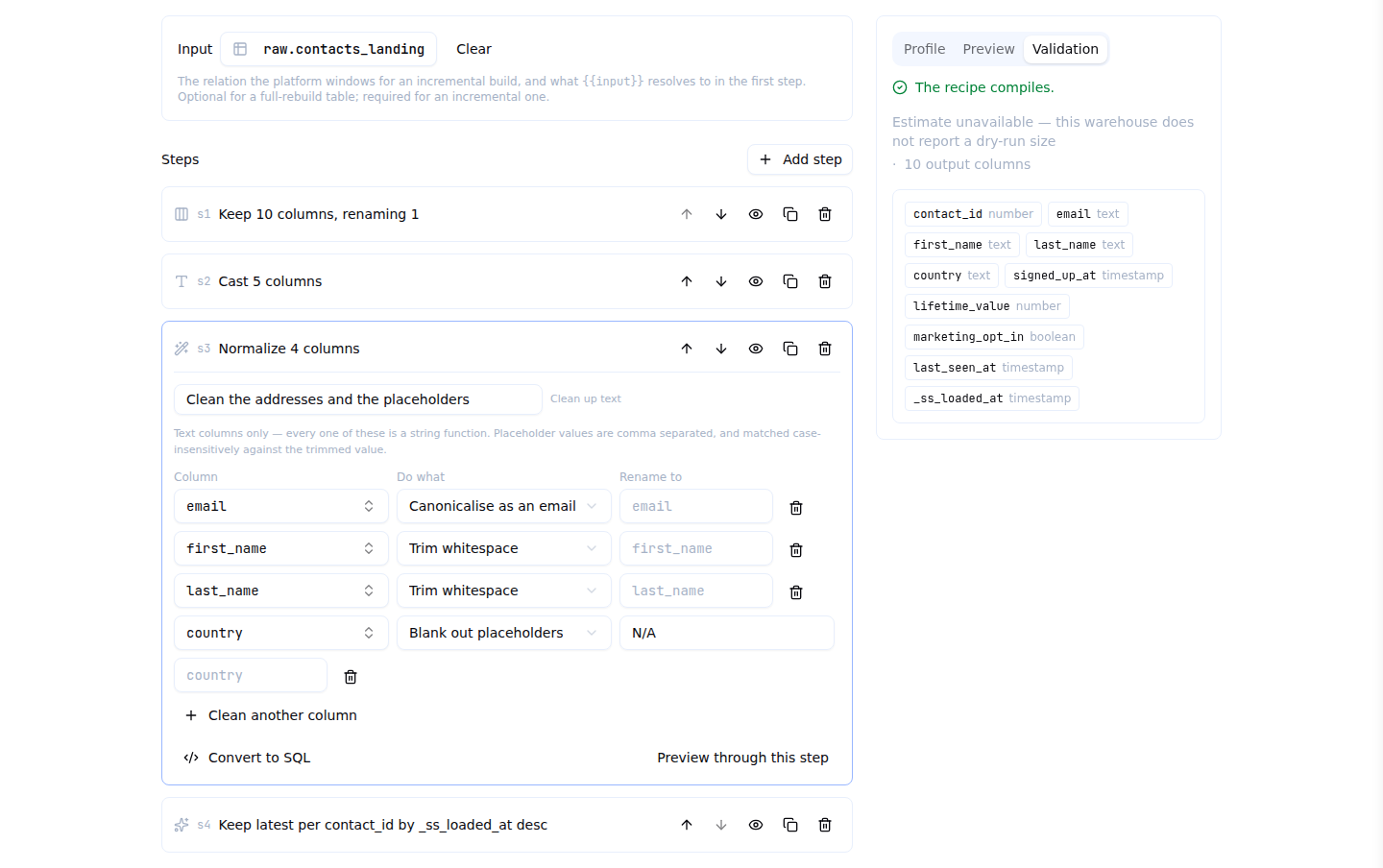
The editor lists the steps in the order they run. Each card carries a one-line summary of what that step does; opening one shows its form, and Preview through this step runs the recipe as far as it — in the panel beside the steps, so the rows a step produces stay next to the controls that produced them.
Inside a SQL step, Insert table or column opens the same browser the Input control uses and
splices a {{source(...)}} or {{ref(...)}} token at the cursor.
Why typed steps are worth preferring
A typed step is a set of fields Zeotap understands. A SQL step is a string it can only pass through. Three things follow, and one enabled SQL step anywhere in the recipe costs you all three:
- Exact column lineage, which is what makes personal-data handling a fact rather than a guess.
Zeotap knows
full_namecame fromfirst_nameandlast_name, so it knowsfull_nameinherits their sensitivity. A column whose path crosses a SQL step is reported as unverified, and an unverified column is masked rather than assumed clean — losing the lineage never loses the protection. (A preview adds a measured backstop on top of that; see Permissions & Grants.) - A real incremental-safety check instead of a warning. See Incremental Builds.
- Portability. The same recipe runs on every supported warehouse, which is what makes blueprints and moving recipes between workspaces possible.
Good reasons to reach for a SQL step anyway: a window function that is not “latest per key”, a CASE
across several columns, a set operation other than append, a correlated subquery, or a function your
warehouse has and no other does.
Column names and case
Three rules, and they are not the same rule: what a recipe reads, what the built table is called, and how you name a raw table.
Columns that already exist are referred to by the spelling your warehouse reports for them. Everywhere a recipe or its build settings name a column, the control is a picker over the columns Zeotap knows that step or table has, with the warehouse’s own spelling and the column’s type beside it. You can always type a name instead — a column downstream of a SQL step is one Zeotap cannot see, and a value the list does not contain is kept and marked not in this step’s input rather than replaced. A name you type is matched against the real column list case-insensitively, so you can write it in whichever case you have to hand. Two columns differing only in case are refused by name rather than guessed between.
The lists fill in on their own. The input’s columns are known as soon as you choose an input, and a later step’s as soon as the step above it compiles — you do not have to press Validate to make a picker work.
The columns of the table you build take the case your warehouse gives a new column, whether you
aliased them or passed them straight through. On Snowflake a prepared table’s columns are always
upper case — CONTACT_ID — even when the table it reads holds contact_id; on BigQuery, Databricks
and ClickHouse they keep exactly the names your recipe produced. That is what the built table will
really be called, so it is what you will see in the model, in an audience filter, and in your own
warehouse.
Snowflake: a quoted lower-case table in, a conventional upper-case table out. Tables written by a
Zeotap loader (and everything a connector blueprint builds on them) hold case-sensitive lower-case
columns, which you can only address as "contact_id". A prepared table over one publishes
CONTACT_ID, addressable without quotes from a model, an audience, a trait, a journey and a sync —
which is the whole point of building it. Three things follow: delete_when is your own SQL over those
published columns, so write is_deleted = true rather than "is_deleted" = true; a recipe that
produces two columns differing only in case (id and ID) is refused, because they would become one
column — rename one with an as; and the first build after this behaviour shipped rebuilds an existing
table in full, once, to republish its columns.
Snowflake: a table or schema name in {{source('schema','table')}} is used exactly as you type
it. Anything created in Snowflake without quotes is stored in upper case, so
{{source('cdp_raw','contacts')}} names a different, non-existent object — write
{{source('CDP_RAW','CONTACTS')}}. Names picked from the schema browser are always correct, because
it reports the warehouse’s own spelling. The editor raises a non-blocking warning with the suggested
spelling when it sees this.
The same applies inside a SQL step over a table a Zeotap loader wrote, but the other way
round: loader landing tables are created with quoted names, so their columns are case-sensitive and
lower case, and a SQL step must write "id" rather than id. Typed steps handle this for you.
Step reference
Types are always drawn from the same list: integer, float, decimal, boolean, string,
date, timestamp.
select_columns — project or drop
| Option | Description |
|---|---|
columns | A list of {column, as?}. This is a projection, and it fixes the output column order |
drop | A list of column names to remove, leaving the rest in their original order |
Use one or the other, never both. Dropping every column is refused.
{ "kind": "select_columns", "params": {
  "columns": [{ "column": "id", "as": "contact_id" }, { "column": "email" }, { "column": "_ss_loaded_at" }] } }
cast — type a column
casts is a list of {column, to, format?, on_error?, as?, precision?, scale?}.
| Option | Description |
|---|---|
to | The target type |
format | iso (default), epoch_seconds, epoch_millis, or a pattern built only from YYYY MM DD HH mi SS and separators. Any other token is refused rather than passed through — an untranslated token is not an error on most warehouses, it is a literal, so every row would quietly become NULL |
on_error | null (default) turns an unparseable value into NULL and finishes the build; fail aborts it. fail really does abort on every supported warehouse, including the three that would otherwise quietly return NULL or round |
precision / scale | decimal only. Defaults 38 and 9; 38 is the highest every warehouse supports. On BigQuery the value is rounded to the scale you asked for, because BigQuery does not accept a sized decimal inside a cast |
Naming the same column twice in one casts list is refused. A cast replaces its column in place, so
one input column can only leave the step as one output column — the second rule would silently win and
the first one’s output would never exist.
epoch_seconds and epoch_millis are only meaningful for timestamp and date.
{ "kind": "cast", "params": { "casts": [
  { "column": "id", "to": "integer", "as": "contact_id" },
  { "column": "lifetime_value", "to": "decimal", "precision": 18, "scale": 2 },
  { "column": "last_seen_ms", "to": "timestamp", "format": "epoch_millis", "as": "last_seen_at" } ] } }
flatten_json — pull values out of a payload column
| Option | Description |
|---|---|
column | The JSON column |
paths | A list of {path, as?, type?}. as defaults to the column name plus the path with dots as underscores; type defaults to string, which is what a JSON path really returns |
keep_original | Default false — the payload is usually the widest thing in the table, and removing it is the point |
A path containing [] is refused, with a pointer to explode_array: crossing an array means many
values per row, which flattening cannot produce.
explode_array — one row per element
| Option | Description |
|---|---|
column | The array column |
as | Required — the name of the element column |
element_paths | Optional {path, as, type?} list, to pull fields out of each element |
keep_empty | Default false, matching what every warehouse’s own unnest does — which silently drops rows whose array is empty or absent. Set it to true when “the customers with no orders” must survive; the kept row’s element is NULL on every warehouse |
keep_original | Default true, unlike flatten_json: the array is often still wanted |
A scalar string element reads the same on every warehouse — unquoted, as the value itself rather than as the JSON that carried it.
normalize — string hygiene
ops is a list of {column, op, values?, country_code?, as?}, where op is one of trim, lower,
upper, trim_lower, email, phone_e164, null_if.
Every operation is a string function, so a non-text column is refused with a note to cast it first.
values belongs to null_if alone and is compared case-insensitively against the trimmed value, so
N/A, n/a and N/A are one rule. country_code belongs to phone_e164 alone — digits only, no
+; without it a bare national number comes back as digits with no + rather than asserting a
country nobody named.
derive — an expression the other kinds cannot hold
columns is a list of {as, expression, type?}. The expression is a scalar SQL fragment over the
step’s own columns, checked conservatively: no statement separators, no comments and no statement
keywords. If you need a subquery, you want a join step.
Declare type whenever you can. Without it the column’s family is unknown, so a later normalize or
aggregate over it cannot be validated and its lineage is weaker.
derive is the escape hatch inside the typed world: it keeps a recipe fully typed, so the
incremental-safety checks stay checks rather than warnings. Prefer it to a whole SQL step.
filter — keep rows
Either a filter tree or a boolean expression, never both.
The tree uses the same grammar and the same operators as the audience builder, compiled by the same
code, so an operator behaves identically in both places — but property conditions only. An event,
relation, computed-attribute or audience condition resolves against the modelling layer, which does
not exist at this point in the pipeline (the models are usually defined over the table you are
building), so those are refused by name with a pointer to a join step.
Prefer the tree: it is data Zeotap can read, where the expression is a fragment it can only check for the obviously dangerous.
dedupe_latest — keep the latest row per key
| Option | Description |
|---|---|
key | The columns that identify a record |
order_by | A list of {column, desc?} — what “latest” means |
Both are required: without order_by there is no defensible “latest” and the step would keep an
arbitrary row. There is no tiebreak — if two rows tie on every order_by column, the surviving
one is whichever the warehouse picked, so order by something that discriminates, usually a business
timestamp plus _ss_loaded_at.
join — a lookup
| Option | Description |
|---|---|
right | The lookup: another prepared table, or a raw table |
type | left (default) or inner |
on | A list of {left, right} key pairs |
select | Optional {side?, column, as?} projection. side disambiguates a name both sides carry |
left is the default because an inner join whose lookup is missing a row removes that row from the
output, which reads as data loss rather than as a join choice. Right and full joins do not exist
here: both can produce a row with no input row behind it, which breaks lineage back to the primary
input and makes an incremental window meaningless.
Omitting select projects everything from both sides and is refused on a name collision rather
than resolved by a rule, because every such rule is wrong half the time.
union — append more inputs
| Option | Description |
|---|---|
inputs | The additional relations to append |
match | by_name — the only value |
fill_missing | null — the only value. A column missing from one branch is NULL there |
By name, always: a positional union silently swaps two columns of the same type the day somebody reorders a projection upstream, which is exactly the change a prepared table exists to absorb.
aggregate — group and measure
| Option | Description |
|---|---|
group_by | Required and non-empty |
measures | A list of {as, fn, column?, order_by?} where fn is count, count_distinct, sum, min, max, avg, first or last |
A grand total is a legitimate query and a terrible prepared table — one row, no key to merge on and
nothing downstream can join to it — so group_by cannot be empty. Every function but count needs a
column. first and last need an order_by (that is what they are first by), and nothing else
may carry one.
pivot — values into columns
| Option | Description |
|---|---|
group_by | The row grain |
key_column | The column whose values become columns |
keys | An explicit list of {key, as?} |
value_column | Required unless fn is count |
fn | max (default), min, sum, avg or count |
prefix | Prepended to every generated column name |
keys is explicit and cannot be discovered: a prepared table’s schema is a fact Zeotap records,
not something that changes with the data on every build. prefix exists because a key called id
would otherwise pivot into a column that collides with a group_by column of the same name.
sql — the escape hatch
One SELECT (it may start with WITH), reading {{input}}. Everything above about lineage,
incremental safety and portability is the cost.
SELECT *, SUM(is_new) OVER (PARTITION BY user_id ORDER BY event_time) AS session_no
FROM {{input}}
Statement separators are refused, and so is anything but a SELECT — a step can never write to your
warehouse.
Validating and previewing
Validate compiles the recipe and tells you what it will produce: the output columns and their types, the lineage of each one, a one-line summary of each step, per-step errors with the field that caused them, any warnings, and — on BigQuery, which is the one supported warehouse that can price a query before running it — how many bytes a build would scan.
Preview runs the compiled query with a small limit and shows the rows, with masked columns masked exactly as a model preview masks them. You can preview through any step, which is how you find the step that changed something unexpectedly.