Metadata Export
The metadata export keeps your audience catalogue as a table in your own warehouse. The table has one row per audience, with its name, tags, folder, description, who created and last edited it, its rules, status and size, so you can join audience ids from your exports and syncs to names and definitions in your own BI tools.
The metadata export is off by default and is enabled per workspace by the Zeotap platform team. To turn it on, contact your account team and tell them which of the workspace’s warehouse sources should hold the table.
Prerequisites
- A warehouse source in the workspace on Snowflake, BigQuery, Databricks, ClickHouse or Redshift. This is the source the table is written to.
- Write access for that source’s user on one more schema,
cdp_metadata(CDP_METADATAon Snowflake). See the grants on your warehouse’s page: Snowflake, BigQuery, Databricks, ClickHouse, Redshift.
Once the export is enabled, the connection test of the source chosen to hold the table includes one more step, write_metadata, which checks that grant. The workspace’s other sources are tested as before.
How It Works
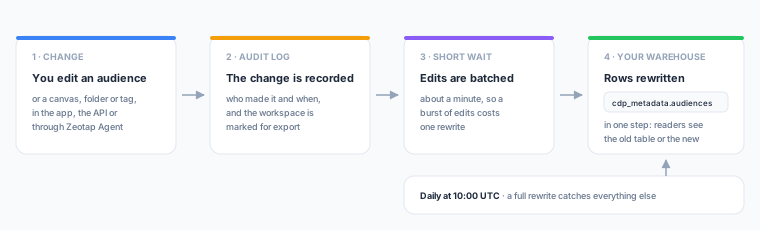
- After a change. Creating, editing, cloning or deleting an audience, a canvas, a folder or a tag schedules an export. It does not matter whether the change was made in the app, through the API or by Zeotap Agent. Changes made within about a minute of each other are exported together.
- Every day. At 10:00 UTC the workspace’s rows are rewritten in full. This picks up changes nobody makes by hand, such as a new audience size estimate or an audience whose status changed while it was being built.
- In one step. Each export builds the new table next to the old one, carrying over any other workspace’s rows unchanged, and swaps it into place. A query sees either the previous version or the new one, never a half-written table.
Freshness
| Change | In the table |
|---|---|
| An edit to an audience, canvas, folder or tag | Usually within 2 minutes |
| Size estimates and status changes made by the platform | By the next 10:00 UTC rewrite |
| An export that failed (for example, a missing grant) | Retried every 15 minutes |
Nothing is written when nothing has changed, so a quiet workspace costs you almost no warehouse work.
The Table
The table is cdp_metadata.audiences on BigQuery, Databricks, ClickHouse and Redshift, and CDP_METADATA.AUDIENCES on Snowflake. It is created in the source’s working database, project or catalog, next to the other Zeotap schemas.
Several Workspaces in One Table
If more than one workspace exports to sources in the same database, project or catalog, they share one table. Each row belongs to one workspace, identified by workspace_id, and each export replaces only its own workspace’s rows. Filter by workspace_id whenever the table may hold more than one workspace. The examples below do.
| Column | Description |
|---|---|
audience_id | The audience’s id |
audience_name | The audience’s name |
tag_names | The audience’s tags, sorted by name. An empty array when it has none |
folder_name | The folder the audience is in, or null at the top level |
folder_path | The full folder path from the top level, joined with /, for example Campaigns/2026/Q3 |
description | The audience’s description |
audit_detail | JSON with the creator and the last editor: {"createdBy": {"userEmail", "userName"}, "updatedBy": {"userEmail", "userName"}} |
audience_rules | JSON with the audience’s filter rules. For an audience published from a canvas, it has canvas_id and canvas_output_node_id instead |
created_at | When the audience was created |
updated_at | When the audience was last updated |
workspace_id | The workspace the audience belongs to |
workspace_name | The workspace’s name |
organization_id | The organization the workspace belongs to |
status | draft, active, archived, error or broken |
status_error | The error message, when the status is an error |
parent_model_id | The id of the model the audience is built on |
parent_model_name | That model’s name |
estimated_size | The last estimated audience size |
estimated_at | When that estimate was taken |
_replicated_at | When this row last changed in the table. An export that leaves the row unchanged does not move it |
_record_hash | A hash of the row’s content, which changes whenever the content changes |
_is_deleted | TRUE when the audience has been deleted |
If you used the V1 client audience view, its nine columns (audience_id, audience_name, tag_names, folder_name, description, audit_detail, audience_rules, created_at, updated_at) keep their names here. audience_id is the V2 id, and workspace_id and organization_id replace the V1 organization id.
JSON columns are stored in each warehouse’s JSON type: VARIANT on Snowflake and JSON on BigQuery. Databricks, ClickHouse and Redshift store them as JSON text. On Redshift, tag_names is also stored as JSON array text. Redshift stores every text column as VARCHAR(65535), so a longer value is shortened to fit rather than failing the export: a JSON document is replaced by {"_truncated": true, "bytes": N}, a text value such as a long description is cut at 65,535 bytes, and tag_names keeps as many whole tags as fit.
Deleted Audiences
A deleted audience stays in the table, with _is_deleted = TRUE and its last exported content. That way an audience id in an older export or sync log can still be looked up. Deleted rows are never removed. An audience that was created and deleted before the next export never appears.
To list only current audiences, filter on _is_deleted:
-- BigQuery
SELECT audience_id, audience_name, folder_path, status, estimated_size
FROM `my-company-analytics.cdp_metadata.audiences`
WHERE workspace_id = 'your-workspace-id'
  AND NOT _is_deleted
ORDER BY audience_name;
-- Snowflake
SELECT audience_id, audience_name, folder_path, status, estimated_size
FROM ANALYTICS.CDP_METADATA.AUDIENCES
WHERE workspace_id = 'your-workspace-id'
AND NOT _is_deleted
ORDER BY audience_name;Querying the JSON Columns
Who last edited each audience, on BigQuery:
SELECT
  audience_name,
  JSON_VALUE(audit_detail, '$.createdBy.userEmail') AS created_by,
  JSON_VALUE(audit_detail, '$.updatedBy.userEmail') AS last_edited_by,
  updated_at
FROM `my-company-analytics.cdp_metadata.audiences`
WHERE workspace_id = 'your-workspace-id'
  AND NOT _is_deleted
ORDER BY updated_at DESC;
The same on Snowflake:
SELECT
  audience_name,
  audit_detail:createdBy.userEmail::string AS created_by,
  audit_detail:updatedBy.userEmail::string AS last_edited_by,
  updated_at
FROM ANALYTICS.CDP_METADATA.AUDIENCES
WHERE workspace_id = 'your-workspace-id'
  AND NOT _is_deleted
ORDER BY updated_at DESC;
updatedBy is taken from the workspace audit log. If the log has no create, update, clone or rollback entry for an audience, for example because it was last edited before the log existed, its updatedBy fields are null.
Audiences that changed in the last day:
SELECT audience_id, audience_name, _is_deleted, _replicated_at
FROM `my-company-analytics.cdp_metadata.audiences`
WHERE workspace_id = 'your-workspace-id'
  AND _replicated_at >= TIMESTAMP_SUB(CURRENT_TIMESTAMP(), INTERVAL 1 DAY);
Access and Security
- Grant read access on the schema, not the table. Each export replaces the table, so a grant on the table itself can be lost. Grant your readers access to the
cdp_metadataschema or dataset. - Audience rules are exported as written.
audience_rulescontains every value used in an audience’s conditions. If someone typed an email address, a device token or another identifier into a filter, it is in the table. Anyone who can readcdp_metadatacan see it. - Names and emails.
audit_detailcontains the name and email of the person who created each audience and of the last person to edit it. - No credentials. The table holds audience metadata only. It never contains source, destination or connection settings or secrets.
- Shared tables are shared with every reader. When several workspaces export to the same database, project or catalog, anyone who can read the table sees all of their audiences. If a workspace’s catalogue must stay separate, export it to a source in its own database, project or catalog.
- Only
cdp_metadata. Zeotap writes only intocdp_metadataand never into your own schemas.
Turning It Off
When the export is disabled, the workspace’s rows stop updating. They are not removed: the last version stays in your warehouse until you delete it. The same applies to the previous table if the export is moved to a different source. You can revoke the cdp_metadata grant whenever it suits you.
Next Steps
- Testing Connections: the
write_metadatacheck - Audit Log: where
updatedBycomes from - Audiences: building the audiences this table lists