Connector Blueprints
A blueprint turns one connector’s raw landing into a modelled workspace in a single step: the prepared tables over the landing, the models over those tables, and the relationships between those models.
If the tables you want to prepare came from a Zeotap loader, try a blueprint before writing anything yourself. It is faster, more complete and better tested than a recipe written from a profile.
Applying one
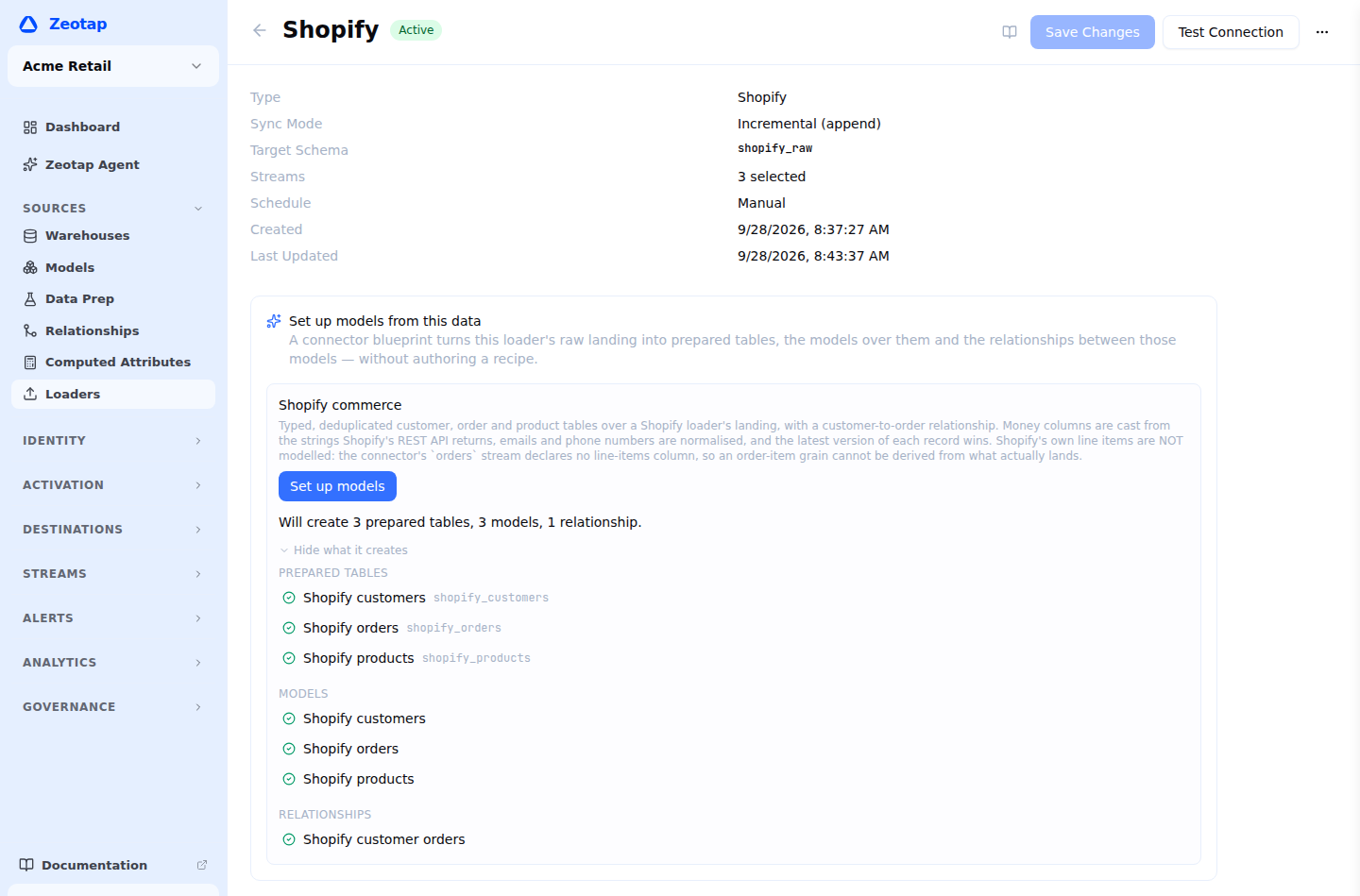
- Open the loader’s detail page. A Set up models from this data card appears when a blueprint applies to it. (There is also a Start from a connector blueprint entry on the Data Prep list.)
- The card says what it will create, and See what it creates lists every prepared table, model and relationship, with a plain-English reason for anything it cannot.
- Click Set up models, then Check this blueprint in the dialog. That is the dry run: the same report, produced by doing the work and undoing it.
- Apply. Everything is created and the first build starts; the dialog follows its progress.
What you can rely on
| Atomic | If anything fails — a recipe your warehouse refuses, a model whose primary key is not there, a join key that is not a column — everything the apply created is removed again, and anything it merely adopted is left alone |
| Idempotent | A second apply adopts what already exists, reports it unchanged and starts no build. Re-checking a workspace is a safe no-op, not a duplicate set |
| Non-destructive | A prepared table already carrying a blueprint’s name with different content is somebody’s work, so the apply stops and says so rather than overwriting it. Use Name prefix to create a separate set instead, with the references between its tables repointed to match |
| Honest dry runs | A dry run does exactly the same work and then undoes it, so its report is what a real apply produces rather than an approximation |
What every blueprint gives you
- Typed steps only, which is what makes one blueprint valid on every supported warehouse.
- Business-friendly column names, keys first.
- Casts for everything the connector landed in a poorer type than it means.
- Normalized email addresses and phone numbers where the connector declares them.
- Latest row per key, ordered by load time, so an append-only landing becomes current state.
- Incremental
mergematerialization on the declared key, watermarked on_ss_loaded_at, with a weekly full refresh. - Build when inputs change switched on, so a loader run rebuilds the tables — no schedule needed.
- Default data tests (uniqueness and not-null on the keys).
- The models and the relationships between them, so an audience over the parent can use a related condition immediately.
A blueprint binds to what has actually landed, not to what is selected on the loader. A stream you ticked this morning has no table yet, so it is reported as unavailable with the fix — select it, or run the loader once — rather than creating a recipe against a table your warehouse does not have.
The blueprints
Every blueprint models only what its connector declares and lands. A field the connector does not read is not in your warehouse, however well documented it is upstream — so the limits below are properties of the loader, not of the blueprint.
Shopify
| Streams | customers (required), orders, products |
| Tables and models | Customers (parent), Orders (event), Products (related) |
| Relationships | Customers → Orders |
| Highlights | Money columns cast from the strings the Shopify API returns; emails and phone numbers normalized |
| Not included | Order line items. The connector’s orders stream declares no line-items column, so an order-item grain cannot be derived from what lands |
HubSpot
| Streams | contacts (required), companies, deals |
| Tables and models | Contacts (parent), Companies (related), Deals (related) |
| Relationships | Contacts → Companies, joined on the company name |
| Not included | Custom properties — the connector reads a fixed property list per object. Object associations, which are served by a separate API the connector does not read; the company join is on name because that is the only link the landed columns carry |
Salesforce
| Streams | Contact (required), Account, Lead, Opportunity |
| Tables and models | Contacts (parent), Leads (parent), Accounts (related), Opportunities (related) |
| Relationships | Accounts → Contacts, Accounts → Opportunities, on the AccountId every object carries |
| Highlights | Soft-deleted rows are kept and flagged rather than filtered, because that flag is how a downstream model learns a record went away |
| Not included | Custom fields (anything ending in __c) — the connector reads a fixed field list per object |
Stripe
| Streams | customers (required), subscriptions, invoices, charges |
| Tables and models | Customers (parent), Subscriptions (related), Invoices (related), Charges (event) |
| Relationships | Customers → Subscriptions, Invoices and Charges; Subscriptions → Invoices |
| Highlights | Every Stripe timestamp is a Unix epoch in seconds and lands as an integer, so each one is cast to a real timestamp — the single most valuable thing this blueprint does |
| Note | Money stays in Stripe’s minor units (an amount of 1999 is 19.99 in the row’s own currency). Dividing by 100 would be wrong for the zero-decimal currencies, and the connector declares no exponent to divide by |
Klaviyo
| Streams | profiles (required), events, campaigns, lists |
| Tables and models | Profiles (parent), Events (event), Campaigns (related), Lists (related) |
| Relationships | Profiles → Events, on the profile id Klaviyo stamps on every event |
| Note | A profile’s custom properties and an event’s event_properties are carried through as the JSON they land as — the connector declares no sub-fields, so nothing here invents a path into them. Profile the landing to see which keys are really there, then add a flatten step |
| Not included | List membership and campaign recipients, which are separate endpoints the connector does not read — so lists and campaigns are catalogues here rather than engagement tables |
Google Analytics 4
| Streams | events (required), sessions |
| Tables and models | Events, Sessions — both event-grain analytics tables |
| Relationships | None |
| Highlights | GA4’s YYYYMMDD date string is cast to a real date |
| Note | GA4’s Data API serves aggregate reports, not per-person rows: a row is a dimension tuple with metrics attached, and carries no user, client or session identifier. So this blueprint has no parent grain — its models are analytics tables a computed attribute or a report reads, not a profile source |
| Not included | A property’s custom dimensions — the connector reads a fixed dimension and metric list |
After applying
The prepared tables are ordinary prepared tables. Open one and change anything: add a step, add a flatten now that you have profiled the JSON, change the schedule, add tests. A blueprint is a starting point, not a managed object — Zeotap will not overwrite your edits, and re-applying reports the tables as unchanged.
Flattening JSON
No shipped blueprint flattens a JSON column, because no connector declares the sub-fields inside one. That is deliberate: inventing a path would produce a column that is NULL for most rows, on a table that is then hard to change. Profile the landing, look at the discovered key paths and their fill rates, and accept the flatten suggestion for the keys that are really there.