On your website
Once a Site is published, the browser SDK reads it for the current visitor and hands the answer to the tools already on your page — your tag manager, your own code, your experimentation tool. You install the SDK once with the Site’s key. What the page receives, where it lands and when the page reads again are set on the Site and arrive with every read, so changing them is a publish, not a deploy.
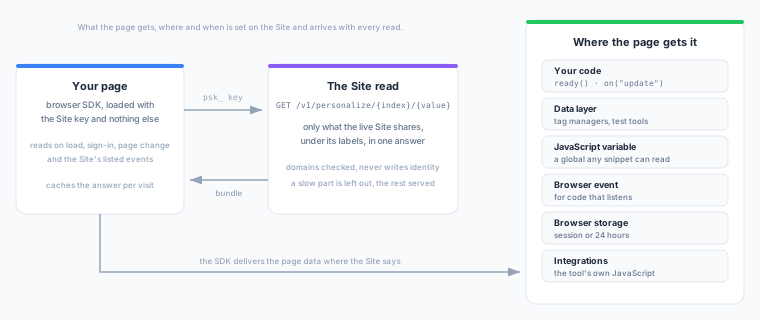
The SDK decides nothing and renders nothing. It reads, caches and delivers; your tools decide what to show.
Prerequisites
- A published Site and one of its Site keys (
psk_…). - Your site’s origin in the Site’s domains, or the domain list left empty.
- The Browser SDK sending events from an event source. The read follows the same visitor the events identify.
Install
The Site’s Overview shows each of the forms below with your write key and Site key filled in.
Script tag
Add the Site key to the load() options of the SDK snippet:
<script>
  !function(){var s=window.zeotap=window.zeotap||[];
  if(!Array.isArray(s)||s.invoked)return;s.invoked=!0;
  s.methods=["load","track","identify","page","screen","group","alias",
  "setConsent","setUserIdentities","unsetUserIdentities","reset","flush"];
  s.factory=function(m){return function(){
  var a=Array.prototype.slice.call(arguments);a.unshift(m);
  s.push(a);return s}};for(var i=0;i<s.methods.length;i++){
  var m=s.methods[i];s[m]=s.factory(m)}
  var q=s.load;s.load=function(k,opts){q(k,opts);
  var e=document.createElement("script");e.type="text/javascript";
  e.async=!0;e.src="https://content.zeotap.com/composable-sdk/v1/zeotap.min.js";
  var n=document.getElementsByTagName("script")[0];
  n.parentNode.insertBefore(e,n)};
  s.load("YOUR_WRITE_KEY",{apiHost:"https://events.zeotap.com",personalization:{key:"YOUR_SITE_KEY"}});
  }();
</script>
If the snippet is already on your pages, add only the personalization option to its load() call:
personalization: { key: "YOUR_SITE_KEY" }npm
With a bundler, enable the module before load(). Without that call the personalization option is ignored with a warning, and your bundle does not carry the module at all.
import { AnalyticsClient, enablePersonalization } from "@zeotap/browser-sdk";

enablePersonalization();

const analytics = new AnalyticsClient("zeotap");
analytics.load("YOUR_WRITE_KEY", {
  apiHost: "https://events.zeotap.com",
  personalization: { key: "YOUR_SITE_KEY" },
});
Google Tag Manager and Adobe Launch
Both tag-manager integrations install with the Site key alone. See Google Tag Manager → Personalization and Adobe Launch → Personalization.
Load options
| Option | Type | Required | Description |
|---|---|---|---|
key | string | Yes | The Site key, psk_…. Any other kind of key is refused before a request is made. |
endpoint | string | No | The serving host. By default the SDK derives it from your apiHost: https://events.<your domain> reads from https://membership.<your domain>. Set it only when your events go through a first-party proxy or you are told to. The snippet on the Site’s Install tab already includes it when the serving host cannot be derived from apiHost. |
initial | object | No | A bundle your server already fetched for this visitor. See Server-side rendering. |
defaults | object | No | Timing settings to use where the Site states none — for example the first-page wait, which applies before the first bundle has told the page the Site’s own value. |
Read it in your code
Everything the module offers is on the personalization namespace of the live client, plus two identity getters. The examples use the snippet’s global.
| Method | What it does |
|---|---|
personalization.get() | The current bundle, from the cache or the network, or null. Never waits. |
personalization.ready() | A promise that resolves with the first bundle, or with null when the first-page wait runs out. Use it to hold back content that depends on the answer. |
personalization.on("update", cb) | Calls cb(bundle) for every bundle after the one ready() resolved with. |
personalization.refresh(reason?) | Reads again now. Reads closer together than the Site’s minimum interval are combined. |
personalization.exposed({ label, feature?, variant? }) | Records that the page showed something because of label. See Exposure events. |
getAnonymousId(), getUserId() | The identifiers the SDK holds — the same ones its events carry. |
zeotap.personalization.ready().then((bundle) => {
  if (bundle && bundle.audiences && bundle.audiences.includes("vip")) {
    showVipBanner();
    zeotap.personalization.exposed({ label: "vip", feature: "home_banner" });
  }
});

zeotap.personalization.on("update", (bundle) => {
  // a later read: after an add to cart, a sign-in, a page change
});
personalization lives on the loaded client, not on the snippet’s stub, so use it once the SDK has loaded. You never need to call refresh() at load: the load reads by itself.
The bundle
Each read returns one bundle for the visitor:
{
  "site":       { "id": "9b1c…", "version": 7, "delivery": { … }, "consent": { … }, "triggers": [ … ], "cache": { … } },
  "identity":   { "index": "anonymous_id" },
  "audiences":  ["vip", "cart_abandoner"],
  "attributes": { "cart_value_30m": 129.9 },
  "profile":    { "last_category": "shoes" },
  "as_of":      "2026-10-21T09:14:05Z",
  "degraded":   []
}| Field | What it holds |
|---|---|
site | The Site’s id and published version, and the delivery, consent, trigger and timing settings the SDK applies. Configuration only — nothing about the visitor. |
identity | The identifier field the read used (user_id or anonymous_id), never its value. |
audiences | The labels of the shared audiences the visitor is in. Positives only. |
attributes | Each shared realtime attribute’s current value, under its label. An attribute with no value has no key. |
profile | Each shared profile field’s value, under its label. |
as_of | When the answer was composed. |
degraded | Why a part could not be answered this time (below). Empty when everything was answered. |
The SDK adds source ("cache" or "network") and fetched_at to the bundle it gives your code.
Empty is not missing
audiences, attributes and profile are three separate answers, and each can be empty or missing — which mean different things:
| What you see | What it means |
|---|---|
"audiences": [] | Answered: the visitor is in none of the shared audiences. |
"profile": {} | Answered: nothing exists for this visitor — for example an anonymous visitor not yet linked to a profile. Not a failure. |
audiences, attributes or profile missing | Could not be answered this time. Its reason is in degraded; the other parts are still served. |
The reasons are fixed codes:
| Code | Meaning |
|---|---|
audiences:timeout, attributes:timeout, profile:timeout | That part did not answer within the read’s time budget. |
audiences:plane_unreachable, attributes:plane_unreachable | The realtime data could not be read. |
profile:plane_unreachable | An anonymous visitor’s linked profile could not be looked up. |
profile:store_unreachable | The Store could not be read. |
profile:unentitled | Stores are not enabled for the workspace. |
Treat a missing part as unknown, not as no: show your default experience rather than the “not a VIP” one.
Where the site gets it
The Site’s Where the site gets it settings decide where each bundle is delivered. Your code’s ready() and on("update") always get the whole bundle. Every other place gets the visitor’s page data: the three answers plus which Site version answered, and when.
{ "audiences": ["vip"], "attributes": { "cart_value_30m": 129.9 }, "profile": { "last_category": "shoes" },
  "meta": { "site_id": "9b1c…", "version": 7, "as_of": "2026-10-21T09:14:05Z" } }
A part that could not be answered is missing from the page data too. The Site’s own configuration is never written to the page, so bind your tags to the page data, never to site.
| Place | Default name | What lands there | Use it when |
|---|---|---|---|
| Data layer | dataLayer, event zeotap_personalization | A push per delivery, nested or flat (below) | Your tag manager (Google Tag Manager, Tealium iQ, Adobe Launch) or an experimentation tool reads the data layer |
| JavaScript variable | zeotapPersonalization | window[name] = page data, replaced on each delivery | A tool or snippet reads a global |
| Browser event | zeotap:personalization | A CustomEvent on document with the page data as detail | Your code prefers to listen |
| Browser storage | zeotapPersonalization, session storage | { "fetched_at", "data" } as one JSON string, replaced on each delivery | A tool reads storage, or a later page needs the data before the SDK has loaded |
| Integrations | — | A call into the tool’s own JavaScript | A listed tool is on the page (see Integrations) |
All places are off until you switch them on, and each name can be changed on the Site. They are delivered in the order storage, JavaScript variable, data layer, browser event, integrations, so a listener reacting to the event can already read the variable and the storage record. One place failing does not stop the others.
// The JavaScript variable (when the Site turns it on)
const data = window.zeotapPersonalization;   // { audiences, attributes, profile, meta }

// The browser event, fired on every delivery
document.addEventListener("zeotap:personalization", (e) => {
  const { audiences, attributes, profile, meta } = e.detail;
});

// Browser storage (session by default)
const record = JSON.parse(sessionStorage.getItem("zeotapPersonalization") || "null");
// record → { fetched_at, data: { audiences, attributes, profile, meta } }
Data layer: nested and flat
Nested (the default) pushes the page data under one key:
{ event: "zeotap_personalization", _clear: true,
  zeotap: { audiences: ["vip"], attributes: { cart_value_30m: 129.9 },
                 profile: { last_category: "shoes" }, meta: { site_id, version, as_of } } }
Flat pushes one key per thing the visitor has, named zeotap_<label>: true for each audience they are in, the value for each attribute and profile field.
{ event: "zeotap_personalization", zeotap_vip: true, zeotap_cart_value_30m: 129.9,
  zeotap_last_category: "shoes" }
The data layer holds the latest answer, not every answer. Google Tag Manager merges pushes rather than replacing them, so without help a visitor who left an audience mid-page would stay in it for every GTM variable. The SDK closes that in both shapes:
- Nested pushes carry
_clear: true, which tells GTM to replace the keys in that push. Other tools ignore it. - Flat pushes also name each key this page pushed earlier that is gone now:
falsefor an audience the visitor left,nullfor an attribute or field that no longer has a value.
// The visitor left cart_abandoner and their cart emptied:
{ event: "zeotap_personalization", zeotap_vip: true,
  zeotap_cart_abandoner: false, zeotap_cart_value_30m: null }
A flat push for a visitor in nothing is just { event: "zeotap_personalization" } — expected, not a lost push. A key the page never pushed is never mentioned, so give your tag-manager variables a default value for “not seen”. The memory of what was pushed lasts for the page and survives a sign-out, so the next visitor on a shared device does not inherit the last one’s audiences.
The data layer is created if the page has none, as any tag does.
Browser storage
The storage place writes one record under its key, in session storage (the default) or local storage:
{ "fetched_at": "2026-10-21T09:14:05Z", "data": { "audiences": ["vip"], "attributes": { }, "profile": { }, "meta": { } } }data is the page data (nested) or the flat keys (flat), and the record is replaced whole on each write. It is never written before consent, and it is removed whenever the SDK forgets the visitor: on reset(), when consent is withdrawn, and when the visitor’s identity changes to someone with nothing cached. A local-storage record older than 24 hours is removed at the next load.
Integrations
An integration delivers the visitor’s answer through a tool’s own JavaScript, with no data-layer step. Add it on the Site under Console → Integrations → the tool → Add integration, and publish. It runs only when the Site lists it and the tool is on the page; nothing runs by default.
Every integration sends the same thing, under its own prefix (zeotap_ by default, changeable per integration on the Site): zeotap_<label> = true for each audience the visitor is in, and zeotap_<label> = the value for each attribute and profile field the Site shares. Labels are unique within a Site, so names never collide. An audience the visitor leaves while on a page is cleared at the next delivery on that page; each tool’s section below says how.
The script-tag (CDN) SDK carries all five integrations. With npm, register the ones your page uses before load():
import { enablePersonalization, registerAdapter, optimizelyWeb } from "@zeotap/browser-sdk";

enablePersonalization();
registerAdapter(optimizelyWeb());   // also: kameleoon(), launchdarklyJs(), adobeTarget(), ga4()
With debug: true, the SDK says why a listed integration did not run: the tool was not detected on the page, the integration is not active on this SDK version (a Site can be set up ahead of an SDK upgrade), or the type is unknown.
Everything a Site shares goes to every integration it lists. Optimizely’s and Google’s terms forbid personal data in attributes and user properties, and the other tools may store what they receive. Do not share personal fields on a Site that feeds an integration.
Optimizely Web
| Setting | Default |
|---|---|
| Attribute prefix | zeotap_ |
Your pages need the Optimizely Web snippet and the Zeotap SDK, in either order: before Optimizely loads, the SDK pushes into its queue. On every delivery the SDK sends the visitor’s labels as Optimizely custom attributes, in one optimizely.push({ type: "user", attributes }). An audience the visitor is in arrives as zeotap_<label> = "true"; each attribute and profile field arrives as zeotap_<label> with its value as a string.
- In Optimizely, create a custom attribute for each label you want to target, with the API name
zeotap_<label>(Audiences → Attributes → Create New Attribute → Custom Attribute). - Build an audience with the condition
zeotap_<label>istrueand use it in any experiment or personalization.
Optimizely keeps attribute values in the browser between visits. A label the visitor lost between two page views therefore stays set in Optimizely until the next page view in which the SDK pushes it and then sees it gone.
Kameleoon
| Setting | Default |
|---|---|
| Custom data prefix | zeotap_ |
Your pages need the Kameleoon script and the Zeotap SDK, in either order: before Kameleoon loads, the SDK hands it the data through Kameleoon’s command queue. On every delivery the SDK sets each label the visitor is in to true, and a label the visitor left during the page view to false. Attributes and profile fields arrive the same way, with the format of their value (number, string, or a list for a list value).
- In Kameleoon, create one custom data per label you want to target (Configure → Custom data → New custom data): name
zeotap_<label>, type Single, format Boolean, scope Visit, acquisition method Kameleoon Javascript API. - Build a segment with the condition Custom data
zeotap_<label>istrueand target your campaigns on it.
Kameleoon evaluates segments when its campaigns trigger, so data set after that is used from the next evaluation (usually the next page). Custom data lives as long as its scope: a label the visitor lost between two page views stays set until the next page view in which the SDK pushes it and then sees it gone. The Visit scope keeps that to one visit.
LaunchDarkly
| Setting | Default |
|---|---|
| Attribute prefix | zeotap_ |
| Client variable | ldClient |
Your pages need the LaunchDarkly JavaScript client SDK, initialized as usual with your own context, and the client exposed to the page as window.ldClient — or under another name you enter as the Client variable:
window.ldClient = LDClient.initialize(clientSideId, context);On every delivery that changes something, the SDK identifies the visitor again with the context the page gave LaunchDarkly, unchanged, plus one attribute per label the visitor is in (zeotap_<label> = true) and one per attribute or profile field (zeotap_<label> = its value). A label the visitor leaves is removed from the context. LaunchDarkly then re-evaluates every flag for the new context, so the page’s variation() calls and change listeners see the result.
To target a flag, add a rule If user zeotap_<label> is one of true; the attributes appear under the context kind’s attributes once a visitor carrying them has been seen. With a multi-context, the attributes go on its user context. Mark personal fields private in LaunchDarkly, or do not share them on the Site. Because the page supplies the context on every load, nothing stale carries over between page views.
Adobe Target
| Setting | Default |
|---|---|
| Parameter prefix | zeotap_ |
Your pages need Adobe Target’s at.js, directly or through Adobe Launch. Load the Zeotap SDK before at.js, so the visitor’s audiences are ready when at.js sends its first request. If at.js can load first, define window.targetPageParams (even one returning {}) or window.targetGlobalSettings before both, so the SDK knows Target is coming.
The SDK does not call Target itself: it hands at.js the visitor’s audiences through targetPageParams(), which at.js reads when it builds a request. Each audience the visitor is in is sent as the parameter zeotap_<label> = true, and each attribute or profile field as zeotap_<label> with its value. Parameters your page already returns from its own targetPageParams() are kept.
- In Target, build an audience from them: Audiences → Create Audience → Add Rule → Custom, choose the parameter
zeotap_<label>and equalstrue. - Use the audience in an activity.
The parameters go with the next at.js request. On a page where the audiences arrive after at.js’s first request, they reach Target with the following one (usually the next page). Page parameters are not stored in the visitor’s Target profile; if you need them there, add a profile script that copies them.
Google Analytics 4
| Setting | Default |
|---|---|
| User property prefix | zeotap_ (must not begin with google_, ga_ or firebase_) |
Your pages need the Google tag (gtag.js) with your GA4 measurement ID. On every delivery the SDK sets the visitor’s audiences as GA4 user properties, zeotap_<label> = true, plus one per attribute or profile field, in one gtag("set", "user_properties", …). A label the visitor leaves during the page view is cleared. Every event the page sends afterwards carries them.
GA4 accepts at most 25 user properties in a property, names of up to 24 characters and values of up to 36. Keep the labels you send to GA4 short (17 characters after zeotap_) and few: the SDK truncates longer names and values, sends at most 25 at a time, and says so in its debug output.
- To report on them or build GA4 audiences, register each as a custom dimension with scope User and user property
zeotap_<label>(Admin → Custom definitions → Create custom dimension). - A GA4 audience can then use the condition
zeotap_<label>exactly matchestrue.
GA4 keeps user properties on the user, so a label the visitor lost between two page views stays set there until the next page view in which the SDK pushes it and then sees it gone.
Triggers
The SDK reads the Site at fixed moments, and again on the events the Site lists under Triggers.
Always, and not configurable: when the page loads (once consent and identity are settled), and when the visitor is identified, aliased, given new identities or reset — the SDK calls identify, alias, setUserIdentities and reset. The reads after identify and alias wait one second first, like an event trigger’s default hold, so the link between the anonymous visitor and the user has landed and the answer carries what the visitor earned before signing in. The others happen straight away.
On a page change, by default: an SDK page() call reads again, which is what single-page apps need. Switch Page change off on the Site to keep the answer for the whole visit. (The page view the SDK records at load never adds a second read.)
On the events you list:
| Source | Listed by | Example |
|---|---|---|
| Your tracked event | Event name | zeotap.track("Order Completed") |
| Data layer event | The push’s event | dataLayer.push({ event: "add_to_cart" }), or gtag("event", "add_to_cart") |
| Browser event | An event type that reaches document | submit, or document.dispatchEvent(new CustomEvent("shop:exit-intent")) |
The SDK listens for browser events on document. The Console suggests ones that reach it: visibilitychange, submit, change, copy, paste, fullscreenchange, selectionchange and readystatechange. An event fired only on window, such as resize or hashchange, never reaches document, so listing it does nothing. Avoid events that fire constantly, such as click or scroll.
An event does not change a visitor’s audiences instantly — it has to be sent and counted first. So on a listed event the SDK sends its queued events first, waits the event’s hold time (1 second by default; choose right away, ½ s, 1 s or 2 s, or a custom wait of up to 10 seconds), then reads. Without the wait, “show the cart offer right after they add to cart” would show the answer from before the add.
Reads are never closer together than the Site’s minimum interval (2 seconds by default): a burst of events becomes one read, late enough for every event’s wait. The Site’s own delivery events never trigger a read.
The data layer is watched by wrapping its push, the way tag managers do. If your page objects to that, or its data layer is not an array, list the name as a Browser event instead and raise it where you push:
dataLayer.push({ event: "add_to_cart", ecommerce: { … } });
document.dispatchEvent(new CustomEvent("add_to_cart"));
For any other moment, call personalization.refresh() yourself.
The first page and the cache
On the first page of a visit there is nothing cached, so ready() waits for the read for up to 1 second and then resolves with null; the answer, when it lands, fires update and is kept for the next page. Set the Site’s first-page wait to 0 to never wait. There is no built-in hiding of page content: if you want to avoid a flicker, hold back the affected element until ready() resolves.
On every later page ready() resolves at once from the session cache, and a fresh read runs behind it and fires update with the new bundle.
The cache lives in session storage for the visit, per visitor and per Site key. A republished Site reaches the page on its next read, never in the middle of one. A sign-out (reset()) clears it.
Identity
The read asks about the visitor the SDK’s events are about: their user_id when the SDK holds one, otherwise their anonymous_id. With first-party cookies the SDK waits, briefly, for the server to confirm the visitor’s anonymous id before the first read, so the first answer is about the right person.
The read never creates, links or changes an identity. An anonymous visitor who signs in is linked by your identify call, as always; the read that follows waits a second so it picks the link up.
Consent
The read joins the SDK’s existing consent model. The Site names the consent category the read needs — functional by default; change it under Consent and timing.
- Default mode (no consent gating): the read runs, as events do — unless the visitor’s consent explicitly denies the Site’s category, which is honoured in either mode.
- Opt-in mode (
require: true,default: "denied", or a CMP): the read is held — no request leaves the page — until consent resolves. When the Site’s category is granted, the read fires. When it is denied, no read is made, and any bundle, cache and storage record is cleared. - Withdrawn later: the same clearing happens, and the page gets nothing until consent is granted again.
A denial clears what the SDK holds: get() returns null, the session cache is emptied and the browser storage record is removed. It does not reach back into what was already handed to the page. The JavaScript variable, the data layer’s last push, the browser event’s last answer and the attributes an integration was given keep the last answer until the next delivery. If your page or tags must stop acting on a label the moment consent is withdrawn, check consent there too, or read get().
Each read declares the consent state it was made under (the granted categories, or unresolved), and the Site’s Insights tab shows the share of reads that granted the Site’s category. The server records the declaration; the SDK is what withholds the read.
Server-side rendering
A renderer that runs on a server or at the edge can fetch the same bundle itself and hand it to the page, which removes the first-page wait entirely. The Site key is public, so the same key and route serve it, and the server gets exactly what the Site grants a page.
curl -H 'Authorization: Bearer YOUR_SITE_KEY' \
     -H 'Origin: https://www.example.com' \
  'https://membership.zeotap.com/v1/personalize/user_id/u_123?consent=functional'
Pass the bundle to the SDK as initial:
zeotap.load("YOUR_WRITE_KEY", {
  apiHost: "https://events.zeotap.com",
  personalization: { key: "YOUR_SITE_KEY", initial: bundleFromServer },
});
The SDK treats it as a cached bundle: ready() resolves at once, it is delivered to the Site’s places, and the usual reads refresh it. Use the identifier the SDK will use on the page (user_id once known, otherwise the visitor’s anonymous_id), or the page’s own read will answer for someone else.
The read
GET /v1/personalize/{index}/{value}
Authorization: Bearer <Site key>| Parameter | Required | Description |
|---|---|---|
index | Yes | The identifier field, normally user_id or anonymous_id (at most 64 characters). |
value | Yes | The identifier. |
?consent | No | The consent state, as the SDK sends it: the granted categories comma-joined in the order functional,analytics,marketing,advertising, or unresolved. Recorded, never refused. |
The response is the bundle, with Cache-Control: no-store so a revocation or a pause takes effect on the next read. The route answers browsers from any origin (CORS *) and sends no cookies.
| Status | When |
|---|---|
200 | Answered — possibly with parts listed in degraded. |
400 | The index or value is missing, or the index is too long. |
401 | The key is unknown or revoked, or is not a Site key. |
403 site_not_live | The Site is a draft or paused. |
403 origin_not_allowed | The request’s Origin or Referer is outside the Site’s domains. |
403 | Realtime audiences are not enabled for the workspace. |
Refusals carry { "error": "…", "code": "…" }.
Exposure events
Two events record what personalization did, as ordinary track events: matchable by audiences, journeys and forwarding rules, and queued and consent-gated like any other event. Their names have no spaces so they can be forwarded to tools such as Google Analytics 4.
| Event | Sent when | Properties |
|---|---|---|
personalization_exposed | Your code calls personalization.exposed({ label, feature?, variant? }) | label, feature, variant, site_id, site_version |
personalization_delivered | Each bundle is delivered, from the network, the cache or the server — only when the Site turns it on | site_id, site_version, labels_count, source, latency_ms (network reads) |
Only the page knows whether an answer was actually shown, so personalization_exposed is yours to send. personalization_delivered is off by default because it costs an event per page view, and the Site’s activity already counts every read. Neither event ever triggers a read.
Latency: what a page can expect
| What to expect | |
|---|---|
| Server side, per read | The read is answered within a 250 ms budget: a part that has not answered by then is left out and listed in degraded, and the rest is served. The target for a Site within its limits is p95 of 150 ms or less at the serving host. |
| The first page of a visit | ready() waits for the read for up to 1 second (the Site’s first-page wait), then resolves with null and lets the answer arrive as an update. |
| Every later page | ready() answers at once from the cache. |
| After a listed event | The event’s hold time (1 second by default) plus one read. |
How these are measured. The server-side figure is the time a read spends at the serving host, which is also what the Site’s Answer time shows (p50, and p95 as “the slowest 5 %”). The browser figures are measured from an EU browser on a test storefront: cold (no cached bundle, the session cache cleared before each load) and warm (a bundle cached), each as the time from navigation start to ready() and the time of the load’s read. The event-to-verdict figure is the time from track() to the first read that carries the new audience, with the default send schedule and with a listed trigger at each hold time, together with how often the triggered read already had the new answer.
Troubleshooting
| Symptom | Check |
|---|---|
ready() resolves null on every first page | The read takes longer than the first-page wait, or is refused. Look at the Site’s Refused figure and its rows. |
| Every read refused, “domain not allowed” | Add the page’s origin to the Site’s domains. Staging and production need their own entries. |
| Every read refused, “Site not live” | Publish the Site, or resume it if it is paused. |
| Nothing is read at all | In opt-in consent mode the read waits for the Site’s category. Check the SDK’s debug output (debug: true) for the reason, including a key that is not a Site key. |
| An audience appears one read late after an event | List the event as a trigger, or raise its hold time. |
| A GTM variable keeps an old value | Bind to zeotap.audiences (nested) or zeotap_<label> (flat) — never to a value you copied — and give the variable a default. |
Next Steps
- Sites — labels, what a Site shares, publishing and activity.
- Site keys — rotation and revocation.
- Browser SDK — the rest of the SDK’s API.
- Consent management — opt-in mode and CMPs.