Authentication
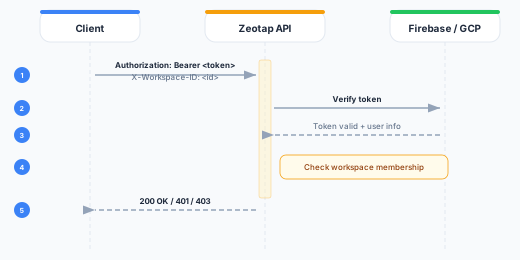
All Zeotap API requests require authentication via the Authorization header and workspace scoping via the X-Workspace-ID header.
Required Headers
Every API request must include:
Authorization: Bearer <token>
X-Workspace-ID: <workspace-id>| Header | Required | Description |
|---|---|---|
Authorization | Yes | Bearer token: a Firebase ID token (UI clients) or a REST API key (rk_...). A connected agent’s user access token (a2u_...) is presented to the A2A server instead, not to the REST API — see User Access Tokens |
X-Workspace-ID | Yes (for workspace-scoped endpoints) | UUID of the target workspace |
Content-Type | Yes (for POST/PUT) | Must be application/json |
Authentication Methods
1. Firebase ID Token (Browser/UI Clients)
Firebase ID tokens are used by the Zeotap web UI and any client-side applications that authenticate through Firebase/GCP Identity Platform.
How it works:
- The user signs in via Firebase Authentication (email/password, Google SSO, etc.)
- The Firebase client SDK returns an ID token
- The token is sent with each API request
curl -X GET https://agentic.zeotap.com/api/v1/workspaces \
  -H "Authorization: Bearer eyJhbGciOiJSUzI1NiIs..." \
  -H "X-Workspace-ID: 550e8400-e29b-41d4-a716-446655440000"
Token lifecycle:
- Firebase ID tokens expire after 1 hour
- The Firebase client SDK automatically refreshes tokens before expiry
- On first use, Zeotap performs JIT (Just-In-Time) provisioning to create an internal account for the authenticated user
Token verification:
The Zeotap control plane verifies Firebase ID tokens using the Firebase Admin SDK. In development, you can configure the FIREBASE_AUTH_EMULATOR_HOST environment variable to use the Firebase Auth emulator.
2. REST API Keys (Server-to-Server)
REST API keys are long-lived credentials (prefix rk_) designed for server-to-server integrations, CI/CD pipelines, and automated workflows against the REST API.
How it works:
- Create a REST API key under Governance → API Keys, on the REST API Keys tab. When creating it, choose the permissions (scopes) the key may use.
- Store the key securely (it is only shown once at creation time)
- Use the key as a Bearer token in the
Authorizationheader, together withX-Workspace-ID
curl -X GET https://agentic.zeotap.com/api/v1/workspaces/{id}/sources \
  -H "Authorization: Bearer rk_abc123..." \
  -H "X-Workspace-ID: 550e8400-e29b-41d4-a716-446655440000"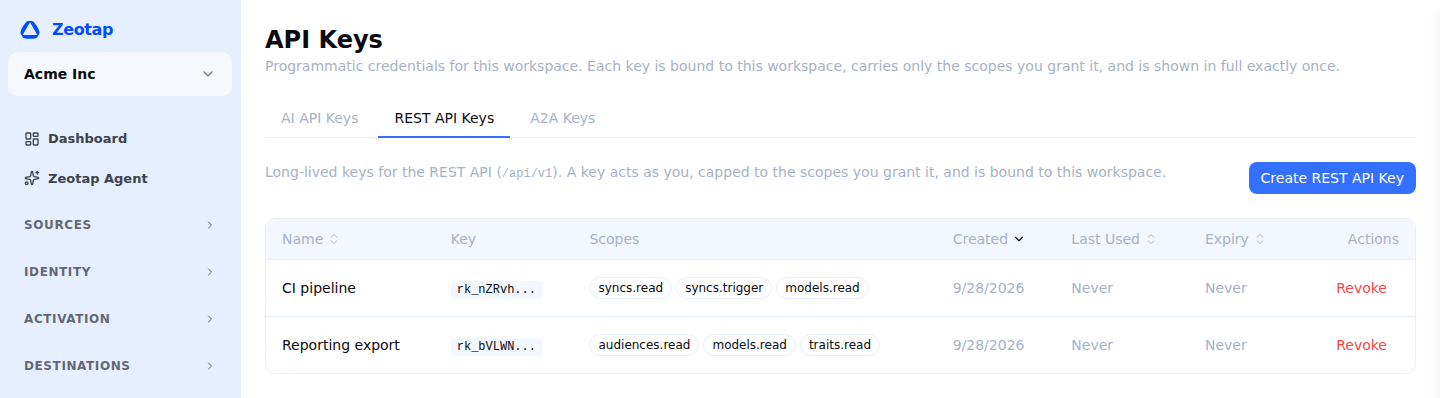
Key properties:
- A key is bound to a single workspace and is rejected on any other workspace
- A key acts as the user who created it, but is capped to the scopes selected at creation — its effective access is the intersection of your current permissions and the key’s scopes
- Keys are stored as secure hashes; the raw key is only returned at creation time
- Keys can be given an optional expiry, or left long-lived, and can be revoked at any time
- Each key shows a
key_prefixfor identification (e.g.,rk_abc1...)
See the REST API Keys reference for full details.
3. User Access Tokens (Connected Apps)
A user access token (prefix a2u_) is what another AI agent holds after a person has signed in and allowed it. It is the only credential here that is obtained by a person rather than issued by an administrator, and the only one that can be created without anybody having an API-key permission — because it grants nothing new: it lets an agent act as the person who signed in, with exactly their permissions, in whichever workspace each conversation runs in.
How it works:
- A Zeotap platform administrator registers the app once, under Platform admin → Connected apps, and hands its client ID and secret to whoever administers it. Gemini Enterprise bought through Google Cloud Marketplace can register itself instead.
- The first time somebody uses that agent, it sends them to the Zeotap login. They sign in as themselves — email and password, Google, or your organisation’s single sign-on — and allow it. There is no workspace to pick.
- The agent receives an access token and, if it asked to stay signed in, a refresh token. It sends the access token as a Bearer token on every request to the A2A server, which is on your instance’s agent address, not the API address. There is no
X-Workspace-IDheader: the workspace is settled at the start of each conversation, asked for when more than one is available, or named by the agent inmetadata.workspaceId.
curl -X POST https://agentic-a2a.zeotap.com/a2a/v1 \
  -H "Authorization: Bearer a2u_abc123..." \
  -H "Content-Type: application/json" \
  -d '{"jsonrpc":"2.0","id":1,"method":"message/send","params":{...}}'
Token properties:
- The token names a person and the app they allowed, and nothing else — no workspace and no permissions. Permissions are resolved live on every request, in the workspace the conversation runs in, so it can never be more than its holder currently has
- An access token lasts one hour. A refresh token lasts ninety days and is replaced every time it is used — presenting one that has already been used revokes the whole connection, on the assumption that a copy is in circulation
- Tokens are stored as secure hashes and can be revoked at any moment: by the person on their Connected apps page (
/account/connected-agents), by a platform administrator disabling the app, or by the agent itself calling the revocation endpoint - A person who leaves a workspace, or loses the AI agent permission in it, stops being able to act there immediately — the token does not have to expire first
The sign-in endpoints are on your instance’s sign-in address. The agent card, at https://agentic-a2a.zeotap.com/.well-known/agent-card.json, lists them, and its oauth2MetadataUrl is the metadata document that describes them. See OAuth for developers for everything a client needs to implement, and Connect an Agent for the full walkthrough, including the Gemini Enterprise recipe.
sk_-prefixed keys are a separate credential, used only for the MCP server. They are not accepted on the REST API (/api/v1) — use a REST API key (rk_) for REST requests — and they are not accepted on the personalization serving APIs either, which have credentials of their own: a svk_ serving key for the Profile API and a public pk_ membership key for the Membership API. The A2A server takes two of its own: a2u_, the user access token a connected agent holds, and a2a_, an unattended key that acts as the person who created it. Each credential authenticates one surface, and is refused 401 on any other.
Workspace Scoping
Most API endpoints operate within the context of a workspace. The X-Workspace-ID header determines which workspace’s data is accessed.
Exceptions that do not require X-Workspace-ID:
GET /api/v1/workspaces— lists workspaces the authenticated user belongs to- Organization-level endpoints under
/api/v1/organizations, includingPOST /api/v1/organizations/{orgId}/workspaces, which creates a workspace in that organization (organization administrators only)
POST /api/v1/workspaces no longer creates a workspace. It returns 410 Gone with "code": "workspace_creation_moved"; create the workspace inside an organization instead.
Auth Flow Diagram
Error Responses
401 Unauthorized
Returned when the token is missing, expired, or invalid:
{
  "error": "not authenticated"
}
403 Forbidden
Returned when the token is valid but the user lacks access to the requested workspace or resource:
{
  "error": "permission denied"
}
Best Practices
- Never expose tokens in client-side code — Use REST API keys only in server-side environments.
- Rotate REST API keys regularly — Revoke old keys and generate new ones periodically.
- Use the minimum required scope — Grant a key only the permissions it needs, so a leaked key has the smallest possible blast radius.
- Handle token expiry gracefully — For Firebase tokens, implement automatic refresh. For REST API keys, handle 401 responses by alerting the administrator.
- Store REST API keys securely — Use environment variables or a secrets manager. Never commit keys to version control.