Identifier Families
An identifier family is a group of identifier types that Zeotap compares against each other during identity resolution. Everything you configure for identity resolution is configured per family: merge rules are one per family, limit rules are one per family, and merge-rule priority ranks families against each other.
Families and Variants
A variant is one fixed encoding of a family — a way the value can be stored in your warehouse. The list of variants is fixed. You do not create, name, or configure them; you pick the one that describes how your column is stored, and Zeotap normalises every variant of a family to the same canonical value so they match each other.
That is the entire purpose of families: a plaintext email in your CRM and a SHA-256 email hash in your app database are two variants of the email family, so a merge rule on email links records across both.
| Family | Identifier types you can choose | How values are compared |
|---|---|---|
| Email (plaintext), Email (SHA-256 hashed) | Plaintext is trimmed, lowercased and SHA-256 hashed; a pre-hashed value is trimmed and lowercased. Both end up as the same hash, so the two encodings match each other | |
| Phone | Phone number, Phone (E.164), Phone (digits only) | Phone number and E.164 have every non-digit character stripped; digits-only is trimmed and used as-is. All three end up as digit strings |
| User ID | User ID | Cast to text, trimmed and lowercased |
| Anonymous ID | Anonymous ID | Cast to text, trimmed and lowercased |
| Name | First name, Last name, Full name | Trimmed and lowercased. Used only by probabilistic scoring, never for exact matching |
| IP Address | IP address | Trimmed. Used only by probabilistic scoring |
| Address | Postal code, ZIP code | Trimmed and uppercased. Used only by probabilistic scoring |
| Custom | Custom…, then any name you type | Trimmed and lowercased. Every distinct name you type is its own family |
What families are not. You cannot define your own variants of a built-in family, write a merge rule that matches only one variant, or set golden-record survivorship per variant. A merge rule matches on the family, so every variant you have mapped into it participates. If you need a column to match only against itself, map it to its own custom family. Golden-record survivorship is configured per golden record attribute, not per identifier.
Choosing Identifier Types
Usually the strongest widely-available identifier: globally unique, stable, and present in most systems.
Pick Email (plaintext) for a column holding an address such as alice@example.com, and Email (SHA-256 hashed) for a column already holding the SHA-256 hash of the lowercased address. Case and surrounding whitespace never matter, and the two encodings match each other, so a system that only shares hashes still resolves against one that stores addresses.
There is no case-sensitivity, normalisation, or minimum-length setting to configure. Anything beyond the fixed normalisation — dropping + aliases, excluding a domain, filtering placeholders — belongs in the model’s SQL.
Shared and role-based addresses (info@, support@, noreply@) are the classic cause of false merges. Exclude them in the model’s SQL, and rely on the default ignore a value shared by more than 100 records limit as the safety net.
Phone
Strong, but recycled by carriers, shared within households, and formatted inconsistently.
All three phone types reduce to digits, so formatting never matters and the types match each other. Country codes are not added: 555-0100 normalises to 5550100 and +1 555 0100 normalises to 15550100, and those are two different values. If your sources disagree about country codes, normalise to a single convention in the model’s SQL.
User ID and other system-assigned ids
The most reliable identifiers you have, because a system assigned them deliberately. Values are cast to text, trimmed and lowercased, so ids that differ only by case match.
Map your application’s own user id to User ID. Map every other system’s id — a CRM id, a loyalty number, a support id — to its own custom family. Two different id systems must never share one family: a person is expected to hold one value per family, and merging two unrelated numbering schemes into user_id breaks that assumption.
Anonymous, cookie and device identifiers
Identifiers that name a browser, a device or a session rather than a person. They link cross-session activity, but they are reset, cleared, and shared between people in a household.
Use the built-in Anonymous ID for an analytics SDK’s anonymous id, and custom families for the rest (cookie_id, device_id, maid, idfa, …). Zeotap recognises device-class families by name and treats them differently in two places:
- The creation wizard seeds them the weakest merge-rule priority.
- Their per-profile limit defaults to 5 rather than 1, because one person legitimately owns a phone, a laptop and a tablet.
A family is treated as device-class when its name is one of anonymous_id, cookie_id, cookie, device_id, session_id, ip_address, ip, idfa, idfv, gaid, aaid, adid, maid, advertising_id, android_id, browser_id or ga_client_id, or when it contains cookie, device, anonymous, session, idfa, idfv, advertis, browser, maid, gaid or aaid. Naming a custom family web_cookie_hash therefore classifies it correctly without any extra configuration.
A weak identifier is not made safe by adding conditions to its merge rule — a rule matches on exactly one family. What makes it safe is a values one profile may hold limit on a stronger family, which stops the device’s merge when it would put two people into one profile. See Rule Priority.
Name, IP Address and Address
These three families exist for probabilistic matching and are read by the scoring functions:
| Family | Read by |
|---|---|
| Name | Fuzzy Name, and Household |
| IP Address | IP Cluster |
| Address | Household |
Mapping them on a deterministic graph is possible but pointless: an exact merge rule on name would link every pair of people who happen to share a spelling. On a probabilistic graph, a scoring function reads these families regardless of which family its own merge rule is on, so they must be mapped for the rule to produce anything.
Custom families
Type any name into the Custom… field to create a family for a domain-specific identifier — an account number, a patient id, a student id, a membership number, a channel-partner id. Each distinct name is its own family with its own merge rule, its own limits and its own priority.
Names ending in id or ids are seeded as strong, system-assigned identifiers; device-marker names (above) are seeded as the weakest; everything else lands in the middle. You can override any seeded priority.
Mapping Columns to Identifier Types
Identifier mappings are made in Map Identifiers, the third step of the creation wizard. Afterwards, open the graph’s Configuration tab and click Edit beside Identifier Mappings.
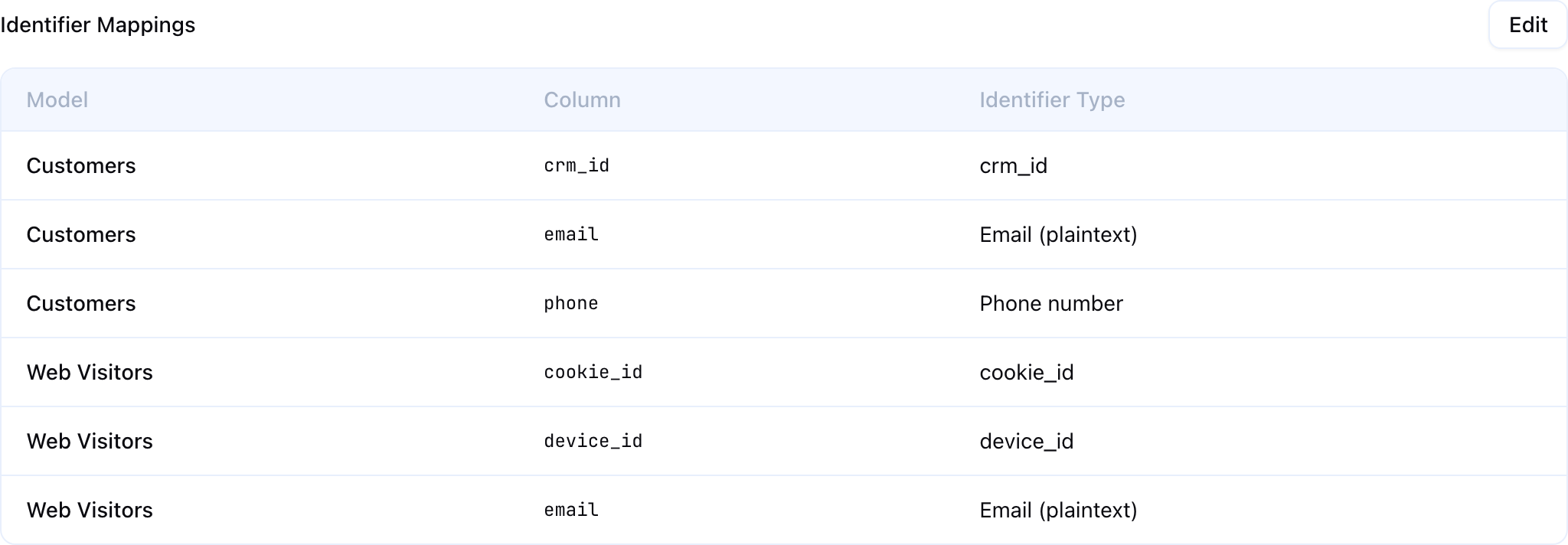
Saved mappings are listed one row per column, with the model, the column and the identifier type it feeds.
For each model in the graph:
- Click + Add Identifier.
- Choose the column from the model’s columns.
- Choose the identifier type — the picker groups the fixed variants under their family, with Custom… at the bottom.
- If you chose Custom…, type the family name.
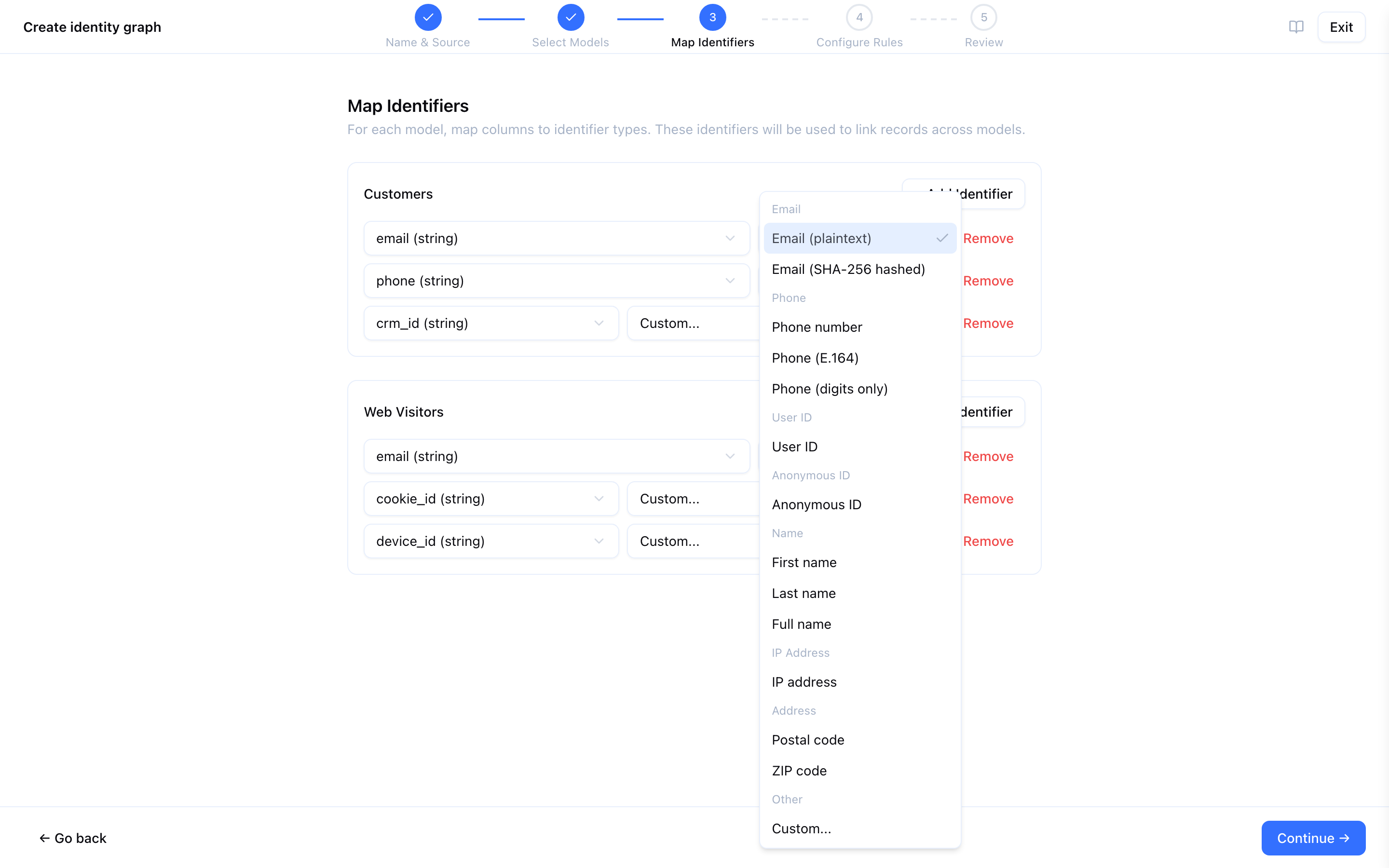
There is no per-mapping enable/disable toggle: click Remove to drop a mapping.
Map one column per family per model. If a model maps two columns to the same family, only the first is used — the second is stored but never read during resolution. Map the second identifier as its own custom family, or split it into a second model.
Example mapping
Three models on the same graph:
| Model | Column | Identifier type |
|---|---|---|
| Website users | email | Email (plaintext) |
| Website users | session_cookie | Custom — cookie_id |
| Mobile app users | user_email_sha256 | Email (SHA-256 hashed) |
| Mobile app users | app_user_id | User ID |
| Mobile app users | advertising_id | Custom — maid |
| CRM contacts | business_email | Email (plaintext) |
| CRM contacts | mobile_phone | Phone number |
| CRM contacts | contact_id | Custom — crm_id |
This graph has six families — email, phone, user_id, cookie_id, maid and crm_id — and therefore up to six merge rules and six limit rules. Website users and Mobile app users link through email even though one stores addresses and the other stores hashes.
Not every model needs every identifier. A model that maps nothing contributes no links.
Normalisation
Normalisation is fixed per identifier type and cannot be configured:
| Identifier type | Normalisation applied |
|---|---|
| Email (plaintext) | Trim, lowercase, SHA-256 hash |
| Email (SHA-256 hashed) | Trim, lowercase |
| Phone number, Phone (E.164) | Trim, strip every non-digit character |
| Phone (digits only) | Trim |
| User ID, Anonymous ID | Cast to text, trim, lowercase |
| First / Last / Full name | Trim, lowercase |
| IP address | Trim |
| Postal code, ZIP code | Trim, uppercase |
| Any custom family | Trim, lowercase |
There are no trim, lowercase, strip-character or regex-replace settings on a mapping. Anything the table above does not do — adding a country code, stripping a prefix, dropping placeholder values, splitting a composite column — is done in the model’s SQL, where it is visible, testable and shared by everything else that reads the model.
Best Practices
- Start with high-confidence families — email and your system-assigned ids first. Add device and cookie families once you have reviewed the results.
- Give every id system its own family — a CRM id and an app user id in the same family will merge two people who happen to share a number.
- Normalise in the model, not in the graph — the graph’s normalisation is fixed, and the model is the only place to change what a value looks like.
- Filter garbage values upstream — placeholder emails, all-zero phones and one-character ids cause more false merges than any configuration setting can repair. Exclude them in the model’s SQL and keep the shared-value limit as the safety net.
- Audit identifier quality first — check null rates and duplicate rates on every column you intend to map, before the first run.
- Name custom families deliberately — the name decides the seeded priority and the default per-profile limit.
Next Steps
- Merge Rules — Decide which families link records, and in what order of trust
- Limit Rules — Stop over-shared values and shared devices from merging two people
- Creating an Identity Graph — The full setup wizard