Roles
A role is a named set of permissions. Zeotap ships three built-in roles and lets you create custom ones with any combination of permissions.
A role is not held by a person — it is held by a grant, which gives one group one role on one workspace. Your permissions in a workspace are the union of the roles every group you belong to holds there. Custom roles belong to the organization, so a role is written once and can be granted in every workspace in it.
The Built-in Roles
| Role | Permissions | Who it is for |
|---|---|---|
| Owner | 119 of 120 | The person responsible for the workspace itself. The only role that can delete it. |
| Admin | 118 of 120 — everything but workspace.delete | Team leads, data engineers, platform administrators. |
| Member | 49 of 120 — read across the platform | Analysts and marketers who work in the platform without configuring it. |
Owner
Owner carries every permission but demo.seed, which no built-in role holds. workspace.delete is what separates Owner from Admin; in day-to-day work the two roles are identical.
Admin
Admin runs the platform: warehouses and destinations, models and audiences, events, journeys, identity graphs, loaders, governance policies, members, groups and custom roles. An Admin cannot delete the workspace.
Member
Member is a read role. A Member can open every part of the platform and see what is configured, what ran and what it produced, but the actions that create, change, delete or trigger something belong to Owner and Admin.
Three things a Member can do beyond reading: converse with the AI agent (agent.write), open the live event debugger (events.debug), and manage tags (tags.write).
Five reads belong to Owner and Admin: the workspace audit log (workspace_audit.read), workspace-wide agent token spend (agent.usage.read), and the three warehouse-infrastructure reads — warehouse_users.read, execution_environments.read and cdp_working_datasets.read, which are a platform or security owner’s concern. Grant any of them to a custom role where a workspace wants a Member to see them.
If your analysts need to build models or audiences themselves, that is a custom role — not a change to Member.
Custom Roles
A custom role is a name, a description and a list of permission keys. Nothing is implied or inherited: the role allows exactly the keys you list.
Creating a Custom Role
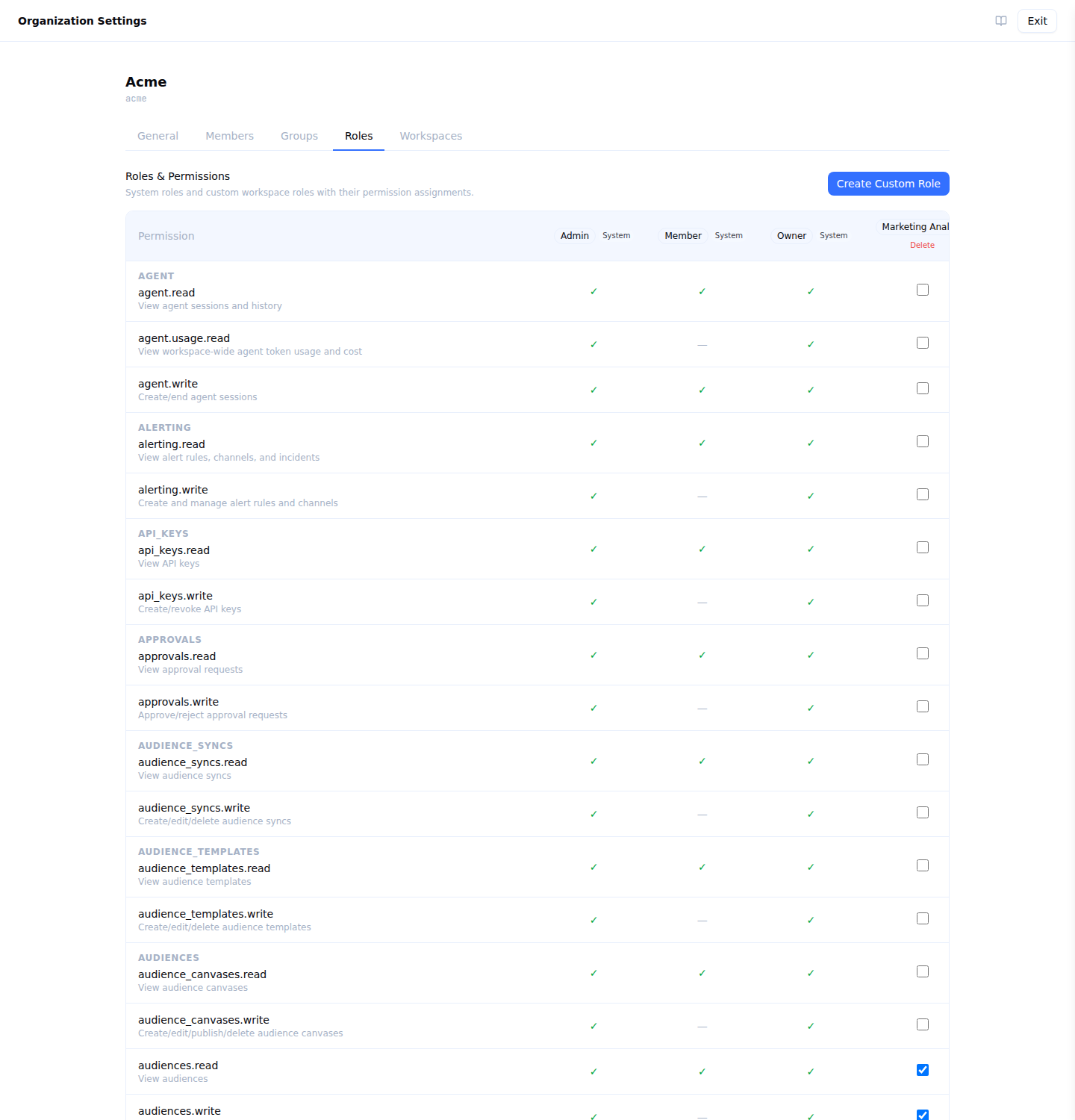
Via the UI
- Go to Organization settings → Roles
- Create a role and give it a name and description
- Tick the permissions it should carry — they are grouped by category
- Save
Via the API
curl -X POST "$API_BASE_URL/api/v1/organizations/$ORG_ID/roles" \
  -H "Authorization: Bearer $API_TOKEN" \
  -H "Content-Type: application/json" \
  -d '{
    "name": "Marketing Analyst",
    "description": "Builds audiences over existing models",
    "permissions": [
      "models.read",
      "audiences.read", "audiences.write",
      "traits.read", "traits.write",
      "audience_syncs.read",
      "destinations.read",
      "syncs.read"
    ]
  }'
POST returns 201 with the created role. roles.write is required, and Owner and Admin are the built-in roles that carry it.
Three Roles Worth Building
| Role | Permissions to grant | What it gets you |
|---|---|---|
| Data engineer | sources.read, sources.write, connections.read, connections.write, models.read, models.write, loaders.read, loaders.write, warehouse_users.read, warehouse_users.write, warehouse_users.rotate, warehouse_users.delete, execution_environments.read, execution_environments.write, execution_environments.delete | Owns the warehouse side without touching destinations or governance |
| Marketing analyst | audiences.read, audiences.write, traits.read, traits.write, splits.read, splits.write, priority_lists.read, priority_lists.write, models.read, destinations.read, syncs.read | Builds and segments without changing the pipeline underneath |
| Sync operator | syncs.read, syncs.trigger, stores.read, stores.trigger, deletion_rules.read, deletion_rules.execute, models.read, destinations.read | Runs and re-runs the pipeline without being able to redefine it |
Every entry in a role’s permissions array is matched against the catalog exactly, so list the individual keys a category expands to. GET /api/v1/organizations/{orgId}/roles returns the role with the permissions it ended up carrying, which is the quickest way to confirm one reads as you intended.
The separate trigger and execute permissions are what make the third one possible — running a sync is grantable without granting the ability to change what the sync does.
Editing a Custom Role
Permission changes take effect on the member’s next request. Built-in roles cannot be edited.
curl -X PUT "$API_BASE_URL/api/v1/organizations/$ORG_ID/roles/$ROLE_ID" \
  -H "Authorization: Bearer $API_TOKEN" \
  -H "Content-Type: application/json" \
  -d '{"name": "Marketing Analyst", "description": "…", "permissions": ["models.read", "audiences.read", "audiences.write"]}'
The permissions array replaces the role’s current set rather than adding to it.
Deleting a Custom Role
curl -X DELETE "$API_BASE_URL/api/v1/organizations/$ORG_ID/roles/$ROLE_ID" \
  -H "Authorization: Bearer $API_TOKEN"
Deleting a role first moves every grant holding it to the built-in Member role, then deletes the role. The reassignment is committed before the delete is issued, so if the delete fails the reassignment stands and the role is still there — re-issue the delete.
This is what stands between a role delete and a silent revocation: the foreign key from a grant to its role is ON DELETE CASCADE, so an unguarded delete would remove the grants instead of the role, taking a whole group’s access to a workspace with no error anywhere.
Rules
- Role names are unique within an organization, compared without regard to case — “Analysts” and “analysts” collide
owner,adminandmemberare reserved and cannot be used as custom role names- Built-in roles cannot be edited or deleted. They belong to no organization, which is what makes the same three ids usable from every one of them
- Custom roles belong to one organization, and can be granted in any of its workspaces
Granting a Role
A role reaches a person through a grant, so changing what somebody can do means changing the grant their group holds — or moving them to a different group.
Via the UI
A workspace’s Workspace settings → Groups tab (Workspace settings is the last item under Governance in the sidebar) lists the groups that reach it, each with an inline roles picker and, for organization administrators, Revoke. From the other end, Organization settings → Groups puts the organization’s groups down the left and the selected one’s workspaces and roles on the right.
Via the API
curl -X PUT "$API_BASE_URL/api/v1/organizations/$ORG_ID/groups/$GROUP_ID/workspaces/$WORKSPACE_ID" \
  -H "Authorization: Bearer $API_TOKEN" \
  -H "Content-Type: application/json" \
  -d '{"role_id": "00000000-0000-0000-0000-000000000002"}'
role_id accepts any built-in or custom role id, or null — which attaches the group to the workspace and grants it nothing. The built-in ids are stable:
| Role | ID |
|---|---|
| Owner | 00000000-0000-0000-0000-000000000001 |
| Admin | 00000000-0000-0000-0000-000000000002 |
| Member | 00000000-0000-0000-0000-000000000003 |
Granting requires organization administration. The change takes effect on that group’s members’ next request, and is recorded in the workspace audit log under the workspace it affects.
Roles and Access Policies
A role decides which actions a member can take. Access policies decide which rows they see, and are assigned through groups.
Holders of Owner or Admin who are in no group carrying an access policy read every row. Once such a person is assigned a policy through a group, that policy applies to them like anyone else.
Next Steps
- Permissions reference — every key and which role carries it
- Groups — the thing a role is granted to
- Managing members — invite people and carry them into workspaces