Sync Runs
Every time a reverse ETL sync executes — whether on schedule, manually triggered, or via the API — it produces a sync run record. Sync runs provide detailed visibility into what happened during each execution: how many rows were processed, how many succeeded or failed, and how long it took.
Viewing Sync Runs
Run History
Navigate to a reverse ETL sync’s detail page and click the Runs tab to see the run history — the 50 most recent runs, newest first. Each row shows:
| Column | Description |
|---|---|
| Status | The state of the run: Pending, Running, Completed, Failed or Cancelled |
| Started | When the run began, as a relative time |
| Duration | How long the run took, from start to completion |
| Rows | What the run wrote, broken down as added / updated / deleted, plus any rows suppressed by a frequency cap. A run that read rows but wrote none shows the total instead. |
| Batches | Batches that succeeded, out of the batches attempted (15/16) |
| Error | The run’s error message, if it has one. Click it to read the whole message. |
A run that is still Pending or Running carries a Cancel action at the end of its row.
Run Statuses
| Status | Description |
|---|---|
| Pending | The run is waiting to start (a previous run may still be executing) |
| Running | The reverse ETL sync run is actively executing — querying the warehouse or writing to the destination |
| Completed | The run finished successfully. Some rows may have individual errors, but the run as a whole succeeded. |
| Failed | The run stopped with an error (e.g., warehouse unreachable, destination authentication expired). Batches delivered before it stopped stay in the destination, so a run that fails partway through may have sent part of its data. |
| Cancelled | The run was manually cancelled before completion |
Completed with failed batches
Rows are sent to the destination in batches. A batch that the destination rejects is counted in the run’s Batches figure — 15/16 means one batch of sixteen failed — and the run still finishes as Completed, because the other fifteen batches were delivered.
Two conditions abort the run as Failed instead:
- Every batch failed.
- More than three batches have failed, and they are more than half of the batches attempted so far. The run stops there rather than spending the rest of its budget on a destination that is clearly rejecting the data.
Run Metrics
Row Counts
Each run records what it wrote, not just how much it read:
| Metric | Meaning |
|---|---|
| Total rows | Rows the model query returned |
| Added | Records created in the destination |
| Updated | Records updated in the destination |
| Deleted | Records deleted from the destination (mirror mode only) |
| Capped | Rows suppressed by a per-profile frequency cap |
| Transform errors | Rows whose field transform failed |
| Batches | Batches delivered, out of those attempted |
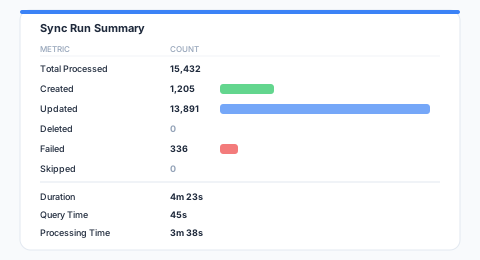
Comparing these between runs is the fastest way to spot a change in the underlying data:
- A jump in total rows — new data loaded into the warehouse, or a change to the model query
- A drop in total rows — data deleted from the warehouse, or a filter tightened in the model
- Batches starting to fail — a destination schema change, a data quality problem, or an API limit
- Duration climbing — a growing dataset, warehouse contention, or destination throttling
Error Details
A failed run records a single error message describing why it stopped. The Runs tab shows it in the Error column, truncated to fit; click it to read the whole message.
| Error | Cause |
|---|---|
| ”Source connection failed: timeout” | Warehouse is unreachable or suspended |
| ”Destination authentication expired” | OAuth token or API key needs renewal |
| ”Model query failed: syntax error at line 12” | The model SQL has an error |
| ”Rate limit exceeded” | Destination API rate limit hit |
| ”aborting: too many failed batches (4/7)“ | The destination rejected most of what was sent — see Completed with failed batches |
Monitoring Sync Runs
Dashboard
The Insights > Overview tab covers every sync in the workspace at once:
- A composite health score per sync
- Success rate
- Row throughput
- Where audiences are and are not being activated
Insights > Sync Analytics narrows the same cards to one sync and adds run duration. See Sync Health.
Alerts
Alert rules watch runs and notify you when something goes wrong. The triggers that apply to a reverse ETL sync are:
| Trigger | Fires when |
|---|---|
| Fatal error | A run fails outright |
| Failure streak | A run fails after a run of consecutive failures you set |
| Run absence | No run has even been created within a window — the case a failure alert cannot catch, because nothing ran to fail |
| Duration | A run takes longer than a threshold you set |
| Row count | A run’s row count falls outside a range you set |
| Rejected rows | A run rejects more rows than a threshold you set |
| Throughput stall | Rows stop moving while a run is still in flight |
| Delivery failure | Deliveries to the destination start failing |
| Run success | A run completes cleanly — a positive notification rather than an incident |
Each rule delivers to one or more channels: Email, Slack, or a webhook of your own.
API Access
All run endpoints are workspace-scoped.
List Runs
Returns the sync’s 50 most recent runs, newest first, as a plain JSON array:
curl https://agentic.zeotap.com/api/v1/workspaces/$WORKSPACE_ID/syncs/$SYNC_ID/runs \
  -H "Authorization: Bearer $API_TOKEN"
Response:
[
  {
    "id": "run_abc123",
    "sync_id": "sync_xyz789",
    "sync_type": "model",
    "status": "completed",
    "started_at": "2026-01-15T09:00:00Z",
    "completed_at": "2026-01-15T09:04:23Z",
    "rows_added": 1205,
    "rows_updated": 13891,
    "rows_deleted": 0,
    "total_rows": 15432,
    "batches_total": 16,
    "batches_failed": 1,
    "transform_errors": 0,
    "rows_capped": 0,
    "error_message": "",
    "triggered_by": "schedule"
  }
]
sync_type distinguishes the four kinds of run that share this record: model (a reverse ETL sync), audience, journey (a journey send tile) and store_feed.
Audience Boost fields
Runs of an audience sync with Audience Boost enabled are listed at /api/v1/workspaces/$WORKSPACE_ID/audience-syncs/$AUDIENCE_SYNC_ID/runs and carry the boost results alongside the usual counts. The base half’s counts are the run’s own rows_* fields; boost_breakdown reports each half separately:
{
  "sync_type": "audience",
  "status": "completed",
  "boost_enabled": true,
  "boost_identifier_counts": {
    "email": { "base": 10000, "boosted": 12500 },
    "phone": { "base": 3000, "boosted": 8200 }
  },
  "boost_total_base": 13000,
  "boost_total_enriched": 20700,
  "boost_match_delta": 59.2,
  "boost_duration_ms": 184000,
  "boost_breakdown": {
    "base": {
      "rows_added": 15000, "rows_updated": 0, "rows_deleted": 0,
      "rows_sent": 12900, "rows_ineligible": 2100,
      "batches_total": 2, "batches_failed": 0, "transform_errors": 0
    },
    "boosted": {
      "rows_added": 15000, "rows_updated": 0, "rows_deleted": 0,
      "rows_sent": 13800, "rows_ineligible": 1200,
      "batches_total": 2, "batches_failed": 0, "transform_errors": 0
    }
  }
}| Field | Meaning |
|---|---|
boost_enabled | Whether this run used Audience Boost |
boost_identifier_counts | Per identifier type: unique identifiers in the base audience (base) and in the boosted audience (boosted) |
boost_total_base / boost_total_enriched | The same counts summed across types |
boost_match_delta | The uplift, as a percentage of boost_total_base |
boost_duration_ms | How long the boosted half took |
boost_breakdown.base / .boosted | Each half’s members added / updated / deleted, rows the destination accepted (rows_sent), rows not sent because they carry no identifier the destination accepts (rows_ineligible), and batches. A half that stopped carries failed: true and an error_message. |
A failed boosted half is reported in boost_breakdown.boosted only; the run’s status is the base half’s outcome.
Get Run Details
curl https://agentic.zeotap.com/api/v1/workspaces/$WORKSPACE_ID/syncs/$SYNC_ID/runs/$RUN_ID \
  -H "Authorization: Bearer $API_TOKEN"
Cancel a Run
Cancels a run that is still pending or running:
curl -X POST \
  https://agentic.zeotap.com/api/v1/workspaces/$WORKSPACE_ID/syncs/$SYNC_ID/runs/$RUN_ID/cancel \
  -H "Authorization: Bearer $API_TOKEN"
Retrying Failed Runs
If a reverse ETL sync run fails due to a transient issue (e.g., temporary network outage, destination API downtime), you can retry it:
- Open the reverse ETL sync
- Click Run now
- The sync re-executes using the current model data (not a replay of the failed run’s data)
Via the API:
curl -X POST \
  https://agentic.zeotap.com/api/v1/workspaces/$WORKSPACE_ID/syncs/$SYNC_ID/trigger \
  -H "Authorization: Bearer $API_TOKEN"
Note: A retry triggers a new full reverse ETL sync run. It does not selectively retry only the failed rows from the previous run.
Best Practices
- Watch the batch figure — batches that fail run after run point at a systematic problem rather than a transient one
- Watch duration trends — If run duration is increasing, optimize the model query or check warehouse performance
- Set up failure alerts — Enable notifications for failed runs so you can respond quickly
- Review errors after the first run — The initial reverse ETL sync often surfaces data quality and mapping issues
- Use the API for automation — Build monitoring dashboards or trigger alerts based on run metrics
Next Steps
- Troubleshoot common errors
- Configure scheduling for optimal cadence
- Review sync modes to understand record handling