Forwarding events into a Profile Store
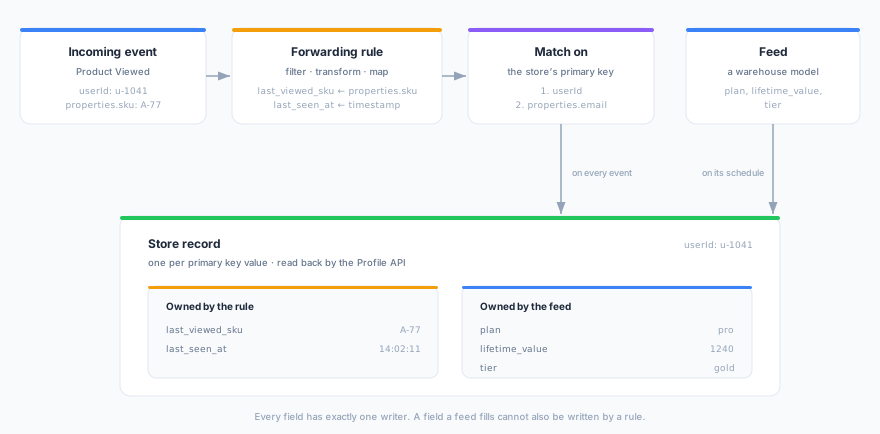
A forwarding rule can write into a store instead of sending the event somewhere. As each event arrives, the rule matches it to a person and writes the fields you map onto that person’s record, where the Profile API serves them in milliseconds.
A store is normally filled by a feed, which copies a warehouse model on a schedule. That is the right way to serve what the warehouse knows: plan, tier, lifetime value. It is the wrong way to serve what just happened. The product someone is looking at right now, or the last time they were seen, would have to reach the warehouse first and wait for the next refresh, by which point it is hours old. Forwarding to a store puts it there as the event lands.
Prerequisites
- Stores are enabled for your workspace, and you have at least one store. See Stores.
- Permission to manage forwarding rules and permission to write stores. Writing into a store is a change to that store, whichever screen it is made from.
- The events you want to forward carry a property holding the same value the store’s records are keyed by, usually
userId.
What a store rule writes
Three settings make up a store rule, on top of the filter, consent and transformation every rule has.
Match on
An ordered list of event properties. The first one that has a value supplies the store’s primary key for that event, which is how the rule decides whose record to write. Any dot-path you can use in a filter or a mapping works here: userId, properties.email, context.traits.customer_id.
The order is what lets one rule cover signed-in and signed-out traffic:
1. userId          ← a signed-in visitor
2. anonymousId     ← the same visitor before they log in
An event where none of them resolves is not written. It is recorded on the rule’s Deliveries tab so you can see it happening rather than guess.
The chain holds at most five properties. Each miss costs a resolution attempt on every event, and a longer chain is configuration nobody can reason about.
If the person is not in the store yet
| Setting | Behaviour |
|---|---|
| Only update people already in the store (default) | The event is skipped when the store has no record for that key. Use this when a feed defines who is in the store, and events only add live values to people the feed already put there. |
| Add them to the store | A record is created holding only the fields this rule writes. Use this for a store built from live signals alone, with no feed behind it. |
The default is the cautious one for a reason. When a feed populates the store, the model behind that feed decides who belongs in it, and a record invented by an event is one the feed will never refresh and never clean up.
Fields these events write
An ordinary field mapping. Each row writes one store field, and the mapping vocabulary is the same one syncs use (see Field Mapping): transforms, type conversion, constants and system values.
One rule may write at most 50 store fields. Every mapped field is a single cell in one mutation, and a rule takes exclusive ownership of each, so the cap also bounds how much of a store’s schema one rule can claim.
A rule must map at least one field. On other targets an empty mapping means “forward the whole event”, which for a store would write dozens of fields nobody asked for, so it is rejected instead.
You cannot map the store’s primary key. It is set from Match on, not from the mapping.
Every field has one writer
A store field is filled by a feed or by an event rule, never by both. Saving a rule claims the fields it maps; saving a feed that claims a field a rule already holds is rejected in the same way, naming the rule.
The mapping editor warns you inline when you pick a field someone else owns, and the store’s own schema view lists the fields its event rules write, each linking to the rule that writes it. So “where does this value come from” always has one answer.
Why not let both write the same field? Nothing on a stored value records which writer produced it. If a feed and a rule both wrote tier, whichever wrote last would win silently, and the feed’s next refresh would quietly undo every live update. One writer per field keeps that from being a question you have to debug.
If you need a live value beside a fed one, give it its own field: keep tier from the feed and add tier_checked_at from the rule.
Creating the rule
- Navigate to Streams → Forwarding and click Create Forwarding Rule.
- Name the rule and select an event source. The rule only fires for events arriving on that source’s write key.
- On the target step, choose the Profile Store tab and pick the store. The tab appears only when your workspace has stores and at least one store exists.
- Set the event filter, and the consent categories the event must carry.
- (Optional) Attach a JavaScript transformation. The rule maps the transformed event, so a value the transformation computes can be written to the store.
- Fill in Match on, choose what happens when the person is not in the store yet, and map the fields the events write.
- Click Save.
The rule’s detail page shows the store it writes to, the match order, and the missing-person setting, so an active rule can be read back without opening the editor.
Ordering, timing, and failures
Events that arrive out of order cannot overwrite a newer value. Each write is stamped with the time the event was received, and the store keeps the newest value per field. If a burst of events is delivered in the wrong order, the field still ends up holding the latest one. The stamp is the time the platform received the event, not the timestamp the device claimed, so a device with a wrong clock cannot freeze a field.
A write happens per event, not in batches. That is the point of the feature, and it is also why a rule that matches very high-volume events writes at that volume.
A failed write is recorded, not retried. It appears as a failed delivery on the rule’s Deliveries tab with the error attached. Nothing is retried, and nothing else about the event is affected: the other rules on that event still run, and the event still reaches the warehouse. A store rule that has quietly stopped working therefore looks different from one that is working, which is where to start looking.
Reading back what you just wrote. A value is readable through the Profile API as soon as it is written. If an enrichment on the same source reads the same store, it may serve a slightly older value for up to its configured cache interval.
Removing a rule
Deleting a store rule releases the fields it owned, so a feed or another rule can claim them. The values it already wrote stay in the store until something overwrites them. To stop a rule writing without releasing its fields, pause it instead.
Next Steps
- Event forwarding — filters, consent, and the other targets
- Stores — feeds, fields, and refreshes
- Profile API — reading a record back by key
- Event enrichment — the other direction: reading a store onto the event