Audiences
Audiences are groups of entities defined by conditions on computed attributes, entity attributes, and entity relationships. They are the primary mechanism for targeting specific groups of entities for activation through syncs.
What Is an Audience?
An audience is a set of filter conditions that define which entity instances (e.g., users, accounts) belong to the audience. When evaluated, Zeotap compiles these conditions into a SQL query, executes it against your warehouse, and produces a membership list — the set of entity keys that match.
For example, an audience called “High-Value Churning Customers” might be defined as:
lifetime_valuegreater than 500 ANDdays_since_last_purchasegreater than 60 ANDorder_countgreater than or equal to 3
Every entity that satisfies all three conditions is a member of the audience.
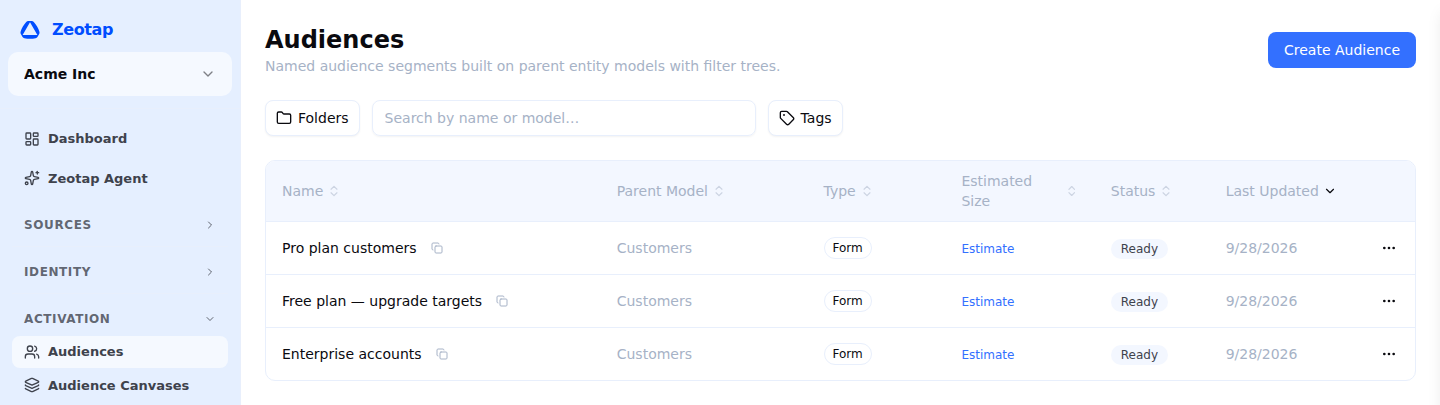
How Audiences Work
Audiences are warehouse-native. The filter conditions you define in the UI are compiled into SQL WHERE clauses and executed directly against your warehouse. No data is extracted or copied — the computation happens entirely inside your warehouse.

The audience membership list is stored in a table in your warehouse’s Zeotap schema and updated on each evaluation. Syncs read from this membership table to determine which records to add, update, or remove from destinations.
Key Features
Visual Filter Builder
The filter builder provides a visual interface for constructing audience conditions. You can:
- Add conditions on computed attributes and entity attributes
- Group conditions with AND/OR logic
- Nest groups for complex boolean expressions
- Use a comprehensive set of comparison operators
Size Estimation
Before activating, you can estimate how many entities match your audience definition. The estimate is a COUNT(*) run against your warehouse and cached for five minutes, so you can iterate on a filter without launching a query on every keystroke.
Preview
Audience preview lets you see sample members of the audience — actual entity records that match the filter conditions. This helps you validate that the audience definition captures the right entities before syncing to a destination.
Templates
Templates are audience definitions your workspace saves and reuses. Applying one opens the builder with its filter already in place, ready to adjust.
Batch and realtime audiences
Everything above describes a batch audience: it is compiled to SQL, evaluated in your warehouse on a schedule, and activated through syncs.
Adding a condition on a Realtime Event — performed Add to Cart in the last 30 minutes — makes it a realtime audience instead. That is a different kind of audience, not a setting on this one:
| Batch audience | Realtime audience | |
|---|---|---|
| Membership is computed | in your warehouse, on a schedule | per person, at the moment you ask |
| You read it by | syncing it to a destination | calling the Membership API |
| It can be referenced elsewhere | yes — canvases, orchestrations, A/B tests, priority lists | no |
| Conditions can combine | freely | one attribute side and one realtime side |
The All / Realtime / Batch filter above the audiences list narrows it to one kind. Realtime audiences are enabled per workspace, so you may not see the filter at all.
Audience Lifecycle
1. Define
Create an audience by setting a name, selecting an entity type, and building filter conditions with the visual filter builder. You can also set a description and tags for organization.
2. Estimate and Preview
Before saving, use size estimation to check the member count and preview to inspect the matching rows. Iterate on the filter conditions until the audience captures the right entities.
3. Save and Evaluate
When you save the audience, Zeotap compiles the filter conditions into SQL and executes the full audience query to materialize the membership list. The audience is now live and ready for activation.
4. Activate
Create one or more syncs to send the audience to destinations. Each sync runs on a schedule, comparing the current membership list to the previous one to determine adds and removes.
5. Monitor
Track audience size over time, view evaluation history, and monitor sync statuses from the audience detail page. Zeotap records the member count after each evaluation, letting you spot trends and anomalies.
Audience Properties
| Property | Description |
|---|---|
| Name | Human-readable label for the audience |
| Entity Type | The entity type this audience targets (e.g., User, Account) |
| Filter Conditions | The set of AND/OR conditions that define membership |
| Schedule | How often the audience is re-evaluated (manual, hourly, daily, weekly, custom cron) |
| Member Count | The number of entities currently in the audience |
| Status | Active, Paused, or Error |
| Tags | Optional labels for organization and filtering |
API Reference
Audiences are managed through the Zeotap REST API. Every path below is workspace-scoped — {id} is your workspace ID. See Base URL for your instance’s API base URL and Authentication for the required Authorization and X-Workspace-ID headers.
# List all audiences
GET /api/v1/workspaces/{id}/audiences

# Get a single audience
GET /api/v1/workspaces/{id}/audiences/{audId}

# Create an audience
POST /api/v1/workspaces/{id}/audiences

# Update an audience
PUT /api/v1/workspaces/{id}/audiences/{audId}

# Delete an audience
DELETE /api/v1/workspaces/{id}/audiences/{audId}

# Estimate audience size
POST /api/v1/workspaces/{id}/audiences/{audId}/estimate

# Preview audience members
GET /api/v1/workspaces/{id}/audiences/{audId}/preview

# List the syncs that activate this audience
GET /api/v1/workspaces/{id}/audiences/{audId}/syncs
An audience has no evaluate call of its own — membership is computed inside your warehouse when a sync runs, so you materialise an audience by triggering one of its audience syncs. To check the definition without activating anything, use estimate for a count or preview for sample members.
Next Steps
- Creating an Audience — Step-by-step guide
- Filter Builder — Detailed reference for the visual builder
- Operators Reference — All available comparison operators
- Size Estimation — Approximate member counts
- Audience Preview — Inspect sample members
- Realtime Audiences — Audiences that react to live behaviour, and the rules they follow