Incremental Builds
A prepared table is materialized in one of two ways.
Rebuild in full writes the whole table on every build. It is correct by construction and it is where you should start — the only thing incremental buys you is cost.
Incremental processes only what is new since the last build.
There is no “view” materialization, deliberately. A view would reintroduce exactly the per-query cost that prepared tables exist to remove.
How one incremental build runs
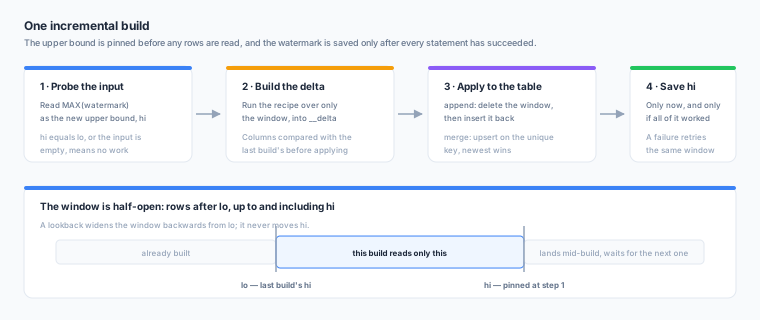
- Probe the primary input for the highest value of the watermark column. That is the new upper bound, and it is pinned before any rows are read, so rows that land during the build belong to the next window rather than to neither.
- If the upper bound has not moved, the build is a no-op: nothing further runs, and the table is recorded as up to date.
- Build the delta — run the recipe over only the window, into a scratch table.
- Apply it to the live table.
- Save the new watermark, and only now — if any statement failed, the watermark stays where it was and the next build re-processes the same window. Both strategies are safe to re-run, so that is a retry rather than a repair.
The window is half-open: rows after the last build’s upper bound, up to and including the new one.
The watermark is Zeotap’s own record of how far a table has been built. You never set it and you never read it out of the table — which is what lets a build be retried safely and what makes a tight schedule cost one small query when nothing has changed.
The two strategies
| Strategy | What it does | Use it for |
|---|---|---|
append | Deletes the target’s rows in the window, then inserts the window’s rows. A retried or overlapping window therefore cannot duplicate anything | Immutable events |
merge | Upserts on a unique key, with an optional newer-wins guard and soft-delete handling | Records that change |
append requires the watermark column to be in the output, since it is what identifies the rows
to replace.
Merge options
| Option | Description |
|---|---|
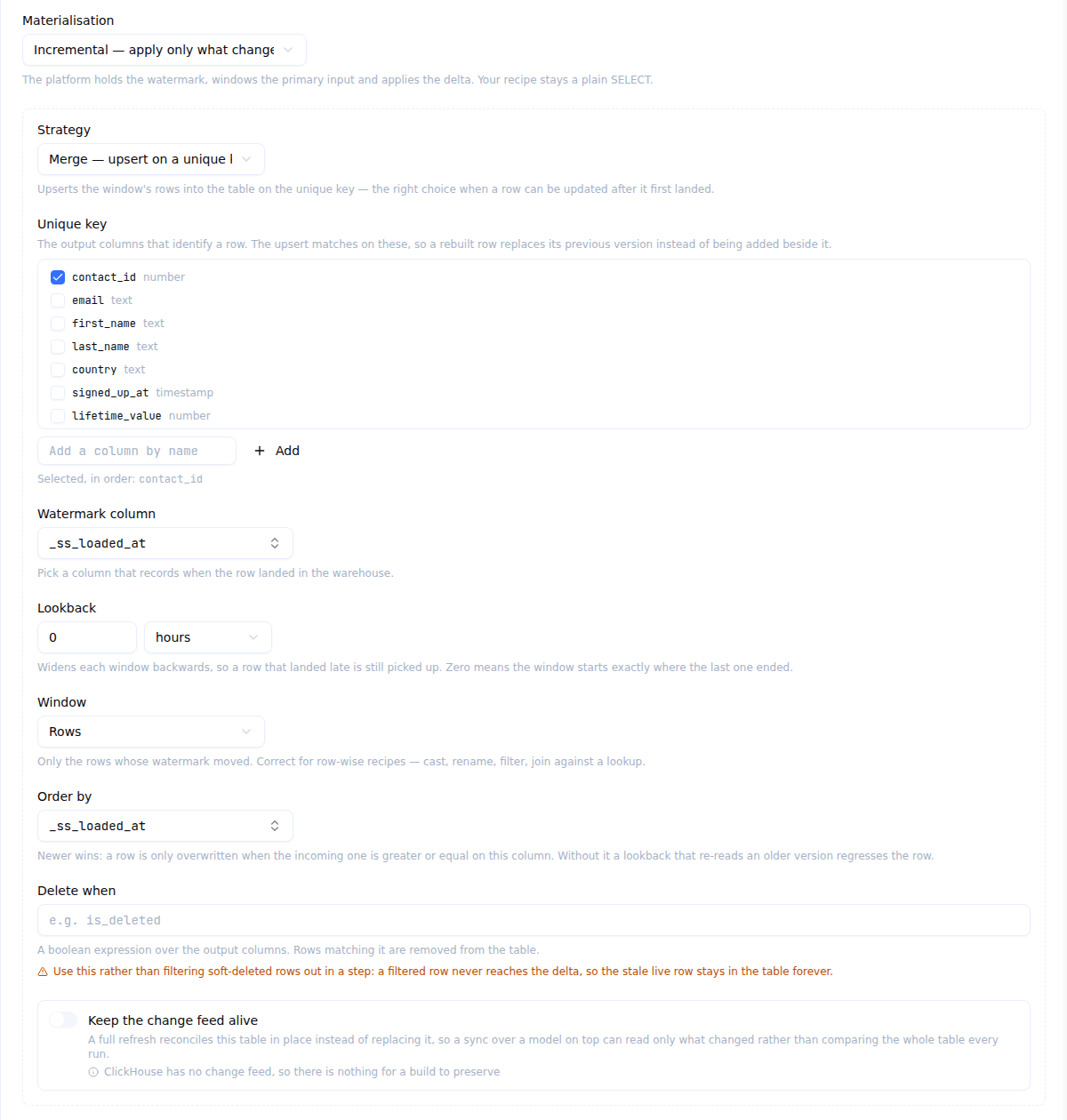
unique_key | The output columns that identify a record |
order_by | An output column that decides which version wins when the same key arrives twice. Without it, the last one processed wins |
delete_when | A boolean expression over the output columns. Rows matching it delete that key from the table instead of upserting it |
Use delete_when for soft deletes, never a filter step. A load that lands is_deleted,
_fivetran_deleted or deleted_at never removes the row, and the obvious move — a step that filters
those rows out — is a trap under merge: filtering removes the row from the delta, and a merge only
ever touches keys that are present in the delta, so the stale live row survives forever. Set
delete_when and the merge issues a delete for those keys.
Under a full rebuild a filter is fine, because the whole table is replaced.
All of it is on one form: the Build settings step of the editor while you are writing the recipe, and the prepared table’s Settings tab afterwards. Choose Incremental, then the strategy, the key it upserts on, the column it windows on, and the rest. The unique key and the order-by are lists over the recipe’s output columns while the watermark and the affected key are lists over the input’s, which is why the two sets can differ; each can also be typed, for a column downstream of a SQL step that Zeotap cannot see.
Choosing a watermark
A watermark answers exactly one question: when did this row become visible in the warehouse? Not when the business event happened, and not when the source system last updated the record.
In order of preference:
_ss_loaded_at. Zeotap stamps it, with_ss_run_id, on every row a loader lands. It is monotonic with respect to visibility by construction. Rows that predate the stamp are NULL, which is correct — a first build is a full build and keeps them, and every later window ignores them.- Another load-time column your ELT tool stamps, such as
_fivetran_syncedor_airbyte_extracted_at. - A business timestamp such as
updated_atorevent_time— only when nothing else exists. It is written by the source, arrives out of order, and is not monotonic with respect to visibility: a row stamped 09:00 can land at 11:00, after a window ending 10:00 has already closed. When you must use one, set a lookback and, undermerge, setorder_byto the same column so a late-arriving older version cannot overwrite a newer one.
Lookback widens the window backwards from the lower bound; it never moves the upper bound. An
hour is a reasonable starting point for a business timestamp. A date watermark’s lookback is in
whole days, rounded up — a wider window re-reads rows the strategies are idempotent against, while a
narrower one would skip them.
On Snowflake, a TIMESTAMP_TZ column cannot be used as a watermark and is never offered as one. Use
TIMESTAMP_LTZ or TIMESTAMP_NTZ, or a different column.
Aggregates and dedupes need affected_keys
The default windowing shows a build only the rows in the window. That is right for a row-by-row step and wrong the moment a step reasons across a record’s history:
- a group by would compute each group from a fragment of itself;
- latest per key would mean latest within the window, which is not latest;
- distinct across a key has the same problem.
Switch the window mode to affected keys and give it the grouping key. Zeotap then recomputes
every row of every key touched in the window and merges on that key, which is the only honest way
to make a group-by incremental. The strategy must be merge, and the unique key should be the same
key.
How firmly this is enforced depends on your recipe. When every enabled step is typed, Zeotap knows which kinds reason across rows and what their keys are, so an unsafe configuration is an error that states the fix:
| Step | What makes it safe |
|---|---|
dedupe_latest | merge on exactly the step’s key |
aggregate, pivot | Affected-keys windowing, with the key covering what the grouping is built from and the unique key equal to the grouping |
With any SQL step present it stays a warning, because nothing can prove it either way. Do not ignore it — in a mixed recipe it is the only signal you get.
ClickHouse: an affected key made of several columns is matched in a way that is not NULL-safe, so a NULL in a composite key drops that key from the window. Prefer a single, non-nullable affected key there.
When an incremental build becomes a full one
It happens, it is normal, and the build always says why in the build history:
- there is no watermark yet — the first build is always a full one;
- the recipe changed;
- the output columns changed (detected by comparing the delta’s real columns with the recorded ones);
- the table is missing;
- an upstream table in the same build rebuilt in full;
- you asked for a full refresh;
- the full-refresh schedule fired.
Preserving the change feed
By default, a reverse ETL sync over a model that reads a prepared table compares whole result sets on every run rather than reading your warehouse’s own change feed.
The reason is how a table is published. A full rebuild stages a fresh copy and swaps it in, which replaces the table object — and a replaced object has no change history, so a sync that believed it was reading a continuous feed across that build would miss rows or apply them twice.
Preserve change feed changes how the table publishes so that it is never replaced.
| Available for | incremental + merge tables with a unique key, on Snowflake, BigQuery and Databricks |
| Not available for | ClickHouse (it has no change feed at all), Redshift and the Spark lakehouse (unverified), and any table that rebuilds in full or uses append |
| Default | Off |
What it does
A full refresh of a table with the switch on does not swap. It builds the new copy as usual and then reconciles it into the live table with a single merge on the unique key: update the rows that genuinely differ, insert what is new, delete what the recipe no longer produces. The comparison is null-safe, so a row that has not changed is not rewritten — which is what makes a refresh over unchanged data report zero operations rather than republishing the whole table as changes.
Zeotap also turns your warehouse’s own change tracking on for the table. It is a table Zeotap created and owns, so nothing of yours is altered.
The trade-off is real, which is why it is off by default. A feed-preserving refresh reads the live table and the newly built copy in full and writes only the differences, where a swap is a metadata operation. It is right for a table whose consumers want a feed, and wasteful for one nothing syncs from.
When a sync actually uses the feed
A model over the table becomes eligible only once all of these are true: the switch is on, a build has actually established the feed, nothing has reset it since, and the warehouse is one of the three supported ones. Until then — and for any model Zeotap has not loaded the table’s state for — the sync keeps comparing result sets, which is always correct and never surprising.
On BigQuery, the change feed lags about ten minutes behind real time: it refuses to serve a range that ends too recently. A sync reading it will not see the last few minutes of a build.
When the table has to be replaced anyway
One change cannot be expressed as a merge: a recipe edit that alters the table’s columns. That build replaces the table, turns change tracking back on, and records the reset.
The table then reads as not refreshed into a live feed for at least one build. Every sync over it goes back to comparing result sets, delivers a correct result, and re-attaches to the feed on its way back. A sync that did not happen to run inside that window is caught by the warehouse itself, which refuses to read across the replacement — and that refusal sends the sync down the same recovery path.
Do not use a unique key that can be NULL. Keys are matched by plain equality, so a NULL-keyed row matches nothing on either side: every refresh inserts it from the new copy and deletes it from the live table, producing two feed operations that describe no real change.
Leave the weekly full refresh on
A new incremental table gets a weekly full refresh by default. It is the only defence against the two kinds of drift that incrementality cannot see:
- a lookup row that changed after the primary row was built, and
- hard deletes upstream.
Turning it off is a decision, not a default. Both drifts can also be measured rather than papered over — see Reconcile.