Membership
Membership answers one question about one person: are they in this audience right now? You ask by identifier, and you get back the realtime audiences in the workspace that they are currently in — fast enough to use while a page is rendering, and callable from the page itself.
Experimental — in active development. The behaviour, setup flow, and API described here may change before general availability. Do not rely on Membership for production traffic yet.
Where to find it
Navigate to Personalize → Membership in the left sidebar. The area has five tabs:
| Tab | What it is for |
|---|---|
| Overview | What this workspace can answer, how each event source is used for realtime, and what to set up next |
| Membership API | The is-member reference — the request to copy into your application |
| Playground | Run a live check for a real identifier without writing any code |
| API keys | Create, copy, and revoke the membership keys (pk_) your application authenticates with |
| Snapshots | When the audiences in this workspace were last rebuilt, and rebuilding them now |
If Personalize → Membership is not in your sidebar, realtime audiences are not enabled for your workspace — ask a platform administrator to enable them.
Event sources on the Overview
Below the three summary cards, the Overview lists every active event source with how it is used for realtime:
- which of the six event types (Track, Page, Screen, Identify, Group, Alias) have a Realtime Event set up — each set-up type links to its event;
- how many audiences use that source’s Realtime Events, and how many of those are active;
- one next step: set up the missing event types (the create form opens with the source already chosen and the mapping filled in from what is there), view its Realtime Events once all six are set up, or attach an event schema when the source has none — a source without a schema cannot carry a Realtime Event.
What a verdict is made of
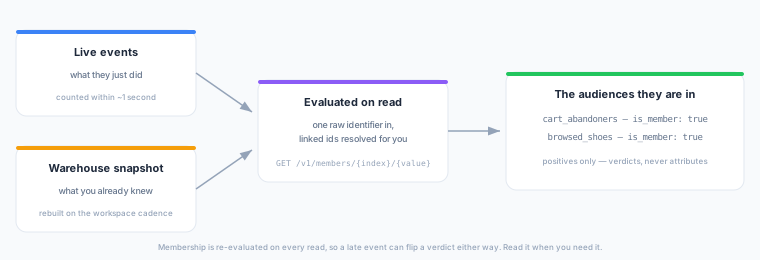
A realtime audience has up to two halves, and a verdict combines them:
- The live half — conditions about what the person has just done, evaluated from the event stream. This updates within about a second of the event arriving.
- The warehouse half — conditions about attributes you already know, taken from a periodically rebuilt snapshot. This is as fresh as the last rebuild, which you control on the Snapshots tab.
Because the live half is re-evaluated continuously, membership is not stable between reads: a late-arriving event can flip a verdict that was true a moment ago. Read the verdict at the moment you need it rather than caching it.
Membership is not attributes. A verdict tells you whether someone is in an audience. It never carries their profile fields — for those, use the Profile API, which can also return the audiences a person is in alongside their attributes when a server-side caller asks for both at once.
Identity
You look a customer up by one raw identifier, and there are only two to choose from. Which one you have depends on whether they have logged in.
| Identifier | What it is |
|---|---|
user_id | The field your realtime event declares as its user-id binding. Its value is the primary key of the event’s parent model — which is what lets the warehouse half of a verdict line up with the live half. |
anonymous_id | The field the same event declares for customers who have not logged in yet. |
These are the only two fields the engine keys state by, and the order is fixed rather than configurable: an event is recorded under its user_id when it carries one, and under its anonymous_id otherwise. Any other field you pass answers every audience is_member: false, which reads exactly like a genuine non-member — so check the field first if every verdict comes back false.
To join a customer’s anonymous activity to their logged-in activity, send an identify event carrying both ids. From then on, a lookup by either one sees the behaviour recorded against the other, so you do not have to resolve identity yourself before calling.
Prerequisites
- At least one realtime event declared for a live event source.
- At least one active realtime audience built on it. A realtime audience is not active the moment you save it — see Going live.
- A membership key, created on the API keys tab. It is a public identifier rather than a secret — see Membership API.
Next Steps
- Membership API — the endpoint reference.
- Playground — run a live check before you integrate.
- Snapshots — the rebuild cadence behind the warehouse half of every verdict.
- Realtime Audiences — what you can and cannot build a live audience from.