A/B Tests
A/B tests let you divide an audience into random, percentage-based groups for experimentation, holdout experiments, and controlled rollouts. Each A/B test creates two or more non-overlapping subsets of the audience that together cover the full membership.
What Is an A/B Test?
An A/B test takes an existing audience and partitions its members into groups based on percentages you define. The assignment is random but deterministic — the same entity always lands in the same group as long as the A/B test configuration doesn’t change.
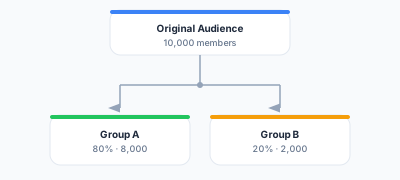
Each group acts as its own audience and can be synced independently to different destinations or different treatments.
Use Cases
A/B Testing Campaigns
Test two versions of a marketing campaign by dividing the audience into control and treatment groups:
- Group A (50%) — Receives Campaign Version A
- Group B (50%) — Receives Campaign Version B
Compare conversion rates between the groups to determine which version performs better.
Holdout Experiments
Measure the incremental impact of a campaign by withholding it from a percentage of the audience:
- Treatment (90%) — Receives the campaign
- Holdout (10%) — Does not receive the campaign
Compare outcomes between the treatment and holdout groups to measure true campaign lift.
Controlled Rollouts
Gradually roll out a new campaign or treatment to increasing percentages of the audience:
- Week 1: 10% receive the new campaign
- Week 2: 25% receive the new campaign
- Week 3: 50% receive the new campaign
- Week 4: 100% receive the new campaign
If issues arise, the rollout can be paused before reaching the full audience.
Multi-Variant Testing
Test more than two variants simultaneously:
- Control (25%) — No campaign
- Variant A (25%) — Email campaign
- Variant B (25%) — Push notification
- Variant C (25%) — SMS campaign
Creating an A/B Test
The create flow is three steps.
Step 1: Select the Audience
Navigate to Activation > A/B Tests and start a new one. Pick the audience to split.
Step 2: Define Groups
Add groups and assign percentages. A new test starts with Control and Variant A at 50% each; add, rename and re-weight as you like. A bar preview shows the allocation as you type.
| Group | Percentage | Purpose |
|---|---|---|
| Control | 80% | Holdout — does not receive the campaign |
| Variant A | 20% | Treatment — receives the campaign |
Requirements:
- At least 2 groups
- Percentages must sum to exactly 100 — the form stops you going over, and the save is refused if the total is anything but 100
- Each group needs a name, which is how you pick it when creating a sync
Step 3: Name and Save
Give the test a name and an optional description, then save.
How Assignment Works
Assignment is deterministic and computed in your warehouse. Each member’s key is hashed and reduced to a bucket from 0 to 99, and the groups take contiguous ranges of those buckets in order. With Control at 80% and Variant A at 20%:
- Buckets 0–79 → Control
- Buckets 80–99 → Variant A
The hash is the warehouse’s own — HASH on Snowflake, FARM_FINGERPRINT on BigQuery, hash on Databricks, cityHash64 on ClickHouse, and MD5 through STRTOL on Redshift, which has none of the others. All of them are deterministic, and all produce a uniform enough spread that the group sizes come out close to the percentages you asked for.
Two consequences follow, and both matter:
- A member stays in the same group. The hash depends only on their key, so a customer in Control today is in Control tomorrow. This is what makes the result of an experiment mean anything.
- The hash is not salted per test. Two tests over the same audience with the same percentages assign the same members to the same positions. If you want two experiments to be independent of one another, vary the group boundaries rather than repeating an identical split.
As Membership Changes
When the underlying audience changes:
- New members are assigned by the same hash, so they land wherever their key falls
- Departed members simply stop appearing
- Existing members keep their group
Group proportions therefore drift a little with the membership, since the split is a property of each key rather than a quota over the current population.
Syncing A/B Test Groups
Each A/B test group can be synced independently as if it were its own audience. When creating a sync, you can select an A/B test group as the source instead of the full audience.
This lets you:
- Send Group A to one destination (e.g., treatment campaign) and Group B to another (e.g., no campaign)
- Send different creative variations to different groups
- Apply different sync modes to different groups
The Detail Page
An A/B test’s detail page shows its Group Distribution — a proportional bar of the groups with their names and percentages, and, if the percentages ever fall short of 100, the unallocated remainder. Editing name, description and the groups themselves happens here.
Member counts are not stored on the test. To see how many members a group actually delivered, look at the runs of the sync pinned to it.
Editing and Deleting A/B Tests
Changing group percentages moves the boundaries between groups, so members near a boundary change group. That invalidates an experiment already in flight — start a new test rather than re-weighting a running one.
- Editing percentages — moves the bucket boundaries. Members whose bucket now falls in a different range change group.
- Adding or removing a group — the same thing, more so: every boundary after the change shifts.
- Deleting a test — removes it and its groups. A sync pinned to one of its groups has to go first.
- Cloning a test — copies the groups and percentages under a new name, which is the safe way to run a follow-up experiment without disturbing the one in progress.
Best Practices
- Keep holdout groups small but statistically significant — a 10-20% holdout is usually sufficient for measuring lift
- Don’t change percentages mid-experiment — moving the boundaries moves members between groups and invalidates the comparison
- Clone rather than edit when you want a follow-up experiment, so the one in flight is left alone
- Document your experiment hypothesis in the A/B test description so team members understand the purpose
- Allow sufficient time for experiments to reach statistical significance before drawing conclusions
Next Steps
- Audiences — Build the audiences to test
- Syncs — Sync A/B test groups to destinations
- Priorities — Manage overlap between audiences