Realtime Attributes
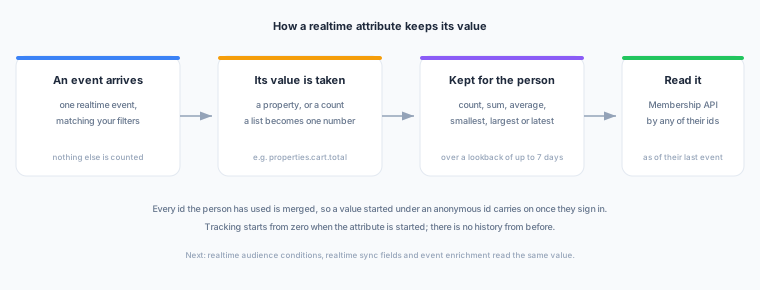
A realtime attribute is a value Zeotap keeps for each person from their live events: how many times they added to cart in the last hour, the total of their cart in the last 30 minutes, the latest page category they viewed. Each matching event updates it as it arrives, and you read it by any id the person has used. It is the realtime counterpart of Computed Attributes, which are worked out in your warehouse.
Experimental — in active development. Today a realtime attribute is read through the Membership API. Using one in an audience condition, in a realtime sync’s payload and in event enrichment are the next increments; they are described below as coming, not as available.
What one is made of
| Part | What it decides |
|---|---|
| Realtime event | The one realtime event the value is worked out from. It fixes the event source, the event type and which fields carry the person’s ids. |
| Function | How the matching events are combined: count, sum, average, smallest, largest or latest value. See Functions and Types. |
| Property | Which property of the event the function reads, for example properties.cart.total. A count reads none. A list can be turned into one number first. |
| Filters | Optional conditions on the event’s own properties. Only matching events count. |
| Lookback | How far back to look: up to 600 seconds, 720 minutes, 48 hours or 7 days, the same limits as a realtime audience condition. |
| Name and key | The key (for example cart_value_30m) is how the API, and later syncs and enrichments, name the value. It is unique in the workspace. |
What the attribute returns — a number, a string, a boolean or a timestamp — is worked out for you from the function and the property. You never set it, so nothing that reads the attribute can disagree with it.
Some examples:
| You want | Function | Property | Lookback |
|---|---|---|---|
| Times added to cart in the last hour | Count | — | 1 hour |
| Cart value in the last 30 minutes | Sum | properties.cart.total | 30 minutes |
| Current cart value | Latest value | properties.cart.total | 7 days |
| Largest basket size today | Largest | properties.items (number of items) | 24 hours |
| Last seen | Largest | timestamp | 7 days |
Where to find it
Navigate to Sources in the left sidebar and open Realtime Attributes, beside Realtime Events. It appears when the realtime plane is enabled for your workspace — the same switch that gives you realtime audiences — and you hold the permission to read realtime attributes. Owners and admins can create and change them; members can view them and look up values.
Creating one
- Navigate to Sources → Realtime Attributes and choose Create Realtime Attribute.
- Fill in the three sections of the page, top to bottom. Each section opens once the one above it is complete:
- Which events: pick the realtime event the value comes from and, optionally, filters that narrow which of its events count.
- What to calculate: pick how matching events are combined, then the property and the lookback. The event’s schema suggests the properties the function can read. If the property is a list, choose how to turn it into one number. If the schema does not describe the property yet, choose its type; see Properties the schema does not describe.
- Name: the name, the key (suggested from the name) and a description.
- Check the summary beside the form. It states what the attribute will hold and what type it returns. Then choose Create realtime attribute.
A new realtime attribute is Ready: saved, but nothing is tracked yet. Choose Start tracking on its page to begin.
Changing one
Open the attribute and choose Edit on its Configuration tab. The same three sections become editable on the page. Choose Save changes to keep your edits or Cancel to discard them. If your change affects what is counted, a note beside the buttons says that saving starts the value again from zero.
Tracking starts from zero
There is no history from before tracking starts. A realtime attribute counts from the first matching event after you start it. Until one full lookback has passed, its value covers less time than it says — a 7-day total started yesterday is a 1-day total.
The same is true after an edit that changes what is counted. Changing the event, function, property, filters or lookback starts the value again from zero for everyone. Changing the name, key or description does not.
The Lookup tab on the attribute’s page shows one person’s current value and says when a value is still warming up.
| Status | What it means |
|---|---|
| Ready | Saved, nothing tracked. |
| Tracking | Every matching event updates the value. |
| Paused | Events are no longer counted. Resuming starts again from the next event. |
Who the value belongs to
A realtime attribute is kept per person, across every id they have used. Each event is recorded under its user id when it carries one and under its anonymous id otherwise, and the ids an identify call links are read together. So a cart total started while someone browsed anonymously carries on once they sign in, and you can read it by either id.
Where you can use it
| Surface | What it does | Available |
|---|---|---|
| Membership API | Read a person’s current values by identifier, alone or together with their audiences | Now |
| Realtime audience conditions | Conditions such as cart value in the last 30 minutes is greater than 100 | Next |
| Realtime syncs | Send a value as a field with each person a sync delivers | Next |
| Event enrichment | Add a person’s values to the events you forward | Next |
When event enrichment arrives, an enriched event will carry the person’s values as of their previous event, not including the event being enriched: the event reaches enrichment and the realtime plane at the same time, so the value cannot yet include it.
Precision and freshness
- Freshness. A value read through the Membership API is current as of the person’s last tracked event, usually within about a second of it arriving.
- The far edge of a lookback. Events are kept in time slots no wider than a tenth of the lookback, so a value can include or miss events from up to a tenth of the lookback at its far edge. The latest value is exact.
- Numbers are kept to six decimal places, within about ±9.2 trillion. A single event whose value is outside that range is skipped rather than added.
- Values of the wrong type are skipped. An event whose property is not of the attribute’s type — text where a number was expected — is not counted.
- An event can sometimes be counted twice. The realtime plane can receive the same event more than once, for example when it retries after a temporary storage error, and each copy is counted. Counts and sums can therefore run slightly high, and an average can shift slightly. The latest value, minimum and maximum are not affected.
What is not available
- Distinct counts and lists of distinct values. Not in this version: keeping every distinct value a person has produced has no upper bound, and one busy visitor could make their own data slow to read for everyone. They return if there is clear demand for a bounded version.
- Lookbacks longer than 7 days, and an “all time” lookback. Use a Computed Attribute for long-range values.
- First value, most frequent value, the last few values and formulas over realtime attributes.
- More than one event per attribute.
Next Steps
- Functions and Types — what each function reads and returns.
- Reading Values — the Membership API’s attributes read.
- Realtime Events — the events a realtime attribute is worked out from.
- Computed Attributes — values worked out in your warehouse, over any period.